Okwu mmalite
Thank you for choosing the GOBOULT Z60 Wireless Earbuds. This manual provides detailed instructions to help you set up, operate, and maintain your earbuds for an optimal audio experience. Please read this manual thoroughly before use and retain it for future reference.

Image: GOBOULT Z60 Earbuds, illustrating the brand transition from BOULT to GOBOULT, highlighting the new logo and packaging while assuring consistent product performance.
Kedu ihe dị na Igbe ahụ
Gbaa mbọ hụ na ihe niile dị na ngwugwu:
- GOBOULT Z60 Wireless Earbuds (Left and Right)
- Nchaji case
- USB Type-C Nchaji USB
- Eartips (nha dị iche iche)
- Akwụkwọ ntuziaka onye ọrụ
- Akwụkwọ ikike kaadị

Image: The GOBOULT Z60 Wireless Earbuds and their charging case, showcasing the product's design and included accessories.
Ngwaahịa gafereview
The GOBOULT Z60 earbuds are designed for comfort and high-quality audio. Each earbud features a 13mm bass driver and multiple microphones for clear calls. The charging case provides extended battery life.
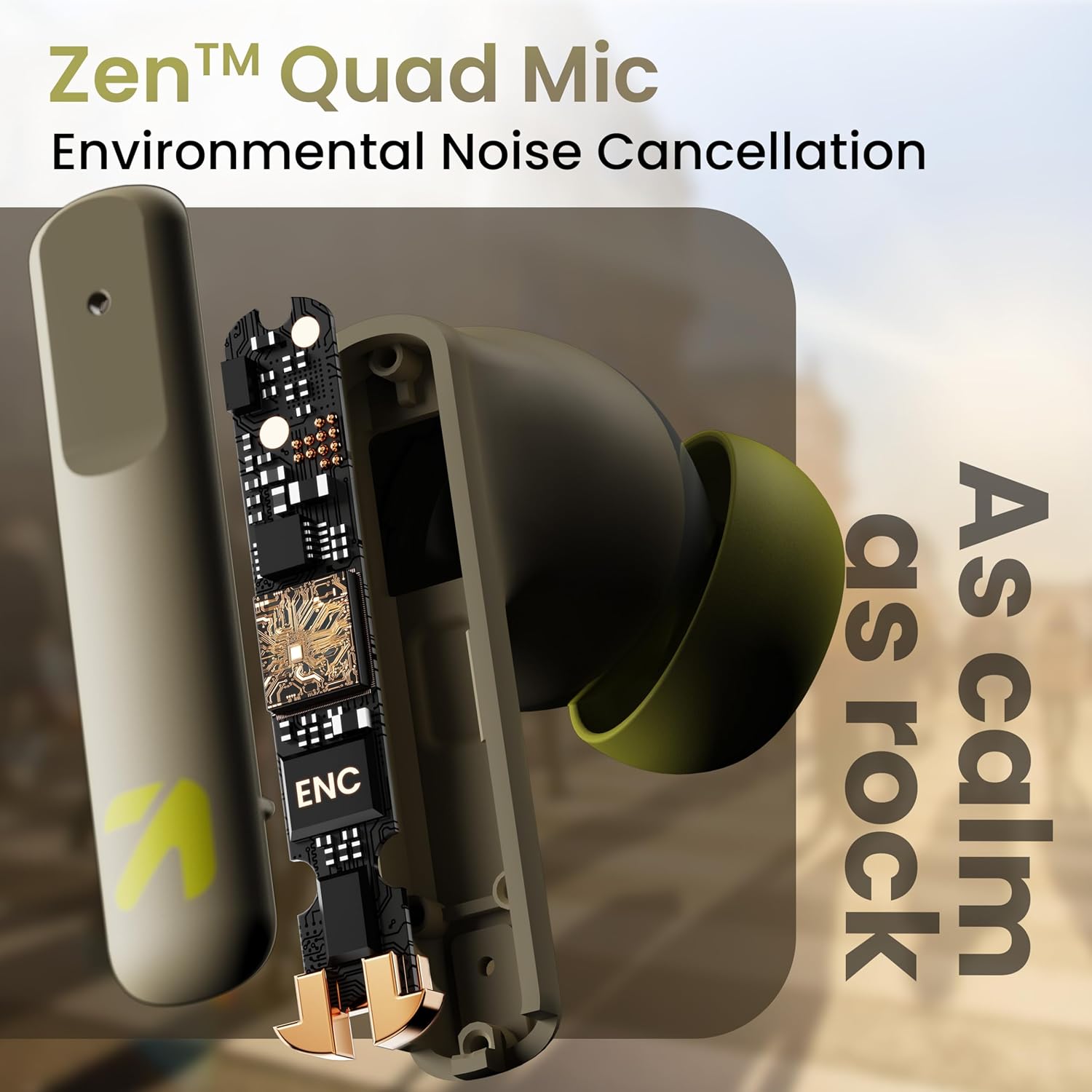
Foto: Ihe dị n'ime view of a GOBOULT Z60 earbud, highlighting the Zen Quad Mic Environmental Noise Cancellation (ENC) technology for clear audio.

Image: A close-up of a GOBOULT Z60 earbud, emphasizing the 13mm BoomX Drivers responsible for rich bass and superior sound quality.
Ịchaji
To charge your GOBOULT Z60 earbuds and charging case:
- Tinye ntị ntị n'ime akpa nchaji. Gbaa mbọ hụ na ha nọ ọdụ nke ọma.
- Jikọọ eriri USB Ụdị-C n'ọdụ ụgbọ mmiri na-ebufe n'okwu ahụ yana na isi iyi ọkụ.
- Ihe ngosi LED na ikpe ahụ ga-egosi ọkwa nchaji.
A full charge provides up to 60 hours of total playtime with the charging case. A quick 10-minute charge can provide up to 150 minutes of playtime.

Image: The GOBOULT Z60 charging case connected via a Type-C cable, illustrating the fast charging capability with indicators for 10 minutes charge yielding 150 minutes playtime.

Image: GOBOULT Z60 earbuds in their charging case, highlighting the impressive 60 hours of total playtime and 8 hours of playtime on a single earbud charge.
Setup: Pairing with Your Device
The GOBOULT Z60 earbuds utilize Bluetooth 5.3 for stable and efficient wireless connectivity.
- Mmakọ izizi:
- Mepee igbe nchaji. Igwe ntị ga-abanye na ọnọdụ njikọta na-akpaghị aka.
- Na ngwaọrụ gị (smartphone, mbadamba, laptọọpụ), gbanye Bluetooth.
- Chọọ maka "GOBOULT Z60" in the list of available Bluetooth devices and select it to connect.
- Once connected, you will hear an audio prompt, and the LED indicator on the case will change.
- Na-emezigharị: The earbuds will automatically connect to the last paired device when taken out of the case, if Bluetooth is enabled on the device.

Image: GOBOULT Z60 earbuds and their open charging case next to a smartphone, illustrating the Bluetooth 5.3 "Blink & Pair" feature for quick and stable connection.
Ịrụ ọrụ ekweisi gị
Njikwa mmetụ
The GOBOULT Z60 earbuds feature intuitive touch controls. The specific functions are:
- Nkpọghachi egwu:
- Otu mgbata: Kwuo/Kwụsị
- Pịa ugboro abụọ (Eti ntị aka nri): Egwu na-esote
- Pịa ugboro abụọ (Eti ntị aka ekpe): Egwu gara aga
- Mpịachi ugboro atọ (Nkuanya aka nri): Elu olu
- Pịa ugboro atọ (Nkuanya aka ekpe): Mbelata olu
- Njikwa oku:
- Otu pịa: Zaa/Kwụsị oku
- Long press: Reject call
- Enyemaka Olu: Long press (either earbud) to activate Google Assistant or Siri.
- Ọnọdụ egwuregwu: Tap 4 times on either earbud to activate/deactivate Combat Gaming Mode (50ms low latency).

Image: A visual guide to the GOBOULT Z60's touch controls, detailing actions for music playback (play/pause, next/back, volume), call management, activating voice assistance, and toggling game/music mode.
Ụdị egwuregwu
Activate the 50ms low latency Combat Gaming Mode for a synchronized audio-visual experience during gaming. Tap 4 times on either earbud to switch between gaming and normal modes.

Image: GOBOULT Z60 earbuds in use with a smartphone displaying a racing game, emphasizing the "Combat Gaming Mode" with 50ms ultra-low latency, activated by tapping the earbud 4 times.
Onye enyemaka olu
Access your device's voice assistant (Google Assistant or Siri) by long-pressing either earbud. This allows for hands-free control of your device.

Image: GOBOULT Z60 earbuds and their charging case, illustrating how to activate voice assistance (Ok Google, Hey Siri) with a long press on an earbud.
Nlekọta
To ensure the longevity and optimal performance of your GOBOULT Z60 earbuds:
- Nhicha: Jiri akwa dị nro na-ehicha ihe ntị ntị na chaja mgbe niile. Zere iji kemịkalụ siri ike ma ọ bụ ihe na-emebi emebi.
- Atụmatụ: Remove and clean the eartips periodically. Ensure they are dry before reattaching.
- Nguzogide mmiri: The earbuds are IPX5 water-resistant, meaning they can withstand sweat and light rain. Do not submerge them in water or expose them to heavy downpours. Ensure the charging port is dry before charging.
- Nchekwa: Mgbe ejighị ya, chekwaa earbuds n'ime akpa nchaji ha iji chebe ha ma debe ha ebubo.

Image: A GOBOULT Z60 earbud with water droplets on its surface, illustrating its IPX5 water resistance, suitable for protection against sweat, rain, and splashes.
Nchọpụta nsogbu
If you encounter issues with your GOBOULT Z60 earbuds, refer to the following common solutions:
| Nsogbu | Ngwọta enwere ike |
|---|---|
| Igwe ntị anaghị ejikọta ọnụ |
|
| Enweghị ụda sitere na otu ntị ntị |
|
| Earbuds anaghị akwụ ụgwọ |
|
| Obere olu ma ọ bụ ogo ụda adịghị mma |
|
Nkọwapụta
| Njirimara | Nkọwa |
|---|---|
| Aha Nlereanya | AirBass (Z60) |
| Teknụzụ Njikọta | Ikuku (Bluetooth) |
| Ụdị Bluetooth | 5.3 |
| Oke Bluetooth | 10 mita |
| Nha ọkwọ ụgbọ ala ọdịyo | 13 Millimita |
| Ụdị ọkwọ ụgbọ ala ọdịyo | Ọkwọ ụgbọala dị ike |
| Ndụ batrị (Ngụkọta) | Ruo elekere 60 (ya na igbe nchaji) |
| Oge Nchaji | Ihe dị ka nkeji 90 |
| Nchaji ngwa ngwa | 10 mins charge = 150 mins playtime |
| Nchaji ọdụ ụgbọ mmiri | Ụdị-C |
| Igwe okwu | 4 ENC Mics for Clear Calling |
| Oge Latịn | 50 Milliseconds (Gaming Mode) |
| Mmiri Nguzogide | IPX5 (Sweatproof, Rainproof, Splashproof) |
| Usoro njikwa | Metụ, olu |
| Ibu Ibu | 41.5 grams |
| Mba onye si | India |
Akwụkwọ ikike na nkwado
Your GOBOULT Z60 Wireless Earbuds come with a Akwụkwọ ikike nke Onye nrụpụta afọ 1 site na ụbọchị ịzụrụ.
For any support, warranty claims, or technical assistance, please refer to the contact information provided on your warranty card or visit the official GOBOULT support websaịtị.


