1. Okwu mmalite
This manual provides detailed instructions for the installation, operation, maintenance, and troubleshooting of your XPG CORE Reactor II VE 650W Power Supply Unit (PSU). Please read this manual thoroughly before using the product to ensure proper functionality and safety.
2. Ozi nchekwa
- Kwụpụ mgbe ọ bụla eriri ọkụ na oghere mgbidi tupu ịwụnye, wepụ ma ọ bụ hichaa PSU.
- Emeghela PSU casing. Akwa voltages are present inside, which can cause electric shock. The warranty will be void if the casing is opened.
- Wụnye PSU na mpaghara ikuku na-ekpo ọkụ nke ọma, pụọ na isi okpomọkụ, ìhè anyanwụ kpọmkwem, na mmiri.
- Ensure all cables are securely connected. Loose connections can cause damage to components.
- Use only the modular cables provided with this PSU. Using third-party cables may cause damage and void the warranty.
- Emebere ngwaahịa a maka iji naanị na sistemụ kọmputa. Ejila ya mee ihe ọ bụla ọzọ.
3. Ihe ngwugwu
Hụ na ihe niile edepụtara n'okpuru dị na ngwugwu ngwaahịa gị:
- XPG CORE Reactor II VE 650W Power Supply Unit
- Modular Cable Set (including 12V-2x6 cable)
- Igwe ọkụ AC
- Ịkwanye kposara
- Ntuziaka mmalite ngwa ngwa

Image: The XPG CORE Reactor II VE 650W power supply unit shown with its retail box, modular cables, AC power cord, and quick start guide.
4. Ngwaahịa gafereview
The XPG CORE Reactor II VE 650W is an 80 PLUS Gold certified power supply compliant with Intel's ATX 3.1 specifications. It features a fully modular design and an FDB (Fluid Dynamic Bearing) fan for efficient and quiet operation.

Foto: Akụkụ ihu view of the XPG CORE Reactor II VE 650W power supply, showcasing its fan grille and XPG branding.

Image: The rear panel of the XPG CORE Reactor II VE 650W power supply, featuring the AC power inlet and the main power switch.

Image: A close-up of the modular cable connection panel on the XPG CORE Reactor II VE 650W PSU, showing labeled ports for Motherboard, CPU & VGA, 12V-2x6, and SATA & Molex connectors.
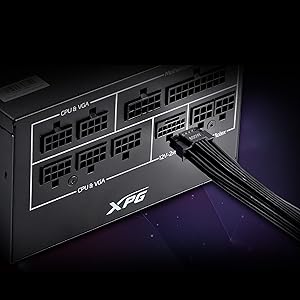
Foto: nkọwa zuru ezu view of the 12V-2x6 connector port on the XPG CORE Reactor II VE 650W PSU, designed for next-generation graphics cards.
5. Ntọala na nwụnye
Follow these steps to properly install your XPG CORE Reactor II VE 650W PSU into your computer system:
- Kwadebe Sistemu gị: Hụ na kọmputa gị gbanyụrụ kpamkpam ma kwụpụkwa ya na ihe nkwụnye mgbidi. Mepee igbe kọmputa gị.
- Wepu Old PSU (ọ bụrụ na ọdabara): Kwụpụ eriri niile na PSU ochie gị wee wepụ ya na akpa ahụ.
- Ugwu PSU ọhụrụ: Insert the XPG CORE Reactor II VE 650W PSU into the designated PSU bay in your computer case. Secure it with the provided mounting screws.
- Jikọọ eriri ndị dị mkpa:
- Jikọọ eriri ATX 24-pin na motherboard gị.
- Connect the 4+4-pin or 8-pin EPS/CPU cable(s) to your motherboard's CPU power connector(s).
- Connect the appropriate PCI-E (6+2-pin) or 12V-2x6 cable(s) to your graphics card(s).
- Jikọọ eriri ike SATA na draịva nchekwa gị (HDDs, SSDs) yana draịva anya.
- Connect Molex cables to any peripherals requiring them.
Ensure all modular cables are firmly seated into both the PSU and the respective components.
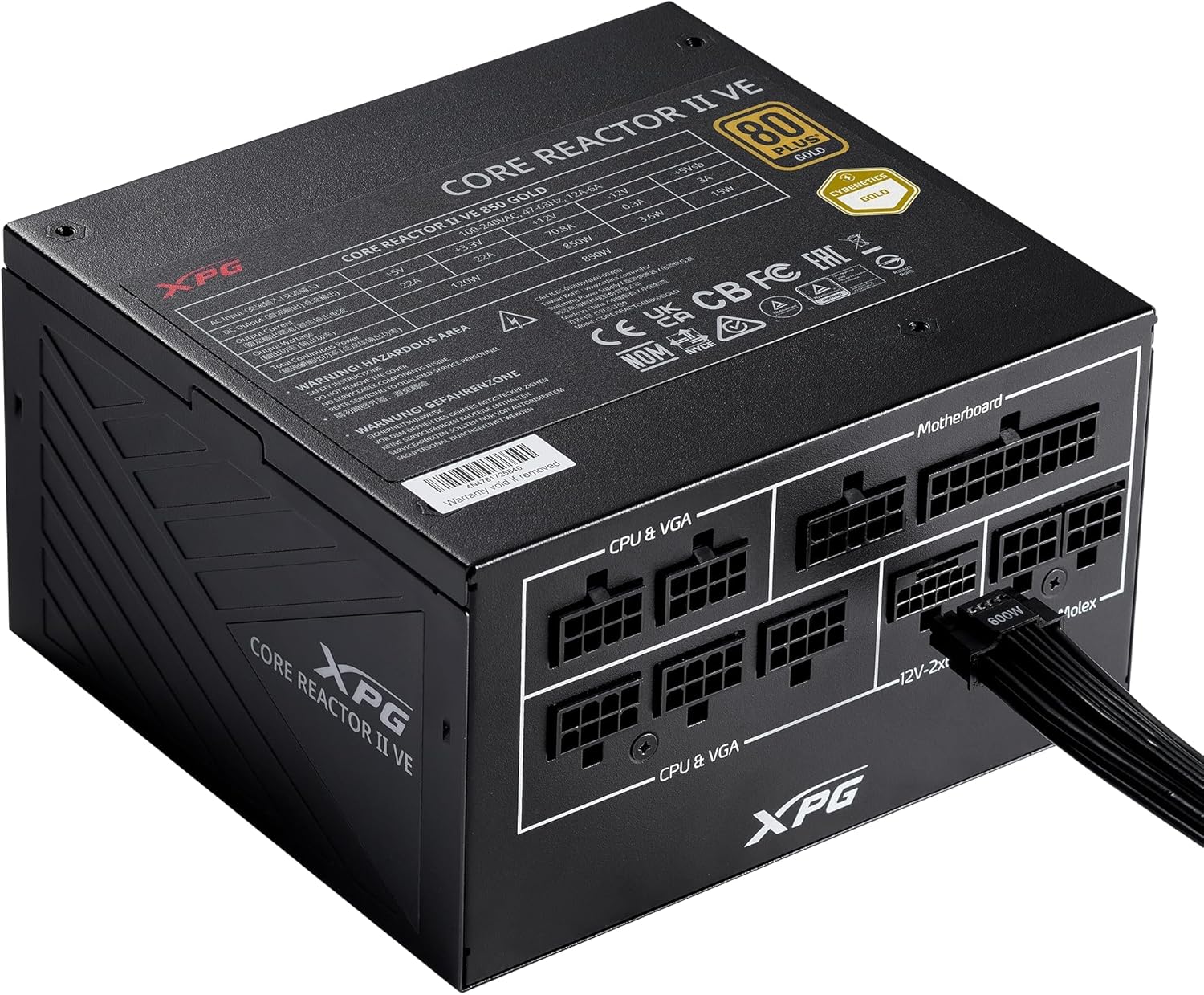
Image: The XPG CORE Reactor II VE 650W power supply with a 12V-2x6 cable connected to its modular port, illustrating a typical cable connection.
- Njikwa USB: Jiri waya ndị ahụ mee ka ikuku na-efegharị nke ọma ma na-eme ka mma dị n'ime akpa gị.
- Mechie Igbe ahụ ma Jikọọ Ike: Close your computer case. Connect the AC power cord to the PSU's inlet and then to a wall outlet.
- Ike Na: Flip the power switch on the back of the PSU to the 'ON' position and power on your computer.
6. Ntuziaka ọrụ
The XPG CORE Reactor II VE 650W PSU operates automatically once installed and powered on. It features an FDB fan with intelligent fan control, which adjusts its speed based on the PSU's temperature and load to maintain optimal cooling and minimize noise.
The PSU is designed to provide stable and reliable power to your system. No user intervention is typically required during normal operation.
7. Nlekọta
To ensure the longevity and optimal performance of your XPG CORE Reactor II VE 650W PSU, consider the following maintenance tips:
- Mwepụ uzuzu: Periodically clean the fan grille and the interior of your computer case to prevent dust buildup. Dust can impede airflow and lead to overheating. Use compressed air for this purpose, ensuring the system is powered off and unplugged.
- Nyocha USB: Occasionally check all modular cable connections to ensure they remain secure.
- gburugburu: Operate the PSU in a clean, dry, and well-ventilated environment.
8. Nchọpụta nsogbu
If you encounter issues with your XPG CORE Reactor II VE 650W PSU, refer to the following common troubleshooting steps:
- Enweghị ike:
- Gbaa mbọ hụ na ejikọrọ eriri ọkụ AC na PSU na oghere mgbidi.
- Check that the power switch on the back of the PSU is in the 'ON' position.
- Nyochaa na oghere mgbidi ahụ na-arụ ọrụ site na itinye na ngwaọrụ ọzọ.
- Confirm that the 24-pin ATX and 4+4-pin/8-pin EPS/CPU cables are correctly and firmly connected to the motherboard.
- Sistemu anaghị akwụsi ike/Mgbochi enweghị usoro:
- Ensure all power cables to components (motherboard, CPU, GPU, drives) are securely connected.
- Check for proper ventilation within your computer case. Overheating can cause instability.
- If you have recently added new components, ensure the 650W output is sufficient for your total system load.
- Fans anaghị agba ọsọ:
- The FDB fan features intelligent control and may not spin at low loads or temperatures. This is normal operation.
- If the fan does not spin under heavy load and the PSU feels excessively hot, contact support.
- Mkpọtụ na-adịghị ahụkebe:
- A slight coil whine can sometimes occur under specific loads; this is generally not indicative of a fault.
- If you hear grinding or scraping noises, power off the system immediately and contact support.
Ọ bụrụ na usoro ndị a akwụsịghị nsogbu gị, biko rụtụ aka na ngalaba akwụkwọ ikike na nkwado maka enyemaka ọzọ.
9. Nkọwapụta
Key technical specifications for the XPG CORE Reactor II VE 650W PSU:
| Njirimara | Nkọwapụta |
|---|---|
| Nọmba nlereanya | COREREACTORIIVE650G-BKCUS |
| Mpụta Wattage | 650 Watt |
| Asambodo arụmọrụ | 80 PLUS Gold, CYBENETICS Gold |
| Ọnụ ego nke ATX Standard | ATX 3.1 / EPS v2.92 |
| Ụdị Ihe | ATX |
| Usoro jụrụ oyi | Air (FDB 120mm Fan) |
| Nhazi ike inye ike | Modul zuru ezu |
| Akụkụ ngwaahịa (L x W x H) | 5.86 x 5.9 x 3.38 sentimita (140x150x86mm) |
| Ibu Ibu | 5.07 pound |
| Ụdị njikọ | ATX, Molex, PCI Express, SATA, 12V-2x6 |
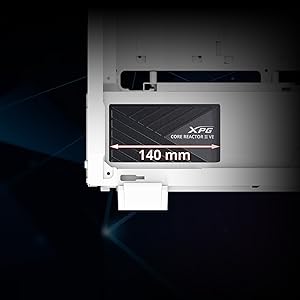
Image: A diagram illustrating the compact 140mm length of the XPG CORE Reactor II VE power supply, highlighting its compatibility with various PC cases.

Image: Visual representation of the multiple protection mechanisms integrated into the PSU, including OPP (Over Power Protection), OVP (Over Voltage Protection), SIP (Surge & Inrush Protection), SCP (Short Circuit Protection), UVP (Under Voltage Protection), OCP (Over Current Protection), OTP (Over Temperature Protection), and NLO (No Load Operation).
10. Akwụkwọ ikike na nkwado
For warranty information, technical support, or service inquiries regarding your XPG CORE Reactor II VE 650W PSU, please visit the official XPG website or contact their customer support directly. Details can typically be found on the product packaging or the manufacturer's official support pages.
Debe ihe akaebe nke ịzụrụ ihe maka akwụkwọ ikike.


