Ngwaahịa gafereview
The Hoco Smart Ear Wireless Bluetooth 5.3 Earbuds offer a seamless audio experience with advanced features. These smart touch stereo earbuds come with a digital LED display charging case, providing convenience and clear battery status at a glance. Designed for comfort and high-quality sound, they are ideal for daily use with mobile phones and other compatible devices.
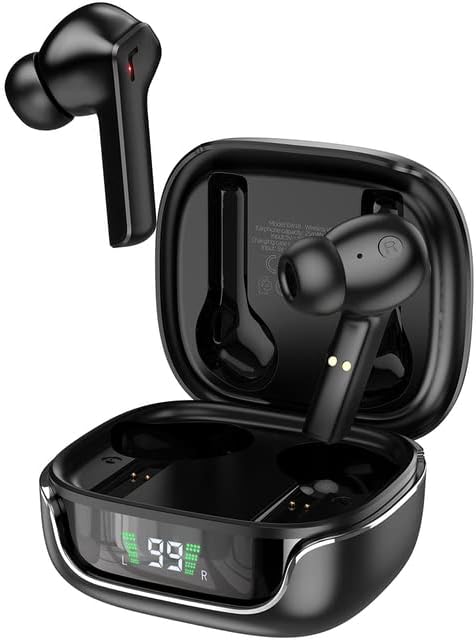
Image: The Hoco Smart Ear Wireless Bluetooth 5.3 Earbuds, showcasing both earbuds and their sleek charging case with a digital LED display.
Ihe ngwugwu
- Hoco Smart Ear Wireless Bluetooth 5.3 Earbuds
- Nchaji case
- Akwụkwọ ntuziaka onye ọrụ
- Ịchaji eriri
Melite
Mmakọ izizi
To pair your Hoco Smart Ear Earbuds for the first time, ensure they are fully charged. Open the charging case; the earbuds will automatically enter pairing mode. On your device (e.g., smartphone), navigate to Bluetooth settings and select 'Hoco EW18' or a similar name from the list of available devices. Once connected, the earbuds are ready for use.

Image: A visual representation of the Hoco earbuds establishing a wireless connection using Bluetooth 5.3 technology, highlighting stable and low-power consumption.

Image: The earbuds and charging case next to a smartphone, illustrating the automatic pairing feature and the ability to switch between devices seamlessly.
Na-ejikọghachi
After initial pairing, the earbuds will automatically reconnect to the last paired device when taken out of the charging case and Bluetooth is enabled on the device.
Ntuziaka ọrụ
The Hoco Smart Ear Earbuds feature intuitive touch controls for various functions:

Image: A detailed diagram illustrating the touch control functions of the Hoco earbuds, including playback, track navigation, call management, power, and voice assistant activation.
- Gwuo/kwụsịtụ: Click the touch area once.
- Track na-esote: Double click the touch area.
- Gara aga Track: Triple click the touch area.
- Oku azaa: Click the touch area once.
- Kpọgide oku: Double click the touch area.
- Jụ oku: Ogologo pịa mpaghara mmetụ ahụ maka sekọnd 2.
- Gbanwuo: Open the cover of the charging case (automatic boot).
- Bilie Siri/Onye enyemaka olu: Ogologo pịa mpaghara mmetụ ahụ maka sekọnd 2.
Nlekọta
Iji hụ na ntị ntị gị dị ogologo ma rụọ ọrụ nke ọma, soro ntuziaka ndị a:
- Nhicha: Jiri akwa dị nro, kpọrọ nkụ na-adịghị na-ehicha ntị ntị na chaja mgbe niile. Ejila kemịkalụ siri ike ma ọ bụ ihe abrasive.
- Kọntaktị na-akwụ ụgwọ: Periodically clean the charging contacts on both the earbuds and inside the case to ensure a proper connection.
- Nchekwa: Mgbe ejighị ya, chekwaa ntị ntị na chaja ha iji chebe ha pụọ na uzuzu na mmebi.
- Zere mmiri mmiri: Keep the earbuds and case away from water and excessive moisture.
- Okpomọkụ: Zere ikpughe ngwaahịa a na oke okpomọkụ.
Nchọpụta nsogbu
If you encounter issues with your Hoco Smart Ear Earbuds, refer to the following common solutions:
- Enweghị ụda:
- Gbaa mbọ hụ na akwụgoro ihe ekwe ntị.
- Lelee olu ngwaọrụ na olu ntị.
- Verify Bluetooth connection. Try disconnecting and reconnecting.
- Igwe ntị anaghị ejikọta:
- Hụ na ekweisi dị n'ụdị njikọta (oghere mepere emepe).
- Gbanyụọ ma gbanye Bluetooth na ngwaọrụ gị.
- Chezọ ngwaọrụ dị na ntọala Bluetooth ekwentị gị wee megharịa ọzọ.
- Hụ na ejikọghị ngwaọrụ ndị ọzọ na ekweisi.
- Okwu ịchaji:
- Check if the charging cable is securely connected.
- Ensure the charging contacts on both earbuds and case are clean.
- Gbalịa eriri chaja dị iche ma ọ bụ nkwụnye ọkụ.
- Njikọ na-adịte aka:
- Ensure you are within the effective Bluetooth range.
- Wedata ndabichi sitere na ngwaọrụ ikuku ndị ọzọ.
Nkọwapụta
Detailed technical specifications for the Hoco Smart Ear Wireless Bluetooth 5.3 Earbuds:
| Njirimara | Nkọwapụta |
|---|---|
| Nlereanya | WE-1005004459784466-002 |
| Ụdị Bluetooth | 5.3 |
| Ọnụọgụ ndị ọkwọ ụgbọ ala | 2 |
| Dayameta ọkwọ ụgbọ ala | 13mm |
| Mgbagwoju anya Harmonic Distor | 15% |
| Mgbochi | 32 Ohm |
| Ihe kpatara ụdị ekweisi | N'ime ntị |
| Teknụzụ Njikọta | Bluetooth |
| Teknụzụ nzikọrịta ozi ikuku | Bluetooth |
| Ngwa dakọtara | Ekwentị mkpanaaka |
| Njirimara USB | Cable-free (Wireless) |
| Agba | Nwa |
| Ụbọchị mbụ dị | Julaị 6, 2023 |

Foto: Ihe gbawara view illustrating the 13mm moving coil driver and bio-carbon fiber composite diaphragm, designed for immersive sound quality.

Image: A person wearing the Hoco earbuds, highlighting the soft silicone ear caps and in-ear ergonomic design for comfortable wear and pure sound enjoyment.
Akwụkwọ ikike na nkwado
Hoco is committed to customer satisfaction and product quality. We offer the following:
- Akwụkwọ ikike nke ọnwa 12: Ngwaahịa niile na-abịa na akwụkwọ ikike ọnwa iri na abụọ.
- Ndị ọrụ nlekọta ndị ahịa: If you experience any issues with defective or incorrect products, please contact us through the Amazon platform. We are dedicated to providing the best solution, including full refunds or product replacements, to ensure 100% customer satisfaction.
- Nkwa nnyefe: We ensure product delivery within the specified timeframe on our sales page.


