Ngwaahịa gafereview
The TechniSat DIGITRADIO 4 IR is a versatile stereo internet radio designed for high-quality audio reception and playback. It supports DAB+, FM, and internet radio, offering a wide range of national and regional programs. The device features Bluetooth audio streaming, allowing playback from smartphones and tablets, and includes a USB port for MP3 file playback. Equipped with two 10W ELAC speakers and a clear 3.5-inch TFT color display, it delivers excellent sound and user experience. Control is intuitive via rotary knobs, remote control, or a smartphone application.
Ihe ngwugwu
- DIGITRADIO 4 IR Stereo Internet Radio (Black)
- Telescopic antenna with mounting tool
- Ihe nkwụnye ọkụ
- Remote control with batteries (2 x AAA)
- Akwụkwọ ntuziaka onye ọrụ
Atụmatụ na njikwa ngwaọrụ
Familiarize yourself with the main components and controls of your DIGITRADIO 4 IR.

Foto: N'ihu view of the TechniSat DIGITRADIO 4 IR radio, showing the central display, two large rotary knobs for volume/standby and select/snooze, and several control buttons (Mode, Menu, Fav, Scan, Play/Pause, Skip tracks).
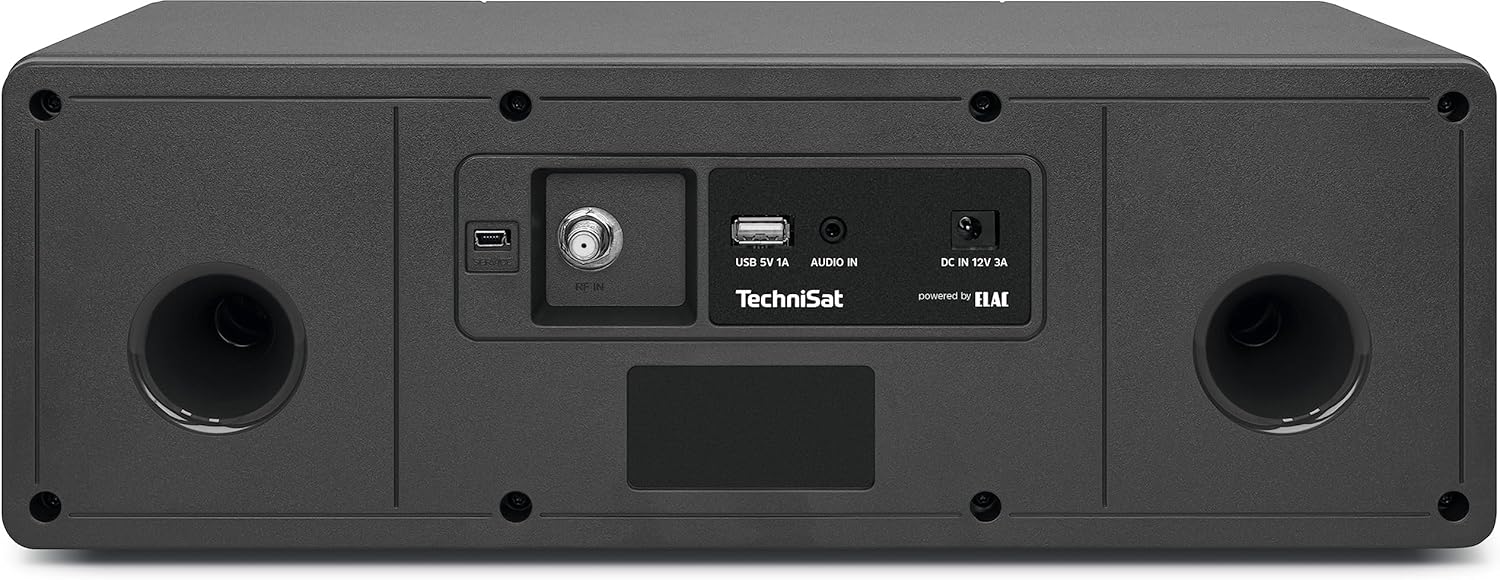
Foto: N'azụ view of the TechniSat DIGITRADIO 4 IR radio, highlighting the connection ports: RF IN for antenna, USB 5V 1A, AUDIO IN (AUX), and DC IN 12V 3A power input. Two bass reflex ports are also visible.

Foto: The remote control for the TechniSat DIGITRADIO 4 IR radio, featuring buttons for power, EQ, scan, alarm, sleep timer, playback controls, menu navigation, volume, and a numeric keypad for direct station access.
Melite
- Iwepu: Jiri nlezianya wepụ ihe niile dị na nkwakọ ngwaahịa.
- Njikọ antenna: Connect the telescopic antenna to the RF IN port on the rear of the device. Extend the antenna for optimal reception.
- Njikọ ike: Connect the power adapter to the DC IN 12V 3A port on the rear of the radio, then plug it into a wall outlet.
- Ọkachamara Mbido Mbido: Upon first power-on, the radio will guide you through an initial setup wizard. Follow the on-screen instructions to set language, time, date, and network connection.
- Network Connection (Wi-Fi): Select your Wi-Fi network from the list and enter the password. A stable internet connection is required for internet radio and streaming services.
Ntuziaka ọrụ
Gbanyụọ/ gbanyụọ yana njikere
Pịa MGBỌ / NKWEKỌRỌ rotary knob to switch the device on or off. In standby mode, the display shows the time and date.
Nhọrọ ọnọdụ
Pịa MODE button on the front panel or remote control to cycle through available modes: DAB+, FM, Internet Radio, Bluetooth, USB, and AUX In.
DAB+ Radio
- Select DAB+ mode.
- The radio will automatically scan for available DAB+ stations.
- Jiri ihe SELECT / SNOOZE rotary knob or the </> bọtịnụ dị na remote iji agagharị na ọdụ.
- Pịa SELECT / SNOOZE mkpịsị aka ma ọ bụ OK on the remote to select a station.
- To save a favorite station, press and hold the FAV button, then select a preset number.
Redio FM
- Họrọ ụdị FM.
- Pịa Nyochaa button to automatically search for FM stations.
- Jiri aka hazie ya site na iji aka hazie ya SELECT / SNOOZE rotary knob or the </> bọtịnụ.
- To save a favorite station, press and hold the FAV button, then select a preset number.
Redio ịntanetị
- Ensure the radio is connected to your Wi-Fi network.
- Select Internet Radio mode.
- Browse stations by location, genre, or search.
- Pịa SELECT / SNOOZE mkpịsị aka ma ọ bụ OK on the remote to select a station.
- To save a favorite station, press and hold the FAV button, then select a preset number.
Bluetooth Audio gụgharia
- Select Bluetooth mode on the radio. The display will show "Pairing".
- Mee ka Bluetooth rụọ ọrụ na ekwentị gị ma ọ bụ mbadamba gị wee chọọ ngwaọrụ dị.
- Select "DIGITRADIO 4 IR" from the list to pair.
- Ozugbo ejikọtara ya, ị nwere ike ịgbasa ọdịyo site na ngwaọrụ gị gaa na redio.
USB playback
- Fanye draịva USB nwere MP3 filebanye n'ọdụ ụgbọ USB dị n'azụ redio ahụ.
- Họrọ ụdị USB.
- Use the controls to navigate and play your music files.
Ntinye aka AUX
- Connect an external audio source (e.g., an MP3 player) to the AUX IN port on the rear of the radio using a 3.5mm audio cable (not included).
- Họrọ ụdị AUX.
- Audio from the connected device will play through the radio's speakers.
Alarm Clock and Sleep Timer
Access alarm and sleep timer settings via the MENU button or dedicated buttons on the remote control. Follow the on-screen prompts to configure these functions.
Ngosipụta Ntọala
Adjust display brightness for operating and standby modes through the MENU settings. The radio also features an auto-dimming function.
Nlekọta
To ensure the longevity and optimal performance of your DIGITRADIO 4 IR, follow these maintenance guidelines:
- Nhicha: Use a soft, dry cloth to clean the exterior of the radio. Do not use abrasive cleaners, waxes, or solvents.
- Ngosipụta Nlekọta: Gently wipe the display with a soft, lint-free cloth. Avoid pressing hard on the screen.
- Igwe ikuku: Gbaa mbọ hụ na egbochighị oghere ikuku iji gbochie ikpo oke ọkụ.
- gburugburu: Keep the radio away from direct sunlight, heat sources, dust, and moisture.
Nchọpụta nsogbu
If you encounter issues with your DIGITRADIO 4 IR, refer to the following common solutions:
- Enweghị ike: Ensure the power adapter is securely connected to both the radio and a working power outlet.
- Enweghị ụda: Check the volume level. Ensure the correct audio source mode is selected. If using AUX or Bluetooth, verify the external device's volume and connection.
- Nnọkọ redio na-adịghị mma (DAB+/FM): Extend and adjust the telescopic antenna. Try repositioning the radio to improve signal strength.
- Internet Radio Connection Issues: Verify your Wi-Fi network connection. Ensure the Wi-Fi password is entered correctly. Restart your Wi-Fi router and the radio.
- Nsogbu njikọta Bluetooth: Ensure the radio is in Bluetooth pairing mode. Delete "DIGITRADIO 4 IR" from your device's Bluetooth list and attempt to pair again.
- Connect App Not Recognizing Radio: If using a companion app, try restarting your smartphone or tablet if the app fails to connect to the radio.
- Nsogbu Mkpọghachi USB: Ensure the USB drive is formatted correctly (FAT32) and contains supported MP3 audio files.
Nkọwapụta
| Njirimara | Nkọwa |
|---|---|
| Ụdị | TechniSat |
| Nọmba nlereanya | 0000/3957 |
| Agba | Nwa |
| Teknụzụ Njikọta | Auxiliary, Bluetooth, USB, Wi-Fi |
| Atụmatụ pụrụ iche | Access to music services (Spotify, Amazon Music, Klassikradio Select, Calm Radio), USB interface with charging function and MP3 playback, FM Radio, Bluetooth audio streaming (reception), Favorite memory (30 DAB+ / 30 FM / 30 Internet) |
| Ngwa dakọtara | Headphones, Smartphone, Tablet |
| Akụkụ ngwaahịa | 38L x 18.5W x 13.5H cm |
| Teknụzụ Ndozi | DAB+ |
| Ndị otu redio akwadoro | DAB+, FM, Internet |
| Isi Iyi Ike | Igwe ọkụ eletrik |
| Ngwa gụnyere | Power adapter, Telescopic antenna with mounting tool, DIGITRADIO 4 IR, User manual, Remote control with batteries |
Akwụkwọ ikike na Ozi Nkwado
For detailed warranty information, please refer to the warranty card included with your product or visit the official TechniSat website. Please note that spare parts availability for this product is currently unavailable, and information regarding guaranteed software updates is not provided.
For technical support or service inquiries, please contact TechniSat customer service through their official channels.


