1. Okwu mmalite
Welcome to the user manual for your new THOMSON 50UA5S13 50-inch 4K UHD Smart Android TV. This manual provides essential information for setting up, operating, and maintaining your television. Please read it thoroughly to ensure optimal performance and safe use of your device.
Your THOMSON TV offers a stunning 4K UHD display, providing four times the detail of Full HD. It features the Android TV operating system, granting access to a vast array of applications, intelligent voice control via Google Assistant, and seamless content streaming with Chromecast built-in. Enjoy immersive audio with Dolby Audio technology and versatile content reception through its integrated triple tuner (DTT, cable, or satellite).

Foto 1: N'ihu view of the THOMSON 50UA5S13 4K UHD Smart Android TV displaying various streaming app icons.
2. Ozi nchekwa
Before operating your television, please read all safety instructions carefully. Keep this manual for future reference.
- Ịnye ọkụ: Ensure the TV is connected to a power outlet with the correct voltage dị ka egosiri na akara ngwaahịa.
- Igwe ikuku: Akwụsịla oghere ikuku. Nye ohere zuru oke na gburugburu TV maka ikuku ikuku kwesịrị ekwesị iji gbochie ikpo oke ọkụ.
- Nkwanye: Place the TV on a stable, level surface. Avoid placing it in direct sunlight, near heat sources, or in environments with high humidity or dust.
- Mmiri na mmiri: Ewepụla TV na mmiri ozuzo ma ọ bụ mmiri. Edokwala ihe jupụtara na mmiri mmiri, dị ka vases, na TV.
- Nhicha: Kwupuo TV tupu ihicha. Jiri akwa dị nro ma kpọọ nkụ. Ejila ihe nhicha mmiri ma ọ bụ ikuku ikuku.
- Ije ozi: Anwala ịrụzi TV ahụ n'onwe gị. Nye ndị ọrụ ruru eru ọrụ niile.
3. Ihe ngwugwu
Chọpụta na ihe niile dị na ngwugwu:
- THOMSON 50UA5S13 50-inch 4K UHD Smart Android TV
- Remote Control (Premium backlit)
- Igwe ọkụ ọkụ
- TV Stand (iberibe 2) na kposara
- Akwụkwọ ikike kaadị
- Quick Start Guide (may be included separately)
4. Nhazi anụ ahụ
4.1 Na-agbakwunye ihe nkwụnye TV
- Jiri nlezianya dobe TV ihu n'elu ala dị nro ma dị ọcha iji gbochie mmebi ihuenyo.
- Dozie iberibe nkwụnye ahụ na oghere ndị kwekọrọ na ala TV.
- Chekwaa ihe nkwụnye ahụ site na iji skru ndị enyere. Gbaa mbọ hụ na agbachiela ha nke ọma.
4.2 Mgbidi mgbidi (nhọrọ)
This TV supports VESA wall mounts with a 200x200 pattern. A wall mount bracket is not included and must be purchased separately. Follow the instructions provided with your wall mount bracket for proper installation. Ensure the wall can support the weight of the TV and the mount.
4.3 Akụkụ na ntinye
Consider the TV's dimensions for optimal placement in your viewmpaghara.

Figure 2: Diagram showing the dimensions of the THOMSON 50UA5S13 TV: 112 cm width, 69 cm height (with stand), 26 cm depth (with stand).
5. Njikọ
Connect your TV to various external devices using the ports located on the back and side panels.

Figure 3: Illustration of the back panel ports including HDMI, LAN, USB, Audio Out, Satellite, Antenna, AV In, and Common Interface.
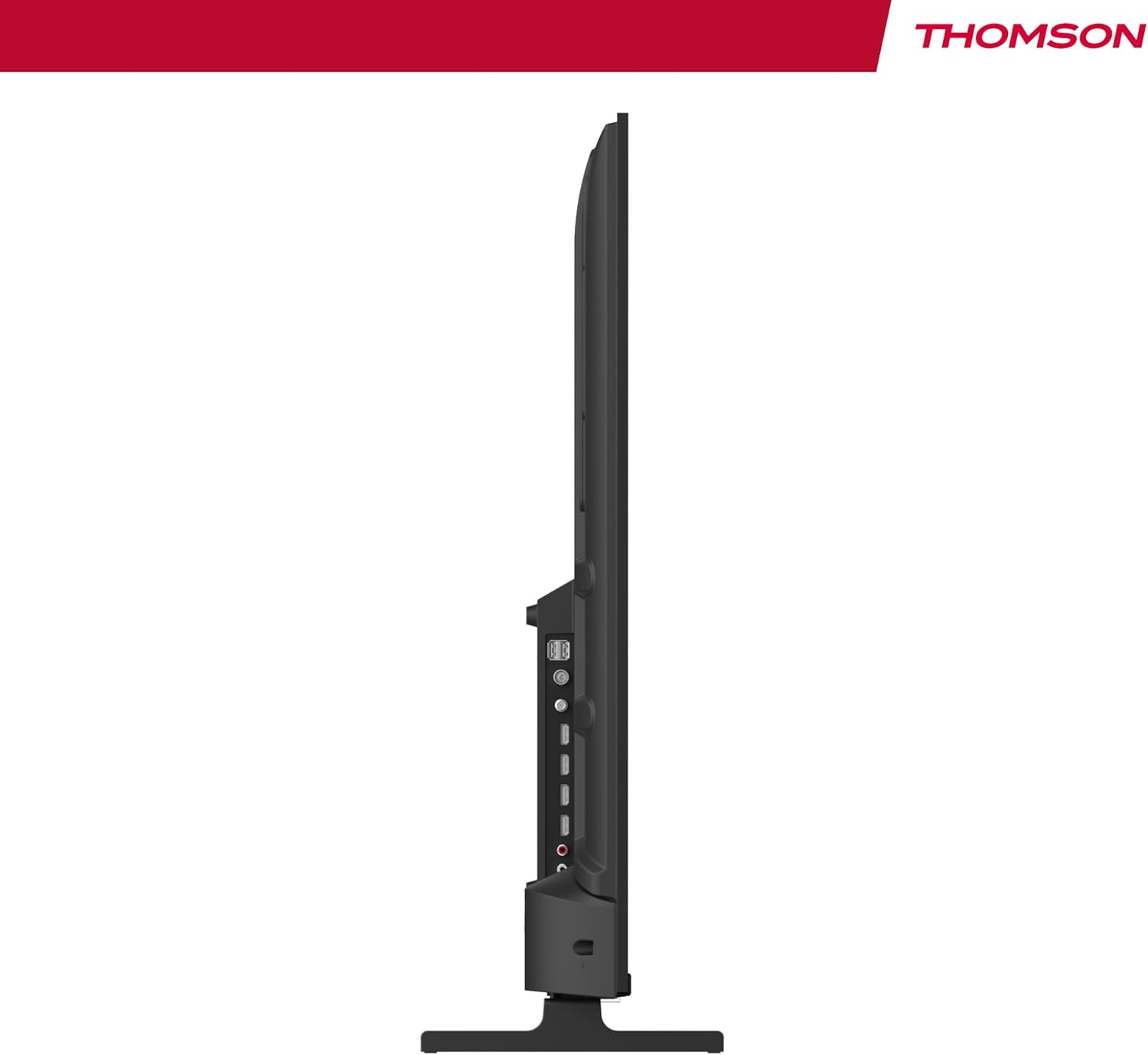
Ọgụgụ 4: Akụkụ profile view of the TV, showing accessible ports on the side.
- Ike: Jikọọ eriri ike ahụ na TV na oghere mgbidi.
- Antenna/Keybel/Satellite: Use the appropriate input for your broadcast signal (DTT, cable, or satellite).
- HDMI (x4): Connect external devices such as Blu-ray players, game consoles, or set-top boxes.
- USB (x2): Jikọọ ngwaọrụ nchekwa USB maka ịkpọghachi mgbasa ozi.
- LAN: Jikọọ eriri Ethernet maka njikọ ịntanetị nwere eriri.
- Audio Out (Digital Optical): Connect to an external sound system for enhanced audio.
- AV n'ime: Jikọọ ngwaọrụ ndị ochie site na iji eriri vidiyo na ụda stereo.
- Common Interface (CI+): Insert a CI+ module and smart card for encrypted digital services.
- Bluetooth: Pair wireless headphones, speakers, or other compatible Bluetooth devices.
6. Initial Setup and Android TV
6.1 First-Time Power On
- After connecting all necessary cables, plug the TV into a power outlet.
- Pịa bọtịnụ ike na njikwa remote ma ọ bụ na TV.
- Soro mkpali na ihuenyo ka ịhọrọ asụsụ ọkacha mmasị gị.
6.2 Ntọala netwọkụ
Connect your TV to the internet for access to Android TV features and apps.
- Wi-Fi: Họrọ netwọk Wi-Fi gị site na ndepụta wee tinye paswọọdụ.
- E tinyere waya (LAN): If you connected an Ethernet cable, the TV should automatically detect the wired connection.
6.3 Google Account Sign-in
Sign in with your Google Account to access the Google Play Store, Google Assistant, and personalized recommendations.
6.4 Nyochaa ọwa
After network setup, the TV will guide you through scanning for available channels based on your antenna, cable, or satellite connection.
7. Na-arụ ọrụ TV gị
7.1 Ime Remote
The premium backlit remote control allows easy navigation, even in low light. Key features include:
- Bọtịnụ ike: Gbanyụọ ma ọ bụ gbanyụọ TV.
- Bọtịnụ igodo nsoroụzọ: Maka igodo menu.
- Bọtịnụ olu/ọwa: Gbanwee olu wee gbanwee ọwa.
- bọtịnụ enyemaka Google: Na-eme ka njikwa olu rụọ ọrụ.
- Favorites Button: Quickly launch your designated favorite application.
- Ngwa mkpirisi bọtịnụ: Nweta ozugbo na ọrụ mgbasa ozi ama ama.
7.2 Atụmatụ TV Android
Your THOMSON TV runs on Android TV, providing a smart and intuitive user experience.

Figure 5: The Android TV home screen displaying various applications and content recommendations.
- Ngwa: Access over 400,000 movies and TV shows from apps like Netflix, Prime Video, Disney+, YouTube, Spotify, and Apple TV.
- Onye enyemaka Google: Jiri olu gị chịkwaa TV, chọọ ihe dị n'ime ya, nweta azịza, ma jikwaa ngwaọrụ ụlọ smart. Naanị pịa bọtịnụ Google Assistant dị na remote gị wee kwuo iwu gị.

Figure 6: A user interacting with the Google Assistant via the TV remote control.
- Chromecast arụnyere n'ime ya: Wirelessly stream movies, music, and videos from compatible smartphones, tablets, or computers directly to your TV.
7.3 Ntọala foto
Bulite gị viewahụmịhe na teknụzụ onyonyo dị elu:
- 4K UHD: Enjoy ultra-high definition resolution with 8 million pixels for incredibly detailed and precise images.
- HDR (Elu Dynamic Range) & Dolby Vision: These technologies enhance contrast, brightness, and color accuracy, providing a more realistic and vibrant picture.

Figure 7: Visual comparison illustrating the enhanced detail of 4K UHD (3840x2160) over Full HD (1920x1080).

Figure 8: Comparison showing the improved contrast and color depth with Dolby Vision compared to Standard Dynamic Range (SDR).
7.4 Ntọala ụda
Experience dynamic and immersive audio:
- Dolby Audio / Dolby Atmos: Creates a rich, room-filling sound experience. (Note: Dolby Atmos requires compatible sound equipment).

Figure 9: Visual representation of Dolby Atmos sound creating an immersive audio experience around viewndi ozo.
8. Nlekọta
8.1 Ihicha TV
- Kwupuo TV mgbe niile tupu ihicha ya.
- Use a soft, lint-free cloth to gently wipe the screen and TV body.
- Maka akara ndị isi ike, dị obere dampen the cloth with water or a specialized screen cleaner (ensure it's safe for TV screens) and wipe gently. Never spray liquid directly onto the screen.
8.2 Mmelite ngwanrọ
Your Android TV may receive periodic software updates to improve performance and add new features. Ensure your TV is connected to the internet to receive these updates. You can usually check for updates in the TV's settings menu.
9. Nchọpụta nsogbu
Ọ bụrụ na ị na-enwe nsogbu na TV gị, rụtụ aka na azịza ndị a na-ahụkarị:
| Nsogbu | Ngwọta enwere ike |
|---|---|
| Enweghị ike | Lelee ma ọ bụrụ na etinyere eriri ọkụ na TV na oghere mgbidi ahụ nke ọma. Gbalịa ụzọ ọpụpụ dị iche. |
| Enweghị foto/ụda | Ensure the correct input source is selected. Check cable connections to external devices. For sound, check volume levels and external audio system connections. |
| Njikwa anya anaghị arụ ọrụ | Lelee ma ọ bụ gbanwee batrị ndị ahụ. Hụ na enweghị ihe mgbochi ọ bụla n'etiti ihe njikwa na ihe mmetụta IR nke TV. |
| Enweghị ike ijikọ na Wi-Fi | Ensure your Wi-Fi router is on and working. Re-enter the Wi-Fi password. Try restarting the TV and router. |
| Slow performance or apps | Close unused applications. Clear cache for problematic apps in settings. Restart the TV. Ensure a stable internet connection. |
10. Nkọwapụta
Detailed technical specifications for the THOMSON 50UA5S13 TV:
| Njirimara | Nkọwapụta |
|---|---|
| Ụdị | Thomson |
| Nọmba nlereanya | 50UA5S13 |
| Nha ihuenyo | 50 sentimita (126 cm) |
| Ngosipụta teknụzụ | UHD (LED LCD) |
| Mkpebi | 3840 x 2160 (4K UHD) |
| Ọnụego ume ọhụrụ | 60 Hz |
| Atụmatụ pụrụ iche | Flat Screen, Android TV, Google Assistant, Chromecast built-in, HDR, Dolby Vision, Dolby Audio |
| Njikọta | Bluetooth, Wi-Fi, 4x HDMI, 2x USB, LAN, Digital Optical Audio Out, AV In, CI+ |
| Tuner | Triple Tuner (ATSC for Antenna, Cable, Satellite) |
| Nhazi ụda | 2.0 |
| Akụkụ (L x W x H) | 111.1 x 26 x 69.2 cm (ya na nkwụnye) |
| Ibu | 8.5 kilogram |
| Ụlọ elu VESA | 200x200 mm (mount not included) |
| Klas arụmọrụ ike | E |
For detailed energy information, please refer to the EU EPREL database:
Mpempe akwụkwọ ozi ngwaahịa EPREL

Figure 10: The EU Energy Label for the THOMSON 50UA5S13 TV, indicating its energy efficiency class and consumption.
11. Akwụkwọ ikike na nkwado
Your THOMSON 50UA5S13 TV comes with a full 3-year manufacturer's warranty, demonstrating its reliability and quality. For warranty claims or technical support, please refer to the warranty card included in your package or visit the official THOMSON support website for your region. Keep your proof of purchase for warranty validation.


