Okwu mmalite
Welcome to the user manual for your boAt Airdopes Bliss ANC True Wireless Stereo (TWS) Earbuds. This guide provides detailed instructions on how to set up, operate, maintain, and troubleshoot your earbuds to ensure optimal performance.
Kedu ihe dị na Igbe ahụ
- 1 X TWS Earbuds
- 1 X Akpa nchaji
- 2 X Additional Earbuds (pairs of ear tips)
- 1 X USB Nchaji USB
- Akwụkwọ ntuziaka onye ọrụ 1 X
Ngwaahịa gafereview
The boAt Airdopes Bliss ANC earbuds are designed for an immersive audio experience with Active Noise Cancellation (ANC) up to 32dB. They feature a long playback time, quick charging, and a low-latency BEAST Mode for gaming.

Image: boAt Airdopes Bliss ANC earbuds in their charging case.
Melite
1. Ịchaji ihe ntị na akpa
Tupu ojiji nke mbụ, chajie nke ọma ekwe ntị na akpa nchaji.
- Connect the USB charging cable to the Type-C port on the charging case and to a power source.
- Ihe ngosi ọkụ na ikpe ahụ ga-egosi ọkwa nchaji.
- Ozugbo chachara chajịrị, kwụpụ eriri ahụ.

Image: ASAP Charge feature, indicating 10 minutes of charge provides 180 minutes of playback.
The earbuds support ASAP Charging, providing 180 minutes of playback with just 10 minutes of charge. A full charge offers up to 42 hours of total playback time (earbuds + case).

Image: Visual representation of up to 42 hours of total playback time.
2. Initial Pairing (IWP™ Technology)
- Mepee mkpuchi nke ihe nchaji. Igwe ntị ga-agbanye na-akpaghị aka wee banye ọnọdụ njikọta.
- On your device (phone, tablet, etc.), enable Bluetooth.
- Chọọ maka "Airdopes Bliss ANC" in the list of available Bluetooth devices.
- Select "Airdopes Bliss ANC" to connect. Once connected, you will hear an audio prompt.

Image: IWP Technology showing the earbuds connecting to a smartphone upon opening the case.
IWP™ (Insta Wake N' Pair) Technology allows the earbuds to connect to your previously paired device as soon as you open the case lid.
3. Yiri ekwe ntị
- Choose the ear tips that provide the most comfortable and secure fit.
- Insert the earbuds into your ears and gently twist them to ensure a snug seal for optimal sound and ANC performance.
Ntuziaka ọrụ
Gbanyụọ/ Gbanyụọ
- Ike Na: Open the charging case lid, or long-press the touch control on both earbuds for 3 seconds.
- Gbanyụọ: Place the earbuds back into the charging case and close the lid, or long-press the touch control on both earbuds for 5 seconds.
Njikwa mmetụ
The Airdopes Bliss ANC features intuitive touch controls on each earbud.
| Ọrụ | Omume |
|---|---|
| Kpọọ/kwụsịtụ egwu | Otu mgbata na ntị ntị |
| Track na-esote | Pịa bọtịnụ ntị aka nri ugboro abụọ |
| Egwu gara aga | Kpatụ ntị ugboro abụọ n'akụkụ aka ekpe |
| Zaa/Kwụsị Oku | Otu mgbata na ntị ntị |
| Jụ oku | Long press on either earbud for 2 seconds |
| Mee ka onye enyemaka olu rụọ ọrụ | Pịa ugboro atọ na ntị ntị |
| Toggle ANC/Transparency Mode | Long press on the left earbud for 2 seconds |
| Gbanwee Ụdị BEAST | Pịa ogologo na ntị ntị aka nri maka sekọnd 2 |
Nkagbu Noise nọchiri anya (ANC)
The earbuds feature Active Noise Cancellation up to 32dB, reducing ambient noise for a focused listening experience. Long press the left earbud for 2 seconds to cycle between ANC On, Transparency Mode, and ANC Off.

Image: Representation of Active Noise Cancellation functionality.
BEAST Mode (Low Latency Gaming)
Activate BEAST Mode for a low-latency audio experience (60ms), ideal for gaming. Long press the right earbud for 2 seconds to toggle BEAST Mode On/Off.
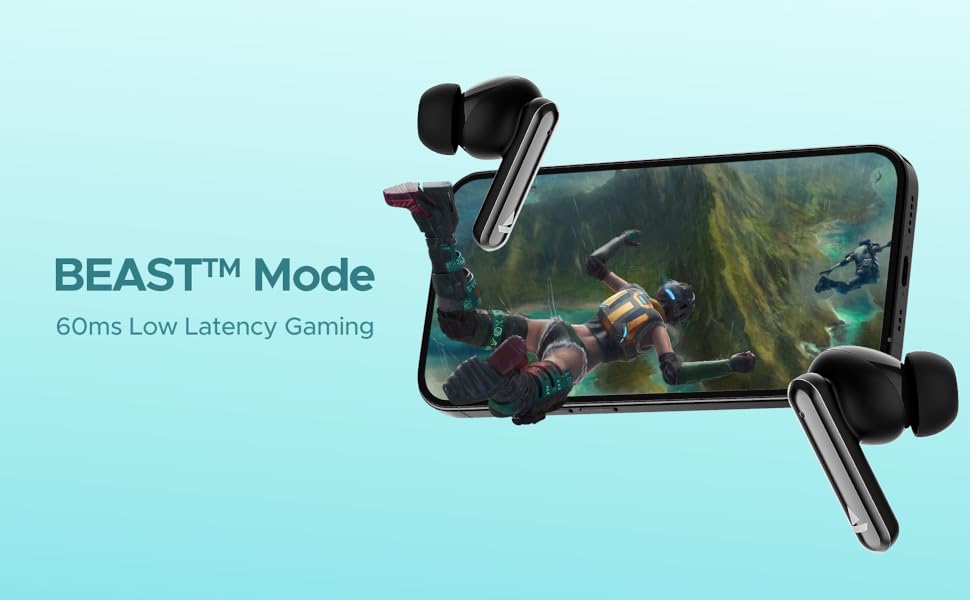
Image: Visual depicting the BEAST Mode for low-latency gaming.
ENx™ Technology (Quad Mics)
The earbuds are equipped with ENx™ Technology and Quad Mics for clear voice calls, ensuring your voice is heard clearly even in noisy environments.

Image: Diagram showing the internal components related to ENx Technology and Quad Mics.
Nlekọta
Nhicha
- Jiri akwa dị nro, kpọrọ nkụ na-adịghị na-ehicha ntị ntị na chaja mgbe niile.
- Wepu ndụmọdụ ntị wee jiri ncha na mmiri dị nro hichaa ha, wee kpochaa nke ọma tupu itinyeghachi ya.
- Hụ na kọntaktị chaja dị na ntị na igbe ntị enweghị uzuzu na ihe mkpofu.
- Ejila ihe nchacha abrasive ma ọ bụ ihe mgbaze.
Nchekwa
- Mgbe ejighị ya, na-echekwa earbuds mgbe niile na chaja ha iji chebe ha ma debe ha ebubo.
- Chekwaa n'ebe dị jụụ, kpọrọ nkụ, pụọ na oke okpomọkụ na ìhè anyanwụ.
Nlekọta batrị
- Zere ịchaji batrị ugboro ugboro.
- Chajie ekweisi na ihe mkpuchi ahụ mgbe niile, ọbụlagodi na ọ naghị adị mkpa iji ya ugboro ugboro, iji hụ na batrị dị mma.

Image: Earbuds and case with water droplets, illustrating IPX5 splash and sweat resistance. While resistant, avoid submerging the device.
Nchọpụta nsogbu
Earbuds anaghị ejikọta ọnụ
- Gbaa mbọ hụ na akwụgoro ekwe ntị abụọ ahụ.
- Place both earbuds back into the charging case, close the lid, wait a few seconds, then open the lid again.
- Gbanyụọ Bluetooth na ngwaọrụ gị, wee gbanye ya ọzọ wee gbalịa ijikọ ọzọ.
- If issues persist, try resetting the earbuds (refer to manufacturer's website for specific reset instructions if not provided here).
Enweghị ụda ma ọ bụ ụda dị ala
- Lelee ọkwa olu dị na ma ngwaọrụ gị ejikọtara ma ekweisi.
- Hụ na e tinyere ntị ntị gị nke ọma n'ime ntị gị, nakwa na ntị gị na-enye ezigbo akara.
- Hichaa irighiri ihe ọ bụla sitere na igwe okwu ntị.
- Jikọọkwa ntị ntị na ngwaọrụ gị.
Okwu Ịchaji
- Gbaa mbọ hụ na ejikọrọ eriri chajị na echekwabara na ikpe ahụ yana isi iyi ike.
- Gbalịa eriri chaja dị iche ma ọ bụ nkwụnye ọkụ.
- Hichaa kọntaktị ịchaji na ntị ntị na n'ime akpa ahụ.
Nkọwapụta
| Njirimara | Nkọwa |
|---|---|
| Aha Nlereanya | Airdopes Bliss ANC |
| Teknụzụ Njikọta | Bluetooth |
| Teknụzụ nzikọrịta ozi ikuku | Bluetooth |
| Nkagbu mkpọtụ nọ n'ọrụ | Ruo 32 dB |
| Oge nkwughachi | Up to 42 Hours (total with case) |
| ASAP Charging | 10 mins charge = 180 mins playtime |
| Akwụsị ọnọdụ BEAST | 60 ms |
| Teknụzụ igwe okwu | ENx Technology with Quad Mics |
| Usoro njikwa | Metụ aka |
| Ogo Nguzogide Mmiri | IPX5 (Mfesa & Ọsụsọ na-eguzogide) |
| Ụdị batrị | Lithium polymer |
| Ibu Ibu | 50 grams |
| Akụkụ ngwaahịa | 5.9 x 4.9 x 2.6 cm |
| Ngwa gụnyere | 1 X TWS Earbuds, 2 X Additional Earbuds, Cable, User Manual |
Akwụkwọ ikike na nkwado
For warranty information and customer support, please refer to the official boAt websaịtị ma ọ bụ kpọtụrụ ndị ahịa ha ọrụ. Debe akwụkwọ nnata ịzụrụ maka akwụkwọ ikike.


