1. Okwu mmalite
This manual provides essential information for the safe and effective operation of your VOLTCRAFT DSO-2202H + AFG Handheld Oscilloscope. This versatile device combines the functions of an oscilloscope, a multimeter, and an arbitrary function generator (AFG) into a single portable unit. Please read this manual thoroughly before using the device to ensure proper handling and to prevent damage or injury.
2. Ozi nchekwa
Always observe the following safety precautions to avoid personal injury and prevent damage to the instrument or other equipment.
- Gụọ ntuziaka niile: Before operating the device, read and understand all safety and operating instructions.
- Use proper probes: Use only probes and accessories rated for the voltage and current of the measurement.
- Zere ọnọdụ mmiri: Ejila ngwaọrụ arụ ọrụ na mmiri ma ọ bụ damp gburugburu.
- Nda ala: Ensure proper grounding when connecting to mains power or high-voltage sekit.
- Emeghela casing: Refer all servicing to qualified service personnel. Opening the casing nwere ike ikpughe gị na vol dị ize ndụtages.
- Observe all ratings: Do not exceed the maximum input ratings of the device.
3. Ngwaahịa gafereview
The VOLTCRAFT DSO-2202H + AFG is a compact, multi-functional test instrument designed for various electrical measurement tasks. It features a clear color LCD display and intuitive controls.
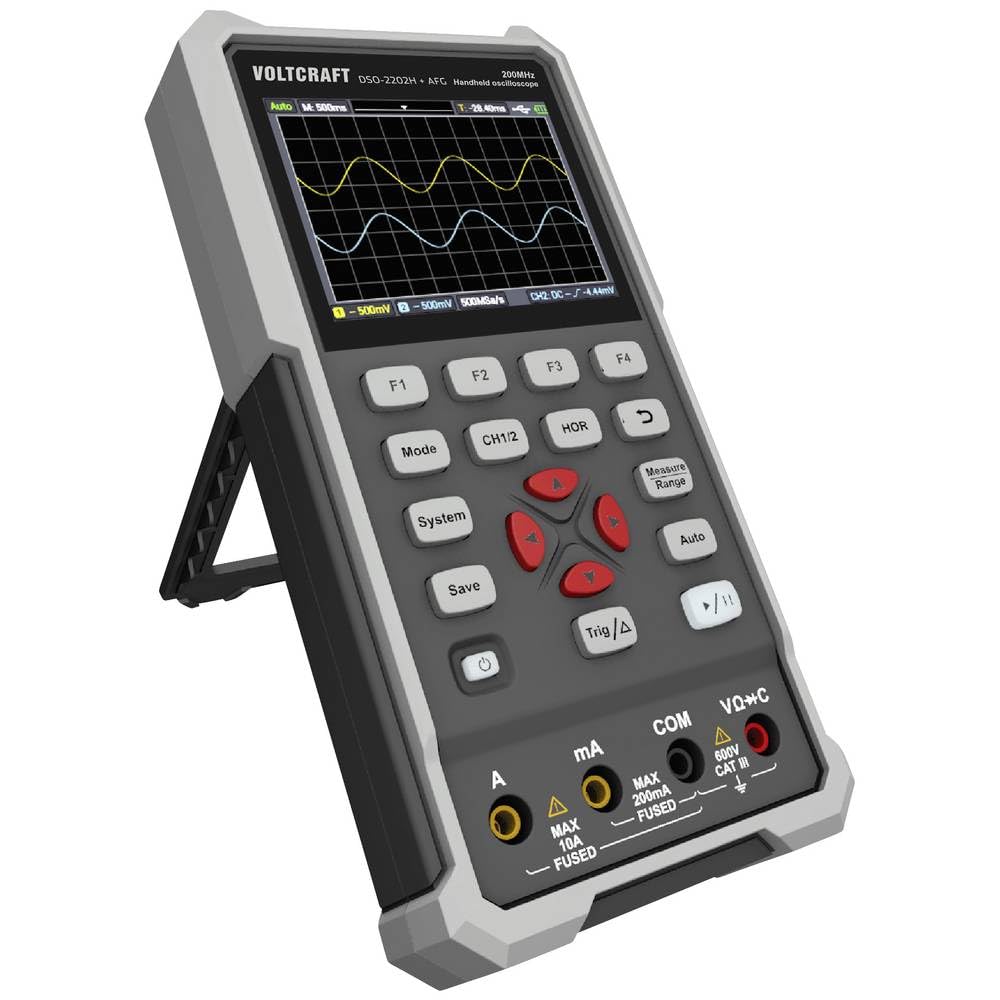
Foto 1: N'ihu view of the VOLTCRAFT DSO-2202H + AFG Handheld Oscilloscope with connected test probes. The display shows a voltage reading, and the control panel with function buttons and navigation keys is visible below.
Akụkụ ndị bụ isi:
- 3-in-1 Oscilloscope, Multimeter, and Waveform Generator
- 3.5-inch (8.89 cm) Color LCD Screen (320 x 240 pixels)
- USB Type-C Interface for connectivity and data storage
- Nhazi na-adịgide adịgide na nke siri ike
4. Nhazi
Follow these steps for initial setup of your device.
4.1 Gbanyụọ/ gbanyụọ
- Iji gbanye ngwaọrụ ahụ, pịa ma jide ya Ike button located on the side/top panel.
- The color LCD screen will illuminate, displaying the startup sequence.
- Iji gbanyụọ, pịa ma jide Ike bọtịnụ ọzọ ruo mgbe ngwaọrụ kwụsịrị.
4.2 Nchọpụta Njikọta
For oscilloscope functions, connect the oscilloscope probes to the BNC connectors. For multimeter functions, connect the test leads to the appropriate input jacks (VΩ+C, mA, A, COM) at the bottom of the device.
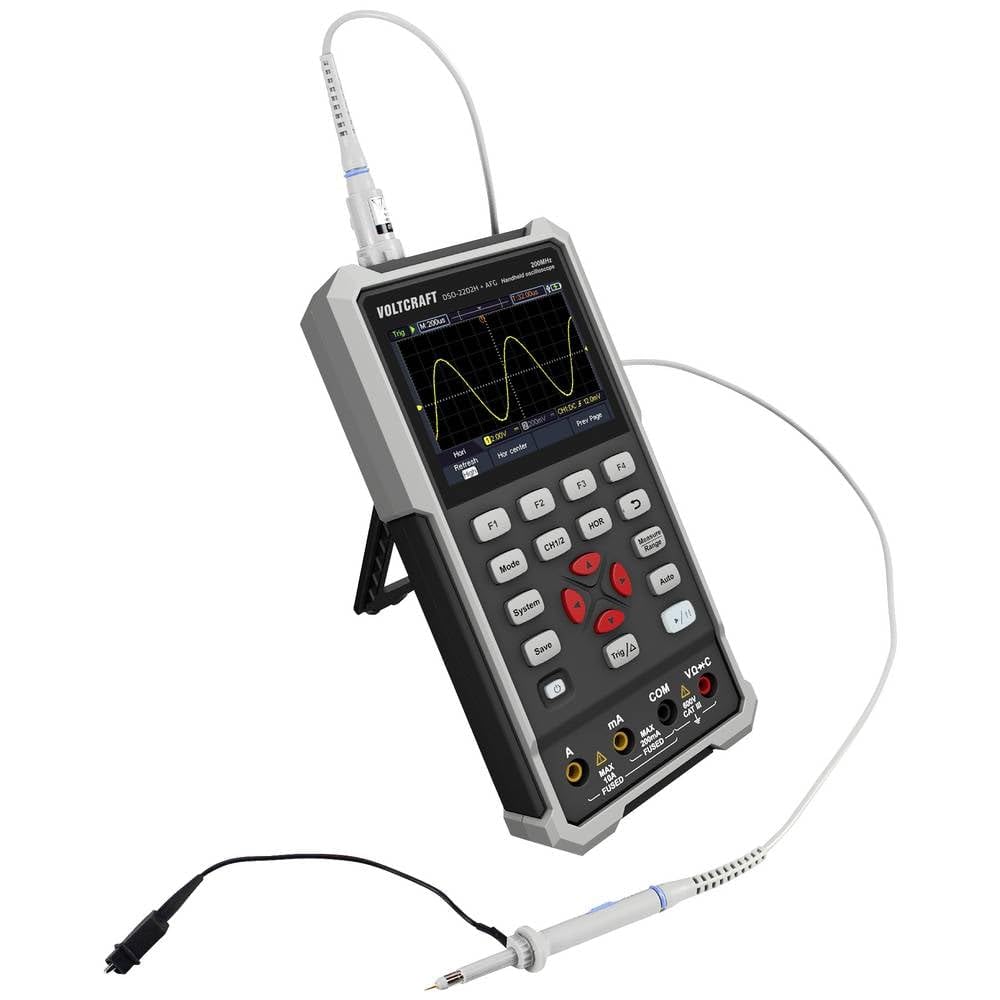
Foto 2: Akụkụ view of the device showing the kickstand extended for desktop use and an oscilloscope probe connected to the BNC input. The multimeter input jacks are visible at the bottom.
5. Ntuziaka ọrụ
The DSO-2202H + AFG offers three primary modes of operation: Oscilloscope, Multimeter, and Arbitrary Function Generator.
5.1 Ụdị Oscilloscope
This mode allows you to visualize and analyze electrical signals. The device features 2 channels and a 200MHz bandwidth.
- Pịa Ụdị button to select Oscilloscope mode.
- Connect the oscilloscope probe(s) to the circuit under test.
- Jiri ihe CH1/2 button to switch between channels or view ha abụọ.
- Adjust the vertical sensitivity (V/div) and horizontal time base (s/div) using the navigation buttons.
- Jiri ihe Trig/Δ button to set trigger conditions for stable waveform display.
- Nke Akpaaka button can automatically adjust settings for a stable waveform.

Figure 3: The device displaying a waveform in oscilloscope mode. The screen shows voltage and time divisions, indicating a signal measurement.
5.2 Ụdị Multimita
The multimeter function allows for precise measurements of voltage, current, resistance, capacitance, and continuity.
- Pịa Ụdị button to select Multimeter mode.
- Connect the test leads to the appropriate input jacks (e.g., VΩ+C for voltage/resistance/capacitance, A or mA for current, COM for common).
- Select the desired measurement function (e.g., DC Voltage, AC Voltage, Resistance) using the function buttons (F1-F4) or navigation keys.
- Gụọ uru nha na ngosipụta.
5.3 Arbitrary Function Generator (AFG) Mode
The AFG allows you to generate various waveforms for testing circuits.
- Pịa Ụdị button to select AFG mode.
- Connect the output of the AFG to the circuit requiring a signal input.
- Use the function buttons (F1-F4) and navigation keys to select waveform type (sine, square, triangle, etc.), frequency, amplitude, and offset.
- Adjust parameters as needed for your application.
5.4 Nchekwa data
The USB Type-C port can be used for data storage. Connect the device to a computer using a USB Type-C cable to transfer saved waveforms or measurement data.
6. Nlekọta
Proper maintenance ensures the longevity and accuracy of your device.
- Nhicha: Clean the device regularly with a soft, dry cloth. Do not use abrasive cleaners or solvents.
- Nchekwa: Chekwaa ngwaọrụ ahụ n'ebe dị jụụ, kpọrọ nkụ na-adịghị na ìhè anyanwụ kpọmkwem na oke okpomọkụ.
- Nlekọta batrị: If the device has an internal rechargeable battery, ensure it is charged periodically if stored for long periods to maintain battery health.
- Nlekọta nyocha: Inspect probes and test leads for damage before each use. Replace any damaged accessories immediately.
7. Nchọpụta nsogbu
If you encounter issues with your device, refer to the following common troubleshooting steps.
- Ngwaọrụ anaghị agbanye: Ensure the device is charged or connected to a power source. Check the power button for proper engagement.
- Enweghị ngosi: If the device powers on but the screen is blank, try adjusting the display brightness (if available) or restarting the device.
- Ọgụgụ na-ezighi ezi: Verify that probes and test leads are correctly connected and not damaged. Ensure the correct measurement mode and range are selected. Calibrate the device if necessary (refer to advanced settings or contact support).
- Unstable waveform: In oscilloscope mode, adjust the trigger level, trigger source, and time base settings. Use the Auto button for initial setup.
For persistent issues, contact VOLTCRAFT customer support or your retailer.
8. Nkọwapụta
| Nkọwapụta | Uru |
|---|---|
| Onye nrụpụta | UMUAKA |
| Nọmba nlereanya | VC-13438620 (DSO-2202H + AFG) |
| Akụkụ ngwaahịa (L x W x H) | 17 x 12 x 40 cm |
| Ibu | 600 grams |
| Ihe onwunwe | Plastic |
| Oscilloscope bandwit | 200 MHz |
| Ọwa | 2-Ọwa |
| Sample Ọnụ | 1 GSa/s |
| Omimi ebe nchekwa | 8 kpts |
| Mkpebi | 8 Bit |
| Ngosipụta | 3.5-inch (8.89 cm) Color LCD (320 x 240 pixels) |
| Interface | USB Ụdị-C |
| Sistemụ nha | Metric |
| Batrị gụnyere | Mba |
| Batrị achọrọ | Mba |
9. Akwụkwọ ikike na nkwado
For warranty information, please refer to the documentation provided with your purchase or contact your retailer. For technical support, visit the official VOLTCRAFT websaịtị ma ọ bụ kpọtụrụ ngalaba ọrụ ndị ahịa ha.


