1. Okwu mmalite
This manual provides detailed instructions for the installation, operation, and maintenance of your YuanLey 8 Port 2.5G Unmanaged Desktop Ethernet Switch with 10G SFP. Please read this manual thoroughly before using the device to ensure proper functionality and to prevent damage.
2. Ihe ngwugwu
Chọpụta na ngwungwu gị nwere ihe ndị a:
- 1 x YuanLey 8 Port 2.5G Ethernet Switch
- 1 x Cdọ Ike
- 1 x Akwụkwọ ntuziaka onye ọrụ
3. Akụrụngwa Ngwaahịa
- 9 Port Configuration: Includes 8 x 2.5 Gigabit Ethernet ports and 1 x 10G SFP+ Port.
- Ịrụ Ọsọ Ọsọ: Delivers 2.5 times faster network performance than traditional Gigabit switches, with a switching capacity of up to 60Gbps.
- Nkwụnye ma kpọọ: Unmanaged design requires no configuration for immediate use.
- Durable and Quiet: Features a metal case with 6KV lightning protection and a fanless design for silent operation.
- Okpomọkụ arụ ọrụ sara mbara: Functions reliably in temperatures ranging from -10°C to 50°C.
- Nkwanye ọtụtụ: Supports both wall mount and desktop placement.
4. Ngwaahịa gafereview

Figure 4.1: YuanLey 8 Port 2.5G Unmanaged Desktop Ethernet Switch

Foto nke 4.2: Ogwe ihu dị n'eluview with Ports and Indicators
The switch features 8 RJ45 ports supporting 10/100/1000Mbps/2.5G adaptive speeds and 1 SFP+ port for 1G/2.5G/10G fiber connections. LED indicators provide status for power and link activity.
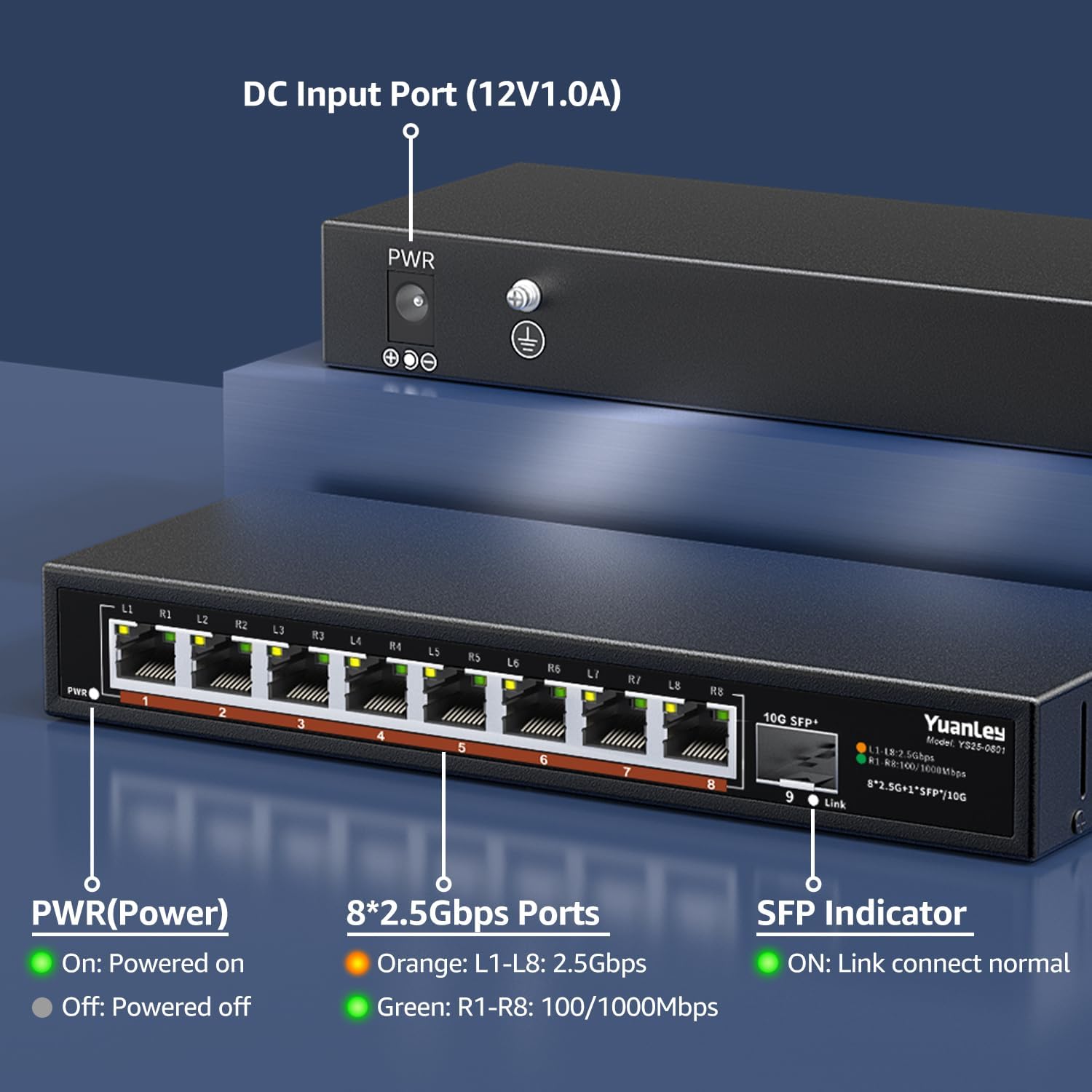
Foto nke 4.3: Ogwe azụ dị n'eluview with Power Input

Ọgụgụ 4.4: Zuru ezu View of Ports and Indicators
The rear panel includes the DC 12V/1.0A power input port and a grounding screw for electrical safety. The front panel LEDs indicate power status, 2.5Gbps link speed (orange), and 100/1000Mbps link speed (green) for RJ45 ports, and link status for the SFP+ port.
5. Nhazi
Follow these steps to set up your YuanLey Ethernet Switch:
- Njikọ Ike: Plug the provided power adapter into the DC 12V/1.0A input port on the rear of the switch, then plug the adapter into a power outlet. The PWR LED on the front panel will illuminate green.
- Connect Ethernet Devices: Connect your network devices (e.g., computers, NAS, WiFi 6 APs, gaming PCs) to the 2.5G Base-T ports (1-8) using standard Ethernet cables (Cat5e or higher recommended for 2.5G speeds). The corresponding port LEDs will light up to indicate a successful connection and speed.
- Connect SFP+ Module (Optional): If using the 10G SFP+ port, insert a compatible 1G/2.5G/10G SFP/SFP+ module (not included) into the SFP+ slot. Then, connect a fiber optic cable or DAC cable to the module. The SFP indicator LED will light up when a link is established.

Figure 5.1: Typical Network Setup with the YuanLey Switch
Nhazi ntuziaka vidiyo
Video 5.1: An official YuanLey video demonstrating the setup and features of the 8 Port 2.5Gbps Switch.
6. Na-arụ ọrụ mgba ọkụ
The YuanLey 2.5G Unmanaged Ethernet Switch is designed for simple plug-and-play operation. Once powered on and connected to your network devices, it will automatically detect the link speed and establish connections without any further configuration.
- Ihe ngosi LED: Observe the PWR, L1-L8, and SFP+ Link LEDs to monitor the switch's status and network activity.
- MDI/MDIX akpaaka: The switch supports Auto MDI/MDIX, eliminating the need for crossover cables.
- Adaptive Speed: RJ45 ports automatically adapt to 10/100/1000Mbps or 2.5Gbps.
7. Nlekọta
To ensure optimal performance and longevity of your switch, consider the following maintenance guidelines:
- Nkwanye: Place the switch in a well-ventilated area, away from direct sunlight, heat sources, and excessive moisture. The fanless design relies on natural convection for cooling.
- Nhicha: Periodically clean the exterior of the switch with a soft, dry cloth. Avoid using liquid or aerosol cleaners.
- Njikwa USB: Gbaa mbọ hụ na a haziri eriri netwọkụ nke ọma ma ghara ịgbagọ oke ma ọ bụ kpachie ya.
- Ịnye ọkụ: Use only the original power adapter provided with the switch.

Figure 7.1: Fanless Design and Environmental Considerations
8. Nchọpụta nsogbu
If you encounter issues with your switch, refer to the following common problems and solutions:
- Enweghị ike:
- Gbaa mbọ hụ na ejikọrọ ihe nkwụnye ọkụ ahụ na mgba ọkụ yana ebe ọkụ na-arụ ọrụ.
- Check if the PWR LED is illuminated. If not, try a different power outlet.
- Enweghị njikọ/ọrụ na ọdụ ụgbọ mmiri:
- Verify that the Ethernet cable is securely connected to both the switch port and the network device.
- Gbalịa eriri Ethernet dị iche.
- Gbaa mbọ hụ na agbanyere ngwaọrụ ejikọrọ ma na-arụ ọrụ nke ọma.
- Check the LED indicator for the specific port. If it's off, there might be no link.
- Ọsọ netwọk dị nwayọ:
- Ensure all devices in the network path (NICs, cables, routers) support 2.5G speeds to achieve maximum performance.
- Use Cat5e or higher-rated Ethernet cables for 2.5G connections.
- Check the color of the port LED: Orange indicates 2.5Gbps, Green indicates 100/1000Mbps.
- SFP+ Port Issues:
- Ensure the SFP/SFP+ module is correctly inserted and compatible with the switch.
- Verify the fiber optic or DAC cable is properly connected and undamaged.
- Check the SFP indicator LED for link status.
9. Nkọwapụta
| Njirimara | Nkọwapụta |
|---|---|
| Nọmba nlereanya | 9 Port | 8x2500Mbps+1x10G SFP |
| Akụkụ ngwaahịa | 7.76"L x 2.87"W x 1.14"H (19.7cm x 7.3cm x 2.9cm) |
| Ibu Ibu | 1.36 pound (0.62 Kilogram) |
| Ọnụọgụ nke ọdụ ụgbọ mmiri | 8 x 2.5G Base-T, 1 x 10G SFP+ |
| Ọnụego mbufe data | 60 Gigabits kwa nkeji (Ike mgbanwe) |
| Voltage | 230 Volts (AC) input to adapter, 12V DC output |
| Ihe gbasara ikpe | Ọla |
| Okpomọkụ na-arụ ọrụ | -10°C ruo 50°C |
| Nchekwa ọkụ | 6KV |
| UPC | 790885573743 |
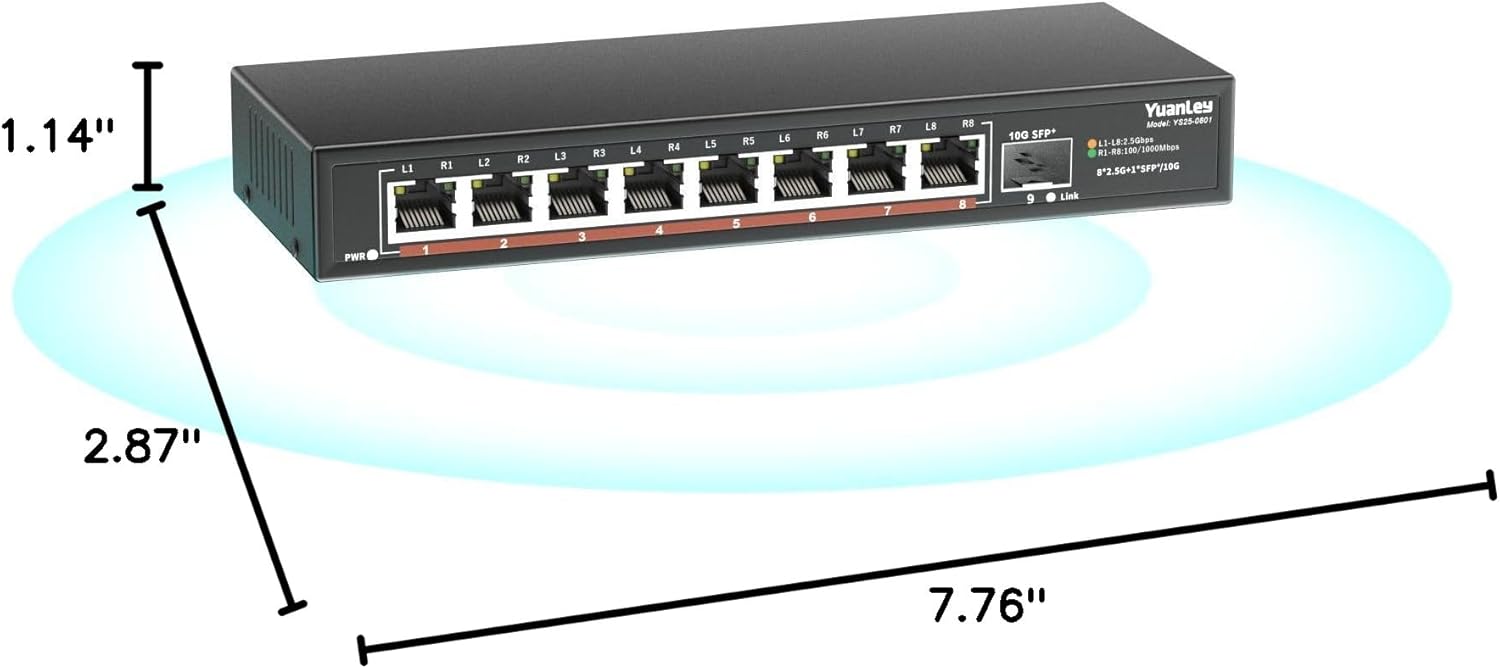
Ọgụgụ 9.1: Akụkụ ngwaahịa
10. Akwụkwọ ikike na nkwado
YuanLey products are designed for reliability and performance. For warranty information and technical support, please refer to the official YuanLey websaịtị ma ọ bụ kpọtụrụ ndị ahịa ha ozugbo. Debe akwụkwọ nnata ịzụrụ maka akwụkwọ ikike.
Maka enyemaka ọzọ, ị nwere ike ịga na YuanLey Store on Amazon.


