1. Okwu mmalite
Thank you for choosing the Stouchi WDQ1/WDQ3 Ultra-Quiet USB Cat Water Fountain Pump. This manual provides essential information for the safe and efficient use of your new pump. Please read these instructions carefully before installation and operation, and retain them for future reference. This pump is designed to provide continuous water circulation for compatible pet water fountains, promoting hydration for your pets.
2. Ntuziaka nchekwa
- Always disconnect the power supply before cleaning or performing any maintenance on the pump or fountain.
- This pump is designed for indoor use only with pet water fountains. Do not use it for any other purpose.
- Do not allow the pump to run dry. Ensure the water level in the fountain is always above the minimum mark to prevent damage to the pump.
- Keep the power cord away from chewing pets. If the cord is damaged, discontinue use immediately.
- Do not operate the pump if it or the power cord is damaged. Contact customer support for assistance.
- Ensure the USB power adapter (not included) meets the required voltage specifications (e.g., 5V USB adapter).
3. Ngwaahịa gafereview
The Stouchi WDQ1/WDQ3 pump is an ultra-quiet, energy-efficient replacement or spare pump for Stouchi cat water fountains. It features a USB port for versatile power options and an LED indicator for operational status.
Akụkụ ndị bụ isi:
- Ọrụ Ultra-Quiet: Operates at less than 30dB for a peaceful environment.
- USB kwadoro: Compatible with various USB power sources (e.g., wall adapters, power banks, computers).
- Ihe ngosi LED: Provides visual feedback on pump status.
- 2-meter Power Cord: Offers flexible placement options.
- Green Material: Constructed from safe, BPA-free plastic.
Ngwa:
- Stouchi WDQ1/WDQ3 Water Fountain Pump
- USB Power Cable (2m)

Foto 1: Stouchi pump with USB plug, demonstrating compatibility with various power sources like a power strip, power bank, or standard wall adapter.
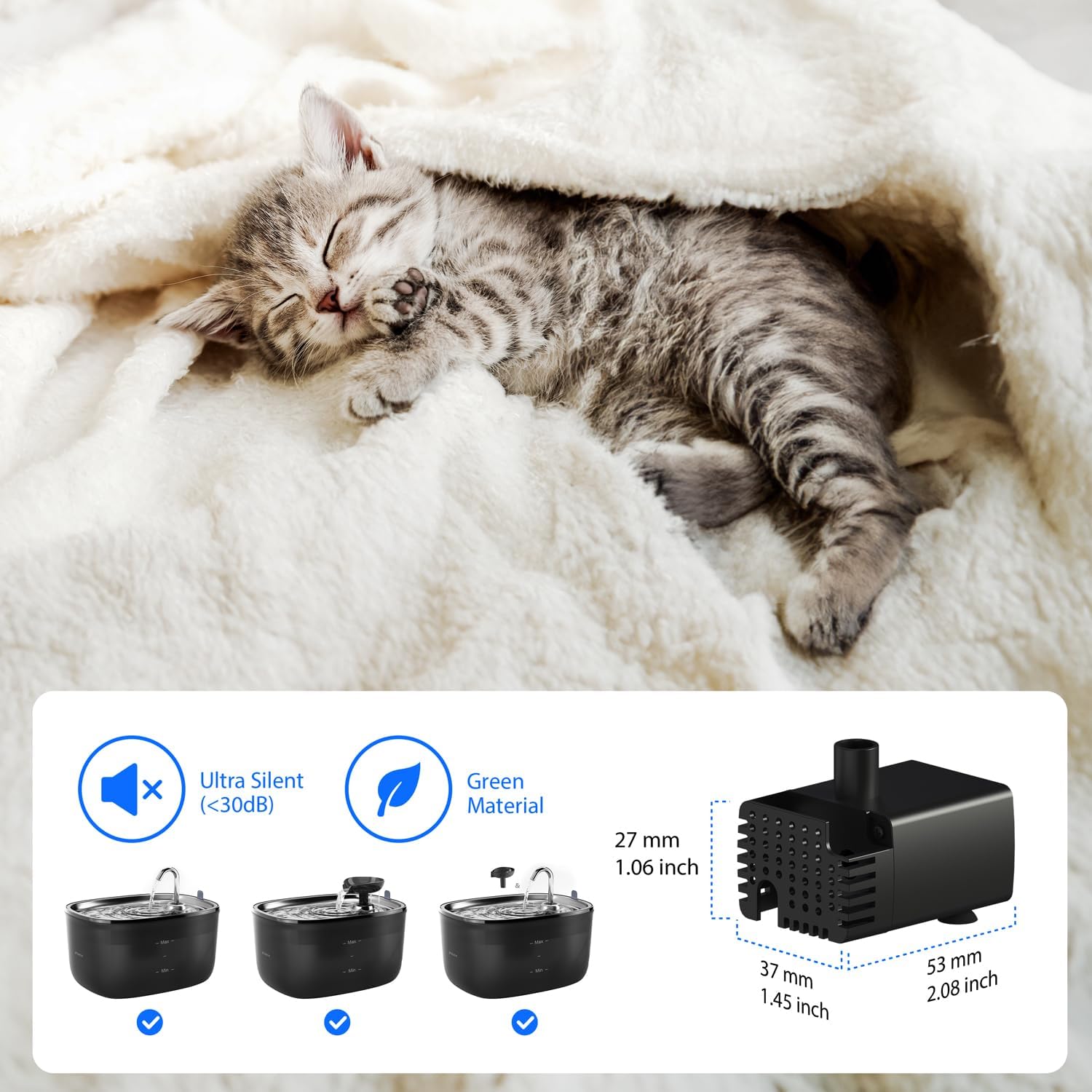
Foto 2: Zuru ezu view of the Stouchi pump, illustrating its compact dimensions (53mm x 37mm x 27mm), ultra-silent operation (less than 30dB), and use of green materials. The image also shows the pump integrated into different fountain designs.
4. Nhazi
- Ịkwapu: Jiri nlezianya wepụ ọkpọkọ ahụ n'ime ngwugwu ya.
- Sachaa: Rinse the pump thoroughly under clean water before first use.
- Install in Fountain: Place the pump into the designated compartment within your compatible Stouchi cat water fountain. Ensure it is securely seated and the outlet nozzle aligns with the fountain's water flow path.
- Njikọ Ike: Route the USB power cable out of the fountain, ensuring it does not interfere with the fountain's lid or water flow. Connect the USB plug to a suitable 5V USB power adapter (not supplied) or a compatible USB port.
- Isi iyi Jupụta: Fill the water fountain with clean water up to the maximum fill line, ensuring the pump is fully submerged.
5. Ntuziaka ọrụ
- Ike Na: Plug the USB power adapter into a wall outlet or activate the USB power source. The pump will begin to operate, and the LED indicator will illuminate, typically blue, indicating it is functioning.
- Ọrụ na-aga n'ihu: The pump is designed for continuous operation to ensure fresh, circulating water for your pet.
- Gbanyụọ: To turn off the pump, simply disconnect the USB power supply.
6. Nlekọta
Regular maintenance is crucial for the longevity and optimal performance of your pump and the cleanliness of your pet's water.
Nlekọta kwa izu:
- Kwụpụ ike: Kwupụchaa mgbapụta ahụ mgbe niile tupu ihicha ya.
- Kwụsa: Carefully remove the pump from the fountain. Disassemble the pump by removing the front cover and impeller.
- Ngwa dị ọcha: Rinse all pump components (front cover, impeller, pump body) under running water. Use a small brush (e.g., a toothbrush) to remove any hair, debris, or mineral deposits from the impeller and its housing.
- Gbakọtaghachi: Reassemble the pump, ensuring the impeller is correctly seated and the front cover is securely attached.
- Clean Fountain: Clean the entire water fountain according to its specific instructions.
- Mejupụta: Refill the fountain with fresh, clean water and reinstall the cleaned pump.
Mara: The frequency of cleaning may need to be increased if you have multiple pets, pets with long hair, or if the water quality in your area is hard.
7. Nchọpụta nsogbu
| Nsogbu | Ihe nwere ike ime | Ngwọta |
|---|---|---|
| Pump not working / No water flow |
|
|
| Mmiri na-adịghị ike |
|
|
| Pump na-eme mkpọtụ na-adịghị ahụkebe |
|
|
8. Nkọwapụta
- Nọmba nlereanya: WDQ1-2306-S002N
- Akụkụ (L x W x H): 12 x 10 x 3 cm (approx. 53 x 37 x 27 mm for pump unit)
- Arọ: 160 grams
- Ihe: Plastic (enweghị BPA)
- Agba: Nwa
- Isi mmalite ike: DC Power (USB)
- Voltage: 230 Volts (AC input for adapter, pump operates on 5V DC via USB)
- Ogologo eriri: 2 mita
- Ihe eji eme ihe: Cat water fountain pump
9. Akwụkwọ ikike na nkwado
Stouchi is committed to providing high-quality products and exceptional customer service. Your Stouchi WDQ1/WDQ3 pump comes with a 2-afọ akwụkwọ ikike.
If you encounter any problems or have questions regarding your product, please do not hesitate to contact our dedicated customer service team. We are always ready to assist you.
For replacement parts, including filters and other accessories for your pet's water fountain, please visit the official Stouchi store or authorized retailers.
Ozi mkpọtụrụ: Please refer to your purchase platform or the Stouchi official websaịtị maka nkọwa kọntaktị kachasị ọhụrụ maka nkwado ndị ahịa.


