1. Okwu mmalite
Thank you for choosing the Taurus Lento Cuina Digital Slow Cooker. This appliance is designed to simplify your cooking process, allowing you to prepare delicious, slow-cooked meals with minimal effort. Featuring a generous 6.5L capacity, digital controls, and a durable stainless steel body, it is perfect for family-sized meals. Please read this manual thoroughly before first use to ensure safe and optimal operation.

Image: The Taurus Lento Cuina Digital Slow Cooker alongside a cooked chicken, illustrating its capacity for large meals.
2. Ntuziaka nchekwa dị mkpa
Na-agbaso usoro nchekwa nchekwa mgbe niile mgbe ị na-eji ngwa eletriki iji belata ihe egwu ọkụ, ujo eletrik na/ma ọ bụ mmerụ ahụ n'ahụ mmadụ, gụnyere ndị a:
- Read all instructions before using the slow cooker.
- Emetụla ebe dị ọkụ aka. Jiri aka ma ọ bụ mkpọ.
- Iji chebe onwe gị pụọ na ujo eletriki, etinyela ihe ndabere, eriri, ma ọ bụ tinye ihe mkpuchi na mmiri ma ọ bụ mmiri mmiri ọzọ.
- Nleba anya dị mkpa mgbe ụmụaka na-eji ngwa ọ bụla ma ọ bụ nso.
- Kpupu na ntinye mgbe ejighị ya na tupu ihicha. Kwe ka ọ dị jụụ tupu ịtinye ma ọ bụ wepụ akụkụ.
- Ejila ngwa ọ bụla nwere eriri ma ọ bụ plọg mebiri emebi rụọ ọrụ, ma ọ bụ mgbe ngwa ahụ dara ma ọ bụ mebie n'ụzọ ọ bụla.
- Iji mgbakwunye ngwa nke onye nrụpụta ngwa anaghị akwado nwere ike bute mmerụ ahụ.
- Ejila n'èzí.
- Ekwela ka eriri kwụgide n'akụkụ tebụl ma ọ bụ counter, ma ọ bụ metụ ebe dị ọkụ aka.
- Etinyela na ma ọ bụ nso gas na-ekpo ọkụ ma ọ bụ ọkụ eletrik, ma ọ bụ na oven ọkụ.
- Ekwesịrị iji nlezianya mee ihe mgbe ị na-ebugharị ngwa nwere mmanụ ọkụ ma ọ bụ ihe ọ bụla na-ekpo ọkụ.
- Buru ụzọ tinye plọg mgbe niile na ngwa, wee tinye eriri n'ime oghere mgbidi. Iji kwupu njikọ, gbanyụọ njikwa ọ bụla ka ọ bụrụ "gbanyụọ", wee wepụ plọg na mpụta mgbidi.
- Ejila ngwa maka ndị ọzọ na-abụghị ebumnuche ebumnuche.
- Zenarị mgbanwe okpomọkụ mberede, dị ka ịgbakwunye nri friji n'ime ite ọkụ.
- The ceramic pot is designed for use with this appliance only. It must not be used on a gas or electric stovetop or in a heated oven.
3. Ngwa ngwaahịa
Familiarize yourself with the parts of your Taurus Lento Cuina Digital Slow Cooker:
- Toughened Glass Lid: Allows you to monitor cooking progress without releasing okpomọkụ.
- Removable Ceramic Pot: The main cooking vessel, easy to clean and serve from.
- Ụlọ igwe anaghị agba nchara: The outer body of the slow cooker, containing the heating element and control panel.
- Ogwe njikwa dijitalụ: Features a 4-digit LED display, Mode, Timer, Up, Down, and On/Off buttons.
- Aka: For safe transportation of the unit.
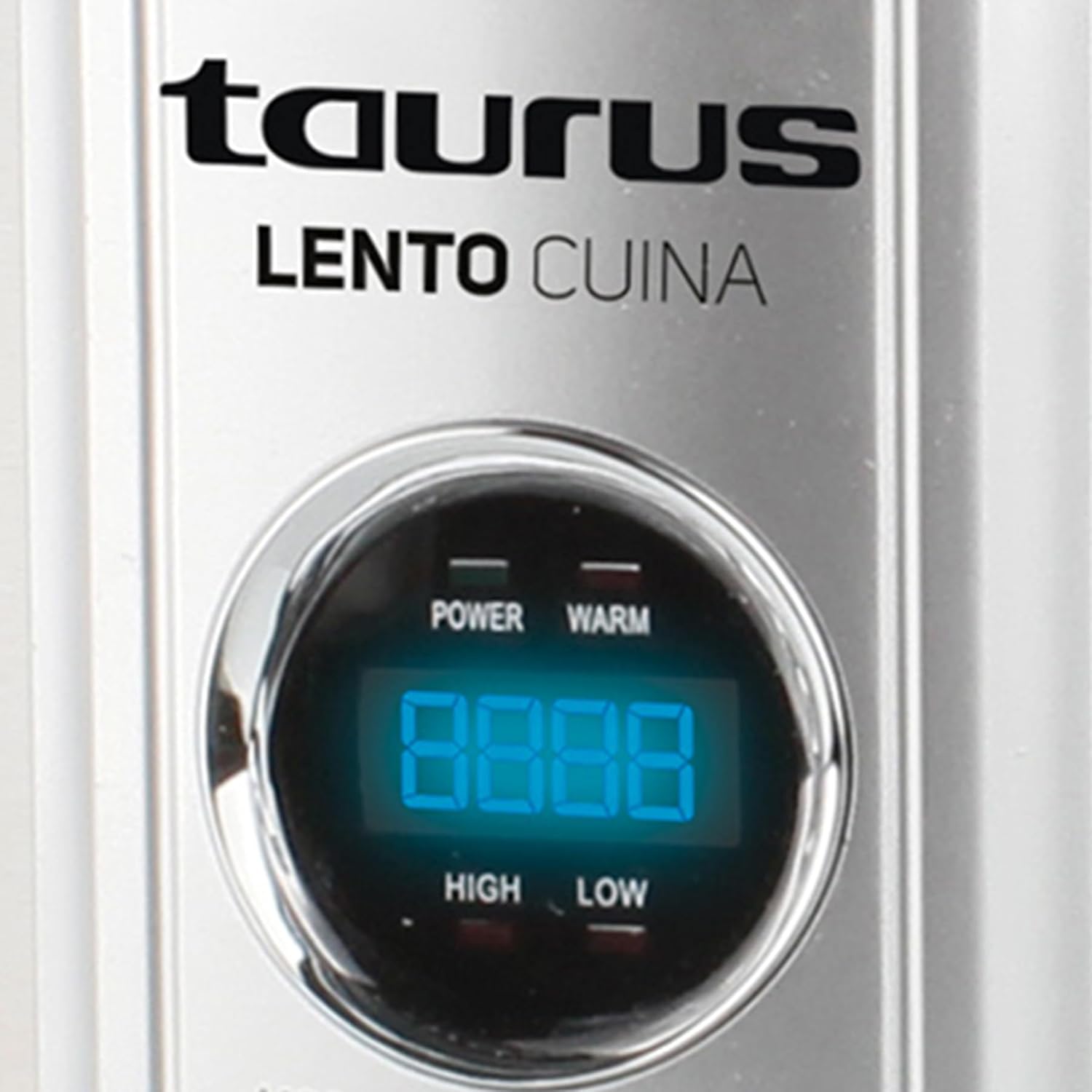
Foto: A zuru ezu n'ihu view of the Taurus Lento Cuina Digital Slow Cooker, highlighting the digital control panel and stainless steel finish.

Image: The Taurus Lento Cuina Digital Slow Cooker with its removable ceramic pot placed next to it, demonstrating ease of cleaning and serving.
4. Ntọala na ojiji mbụ
Before using your slow cooker for the first time:
- Wepu ngwa ngwa ngwa ngwa wee wepụ ihe nkwakọ ngwaahịa niile.
- Wash the ceramic pot and glass lid in warm, soapy water. Rinse thoroughly and dry completely.
- Wipe the exterior of the stainless steel housing with a damp akwa . Ejila akụkụ ntọala n'ime mmiri.
- Place the ceramic pot into the stainless steel housing.
- Place the slow cooker on a flat, stable, heat-resistant surface, away from walls or cabinets to allow for proper ventilation.
- Ensure the power cord is not tangled and is placed where it will not be tripped over.
5. Ntuziaka ọrụ
The Taurus Lento Cuina Digital Slow Cooker offers simple digital controls for precise cooking.
5.1 Ogwe njikwa gafereview

Foto: A nso nso view of the digital control panel, showing the LED display and buttons for Mode, Timer, Up, Down, and On/Off.
- Ikanam Display: Shows cooking time and temperature settings.
- Bọtịnụ MODE: Cycles through cooking modes (High, Low, Keep Warm).
- Bọtịnụ TIMER: Activates the timer setting function.
- Bọtịnụ elu / ala: Hazie oge nri.
- Bọtịnụ ngbanwu/ Gbanyụọ: Na-agbanye unit ahụ ma ọ bụ gbanyụọ.
5.2 Usoro nri
- Prepare your ingredients and place them into the ceramic pot.
- Place the ceramic pot into the stainless steel housing and cover with the glass lid.
- Plug the slow cooker into a grounded electrical outlet. The LED display will illuminate.
- Pịa Gbanye/ Gbanyụọ bọtịnụ iji gbanye unit ahụ.
- Pịa MODE button to select your desired cooking setting:
- Elu: Maka isi nri ngwa ngwa, ọ na-ewekarị awa 2-4.
- ala: Maka isi nri dị nwayọ, ọ na-ewekarị awa 6-8.
- Na-ekpo ọkụ: Automatically activates after cooking is complete, or can be selected manually to keep food at serving temperature.
- Pịa TIMER button. The display will flash. Use the UP na N'ala buttons to set the desired cooking time in hours. The timer can be set for up to 20 hours.
- Once the time is set, the display will stop flashing, and the cooking process will begin. The timer will count down.
- When the cooking time expires, the slow cooker will automatically switch to the "KEEP WARM" setting.
- To turn off the slow cooker at any time, press the Gbanye/ Gbanyụọ button. Unplug the unit from the wall outlet after use.

Image: A hand pressing the ON/OFF button on the slow cooker's control panel, demonstrating the ease of operation.

Image: The Taurus Lento Cuina Digital Slow Cooker with a meal cooking inside, visible through the clear glass lid.
6. Nlekọta na nhicha
Proper cleaning and maintenance will extend the life of your slow cooker.
- Mgbe niile, gbanyụọ ihe na-esi nri nwayọ na ebe a na-esi ọkụ eletrik ma hapụ ya ka ọ jụọ oyi kpamkpam tupu e hichaa ya.
- Ceramic Pot and Glass Lid: These parts are dishwasher safe or can be washed by hand with warm, soapy water. Avoid abrasive cleaners or scouring pads that may scratch the surface. Rinse thoroughly and dry.
- Ụlọ igwe anaghị agba nchara: Jiri nwayọ hichaa mpụta, damp cloth. Do not use abrasive cleaners or immerse the base unit in water or any other liquid.
- For stubborn food residue on the ceramic pot, fill it with warm, soapy water and let it soak for a few hours before cleaning.
- Gbaa mbọ hụ na akụkụ niile akpọọla nkụ tupu echekwa ya.
7. Nchọpụta nsogbu
Ọ bụrụ na ị na-enwe nsogbu na ngwa nri gị, lee nsogbu na ngwọta ndị a na-ahụkarị:
| Nsogbu | Ihe nwere ike ime | Ngwọta |
|---|---|---|
| Oghere dị nwayọọ anaghị agbanwuo. | Not plugged in; power outlet not working; unit not switched on. | Ensure plug is securely in a working outlet. Press the ON/OFF button. Check household circuit breaker. |
| Nri anaghị esi nke ọma. | Incorrect heat setting; lid not sealed properly; insufficient cooking time. | Verify correct heat setting (HIGH/LOW). Ensure lid is seated firmly. Adjust cooking time as needed for recipe. Avoid lifting lid frequently. |
| Nri na-ere ọkụ n'ala. | Mmiri dị oke ntakịrị; esi nri na HIGH ruo ogologo oge. | Add more liquid to the recipe. Consider using the LOW setting for longer cooking times. |
| Lid does not fit tightly. | Food obstruction; lid not aligned correctly. | Ensure no food is preventing the lid from seating properly. Realign the lid. |
8. Nkọwapụta
Technical details for the Taurus Lento Cuina Digital Slow Cooker:
- Nọmba nlereanya: 3997
- Ike: 6.5 lita
- Ike / Wattage: 320 watt
- Ihe: Stainless Steel (housing), Ceramic (pot)
- Agba: Ọlaọcha
- Usoro njikwa: Touch (Digital)
- Atụmatụ pụrụ iche: Timer, Digital Controls, High/Low/Keep Warm Functions
- Ibu ihe: 6.5 n'arọ
- Akụkụ ngwaahịa: 39.8D x 37.3W x 26H centimita
9. Akwụkwọ ikike na nkwado
Your Taurus Lento Cuina Digital Slow Cooker comes with a standard 1-year retail warranty, with an additional 1-year extended warranty. For warranty claims, technical support, or spare parts information, please contact Taurus customer service. Refer to the contact information provided with your purchase documentation or visit the official Taurus websaịtị.
Note: Spare part information is not available or provided directly in this manual.


