1. Okwu mmalite
This manual provides detailed instructions for the setup, operation, maintenance, and troubleshooting of your Steelplay Adventure Controller for Nintendo Switch. Please read this manual thoroughly before using the product to ensure optimal performance and longevity.
2. Ihe ngwugwu
- Steelplay Adventure Controller
- Igwe nchaji USB
- Akwụkwọ ntuziaka (akwụkwọ a)
3. Nhazi njikwa
Familiarize yourself with the buttons and features of your Steelplay Adventure Controller.

Foto 1: N'ihu view of the Steelplay Adventure Controller. This image displays the controller's ergonomic design, featuring a teal main body, brown grips, and yellow accents on the analog sticks, D-pad, and face buttons. The layout includes two clickable analog sticks, a directional pad, A/B/X/Y action buttons, Home, Capture, Plus, Minus, and Turbo buttons.
- Mkpanaka Analọg Aka ekpe: Maka njikwa mmegharị na igwefoto.
- Ogwe aka nri Analọg: For camera control or specific in-game actions.
- D-Pad: Ntinye ntụziaka.
- Bọtịnụ A/B/X/Y: bọtịnụ ime ihe.
- Bọtịnụ L/R: Bọtịnụ ubu.
- Bọtịnụ ZL/ZR: Bọtịnụ mkpali.
- Bọtịnụ ụlọ: Returns to the Nintendo Switch HOME Menu.
- Bọtịnụ MGBE E JIJI: Na-ese foto ma ọ bụ vidiyo.
- + (Gụnyere) bọtịnụ: Malite/kwụsịtụ bọtịnụ.
- - (Mbelata) bọtịnụ: Họrọ bọtịnụ.
- Bọtịnụ TURBO: For setting rapid-fire functionality (refer to operating section).
- Ihe ngosi LED: Display connection status, player number, and charging status.
4. Ntọala na Njikọ
4.1 Nchaji izizi
Before first use, fully charge the controller. Connect the USB charging cable to the controller's charging port and the other end to a USB power source (e.g., Nintendo Switch dock, USB wall adapter, computer USB port). The LED indicators will show charging status and turn off or change color when fully charged.
4.2 Ijikọ na Nintendo Switch
- On your Nintendo Switch HOME Menu, select "Controllers".
- Select "Change Grip/Order".
- On the Steelplay Adventure Controller, press and hold the Bọtịnụ ụlọ na nke bọtịnụ Y simultaneously for a few seconds until the LED indicators start flashing rapidly. This indicates the controller is in pairing mode.
- The Nintendo Switch will detect the controller. Once detected, the LED indicators on the controller will stop flashing and remain solid, indicating a successful connection.
- Press the L+R buttons on the controller as prompted by the Switch screen to finalize the connection.
Once paired, the controller will automatically connect to your Nintendo Switch when powered on and within range.
5. Na-arụ ọrụ njikwa
5.1 Njikwa ntọala
The Steelplay Adventure Controller functions similarly to official Nintendo Switch Pro Controllers. Use the analog sticks for movement, D-pad for directional input, and A/B/X/Y buttons for in-game actions. The L/R and ZL/ZR buttons provide additional input options.
5.2 Njikwa Mmegharị
The controller supports motion control functionality, allowing for immersive gameplay in compatible titles. Ensure your Nintendo Switch system software is up to date for optimal motion control performance.
5.3 TURBO ọrụ
The TURBO function allows a button to be pressed repeatedly as long as it is held down, providing a rapid-fire effect.
- Iji mee ka TURBO rụọ ọrụ: Pịa ma jide TURBO bọtịnụ, then press the desired action button (e.g., A, B, X, Y, L, R, ZL, ZR). The button will now have TURBO functionality.
- Iji gbanyụọ TURBO: Pịa ma jide TURBO bọtịnụ again, then press the same action button. The TURBO function for that button will be turned off.
6. Nlekọta
6.1 Nhicha
Iji hichaa ihe njikwa gị, jiri ákwà dị nro ma kpọọ nkụ. Maka unyi siri ike, jiri obere dampen the cloth with water and gently wipe the surface. Do not use harsh chemicals, solvents, or abrasive cleaners, as these can damage the controller's finish and internal components.
6.2 Nchekwa
Store the controller in a cool, dry place away from direct sunlight, extreme temperatures, and high humidity. Avoid placing heavy objects on the controller to prevent damage to the buttons or casing.
6.3 Nlekọta batrị
The controller contains a built-in Lithium-ion battery. To prolong battery life, avoid fully discharging the battery frequently. If storing the controller for an extended period, charge it to approximately 50% capacity every few months.
7. Nchọpụta nsogbu
| Nsogbu | Ihe nwere ike ime | Ngwọta |
|---|---|---|
| Controller does not connect to Switch. |
|
|
| Mbelata ntinye ma ọ bụ bọtịnụ anaghị anabata. |
|
|
| Controller does not charge. |
|
|
8. Nkọwapụta
| Njirimara | Nkọwa |
|---|---|
| Ụdị | Egwuregwu ígwè |
| Nọmba nlereanya | 3760352735322 |
| Njikọta | Bluetooth (ikuku) |
| Ngwa dakọtara | Nintendo Switch |
| Agba | Multicolore (Teal, Brown, Yellow) |
| Atụmatụ pụrụ iche | Wireless, Motion Control, TURBO Function |
| Ibu | 185 grams |
| Akụkụ (L x W x H) | 16 x 11.5 x 6.3 centimita |
| Ụdị batrị | 1 Lithium-ion (built-in) |
9. Akwụkwọ ikike na nkwado
The product packaging indicates a 5-year warranty. For specific warranty terms, conditions, and support inquiries, please refer to the official Steelplay websaịtị ma ọ bụ kpọtụrụ ndị ahịa ha ozugbo. Debe ihe akaebe nke ịzụrụ ihe maka akwụkwọ ikike.
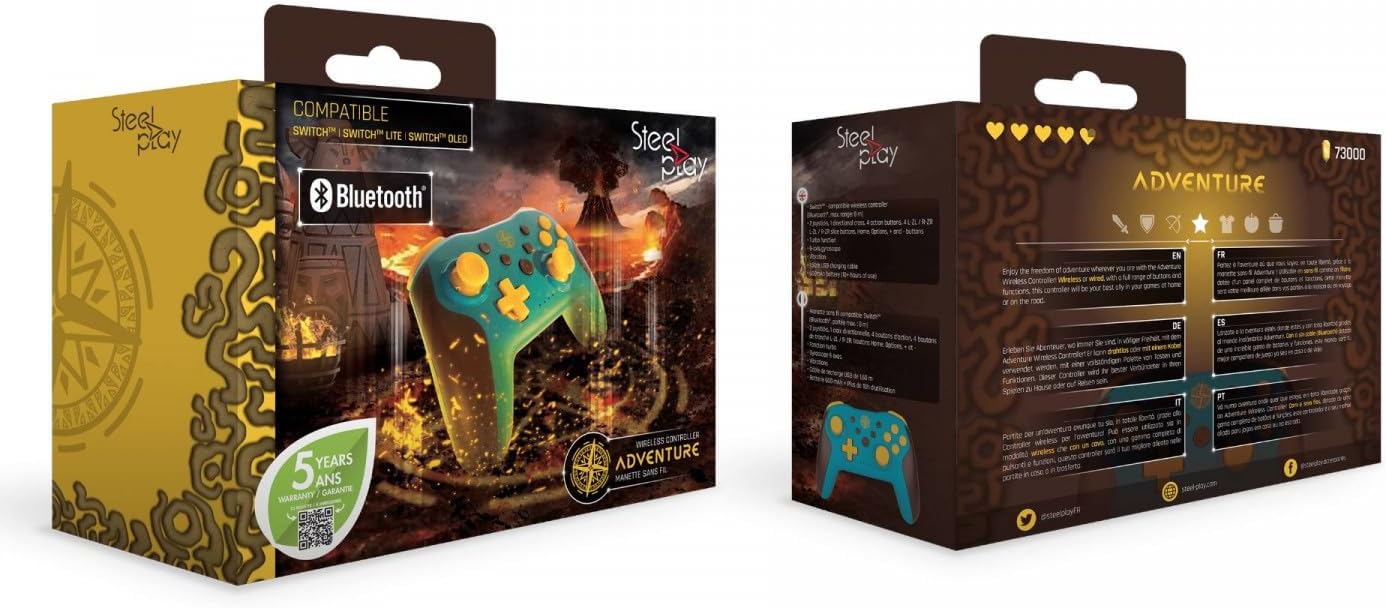
Foto 2: Packaging of the Steelplay Adventure Controller. The box prominently features the controller's design, compatibility with various Nintendo Switch models, Bluetooth logo, and a "5 years warranty" seal. The reverse side provides product information in multiple languages.


