1. Okwu mmalite
Thank you for choosing the SPLITSKY NZFS Kids Alarm Clock. This device combines an alarm clock, white noise sleep aid, and an 8-mode RGB night light, designed to assist with sleep and wake-up routines for children and adults. Please read this manual thoroughly to understand its features and ensure proper operation.
Ozi nchekwa:
- Debe ngwaọrụ ahụ pụọ na mmiri na oke iru mmiri.
- Anwala ịkwasa ma ọ bụ rụkwaa ngwaọrụ n'onwe gị.
- Use only the provided USB-C power cable or a certified equivalent.
- Gbaa mbọ hụ na ikuku ikuku dị na gburugburu ngwaọrụ ahụ.
2. Ihe ngwugwu
Chọpụta na ihe niile dị na ngwugwu gị:
- SPLITSKY NZFS Kids Alarm Clock
- 1.2M (4.7 inch) USB-C Power Cable
- Akwụkwọ ntuziaka (akwụkwọ a)
- 1 x CR2032 Lithium Ion Battery (pre-installed for memory backup)
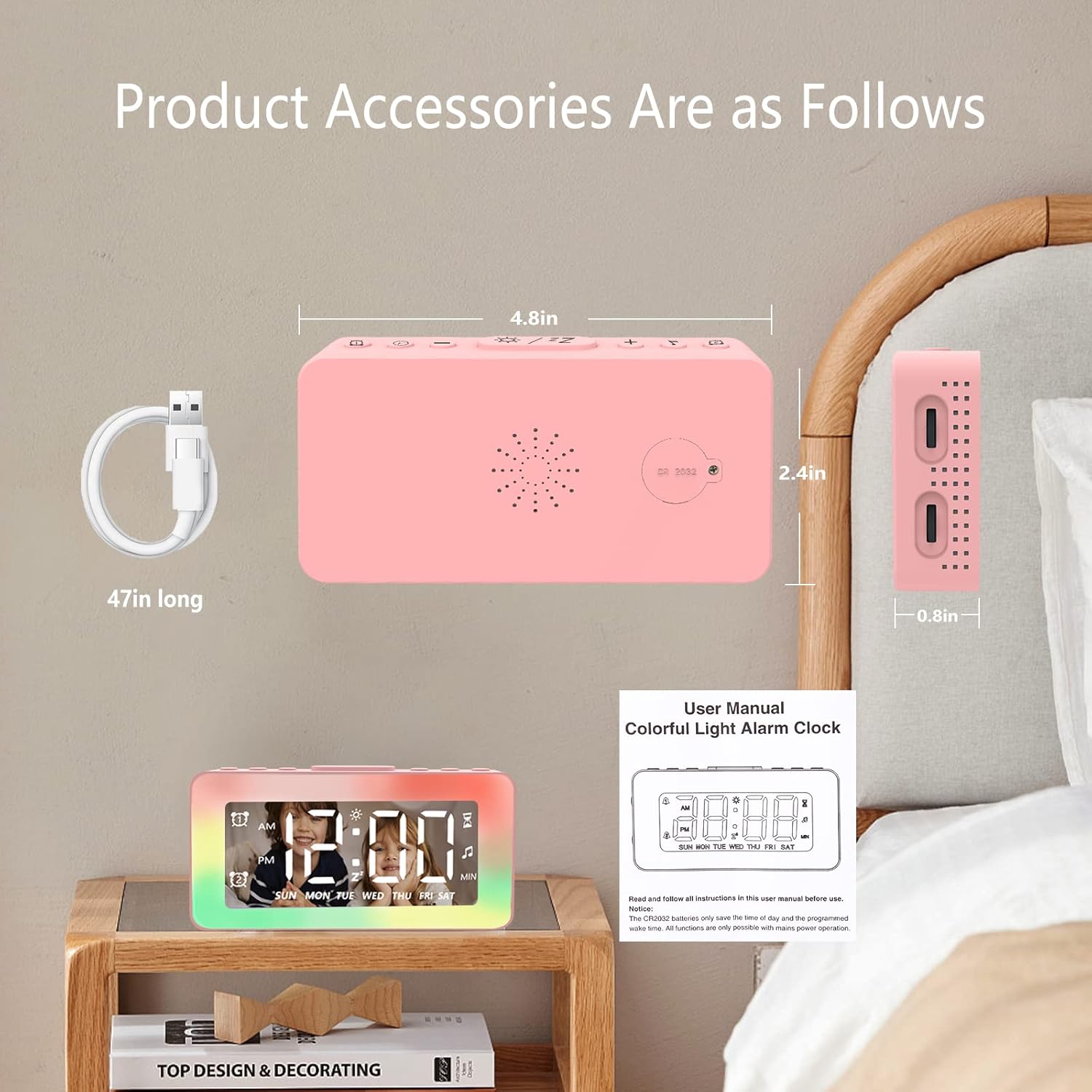
Image: The SPLITSKY NZFS Kids Alarm Clock, a USB-C power cable, and the user manual are included in the package.
3. Ngwaahịa gafereview
Familiarize yourself with the buttons and ports on your alarm clock:

Foto: Zuru ezu view of the alarm clock's top buttons and side ports, including Alarm 1, Time Setting, Light Minus/Settings, Snooze/Light Mode Switch, Light Plus/Setup, Music Switch, Alarm 2, Volume Setting, Time Brightness Setting, USB Output Charging Port, and Type-C Input Interface.
- Bọtịnụ Mkpu 1: Set and activate Alarm 1.
- Bọtịnụ nhazi oge: Hazie oge ugbu a.
- Light Minus / Settings Button: Decrease light brightness or navigate settings.
- Snooze / Light Mode Switch Button: Activate snooze, or cycle through light modes.
- Light Plus / Setup Button: Increase light brightness or confirm settings.
- Music Switch Button: Cycle through white noise sounds.
- Bọtịnụ Mkpu 2: Set and activate Alarm 2.
- Volume Setting Wheel (Side): Adjust alarm and white noise volume.
- Time Brightness Setting Wheel (Side): Gbanwee nchapụta ngosi.
- USB Output Charging Port (Side): Charge external devices.
- Type-C Input Interface (Side): Connect power cable to the alarm clock.
4. Nhazi
4.1 Njikọ ike
- Connect the provided USB-C power cable to the Type-C Input Interface on the side of the alarm clock.
- Tinye nsọtụ nke ọzọ nke eriri USB-C n'ime ihe nkwụnye ọkụ USB dakọtara (anaghị etinye ya) ma ọ bụ ọdụ ụgbọ USB.
- The display will illuminate, indicating the clock is powered on.

Image: The SPLITSKY NZFS Kids Alarm Clock is shown powered on and connected via its USB-C port, also demonstrating its capability to charge a smartphone.
4.2 Battery Installation (Memory Backup)
The alarm clock includes a pre-installed CR2032 battery. This battery serves as a memory backup to retain time and alarm settings during a power outage or when the main power is disconnected. It does not power the clock for regular operation.
- If the battery needs replacement, locate the battery compartment on the back of the unit.
- Jiri obere screwdriver mepee oghere.
- Dochie jiri batrị CR2032 ọhụrụ, na-agba mbọ hụ na polarity ziri ezi.
- Mechie ọnụ ụlọ ahụ nke ọma.
5. Ntuziaka ọrụ
5.1 Setting the Time (12H/24H Format)
- Pịa ma jide Bọtịnụ nhazi oge until the hour digits begin to flash.
- Jiri ihe Light Minus / Settings Button (ala) ma ọ bụ Light Plus / Setup Button (up) to adjust the hour.
- Pịa Bọtịnụ nhazi oge again to move to minute adjustment. Adjust minutes using the Light Minus/Plus buttons.
- Pịa Bọtịnụ nhazi oge a third time to select 12-hour or 24-hour format. Adjust using the Light Minus/Plus buttons.
- Pịa Bọtịnụ nhazi oge otu ugboro ọzọ iji kwado ma wepụ ọnọdụ ntọala oge.
5.2 Setting Alarms (Dual Alarm, Daily/Weekday/Weekend Mode)
Elekere ahụ na-akwado mkpu abụọ nọọrọ onwe ha (Mkpu 1 na Mkpu 2).
- Pịa ma jide Mkpu 1 bọtịnụ (for Alarm 1) or Mkpu 2 bọtịnụ (for Alarm 2) until the alarm hour digits flash.
- Jiri ihe Light Minus / Settings Button or Light Plus / Setup Button iji dozie elekere.
- Press the respective Alarm Button again to move to minute adjustment. Adjust minutes using the Light Minus/Plus buttons.
- Press the respective Alarm Button again to select the alarm mode:
- Modebọchị kwa ụbọchị: Alarm sounds every day.
- Weekday Mode: Alarm sounds Monday to Friday.
- Ụdị Izu Ụka: Alarm sounds Saturday and Sunday.
- Press the respective Alarm Button once more to confirm and exit alarm setting mode.
- Iji mee ka/gbanyụọ mkpu, pịa obere oge Mkpu 1 bọtịnụ or Mkpu 2 bọtịnụAkara ngosi mkpu ga-apụta/pụọ n'anya na ngosipụta ahụ.
5.3 Ọrụ snooze
When an alarm sounds, tap the Snooze / Light Mode Switch Button on top to activate snooze. The alarm will pause for 9 minutes and then sound again. This can be repeated multiple times.
5.4 Night Light (8 Modes RGB, 10-level dimming)
The alarm clock features 6 solid color lights and 2 ambient colorful lights.
- Mkpirisi pịa Snooze / Light Mode Switch Button to turn on the night light and cycle through the 8 color modes.
- To adjust the brightness (10 levels), use the Light Minus / Settings Button or Light Plus / Setup Button while the night light is active.
- To turn off the night light, continue pressing the Snooze / Light Mode Switch Button ruo mgbe ọkụ na-agbanyụ.

Image: Multiple SPLITSKY NZFS Kids Alarm Clocks are shown, each displaying a different color from the 8 available RGB night light modes.
5.5 White Noise Sleep Aid (8 Sounds)
The clock offers 8 soothing sounds to aid sleep.
- Mkpirisi pịa Bọtịnụ Mgbanwe Egwu to turn on the white noise and cycle through the available sounds.
- To adjust the volume (16 levels), use the Volume Setting Wheel on the side of the clock.
- To turn off the white noise, continue pressing the Bọtịnụ Mgbanwe Egwu until the sound stops.

Image: The SPLITSKY NZFS Kids Alarm Clock is displayed on a bedside table, with icons illustrating the various white noise options such as rain, cicadas, piano, bonfire, waves, birdsong, and church bells.
5.6 Sleep Timer (10-120 minutes)
The sleep timer allows you to set a duration for the white noise and/or night light to play before automatically turning off.
- While white noise or night light is active, press and hold the Bọtịnụ Mgbanwe Egwu (for white noise timer) or Snooze / Light Mode Switch Button (for light timer).
- Jiri ihe Light Minus / Settings Button or Light Plus / Setup Button to select the desired timer duration (10, 20, 30, 60, 90, 120 minutes).
- Press the respective button again to confirm the timer setting. The timer icon will appear on the display.
5.7 Ngosipụta mmezi ihie
Adjust the brightness of the LED time display using the Time Brightness Setting Wheel on the side of the clock.
5.8 USB Nchaji Port
The USB output charging port on the side of the alarm clock can be used to charge other small electronic devices, such as smartphones. Connect your device's charging cable to this port.
6. Nlekọta
6.1 Nhicha
- Gbaa mbọ hụ na ewepụghị ngwaọrụ ahụ tupu ihicha ya.
- Jiri akwa dị nro hichaa elu ya.
- Do not use abrasive cleaners, solvents, or chemical sprays.
6.2 Nchekwa
When not in use for extended periods, store the alarm clock in a cool, dry place, away from direct sunlight and extreme temperatures.
7. Nchọpụta nsogbu
If you encounter issues with your SPLITSKY NZFS Kids Alarm Clock, refer to the table below for common problems and solutions.
| Nsogbu | Ihe nwere ike ime | Ngwọta |
|---|---|---|
| Ngosipụta elekere agbanyụrụ ma ọ bụ gbanyụrụ agbanyụ. | Not connected to power; Time brightness set too low. | Ensure USB-C cable is securely connected to a power source. Adjust the Time Brightness Setting Wheel. |
| Oti mkpu anaghị ada ụda. | Agbaghị mkpu ọrụ; Olu mkpu dị oke ala. | Check if the alarm icon is displayed. If not, short press the respective Alarm Button to activate. Adjust the Volume Setting Wheel. |
| Time/settings reset after power disconnection. | CR2032 backup battery is depleted or missing. | Replace the CR2032 battery in the battery compartment. |
| Night light or white noise not working. | Function not activated; Sleep timer active. | Mkpirisi pịa Snooze / Light Mode Switch Button or Bọtịnụ Mgbanwe Egwu to activate. Check if a sleep timer is set. |
8. Nkọwapụta
| Njirimara | Nkọwa |
|---|---|
| Ụdị | SPLITSKY |
| Nọmba nlereanya | NZFS |
| Ụdị ngosi | Igwe ọkụ dijitalụ |
| Akụkụ ngwaahịa | 3.17"W x 3.17"H (approximately 8.05 cm W x 8.05 cm H) |
| Ibu Ibu | Ounce ise (ihe dị ka gram 230) |
| Isi Iyi Ike | Corded Electric (USB-C), Battery Powered (CR2032 for memory) |
| Ụdị ìhè abalị | 8 (6 solid colors, 2 ambient colorful) with 10-level dimming |
| Ụda Ọcha | 8 na-ada ụda |
| Ụda mkpu | 7 wake-up alarm tones with 16-level volume control |
| Atụmatụ mkpu | Dual Alarm, Daily/Weekday/Weekend modes, 9-minute Snooze |
| Ọrụ ngụ oge | 10-120 minute sleep timer for sounds and lights |
| Njikọta | USB-C Input, USB-A Output (for charging external devices) |
| Ihe onwunwe | Acrylonitrile Butadiene Styrene |
9. Akwụkwọ ikike na nkwado
9.1 Ozi akwụkwọ ikike
Please refer to the warranty information provided at the time of purchase or contact your retailer for details regarding the product warranty. Keep your proof of purchase for any warranty claims.
9.2 Nkwado ndị ahịa
For technical assistance, troubleshooting beyond this manual, or general inquiries, please contact the seller through the platform where you purchased the product. Provide your order number and a detailed description of the issue for prompt support.


