Firecore F95T-PRO-WT 3x360 Green Laser Level with 60-inch Tripod User Manual
Model: F95T-PRO-WT | Brand: Firecore
Okwu mmalite
This manual provides detailed instructions for the safe and effective operation of your Firecore F95T-PRO-WT 3x360 Green Laser Level. This precision tool is designed for various leveling and alignment tasks in construction, renovation, and DIY projects. Please read this manual thoroughly before use and retain it for future reference.
Ozi nchekwa
ỊDỌ AKA NA NTỊ: REDỊZI LASER
Do not stare directly into the laser beam. Direct exposure to the laser beam can cause eye injury. Always wear appropriate laser safety glasses when operating the device. Ensure the laser is not aimed at people or reflective surfaces.
- Zere ikpughe anya ozugbo na doo laser.
- Do not disassemble the laser level. Repairs should only be performed by authorized service personnel.
- Debe ngwaọrụ ahụ ka ụmụaka ghara iru ya.
- Use only specified batteries and charging accessories.
- Operate the device in a stable environment to prevent accidental movement.
Ihe ngwugwu
Nyochaa na etinyere ihe niile edepụtara n'okpuru na ngwugwu gị:
- 1x Firecore F95T-XG Laser Level with Integrated Magnetic Bracket
- 1x 60-Inch Tripod
- 2x 4000mAh Rechargeable Li-ion Batteries
- 1x njikwa anya
- 1x Type-C Power Cord
- 1x nkwụnye ọkụ
- 1x Laser Target Plate
- 1 x Akwụkwọ ntuziaka onye ọrụ (akwụkwọ a)
- 1x Akpa akpa
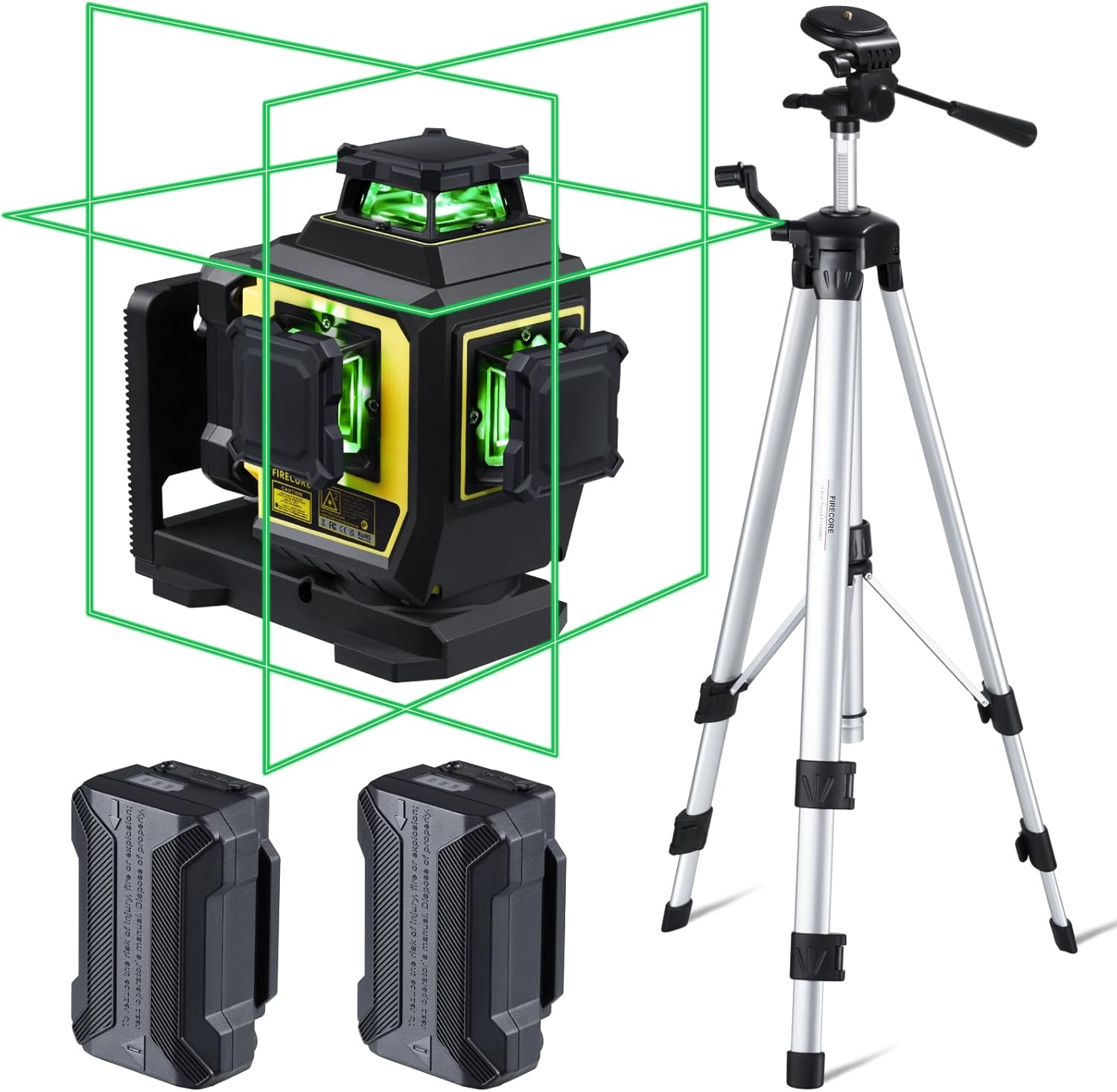
Figure 1: Complete package contents of the Firecore F95T-PRO-WT Laser Level system.
Njirimara ngwaahịa
- Laser Green na-egbuke egbuke: Up to 4X brighter than standard red beams, offering a working range of up to 98 ft with ±1/13" accuracy at 33 ft.
- 3 x 360° Line Laser: Projects one 360° horizontal and two 360° vertical planes for comprehensive room layout.
- Ụdị ọkwa onwe: Automatically levels within ±4°. The laser blinks as an alarm when out of range.
- Ụdị akwụkwọ ntuziaka: Allows the laser tool to be placed at any angle when the pendulum is locked.
- Outdoor Pulse Mode: Extends the working range up to 197 ft with a Firecore Line Laser Receiver (sold separately).
- Batrị enwere ike ịgbanye ugboro abụọ: Two 4000mAh Li-ion batteries provide up to 16 hours of continuous runtime.
- Njikwa anya: Adjust laser lines, brightness, and modes without direct interaction with the unit.
- Nhazi siri ike: IP54 dust/water resistance with over-molded construction.
- Nrịgo dị iche iche: Integrated magnetic bracket, 360° rotating base with micro-adjustment, and 1/4-20 & 5/8-11 threads for tripod mounting.
- 60-Inch Tripod: Lightweight aluminum construction, adjustable from 26 to 60 inches, with a quick-release plate and built-in bullseye level.
Melite
- Nwụnye batrị:
Insert one of the provided 4000mAh Li-ion batteries into the battery compartment of the laser level. Ensure it clicks securely into place. The device can also be powered by the second battery or charged via the Type-C port.
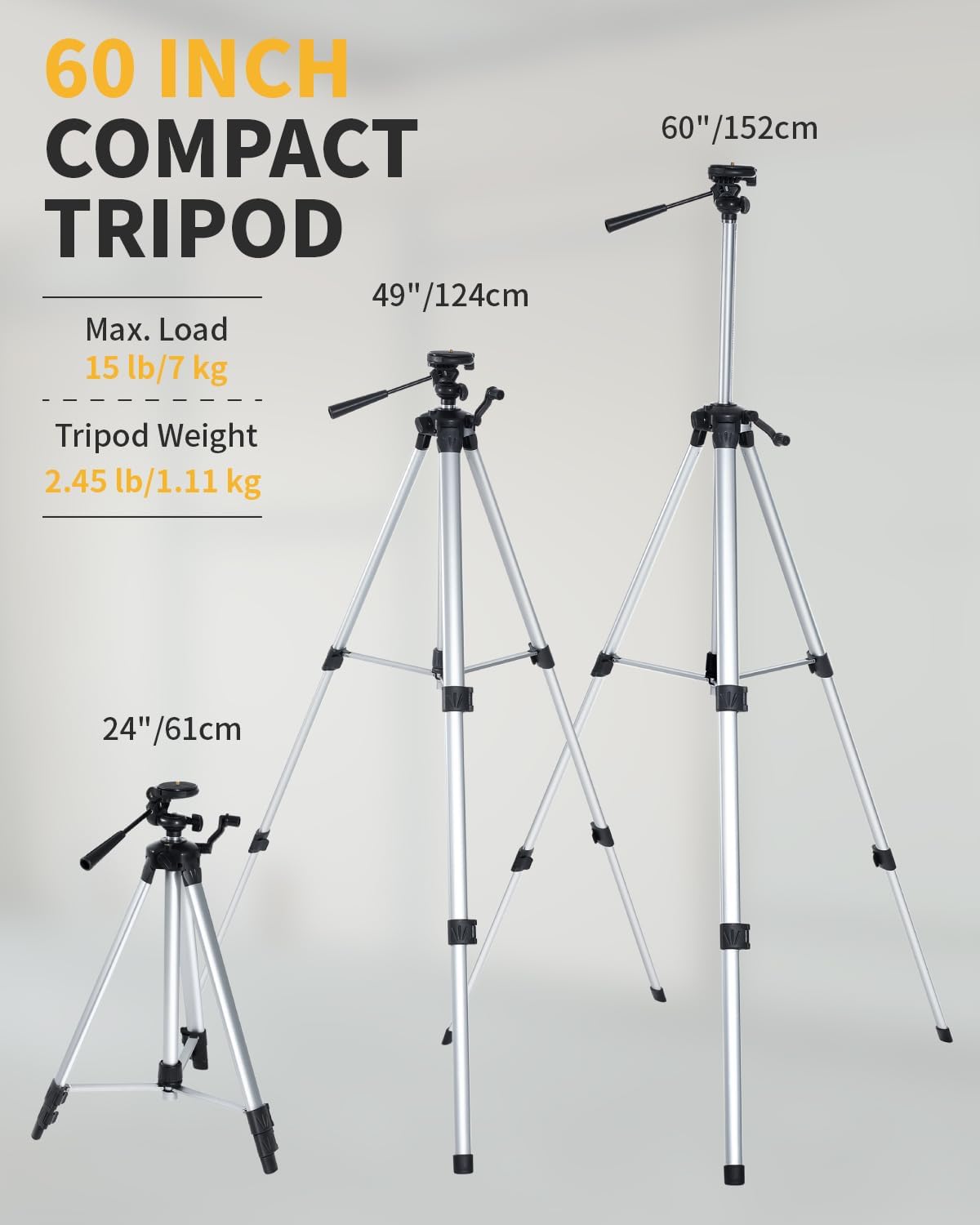
Figure 2: Battery installation and Type-C charging port.
- Mounting the Laser Level:
The laser level offers multiple mounting options:
- On the Tripod: Attach the laser level to the 60-inch tripod using the 1/4-20 or 5/8-11 mounting threads. Extend the tripod legs and adjust the height as needed. Use the built-in bullseye level on the tripod to ensure a stable and level base.
- Ihe njide magnetik: Utilize the integrated magnetic bracket to attach the laser level to metal surfaces, such as steel studs.
- Ntọala na-atụgharị: The 360° rotating base allows for fine adjustment of horizontal lines.

Figure 3: Laser level mounted on the tripod.
Ụdị arụ ọrụ
The Firecore F95T-PRO-WT laser level features several operating modes to suit different applications.
1. Ụdị Nhazi Onwe Onye
This mode is ideal for applications requiring precise horizontal and vertical alignment. The device automatically levels itself within a range of ±4°.
- Unlock the pendulum by sliding the lock switch to the unlocked position.
- Place the laser level on a stable surface or tripod.
- The laser will automatically self-level. If the device is outside its ±4° self-leveling range, the laser lines will blink as an alarm. Adjust the device's position until the lines become steady.

Figure 4: Self-Leveling Mode in operation.
2. Manual Mode (Locked Mode)
Manual mode allows you to project laser lines at any desired angle, useful for tasks like installing handrails or decorative patterns.
- Lock the pendulum by sliding the lock switch to the locked position.
- Press and hold the Manual button for 3 seconds to activate manual mode.
- The laser lines will be projected at the angle the device is positioned, without self-leveling.

Figure 5: Manual Mode for angled projections.
3. Pulse Mode (Outdoor Mode)
Pulse mode extends the working range of the laser level, especially useful for outdoor applications or in bright conditions when paired with a compatible Firecore Line Laser Receiver.
- Activate the pulse mode by pressing the Receiver Button on the laser level or the remote control.
- The laser lines will emit a pulsed signal, allowing detection by a Firecore Line Laser Receiver up to 197 ft away.

Figure 6: Pulse Mode for extended range with a receiver.
4. Switching Line Modes and Brightness
The laser level can project various combinations of horizontal and vertical lines, and the brightness can be adjusted.
- Use the H/V buttons on the device or the remote control to cycle through different line combinations (e.g., one horizontal, two vertical, all three 360° planes).
- The remote control also allows adjustment of laser brightness.

Figure 7: Using the remote control to switch line modes.
Ozi batrị
The Firecore F95T-PRO-WT laser level is powered by two 4000mAh Li-ion batteries, providing extended operation.
- Ịchaji: Connect the Type-C power cord to the laser level and the power adapter. Plug the adapter into a standard electrical outlet. The battery indicator will show charging status.
- Oge ịgba ọsọ: A fully charged battery provides up to 16 hours of continuous runtime.
- Ngbanwe batrị: The two included batteries allow for easy hot-swapping to minimize downtime.

Figure 8: Charging the laser level and spare batteries.
Tripod Usage
The included 60-inch tripod provides a stable and adjustable platform for the laser level.
- Ndozi elu: The tripod can be adjusted from 26 inches (61 cm) to 60 inches (152 cm) to suit various working heights.
- Efere Mwepụta ngwa ngwa: Use the quick-release plate for fast attachment and detachment of the laser level.
- Nkwanye: Ensure the tripod is on a level plane using its built-in bullseye level before mounting the laser level.
- Nkwụsi ike: Always ensure the tripod legs are fully extended and locked for maximum stability.
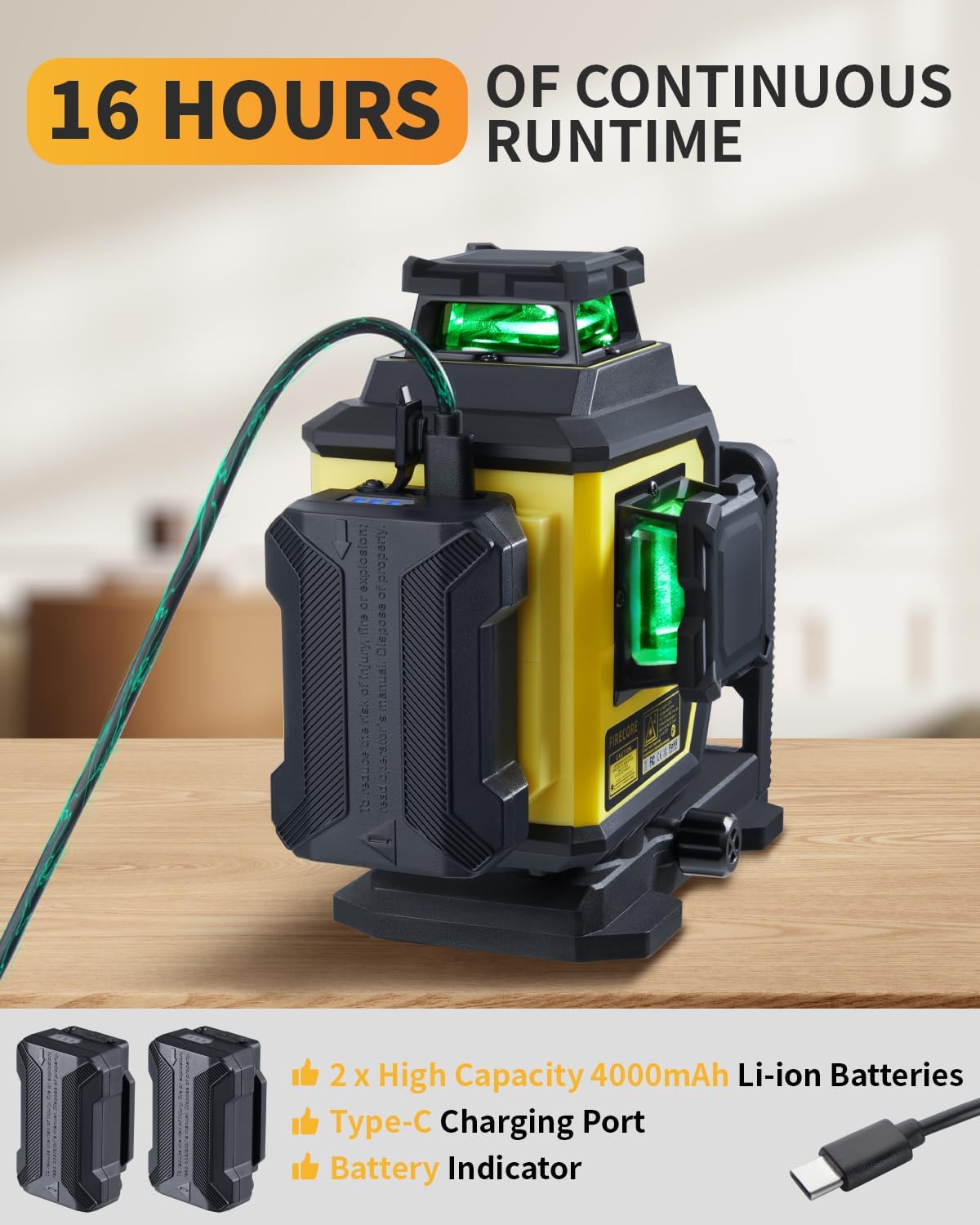
Figure 9: Tripod height adjustments and features.
Nlekọta
- Nhicha: Jiri nwayọ hichaa ngwaọrụ ahụ, damp akwa . Ejila kemịkalụ siri ike ma ọ bụ ihe mkpocha abrasive.
- Nchekwa: Store the laser level and accessories in the provided carry pouch in a dry, cool place when not in use.
- Nlekọta batrị: Charge batteries regularly, even if not in use, to maintain their lifespan.
- Nyocha: Lelee ngwaọrụ ahụ kwa oge maka akara ọ bụla mebiri emebi ma ọ bụ eyi.
Figure 10: Store the laser level and accessories in the provided carry pouch.
Nchọpụta nsogbu
| Nsogbu | Ihe nwere ike ime | Ngwọta |
|---|---|---|
| Laser lines are blinking. | Device is out of self-leveling range (±4°). | Adjust the device's position until it is within the self-leveling range. Ensure the pendulum is unlocked. |
| Laser lines are not visible or dim. | Low battery; Bright ambient light; Brightness setting is low. | Charge the battery; Use pulse mode with a receiver in bright conditions; Adjust brightness using the remote control. |
| Ngwaọrụ anaghị agbanwu. | Battery is not installed correctly or is depleted. | Ensure the battery is properly inserted and charged. Try using the second battery. |
| Njikwa anya anaghị arụ ọrụ. | Remote battery depleted; Obstruction between remote and device. | Replace remote battery; Ensure clear line of sight. |
Nkọwapụta
| Njirimara | Nkọwa |
|---|---|
| Ụdị | Firecore |
| Nọmba nlereanya | F95T-PRO-WT (F95T-XG Laser Level) |
| Agba Laser | Green Beam |
| Izi ezi | ±1/13" at 33 ft (±2mm at 10m) |
| Oke nhazi onwe | ±4° |
| Ogologo ọrụ | Up to 98 ft (197 ft with receiver in Pulse Mode) |
| Laser Planes | One 360° Horizontal, Two 360° Vertical |
| Ụdị ọrụ | Self-Leveling Mode / Manual Mode / Pulse Mode |
| Isi Iyi Ike | Battery Powered (2x 4000mAh Li-ion batteries included) |
| Oge ịgba ọsọ batrị | Up to 16 hours (continuous with all beams on) |
| Nchaji ọdụ ụgbọ mmiri | Ụdị-C |
| Ogo IP | IP54 (Dust/Water Resistant) |
| Eriri nkwụnye | 1/4-20 & 5/8-11 |
| Tripod Height | 26 sentimita (61 sentimita) ruo sentimita 60 (152 sentimita) |
| Ihe onwunwe | Thermoplastic Elastomers, Acrylonitrile Butadiene Styrene, Aluminum |
| Ibu Ibu | 7.05 pound (ihe dị ka 3.2 n'arọ) |
Akwụkwọ ikike na nkwado
Firecore provides a Ọrụ ọnwa iri na abụọ gachara na nkwado teknụzụ ndụ oge niile for the F95T-PRO-WT laser level.
For any concerns, questions, or technical assistance, please contact Firecore customer support through the official channels or refer to the contact information provided with your purchase documentation.
Maka ozi ndị ọzọ, gaa na Firecore Store on Amazon.


