Okwu mmalite
This manual provides comprehensive instructions for the ALLIMITY Replacement Remote Control, designed to operate various RCA and HKC HD TV models. This remote functions as a direct replacement, offering all the features of your original remote without the need for complex programming.
Ngwaahịa gafereview
The ALLIMITY replacement remote control is designed for ease of use and immediate functionality. Below are images illustrating the remote's layout and key buttons.

Foto 1: N'ihu view of the ALLIMITY Replacement Remote Control. This image displays the full button layout, including power, number keys, volume, channel, menu, navigation, and special function buttons.
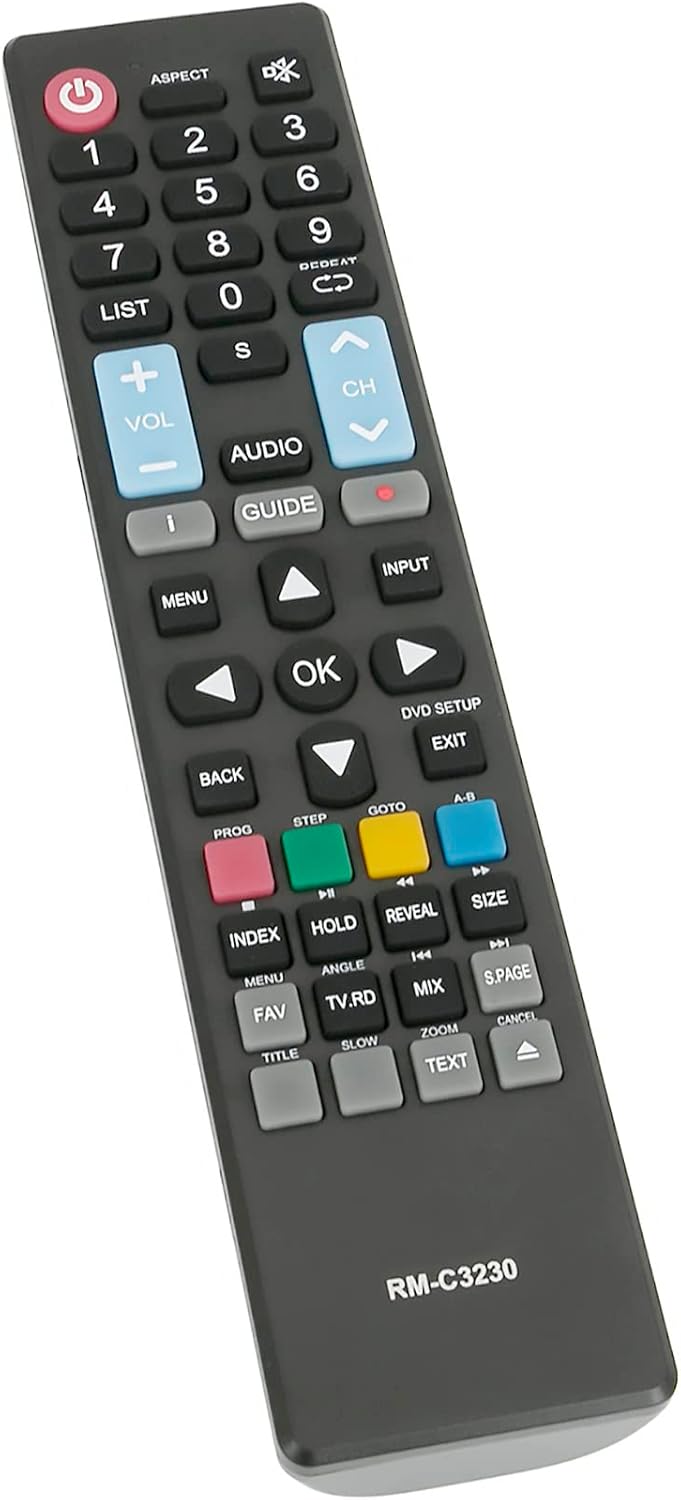
Onyonyo 2: Akuku view of the ALLIMITY Replacement Remote Control, highlighting its ergonomic design and button placement for comfortable use.
Melite
- Fanye batrị: Open the battery compartment cover on the back of the remote control. Insert two AAA alkaline batteries, ensuring correct polarity (+ and -).
- Mechie Ụlọ: Dochie mkpuchi nke batrị batrị nke ọma.
- Enweghị mmemme achọrọ: This remote control is pre-programmed and ready to use immediately with compatible RCA and HKC HD TV models. No additional setup or code entry is necessary.
Ntuziaka ọrụ
Familiarize yourself with the remote's buttons for optimal control of your television.
- bọtịnụ ike (●): Press to turn your TV on or off.
- Igodo ọnụọgụ (0-9): Use to directly select channels.
- Elu elu/ala (VOL +/-): Gbanwee ọkwa ụda.
- Ọwa Elu/Mbelata (CH +/-): Gbanwee ọwa TV n'usoro.
- NchNhr: Access the TV's main menu.
- Ntinye: Select different input sources (HDMI, AV, etc.).
- Bọtịnụ Nsoroụzọ (Elu, Ala, Aka ekpe, Aka nri, Ọ DỊ MMA): Gaa na menu wee chọpụta nhọrọ ndị ị họọrọ.
- BACK/EXIT: Laghachi na ihuenyo gara aga ma ọ bụ pụọ na menu dị ugbu a.
- NDỤMỌDỤ: Access the electronic program guide (if supported by your TV).
- Ndepụta: View a list of channels or recorded programs.
- AUDIO: Change audio tracks or modes.
- Nkebi: Adjust the screen aspect ratio.
- Bọtịnụ ụcha (Red, Green, Yellow, Blue): These buttons perform specific functions depending on the TV menu or application.
Nlekọta
- Ngbanwe batrị: Replace batteries when the remote's response becomes sluggish or stops working. Always use new AAA alkaline batteries. Do not mix old and new batteries, or different types of batteries.
- Nhicha: Jiri akwa dị nro hichaa ihe dịpụrụ adịpụ. Ejila ihe na-ehicha mmiri mmiri ma ọ bụ ihe abrasive.
- Nchekwa: Ọ bụrụ na a gaghị eji remote ahụ ruo ogologo oge, wepụ batrị ndị ahụ iji gbochie mmiri ịpụ apụ.
Nchọpụta nsogbu
- Remote anaghị arụ ọrụ:
- Lelee ma etinyere batrị ndị ahụ nke ọma site na polarity ziri ezi.
- Jiri ndị ọhụrụ dochie batrị ochie.
- Hụ na enweghị ihe mgbochi ọ bụla n'etiti njikwa remote na sensọ infrared nke TV.
- Jide n'aka na ị nọ n'ime oke ọrụ dị irè (ruo mita 10).
- Some buttons are unresponsive:
- Hichaa ihe njikwa remote, ọkachasị gburugburu bọtịnụ ndị na-anaghị anabata ozi, iji wepụ unyi ma ọ bụ ihe mkpofu ọ bụla.
- If the issue persists after replacing batteries, the remote may require replacement.
- TV not responding to remote:
- Verify that your TV model is listed as compatible.
- Ensure the TV's power is on.
- Remote range is limited:
- Dochie batrị.
- Ensure no strong light sources (like direct sunlight) are interfering with the IR signal.
Nkọwapụta
- Akara: EZIOKWU
- Aha nlereanya: QYSY-PSGA-H-QYSY
- Teknụzụ Njikọta: Infrared
- Agba: Nwa
- Njirimara Pụrụ Iche: Ergonomic imewe
- Oke kacha: 10 mita
- Ọnụọgụ bọtịnụ: 40
- Ngwa dakọtara: RCA HKC HD TV models including 13M4, 13M4C, 16M4, 16M4C, 17H2, 32C1NHD-T2, 17H2C, 24C2NB, 24C2NBD, 32C9A, 32D1-H2EU, 40F1, 43F3, 43F6, 50F1, R40F1FHD-EU, RB24H1-UK, RB32H1-EU, RB40F1-EU, RS43F1-EU, RS50U1-EU, RS55U1-EU, RS65U1-EU, and others listed in product description.
Akwụkwọ ikike na nkwado
For warranty information or technical support, please refer to the seller's policy or contact the point of purchase. Keep your purchase receipt for any warranty claims.


