Okwu mmalite
Daalụ maka ịzụrụasing the VR-robot MP3 Player. This device is designed to provide a versatile and portable entertainment experience, featuring music playback, video viewing, FM radio, voice recording, and e-book reading capabilities. With its compact design and expandable storage, it is ideal for various activities such as running, walking, or simply enjoying your favorite media on the go. This manual will guide you through the setup, operation, maintenance, and troubleshooting of your new MP3 player.
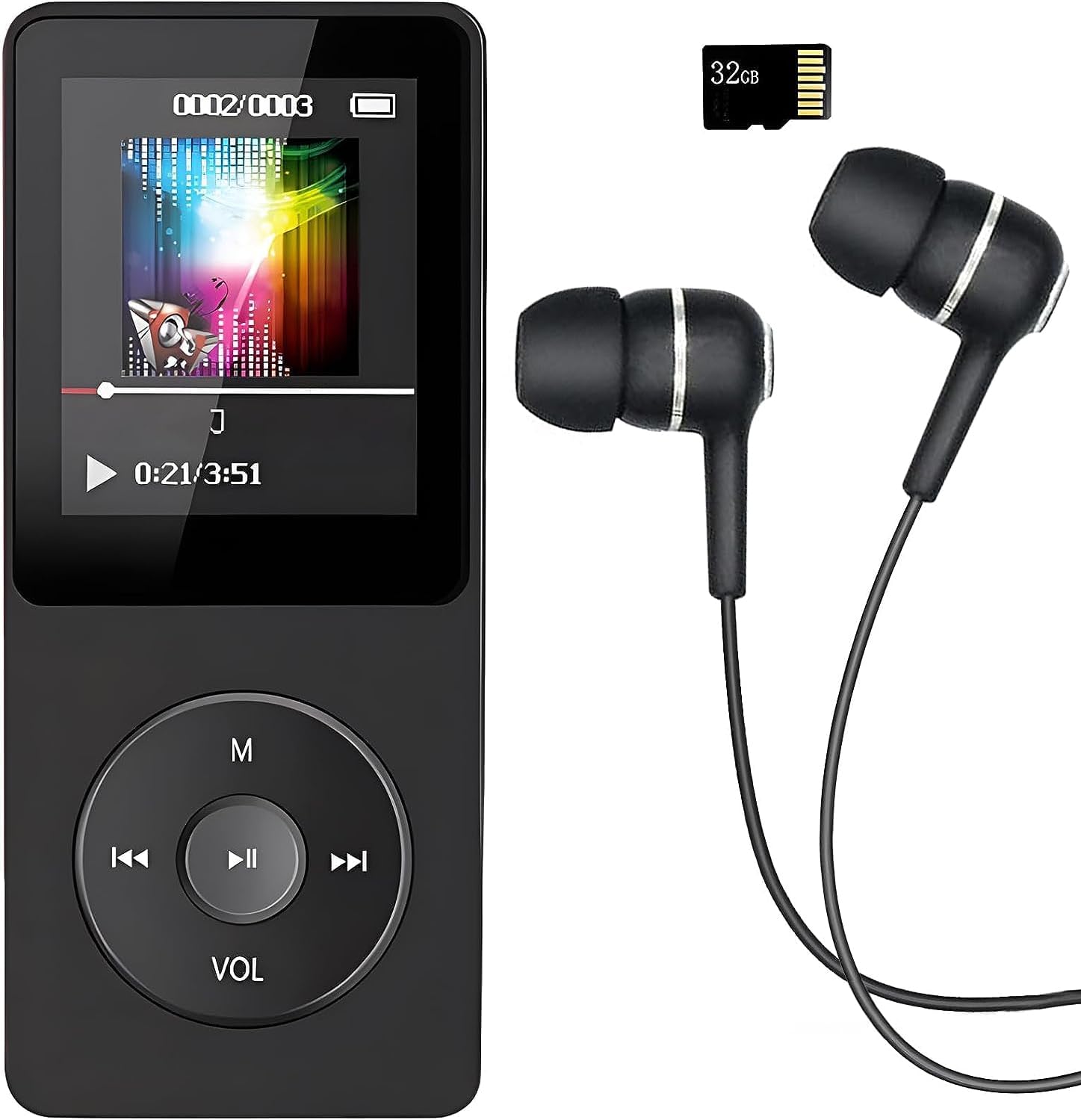
Image: The VR-robot MP3 Player, showcasing its compact design, screen, control buttons, and the included 32GB Micro SD card and wired earphones.
Melite
1. Ịchaji ngwaọrụ
Before first use, fully charge the MP3 player. Connect the device to a USB power adapter (not included) or a computer's USB port using the provided USB cable. The battery indicator on the screen will show charging progress. A full charge typically takes 2-3 hours and provides up to 10 hours of music playback.
2. Ịtinye kaadị Micro SD
Your MP3 player comes with a 32GB Micro SD card. Locate the Micro SD card slot on the side of the device. Gently insert the Micro SD card into the slot until it clicks into place. The device supports Micro SD cards up to 128GB for expanded storage.

Image: A hand inserting a blue Micro SD card into the dedicated slot on the side of the VR-robot MP3 Player, illustrating the expandable storage feature.
3. Connecting to a Computer for File Nyefee
To transfer music, videos, photos, or e-books to your MP3 player, connect it to your computer using the USB cable. The device will appear as a removable disk drive. You can then drag and drop files into the appropriate folders on the device or the inserted Micro SD card.
Ntuziaka ọrụ
Nsoro ụzọ
The MP3 player features a central control pad with directional buttons and a central play/pause button. The 'M' button typically serves as a menu or back button, while 'VOL' controls volume. Navigate through menus and select options using these buttons.
Egwu Egwu
The player supports multiple audio formats including MP3, WMA, APE, WAV, and FLAC. For optimal sound quality, the device incorporates a professional intelligent digital noise reduction chip. Connect the included earphones or use the built-in speaker for audio output.

Image: A person wearing headphones, illustrating the high-fidelity sound experience provided by the MP3 player, with text indicating support for various audio formats.
- Egwu na-egwu: Select "Music" from the main menu, then browse by artist, album, song, or folder.
- Njikwa olu: Use the 'VOL' button to adjust the playback volume.
- AB kwugharịa: This function allows you to loop a specific segment of an audio track. Select the start point (A) and end point (B) during playback.
Ihe nkiri vidiyo
The MP3 player supports video playback. Ensure your video files are in a compatible format for smooth playback. Refer to the device specifications for supported video formats.
Redio FM
To use the FM radio function, connect wired headphones to the device, as they serve as the antenna. Navigate to the "FM Radio" option in the main menu. You can then auto-scan for stations or manually tune to a specific frequency (87.5 MHz - 108 MHz).

Image: A person with an earphone in, surrounded by circular graphics indicating various FM radio frequencies, demonstrating the FM radio capability of the MP3 player.
Ihe ndekọ olu
The built-in voice recorder allows you to capture audio notes or lectures. Select "Record" from the main menu to start a new recording. Recordings are typically saved in WAV format.

Image: The VR-robot MP3 Player displaying a recording interface, with a child studying in the background, highlighting its use as a voice recorder.
E-akwụkwọ na-agụ
Load compatible e-book files onto your device to read on the go. Navigate to the "E-Book" section to access your digital library.
Ọrụ mkpu
The device includes an alarm function. Set alarms through the settings menu for reminders or as a wake-up call.
Nchọgharị nchekwa
Nweta files directly by browsing folders. This is useful for organizing different types of media or for audiobooks where tracks are separated into specific folders.

Image: The VR-robot MP3 Player screen displaying icons for E-Book, Alarm, Record, Music, Folder, FM Radio, A-B Repeat, and Video, illustrating its diverse functionalities.
Nlekọta
- Nhicha: Jiri ákwà dị nro ma kpọọ nkụ hichaa ngwaọrụ ahụ. Zere iji ihe nhicha mmiri ma ọ bụ ihe ndị na-eme ka ọ dị nro hichaa ya.
- Nchekwa: Debe ihe ọkpụkpọ MP3 ahụ n'ebe dị jụụ ma kpọọ nkụ, ebe anwụ na-anaghị anwụ kpọmkwem na oke okpomọkụ dị oke njọ.
- Nlekọta batrị: Ka ịgbatị ndụ batrị ogologo, zere ịchaji batrị ugboro ugboro. Na-anya ngwaọrụ mgbe niile, ọbụlagodi na ọ naghị eji ya ogologo oge.
- Mmelite ngwanrọ: Lelee onye nrụpụta website periodically for any available firmware updates to ensure optimal performance.
Nchọpụta nsogbu
| Nsogbu | Ihe kpatara/ Ngwọta nwere ike ime |
|---|---|
| Ngwaọrụ anaghị agbanwu. | Battery is depleted. Charge the device for at least 30 minutes. If still unresponsive, try a different USB cable or charging port. |
| Enweghị ike ịnyefe files na ngwaọrụ. | Ensure the USB cable is securely connected. Try a different USB port on your computer. The device might be in charging mode; check if it needs to be set to "Media Device (MTP)" or "USB Storage" mode. |
| Egwu files are not playing or are corrupted. | Chọpụta na egwu ahụ files are in a supported format (MP3, WMA, APE, WAV, FLAC). Ensure files are not corrupted. Re-transfer the files ọ bụrụ na ọ dị mkpa. |
| FM Radio signal is weak or non-existent. | Ensure wired headphones are properly plugged in, as they act as the antenna. Try moving to an area with better signal reception. |
| Albums/folders are not separated correctly. | Gbaa mbọ hụ na egwu gị files have correct ID3 tags and are organized into distinct folders on the device's storage. Some players may combine tracks if metadata is inconsistent. |
| Voice recording not working. | Check if there is sufficient storage space. Ensure the microphone is not obstructed. |
Nkọwapụta
- Akara: VR-robot
- Aha nlereanya: build-in
- Ike Nchekwa ebe nchekwa: 32 GB (Micro SD card included), supports up to 128 GB
- Teknụzụ Njikọta: Bluetooth, USB
- Atụmatụ pụrụ iche: Video Playback, Voice Recorder, FM Radio, E-Book Reader, Built-in Speaker
- Nha ihuenyo: 3.5 sentimita asatọ
- Agba: Nwa
- Ibu ihe: 2.89 ounces
- Batrị: 1 batrị lithium ion achọrọ (gụnyere)
- Akụkụ ngwugwu: 4.84 x 2.87 x 1.42 sentimita asatọ
- Ngwa gụnyere: MP3 Player, 32GB Micro SD Card, Earphone, USB Cable
Akwụkwọ ikike na nkwado
Your VR-robot MP3 Player comes with a Akwụkwọ ikike nke ọnwa 12 site na ụbọchị ịzụrụ ya. Akwụkwọ ikike a na-ekpuchi ntụpọ nrụpụta ma na-ahụ na ngwaahịa gị dị mma.
If you encounter any problems or have questions regarding your device, please do not hesitate to contact our professional after-sales service team. You can typically find contact information on the seller's page or through your purchase platform. We are committed to providing a quick and satisfactory response to ensure your satisfaction.
For further assistance, please refer to the VR-robot store on Amazon: VR-robot Store


