Okwu mmalite
This manual provides essential information for the safe and efficient operation, maintenance, and troubleshooting of your Intertek Cordless Robotic Pool Cleaner. Please read this manual thoroughly before using the device to ensure optimal performance and longevity.
Ozi nchekwa
- Always ensure the charging port is securely covered before placing the cleaner in water.
- Ejila ihe nhicha ahụ rụọ ọrụ ma ọ bụrụ na batrị ma ọ bụ eriri chaja mebiri emebi.
- Debe aka na uwe rụrụ arụ pụọ na akụkụ ndị na-akpụ akpụ mgbe ị na-arụ ọrụ.
- Chekwaa ihe nchacha n'ebe dị jụụ, kpọrọ nkụ mgbe ọ naghị eji ya.
- Jiri naanị chaja na ihe ndị ọzọ enyere.
- Debe ebe ụmụaka na anụ ụlọ na-apụghị iru.
Ihe ngwugwu
- Ọdọ mmiri Robotic na-enweghị eriri
- Nchaji nkwụnye
- Mpekere nkata
- Nzacha (etinyelarị ya)
- Extra Filter
- Ọkpụkpụ Sleeve
- Pool Hook
- Replaceable Tire Covers (2 extra included)
- Akwụkwọ ntuziaka (akwụkwọ a)
Ngwaahịa gafereview
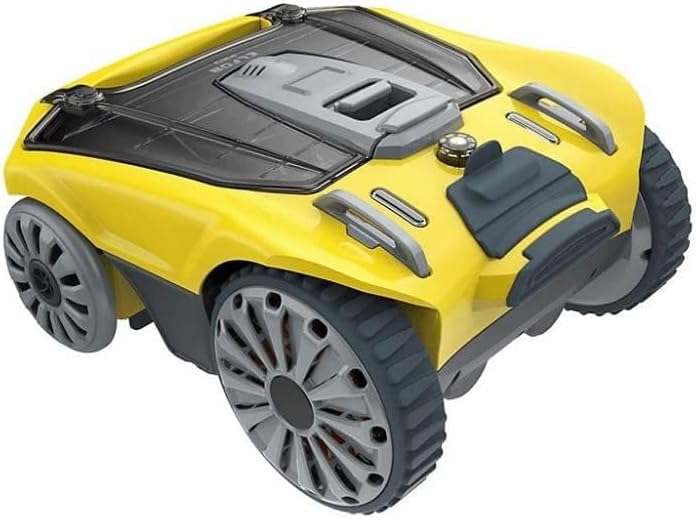
Image showing the Intertek Cordless Robotic Pool Cleaner, a compact yellow and gray device with large wheels, designed for autonomous pool cleaning.
The Intertek Cordless Robotic Pool Cleaner is designed for hands-free pool maintenance. It features a robust construction with durable plastic and metal components. The unit is equipped with soft wheels to protect pool surfaces and a powerful suction system to collect debris. A power indicator light provides battery status, and a covered charging port ensures safety.
- Isi Isi: Houses the motor, battery, and debris collection system.
- Wheel: Soft wheels for gentle movement across pool surfaces.
- Nkata irighiri ihe: Easy-to-empty basket for collecting leaves, dirt, and other debris.
- Sistemụ nzacha: Offers 3 levels of filtration: Debris Basket Only, Debris Basket with Filter, and Debris Basket with Filter + Suction Sleeve.
- Nchaji ọdụ ụgbọ mmiri: Covered for water protection.
- Ìhè egosi ike: Displays current battery levels.
Melite
- Nchaji mbụ:
Before first use, fully charge the robotic pool cleaner. Connect the charging adapter to the cleaner's covered charging port and plug it into a power outlet. The power indicator light will show charging status. A full charge typically takes several hours.
- Ntinye nyocha:
Ensure the debris basket and desired filter (or suction sleeve) are correctly installed. The cleaner comes with a filter pre-installed. To access, snap open the lid.
- Ebe a na-etinye n'ọdọ mmiri:
Once fully charged and assembled, carefully lower the cleaner into the pool. Ensure it is fully submerged before activating. The cleaner will automatically begin its cleaning cycle.
Ntuziaka ọrụ
The Intertek Cordless Robotic Pool Cleaner operates autonomously, changing direction automatically when encountering pool walls or obstacles. It is designed to clean the pool bottom, including corners, and can climb vertical walls.
- Ọrụ akpaaka: After being placed in the water and activated, the cleaner will navigate the pool independently, collecting debris.
- Njikwa ngwa: This model supports control via a smartphone application. Download the official app (refer to packaging for QR code or app store name). The app allows for remote control, scheduling of cleaning cycles, and provides notifications, including when to clean the filter.
- Ndụ batrị: Powered by a 22.2V, 4400mAh Lithium Battery, providing long running life. Monitor the power indicator light for battery levels.
Nlekọta
Regular maintenance ensures the longevity and efficiency of your pool cleaner.
- Cleaning the Debris Basket and Filter:
After each cleaning cycle or when indicated by the app/power light, remove the cleaner from the pool using the provided pool hook. Snap open the lid and empty the debris basket. Rinse the debris basket and filter thoroughly with a hose to remove all collected particles. Allow to air dry before reassembling.
- Nlekọta batrị:
For optimal battery life, fully charge the unit after each use and before long-term storage. Avoid completely draining the battery frequently.
- Replacing Tire Covers:
The cleaner comes with replaceable tire covers. If the existing covers show signs of wear, replace them with the two extra covers provided in the package to maintain optimal traction and protect pool surfaces.
- Nchekwa:
When storing the cleaner for extended periods, ensure it is clean, dry, and fully charged. Store in a cool, dry environment away from direct sunlight.
Nchọpụta nsogbu
| Nsogbu | Ihe nwere ike ime | Ngwọta |
|---|---|---|
| Cleaner not moving or weak movement. | Low battery; Debris caught in wheels/motor; Filter basket full. | Charge the battery; Check for obstructions and clear them; Empty and clean the filter basket. |
| Arụmọrụ nhicha na-adịghị mma. | Filter clogged; Incorrect filter level used; Suction sleeve not installed. | Clean the filter thoroughly; Ensure appropriate filter level (debris basket only, with filter, or with suction sleeve) is used for the type of debris; Install suction sleeve for finer particles. |
| Ihe nhicha na-arapara ugboro ugboro. | Obstacles in pool; Pool shape/features. | Remove large obstacles from the pool; Monitor cleaner during initial runs to identify problem areas. |
| Power indicator light not working. | Battery completely drained; Internal fault. | Attempt to charge for an extended period; If issue persists, contact customer support. |
Nkọwapụta
| Njirimara | Nkọwa |
|---|---|
| Njirimara Pụrụ Iche | Enweghị eriri |
| Usoro njikwa | Ngwa |
| Voltage | 22.2 volts |
| Nkọwa batrị | Lithium (4400mAh) |
| Ụdị nwụnye | Robotic |
| Akụkụ ngwaahịa | 14.3 x 12.8 x 6.6 sentimita asatọ |
| Ibu Ibu | 15.27 pound |
| Ihe onwunwe | Plastic |
| Agba | Odo |
| Isi Iyi Ike | Akwanyere batrị |
| Nzacha nzacha | 0.05 ka 0.07mm |
Akwụkwọ ikike na nkwado
This product comes with a limited warranty. For warranty details, technical support, or service inquiries, please refer to the contact information provided on the product packaging or the official Intertek website. Please have your model number (SM22-301-032-01) and purchase information ready when contacting support.


