1. Okwu mmalite
Daalụ maka ịzụrụasing the SOAR XL ShockBox BTH6 Wireless Bluetooth Speaker. This speaker is designed to provide high-quality audio with versatile connectivity options, including Bluetooth 5.0, AM/FM radio, USB, and Aux inputs. Its portable and shockproof design, combined with dynamic multicolor LED lights, makes it suitable for various environments. Please read this manual carefully to ensure proper use and maintenance of your device.
2. Ngwaahịa gafereview
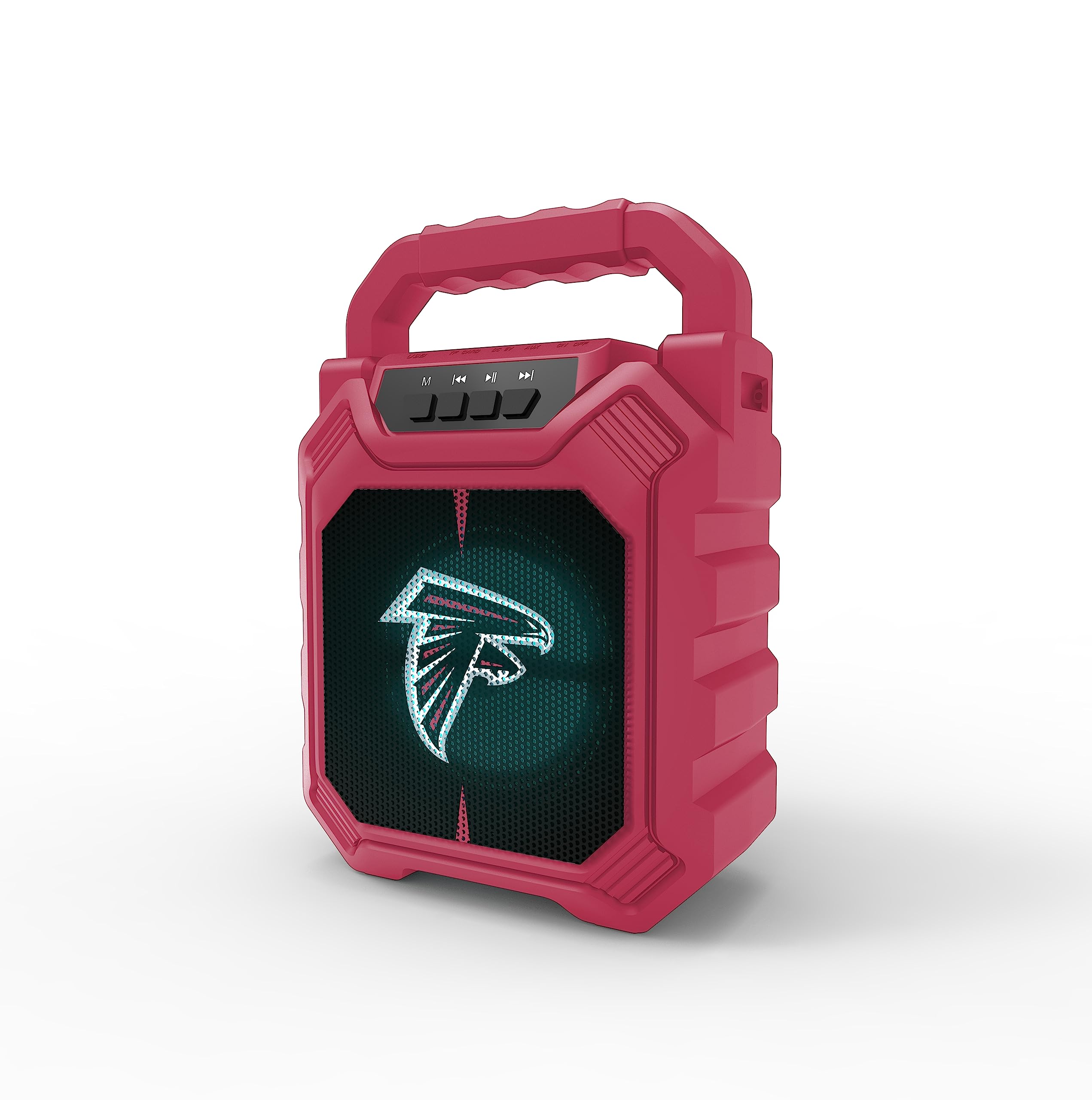
Foto 1: N'ihu view of the SOAR XL ShockBox BTH6 Wireless Bluetooth Speaker, featuring the Atlanta Falcons logo.
Akụkụ ndị bụ isi:
- Njikọ Bluetooth 5.0: For seamless wireless audio streaming.
- Ntinye ọnụnụ ọtụtụ: Supports AM/FM radio, USB, and Aux connections.
- Enwere ike ibugharị: Features a convenient top handle and shockproof construction.
- Ogologo ndụ batrị: Provides over 5 hours of playback on a single charge.
- Ọkụ ọkụ ọkụ ọkụ: Multicolor LED lights pulse with the music.
- Ezi stereo ikuku ikuku (TWS): Connect two speakers for enhanced stereo sound.
3. Njikwa na Ọdụ Ụgbọ Mmiri

Image 2: Top panel of the speaker, illustrating the control buttons and various input ports.
Ọrụ bọtịnụ:
- Bọtịnụ ike: Press and hold to turn the speaker ON/OFF. Short press to switch modes (Bluetooth, FM, USB, Aux).
- 'M' (Mode) Button: Short press to cycle through input modes (Bluetooth, FM Radio, USB, Aux).
- Previous Track / Volume Down: Short press for previous track (in Bluetooth/USB mode). Press and hold to decrease volume.
- Bọtịnụ Kwụsị/Kwụsị: Short press to play or pause audio. In FM mode, short press to auto-scan and save stations.
- Next Track / Volume Up: Short press for next track (in Bluetooth/USB mode). Press and hold to increase volume.
Ọdụ mbata:
- Ọdụ ụgbọ mmiri Micro-USB: Maka ịchaji ọkà okwu.
- Ọdụ ụgbọ mmiri USB: Maka ịkpọ ụda site na draịvụ USB.
- Aux-in Port (3.5mm): For connecting external audio devices via an auxiliary cable.
- Oghere Kaadị MicroSD: For playing audio from a MicroSD card.
4. Ntọala na arụ ọrụ
4.1 Ịchaji ọkà okwu
- Connect the provided micro-USB cable to the charging port on the speaker.
- Jikọọ nsọtụ nke ọzọ nke eriri na ihe nkwụnye ọkụ USB (anaghị etinye ya) ma ọ bụ ọdụ ụgbọ USB nke kọmputa.
- Ọkụ na-egosi ịchaji ga-enwu. Ozugbo chajịchara zuru oke, ọkụ ahụ nwere ike ịgbanwe agba ma ọ bụ gbanyụọ.
- A full charge provides over 5 hours of playback time.
4.2 Gbanyụọ/ gbanyụọ
- To turn ON, press and hold the Power button until you hear an audible prompt.
- To turn OFF, press and hold the Power button again until the speaker powers down.
4.3 Njikọ Bluetooth
- Turn on the speaker. It will automatically enter Bluetooth pairing mode, indicated by a flashing LED light and an audible prompt.
- Na ngwaọrụ gị (smartphone, tabletị, wdg), gbanye Bluetooth wee chọọ ngwaọrụ dịnụ.
- Select "SOAR BTH6" from the list of devices.
- Ozugbo ejikọtara ya, ọkà okwu ahụ ga-ewepụta nkwenye a na-anụ, ọkụ LED ahụ ga-akwụsịkwa ịgbawa.
- Ọkà okwu ahụ ga-ejikọghachi na ngwaọrụ ikpeazụ ejikọtara ozugbo mgbe agbanyere ya, ọ bụrụ na ngwaọrụ ahụ dị n'ime oke ma gbanye Bluetooth.
4.4 FM Redio arụ ọrụ
- Turn on the speaker and press the 'M' (Mode) button until you enter FM Radio mode.
- To auto-scan and save available FM stations, short press the Play/Pause button. The speaker will scan and store stations automatically.
- Use the Previous Track and Next Track buttons to navigate between saved stations.
4.5 USB and Aux Input
- Ntinye USB: Insert a USB flash drive into the USB port. The speaker will automatically switch to USB mode and begin playing audio files.
- Ntinye Aux: Connect an external audio device (e.g., MP3 player) to the Aux-in port using a 3.5mm audio cable. Press the 'M' button to switch to Aux mode.
Ụdị ọkụ ọkụ 4.6 LED

Image 3: The speaker displaying its dynamic LED lights in a vibrant setting.
The speaker features dynamic multicolor LED lights that pulse to the rhythm of the music. These lights activate automatically when the speaker is in use. There are no user-adjustable modes for the LED lights; they are designed to enhance the audio experience visually.
4.7 Ezi ikuku stereo (TWS) ijikọ

Image 4: Two SOAR XL ShockBox BTH6 speakers paired together for True Wireless Stereo (TWS) sound.
To achieve a wider soundstage, you can pair two SOAR XL ShockBox BTH6 speakers together using the TWS function:
- Ensure both speakers are turned OFF.
- Turn ON both speakers. They will enter Bluetooth pairing mode.
- On one of the speakers (this will be your primary speaker), double-press the 'M' (Mode) button. The speakers will attempt to connect to each other.
- Once successfully paired, you will hear an audible confirmation. The LED lights on both speakers will synchronize.
- Ugbua, jikọọ ngwaọrụ gị na ọkà okwu bụ isi site na Bluetooth dịka akọwara na ngalaba nke 4.3. Ọdịyo ga-akpọ site na ọkà okwu abụọ ahụ na stereo.
5. Nlekọta
- Nhicha: Jiri ákwà dị nro ma kpọọ nkụ hichaa mpụta okwu ahụ. Ejila ihe nhicha ma ọ bụ ihe mgbaze.
- Nchekwa: Chekwaa ọkà okwu n'ebe dị jụụ, kpọrọ nkụ na-adịghị na ìhè anyanwụ kpọmkwem na oke okpomọkụ.
- Nlekọta batrị: To prolong battery life, charge the speaker regularly, even if not in frequent use. Avoid fully discharging the battery for extended periods.
- Nguzogide mmiri: While designed to be durable, avoid submerging the speaker in water.
6. Nchọpụta nsogbu
| Nsogbu | Ngwọta enwere ike |
|---|---|
| Ọkà okwu anaghị agbanwuo. | Ensure the battery is charged. Connect the speaker to a power source using the micro-USB cable. |
| Enweghị ike ijikọ site na Bluetooth. | Make sure the speaker is in Bluetooth mode and within range (approx. 10 meters). Turn off and on your device's Bluetooth. Forget "SOAR BTH6" from your device's Bluetooth list and try pairing again. |
| Enweghị ụda ma ọ bụ obere olu. | Check the volume levels on both the speaker and your connected device. Ensure the correct input mode is selected. |
| Nnabata redio FM adịghị mma. | Adjust the speaker's position. Ensure you are in an area with good signal strength. |
| Njikota TWS ada ada. | Ensure both speakers are fully charged and not connected to any other Bluetooth devices. Follow the TWS pairing steps carefully. |
7. Nkọwapụta
| Njirimara | Nkọwa |
|---|---|
| Nọmba nlereanya | BTH6 (Variant: NFL-BTH6-DLPH) |
| Ụdị Bluetooth | 5.0 |
| Ntinye ọdịyo | Bluetooth, AM/FM Radio, USB, Aux-in, MicroSD |
| Oge egwuregwu | Over 5 hours (per charge) |
| Nchaji ọdụ ụgbọ mmiri | Micro-USB |
| Onye nrụpụta | Ụlọ ọrụ Prime Brands Group Inc |
| Ụbọchị mbụ dị | Septemba 6, 2023 |
8. Official Product Video
Vidiyo 1: Ihe ngosi vidiyo ngwaahịa gọọmentịasing the features and dynamic LED lights of the SOAR BTH6 Wireless Bluetooth Speaker.
9. Akwụkwọ ikike na nkwado
For warranty information and customer support, please refer to the documentation included with your product or contact the manufacturer, Prime Brands Group Inc., directly. Details regarding specific warranty periods and support procedures are typically provided at the point of purchase or on the manufacturer's official websaịtị.


