1. Okwu mmalite
This user manual provides essential information for the safe and efficient operation of your HYCHIKA 3.6V Cordless Electric Rechargeable Screwdriver Drill Set. Please read this manual thoroughly before first use and keep it for future reference.
The HYCHIKA 3.6V Cordless Electric Screwdriver is designed for various screwing and light drilling tasks around the home. It features a maximum torque of 6 N-m, a 6.35 mm quick-change chuck, and a versatile design that allows for both pistol and straight grip configurations.
2. Ntuziaka nchekwa
Na-edebe nchekwa nchekwa mgbe niile mgbe ị na-eji ngwa eletrik iji belata ihe egwu nke ọkụ, ujo eletrik na mmerụ ahụ nkeonwe.
- Nchekwa mpaghara ọrụ: Debe ebe ọrụ gị ọcha na ọkụ nke ọma. Ebe mgbagwoju anya ma ọ bụ ọchịchịrị na-akpọ ihe mberede. Ejila ngwaọrụ ike rụọ ọrụ n'ime ikuku mgbawa, dị ka n'ihu mmiri ọkụ, gas, ma ọ bụ uzuzu.
- Nchekwa Eletriki: Zenarị mmetụ ahụ n'elu ala ala ma ọ bụ n'ala dị ka ọkpọkọ, radiators, ranges, na friji. Ewepụla ngwaọrụ ike na mmiri ozuzo ma ọ bụ ọnọdụ mmiri.
- Nchekwa nkeonwe: Always wear eye protection. Use safety glasses, goggles, or a face shield. Wear hearing protection when operating noisy tools. Dress properly; avoid loose clothing or jewelry.
- Iji na Nlekọta Ngwa: Amanyela ngwá ọrụ ike. Jiri ngwa ike ziri ezi maka ngwa gị. Kwụpụ plọg na isi iyi ike na/ma ọ bụ wepụ ngwugwu batrị tupu ime mgbanwe ọ bụla, ịgbanwe ngwa ma ọ bụ ichekwa ngwa ike.
- Iji na Nlekọta batrị: Chaja nke onye nrụpụta kwuru naanị chaja ahụ. Ejila batrị ya na ngwaọrụ ike ọ bụla ọzọ. Mgbe a naghị eji batrị eme ihe, debe ya ka ọ ghara ịnọ n'ebe ihe ndị ọzọ dị ka ígwè nọ.
3. Ihe ngwugwu
Nyochaa na etinyere ihe niile edepụtara n'okpuru na ngwugwu gị. Ọ bụrụ na ihe ọ bụla na-efu ma ọ bụ mebie, biko kpọtụrụ nkwado ndị ahịa.
- 1 x HYCHIKA 3.6V Cordless Screwdriver
- 19 x Screwdriver Bits
- 1 x Ogwe ndọtị
- 1 x nkwụnye Nchaji
- 1 x Akwụkwọ ntuziaka onye ọrụ

Figure 3.1: Contents of the HYCHIKA 3.6V Cordless Screwdriver package, including the screwdriver, various bits, and charging adapter.
4. Njirimara ngwaahịa na akụrụngwa
Familiarize yourself with the different parts of your cordless screwdriver.

Figure 4.1: Key components of the screwdriver, including the magnetic chuck, PUSH button, front LED light, On/Off switch, LED charger indicator, 3.5mm charger port, and forward & reverse button.
- Magnetic Chuck: 1/4 inch (6.35mm) quick-change chuck for easy bit installation and removal.
- Ọkụ LED n'ihu: Illuminates the work area for improved visibility in dark environments.
- Mgbanwu ma ọ bụ gbanyụọ: Activates and deactivates the screwdriver.
- Forward & Reverse Button: Controls the rotation direction for screwing and unscrewing.
- LED Charger Indicator: Provides status of battery charging.
- 3.5mm Charger Port: Connection point for the charging adapter.
- Bọtịnụ PUSH: Used to adjust the grip configuration from pistol to straight.
5. Nhazi
5.1 Ịchaji batrị
The screwdriver is powered by a 3.6V 2000 mAh Lithium-Ion battery. Before first use, fully charge the battery.
- Connect the charging adapter to the 3.5mm charger port on the screwdriver.
- Tinye ihe nkwụnye chaja n'ime oghere eletriki nkịtị.
- The LED charger indicator will illuminate during charging. Once fully charged, the indicator may change color or turn off depending on the model.
- Kwupu chaja ozugbo chaja gwụchara.

Figure 5.1: The screwdriver connected to its charging adapter, indicating a full charge.
The screwdriver is designed to maintain full power output even when the battery is low, ensuring consistent performance until the battery is depleted.
5.2 Installing Screwdriver Bits
The screwdriver features a 1/4 inch (6.35mm) magnetic quick-change chuck for easy bit installation.
- Họrọ bit kwesịrị ekwesị screwdriver maka ọrụ gị.
- Insert the bit into the magnetic chuck until it is securely seated. The magnetic chuck will hold the bit firmly in place.
- To remove a bit, simply pull it out of the chuck. Bits with grooves are designed for easier removal.

Figure 5.2: Visual guide for inserting a bit into the magnetic chuck and removing it.
6. Ntuziaka ọrụ
6.1 Adjusting Grip Configuration
The screwdriver can be used in two grip configurations: pistol grip or straight grip, for enhanced versatility and comfort.
- To change the grip, press and hold the "PUSH" button located at the top of the screwdriver.
- While holding the button, rotate the handle ninety degrees to switch between pistol and straight configurations.
- Release the "PUSH" button once the desired configuration is achieved. The handle will lock into place.
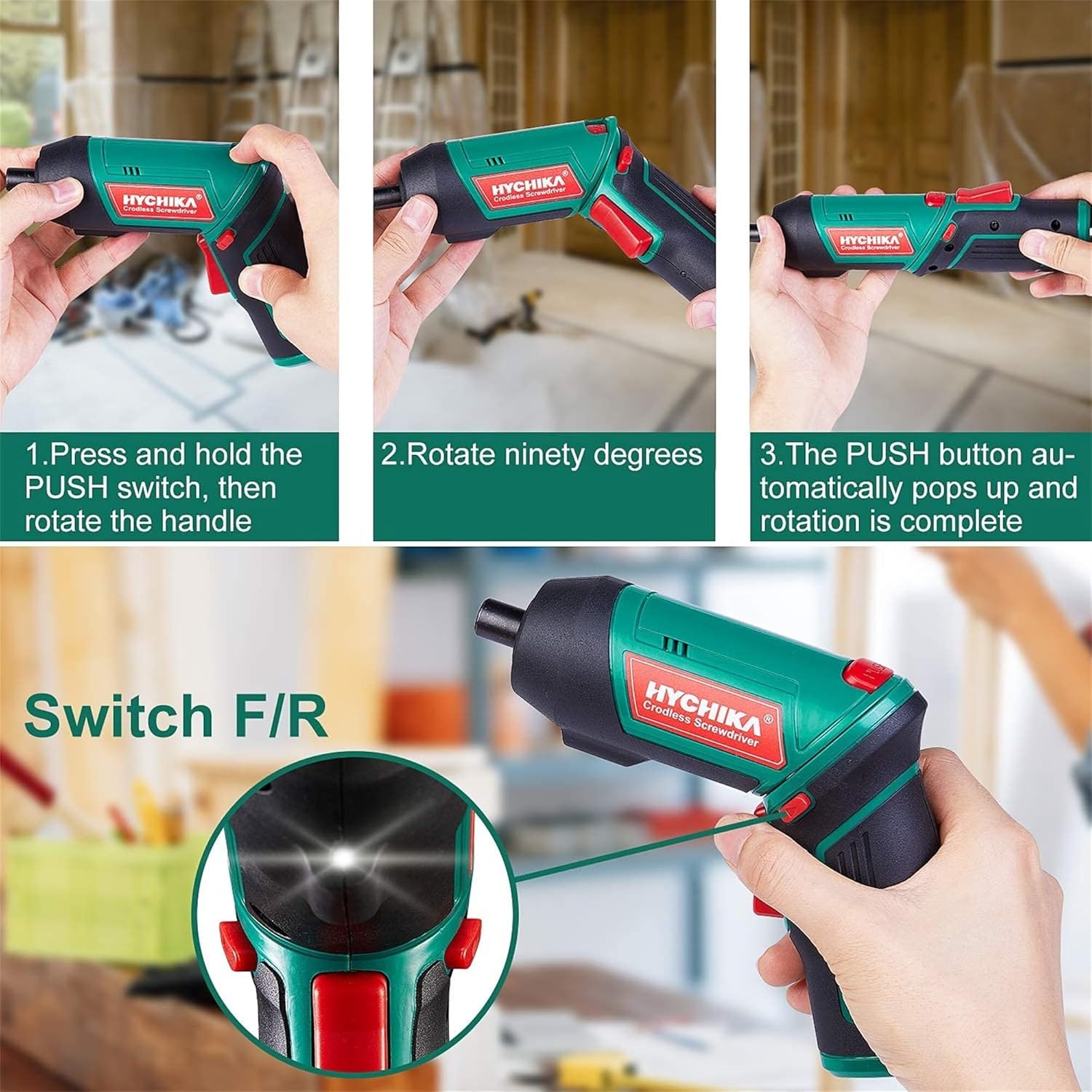
Figure 6.1: Demonstrates the process of transforming the screwdriver's grip by pressing the PUSH button and rotating the handle.
6.2 Forward and Reverse Operation
The forward/reverse button controls the direction of rotation for screwing and unscrewing.
- To drive screws (forward rotation), push the forward/reverse button to the left (when viewed site n'azụ ngwá ọrụ).
- To remove screws (reverse rotation), push the forward/reverse button to the right.
- When the button is in the center position, the tool is locked, preventing accidental activation.
6.3 Iji ọkụ ọrụ LED
The built-in LED light automatically illuminates when the screwdriver is in operation, providing visibility in dimly lit areas.

Figure 6.2: The integrated LED light provides clear illumination for working in dark environments.
7. Nlekọta
Regular maintenance ensures the longevity and optimal performance of your screwdriver.
- Nhicha: Debe oghere ikuku ventilashị dị ọcha na enweghị ntụ. Jiri nwayọọ, damp ákwà iji hichaa ngwaọrụ casing. Do not use harsh chemicals or abrasive cleaners.
- Nlekọta Bit: Clean screwdriver bits after use. Store them in the provided case to prevent loss and damage.
- Nchekwa batrị: If storing the tool for an extended period, ensure the battery is partially charged (around 50%) and store it in a cool, dry place. Recharge the battery every 3-6 months to maintain its health.
- Nyocha izugbe: Periodically check for any loose screws, damaged cords, or worn parts. Do not use the tool if any damage is observed.
8. Nchọpụta nsogbu
This section addresses common issues you might encounter with your screwdriver.
| Nsogbu | Ihe nwere ike ime | Ngwọta |
|---|---|---|
| Screwdriver anaghị agbanwuo. | Batrị agwụla. Forward/Reverse switch is in the center (locked) position. | Chajie batrị zuru oke. Pịa mgba ọkụ n'ihu/ tụgharịa gaa n'aka ekpe ma ọ bụ aka nri. |
| Screwdriver loses power quickly. | Achachabeghị batrị zuru oke. Battery life degraded. | Ensure battery is fully charged before use. If battery life is significantly reduced, contact customer support for replacement options. |
| Bits are not held securely in the chuck. | Bit is not fully inserted. Chuck is dirty or damaged. | Push the bit firmly into the chuck until it clicks into place. Clean the chuck area. If damage is visible, contact customer support. |
Ọ bụrụ na nsogbu ahụ dịgidere mgbe ị nwara azịza ndị a, biko kpọtụrụ nkwado ndị ahịa.
9. Nkọwapụta
| Njirimara | Nkọwapụta |
|---|---|
| Ụdị | Overstock (HYCHIKA) |
| Nọmba nlereanya | c131a012-0da9-4306-aeab-b1d9ff5cd4b7 |
| Voltage | 3.6 volts |
| Isi Iyi Ike | Akwanyere batrị |
| Ọsọ | 180 RPM |
| Ihe Torque | 6 Newton Meters (6 N-m) |
| Ụdị batrị | Lithium ion |
| Ike batrị | 2000 mAh |
| Ogo Chuck | 1/4 anụ ọhịa (6.35mm) |
| Ihe onwunwe | Plastic, rọba |
| Agba | Akwụkwọ ndụ akwụkwọ ndụ |
| UPC | 616859793583 |
10. Akwụkwọ ikike na nkwado
Overstock offers lifetime after-sales service for this product. For any questions, concerns, or technical assistance, please contact our customer support team.
Please have your model number (c131a012-0da9-4306-aeab-b1d9ff5cd4b7) and purchase information ready when contacting support.