Okwu mmalite
This user manual provides detailed instructions for the operation and maintenance of your HCMOBI Bone Conduction Headphones (Model S100). Please read this manual thoroughly before using the product to ensure proper function and longevity.

Image: HCMOBI Bone Conduction Headphones, featuring a black body with a green band, designed for open-ear wear.
Melite
Kedu ihe dị na Igbe ahụ
- 1 x HCMOBI Bone Conduction Headphones (Model S100)
- 1 x Ụdị-C eriri USB
- 1 x Akwụkwọ ntuziaka onye ọrụ
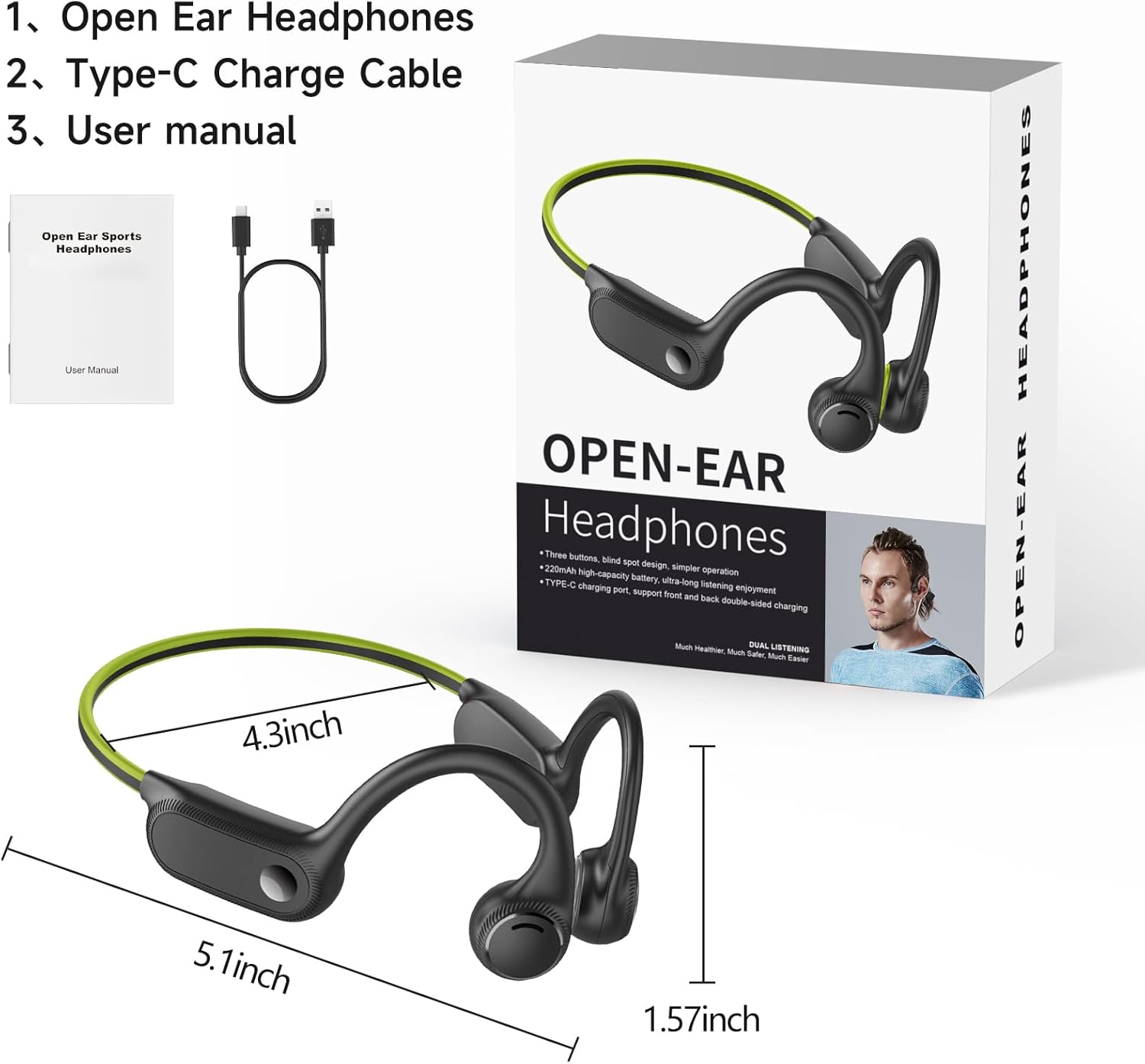
Image: The product packaging displaying the headphones, a Type-C charging cable, and the user manual.
Ịchaji ekweisi
Before first use, fully charge the headphones. Connect the provided Type-C charging cable to the charging port on the headphones and the other end to a compatible USB power source. The red LED indicator will be on during charging. Once fully charged, the LED indicator will turn blue.
A full charge takes approximately 1.5 hours and provides up to 10 hours of music playtime. A 10-minute fast charge can provide 1 hour of use.
Ijikọ na ngwaọrụ
Ijikọ ekweisi gị na ngwaọrụ enyere Bluetooth:
- Gbaa mbọ hụ na agbanyụrụ ekweisi.
- Press and hold the On/Off button for 3 seconds until the blue and red lights flash alternately, indicating pairing mode.
- On your device (smartphone, tablet, PC), open "Settings" and navigate to "Bluetooth".
- Select "S100" from the list of available devices to connect. Once connected, the blue light will stop flashing.
Video: This video demonstrates the power-on, Bluetooth pairing, music playback controls (play/pause, volume up/down, next/previous song), voice assistant activation, and Type-C charging process for the HCMOBI Bone Conduction Headphones.
Ọrụ
Njikwa na Ọrụ
The headphones feature intuitive controls for easy management of your audio and calls.
- Gbanyụọ/ Gbanyụọ: Pịa ma jide bọtịnụ ike maka sekọnd iri na ise.
- Kpọọ/Kwụsị Egwu: Click the On/Off button once.
- Olu elu: Click the "+" button to increase volume by 10%.
- Olu ala: Click the "-" button to decrease volume by 10%.
- Abụ na-esote: Long press the "+" button.
- Abụ gara aga: Long press the "-" button.
- Mee ka onye enyemaka olu rụọ ọrụ (Siri/onye enyemaka Google): Pịa bọtịnụ ike ugboro abụọ.
- Azịza/Kwụsị Oku: Click the Power button once.
- Jụ oku: Pịa ogologo bọtịnụ Ike.

Image: A detailed diagram illustrating the location and function of each button on the headphone's control panel, including LED indicator, volume controls, power button, and Type-C charging port.
Atụmatụ igodo
- Comfortable & Stable Fit: Ergonomically designed with soft silicone material, lightweight (26g), and a flexible titanium headband for secure wear during various activities.
- Open Ear Design & Superior Sound Quality: Utilizes vibration-free bone conduction technology, allowing awareness of surroundings. Engineered for clear highs, soft mids, and deep bass.
- 10-Hour Battery & Fast Charge: Built-in 230 mAh battery provides 10 hours of playtime. USB-C fast charging allows 1 hour of use from a 10-minute charge.
- Bluetooth 5.2 & IP65 Waterproof: Offers faster data transmission and stable signal up to 33ft. IP65 rating protects against sweat, rain, and oil, suitable for sports and outdoor use.

Image: Demonstrates the comfortable and stable fit of the open-ear headphones compared to traditional in-ear headphones, highlighting the pain-free design.

Image: Highlights the lightweight (0.9oz/26g), elastic headband, and IPX4 waterproof features, emphasizing the headphones' suitability for sports activities.

Image: Illustrates the high-fidelity audio, noise-canceling microphone, and exclusive vocalizer features, showcasing the superior sound quality for music and calls.

Image: Compares Bluetooth 5.2 features of the headphones with older versions, highlighting faster speed, lower delay, and compatibility with various devices like smartwatches, iPhones, Android phones, and tablets.
Image: Details the 10-hour battery life, 230mAh battery capacity, and 1.5-hour quick charging feature, emphasizing long-lasting use and efficient charging.
Nlekọta
Nhicha
Regular cleaning helps maintain the performance and hygiene of your headphones. Use a soft, damp cloth to wipe down the surfaces. Avoid using harsh chemicals or abrasive materials. Given the IP65 waterproof rating, the headphones can withstand sweat and light rain, but should not be submerged in water.
Nchekwa
Store the headphones in a cool, dry place away from direct sunlight and extreme temperatures. When not in use for extended periods, ensure they are fully charged before storage to preserve battery health.
Nchọpụta nsogbu
If you encounter issues with your HCMOBI Bone Conduction Headphones, please refer to the following common problems and solutions:
| Nsogbu | Ihe nwere ike ime | Ngwọta |
|---|---|---|
| Igwe ekweisi anaghị agba ọkụ. | Batrị dị ala. | Chajie ekweisi nke ọma. |
| Enweghị ike ijikọ na ngwaọrụ. | Igwe ekweisi adịghị na ọnọdụ njikọta; Gbanyụọ Bluetooth na ngwaọrụ; ngwaọrụ tere aka. | Ensure headphones are in pairing mode (flashing red/blue). Turn on Bluetooth on your device. Move headphones closer to the device (within 33ft). |
| Enweghị ụda ma ọ bụ ụda dị ala. | Olu dị oke ala; ejikọghị ya; ahọrọghị mmepụta ọdịyo na-ezighi ezi na ngwaọrụ ahụ. | Increase headphone and device volume. Re-pair the headphones. Check device's audio output settings. |
| Headphones automatically turn off when charging. | This is normal behavior for the device. | Headphones are designed to turn off during charging. Power them on after disconnecting from charger. |
| Volume resets to 100% after re-pairing. | Device specific behavior. | Adjust volume manually after each re-pairing. |
Nkọwapụta
| Njirimara | Nkọwa |
|---|---|
| Ụdị | HCMOBI |
| Aha Nlereanya | S100 |
| Teknụzụ Njikọta | Bluetooth 5.2, ikuku |
| Teknụzụ nzikọrịta ozi ikuku | Bluetooth |
| Jack ekweisi | USB (Ụdị-C) |
| Ndụ batrị | Awa 10 |
| Oge Nchaji | Awa 1.5 |
| Ike batrị | 230 mAh |
| Ọkwa Nguzogide mmiri | Ihe mgbochi mmiri IP65 |
| Ibu Ibu | 3.2 ounces (ihe dị ka 90g) |
| Ihe onwunwe | Plastic |
| Ntinye ntị | Mepee Ntị |
| Ụdị njikwa | Njikwa Mgbasa ozi |
| Usoro njikwa | Metụ aka (bọtịnụ) |
| Oke ugboro ugboro | 20 Hz - 20,000 Hz |
| Oke Bluetooth | 10 Mita (33 ụkwụ) |
| Onye nrụpụta | CelsusSound |
| UPC | 711523306424 |
Akwụkwọ ikike na nkwado
HCMOBI offers a nkwa azụghachi ego nke ụbọchị 90 na a akwụkwọ ikike otu afọ for these bone conduction headphones.
If you encounter any problems or have questions regarding your product, please contact our professional customer service team. We are committed to replying and solving your problem within 6 hours.
For support, please refer to the contact information provided on the product packaging or the official HCMOBI websaịtị.


