Okwu mmalite
The Geeni Smart Cascading Curtain Color String Lights offer a versatile lighting solution with customizable multicolor LED illumination. These lights are designed for easy control via the Geeni App, voice commands through Amazon Alexa and Google Home, and feature music synchronization capabilities. This manual provides essential information for the safe and effective use of your smart string lights.
Ozi nchekwa
- Gụọ ntuziaka niile tupu echichi na iji.
- Ewepụla ọkụ ka ọ bụrụ oke mmiri ma ọ bụ oke okpomọkụ.
- Ensure the power adapter is connected to a suitable power source.
- Debe ebe ụmụaka na-apụghị iru.
- Do not attempt to repair or modify the product. Contact customer support for assistance.
Kedu ihe dị na Igbe ahụ
- Geeni Smart Cascading Curtain Color String Lights (6.6ft x 5ft)
- Onye njikwa Wi-Fi
- Ihe nkwụnye ọkụ

Foto: Ofeview of the Geeni Smart Curtain Lights highlighting key features such as multicolor options, brightness adjustment, music sync, scheduling, voice control, extendability, app control, and share access.
Melite
- Budata ngwa Geeni: Chọọ maka "Geeni" in the App Store (iOS) or Google Play Store (Android) and download the application.
- Ike Na: Connect the string lights to the Wi-Fi controller, then plug the power adapter into a standard electrical outlet. The lights should begin to flash, indicating pairing mode.
- Jikọọ na Wi-Fi: Open the Geeni App, create an account or log in, and follow the on-screen instructions to add your new smart curtain lights. Ensure your mobile device is connected to a 2.4 GHz Wi-Fi network during setup.
Image: A visual guide showing the three simple setup steps: 1. Download App, 2. Power On, 3. Connect via Wi-Fi.
Ntuziaka ọrụ
Njikwa ngwa
Use the Geeni App to fully customize your lights. From the app, you can:
- Change colors (millions of options, including RGB and cool white).
- Gbanwee ọkwa nchapụta.
- Select from various preset scenes and dynamic effects.
- Set schedules and timers for automatic operation.
- Enable music synchronization.
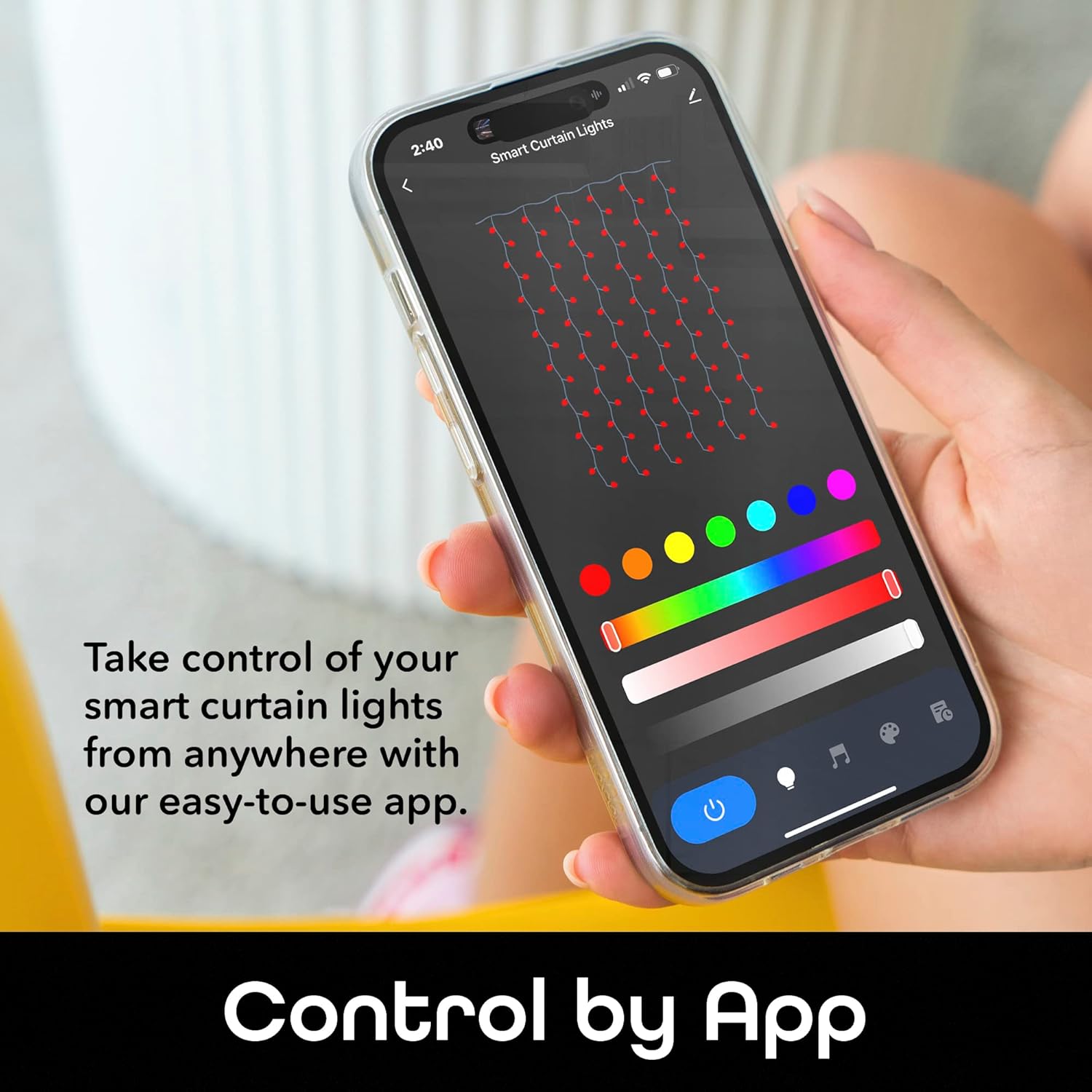
Image: A smartphone displaying the Geeni app interface for controlling smart curtain lights, showing color selection and various light settings.

Image: A smartphone showing the Geeni app's custom scene creation interface, allowing users to select colors, effects (static, jump, twinkle), and speed for their light show.

Foto: Nkewa view demonstrating the wide range of RGB color options on one side and the refreshing clarity of cool white light on the other, showcasing the versatility of the smart curtain lights.
Njikwa olu
The Geeni Smart Curtain Lights are compatible with Amazon Alexa and Google Assistant. Once integrated, you can use voice commands for hands-free operation.
- ExampIwu:
- "Alexa, turn on the curtain lights."
- "Hey Google, set the curtain lights to blue."
- "Alexa, dim the curtain lights to 50%."

Image: A person interacting with an Amazon Alexa device, demonstrating voice control functionality for the smart curtain lights.
Njirimara mmekọrịta egwu
Activate the music sync feature through the Geeni App to make your lights respond to the rhythm and beat of your favorite music, creating an immersive audio-visual experience.

Image: A smartphone displaying the Geeni app's music rhythm mode, with lights flashing to the beat of music, enhancing the ambiance of a room.
Scheduling and Timers
Program your lights to turn on/off or change settings at specific times using the scheduling and timer functions in the Geeni App. This feature helps conserve energy and ensures your lights are always on when needed.

Image: A smartphone showing the Geeni app's timer and schedule settings, allowing users to customize light operation for different times of the day.
Nlekọta
- Nhicha: Disconnect the power before cleaning. Wipe the lights and controller with a soft, dry cloth. Do not use liquid cleaners or abrasive materials.
- Nchekwa: When not in use, store the lights in a cool, dry place, away from direct sunlight and extreme temperatures.
- Nyocha: Periodically inspect the lights and wiring for any damage. If damage is found, discontinue use and contact customer support.
Nchọpụta nsogbu
| Nsogbu | Ngwọta |
|---|---|
| Ọkụ anaghị agbanwu. | Ensure the power adapter is securely plugged into a working outlet. Check if the lights are properly connected to the Wi-Fi controller. |
| Lights are not connecting to the Geeni App. | Verify your mobile device is connected to a 2.4 GHz Wi-Fi network. Ensure the lights are in pairing mode (flashing). Try resetting the lights by unplugging and replugging them. Move the lights closer to your Wi-Fi router. |
| Some lights remain on or do not change color. | This may indicate a minor software glitch. Try unplugging the lights for a few seconds and then plugging them back in. If the issue persists, contact customer support. |
| Njikwa olu anaghị arụ ọrụ. | Ensure your Geeni account is correctly linked to Amazon Alexa or Google Assistant. Check your internet connection and the status of your voice assistant device. |
Nkọwapụta
| Njirimara | Nkọwa |
|---|---|
| Nọmba nlereanya | GN-DW005-999 |
| Akụkụ | 6.6 ft. (Height) x 5 ft. (Width) |
| Ụdị ọkụ | LED (Multicolor RGB + Cool White) |
| Ọnụọgụ nke isi mmalite ọkụ | 120 |
| Isi Iyi Ike | Igwe ọkụ eletrik |
| Usoro njikwa | App (Geeni App), Voice (Alexa, Google Home) |
| Njikọta | Wi-Fi (2.4GHz) |
| Ojiji ime ime/n'èzí | Ime ụlọ |
| Ibu Ibu | 14.9 ounces |
| UPC | 194383042259 |
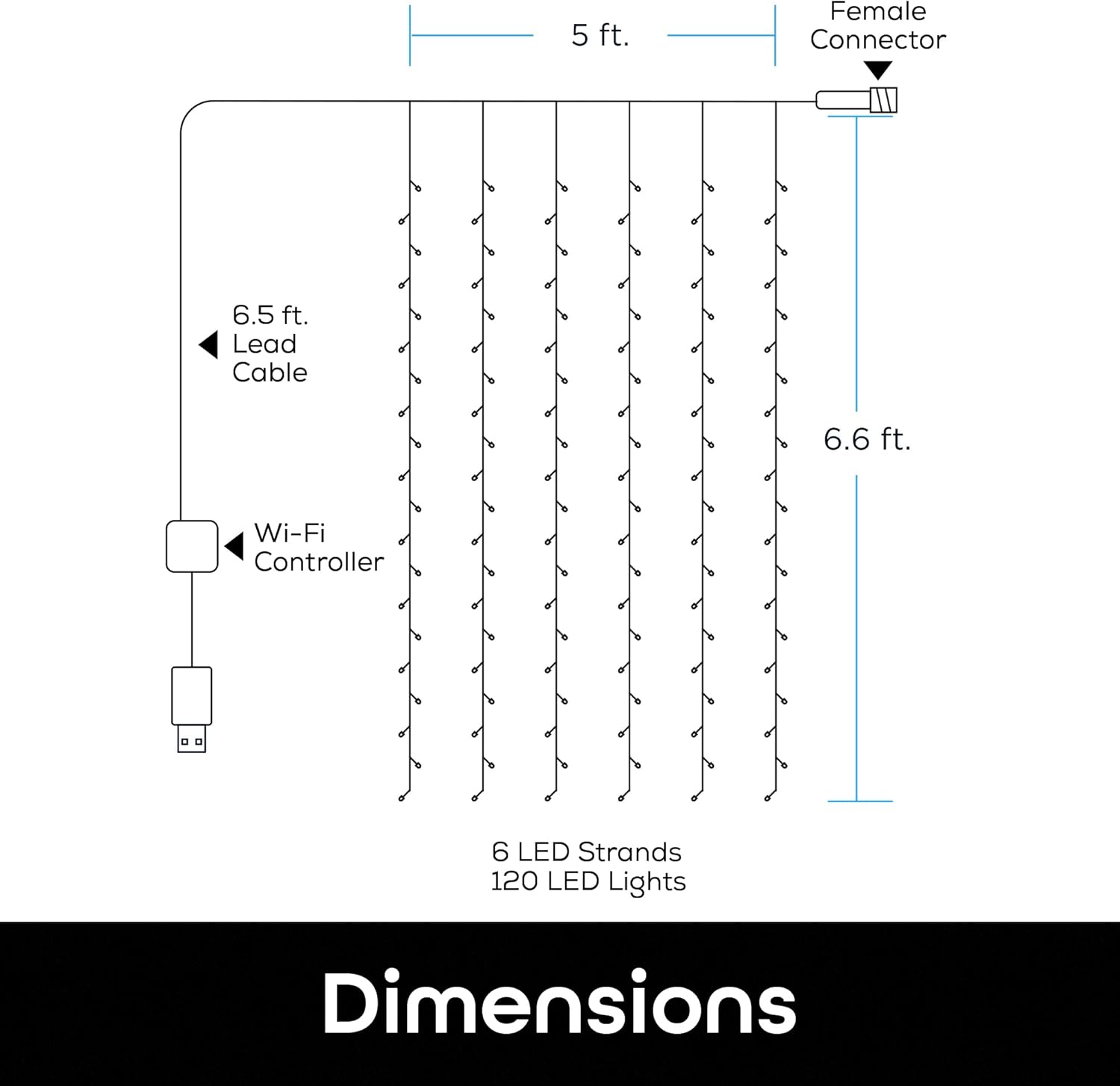
Image: A diagram illustrating the dimensions of the smart curtain lights, showing a 6.5 ft lead cable, 5 ft width, 6.6 ft height, 6 LED strands, and 120 LED lights.
Akwụkwọ ikike na nkwado
For warranty information, technical support, or any product-related inquiries, please visit the official Geeni websaịtị ma ọ bụ kpọtụrụ ndị ahịa ha ozugbo. Debe akwụkwọ nnata ịzụrụ maka akwụkwọ ikike.
Geeni Official Websaịtị: Ụlọ Ahịa Geeni dị na Amazon


