1. Ngwaahịa gafereview
This manual provides detailed instructions for the roborock S8 Pro Ultra Robot Vacuum with RockDock Ultra System and the roborock Dyad Pro Wet and Dry Vacuum Cleaner. These devices are designed to provide efficient floor cleaning solutions for various household needs.

Image 1.1: The roborock S8 Pro Ultra Robot Vacuum with its RockDock Ultra and the roborock Dyad Pro Wet and Dry Vacuum Cleaner.
Atụmatụ igodo
- roborock S8 Pro Ultra: Features the RockDock Ultra System for self-washing, self-refilling, self-emptying, self-drying, and self-cleaning. Equipped with DuoRoller Riser Brush, Upgraded VibraRise 2.0 Mopping System, Reactive 3D Obstacle Avoidance, and 6000Pa suction power.
- roborock Dyad Pro: Utilizes DyadPower for wet and dry messes, offering improved edge-to-edge cleaning and 17000Pa suction. Includes a dual water-tank design, bi-directional self-cleaning brushes, hot air drying, auto cleaning solution dispenser, and adaptive cleaning with DirTect.
2. Nhazi
2.1 roborock S8 Pro Ultra Robot Vacuum
- Iwepu: Carefully remove all components from the packaging. Ensure all protective films and packing materials are removed from the robot and the RockDock Ultra.
- Ebe a na-adọba ụgbọala: Place the RockDock Ultra on a hard, level surface against a wall, ensuring adequate space around it for the robot to maneuver. Avoid placing it near stairs or in high-traffic areas.
- Njikọ ike: Connect the power cable to the RockDock Ultra and plug it into a wall outlet.
- Tankị mmiri: Fill the clean water tank with clean water and ensure the dirty water tank is empty and correctly installed.
- Ebube mbụ: Place the robot onto the RockDock Ultra to charge fully before first use. The indicator lights will show charging status.
- Njikọ ngwa: Download the roborock app from your device's app store. Follow the in-app instructions to connect your robot vacuum to your home Wi-Fi network and complete the initial setup, including mapping your home.
2.2 roborock Dyad Pro Wet and Dry Vacuum Cleaner
- Mgbakọ: Assemble the handle to the main body of the vacuum cleaner according to the quick start guide.
- Ịchaji: Place the Dyad Pro on its charging dock and connect the power adapter. Allow it to charge completely before initial use.
- Tankị mmiri: Fill the clean water tank with water and, if desired, add the recommended cleaning solution. Ensure the dirty water tank is empty.
3. Ntuziaka ọrụ
3.1 roborock S8 Pro Ultra Robot Vacuum
The S8 Pro Ultra offers automated cleaning with advanced navigation and self-maintenance features.
Vidiyo nke 3.1: Mwepuview of the Roborock S8 Pro Ultra robot vacuum's features and operation.
- Ịmalite Ịsachasị: Use the roborock app to start, pause, or stop cleaning. You can also press the power button on the robot.
- Maapụ: The robot uses PreciSense LiDAR Navigation to create an accurate map of your home, optimizing cleaning routes.
- Izere ihe mgbochi: Reactive 3D Obstacle Avoidance technology helps the robot identify and bypass common household objects, preventing entanglement or collisions.
- Ụdị nhicha: Select various cleaning modes (e.g., vacuum-only, mop-only, vacuum & mop) via the app. The DuoRoller Riser Brush and VibraRise 2.0 Mopping System adapt to different surfaces.
- Nkwalite kapeeti: The robot automatically detects carpets and adjusts suction power. The mop lifts automatically when a carpet is detected to prevent wetting.
- RockDock Ultra Functions: The dock handles self-washing of the mop, self-refilling of the robot's water tank, self-emptying of the dustbin, self-drying of the mop and dock, and self-cleaning of the dock base.
- Njikwa ngwa: Customize cleaning settings, set no-go zones, virtual walls, and schedule cleanings through the roborock app.
- Njikwa olu: Integrate with Amazon Alexa, Google Home, or Siri Shortcuts for hands-free operation.
Video 3.2: Demonstration of the S8 Pro Ultra's Reactive 3D Obstacle Avoidance system.
Video 3.3: Explaining the Dual Brush and Dual Sonic Cleaning features of the Roborock S8 Pro Ultra.
Video 3.4: Demonstrating the convenient all-in-one features of the S8 Pro Ultra's RockDock Ultra.
3.2 roborock Dyad Pro Wet and Dry Vacuum Cleaner
The Dyad Pro is designed for effective wet and dry mess cleanup.
Vidiyo nke 3.5: Mwepuview of the Roborock Dyad Pro's capabilities for wet and dry cleaning.
- Gbanyụọ/ Gbanyụọ: Pịa bọtịnụ ike ka ịgbanwuo ma ọ bụ gbanyụọ oghere ahụ.
- Nhicha: Push the vacuum forward to clean. The DyadPower system with 17000Pa suction effectively removes wet and dry debris.
- Nhicha site n'akụkụ ruo n'akụkụ: The design allows for cleaning close to walls and edges.
- Adaptive Cleaning: The DirTect system automatically adjusts cleaning power and water flow based on the detected dirt level.
- Self-Cleaning & Drying: After use, place the Dyad Pro on its dock for automatic roller self-cleaning and hot air drying to prevent odors.
- Voice Alerts: The vacuum provides voice alerts for status updates and maintenance reminders.
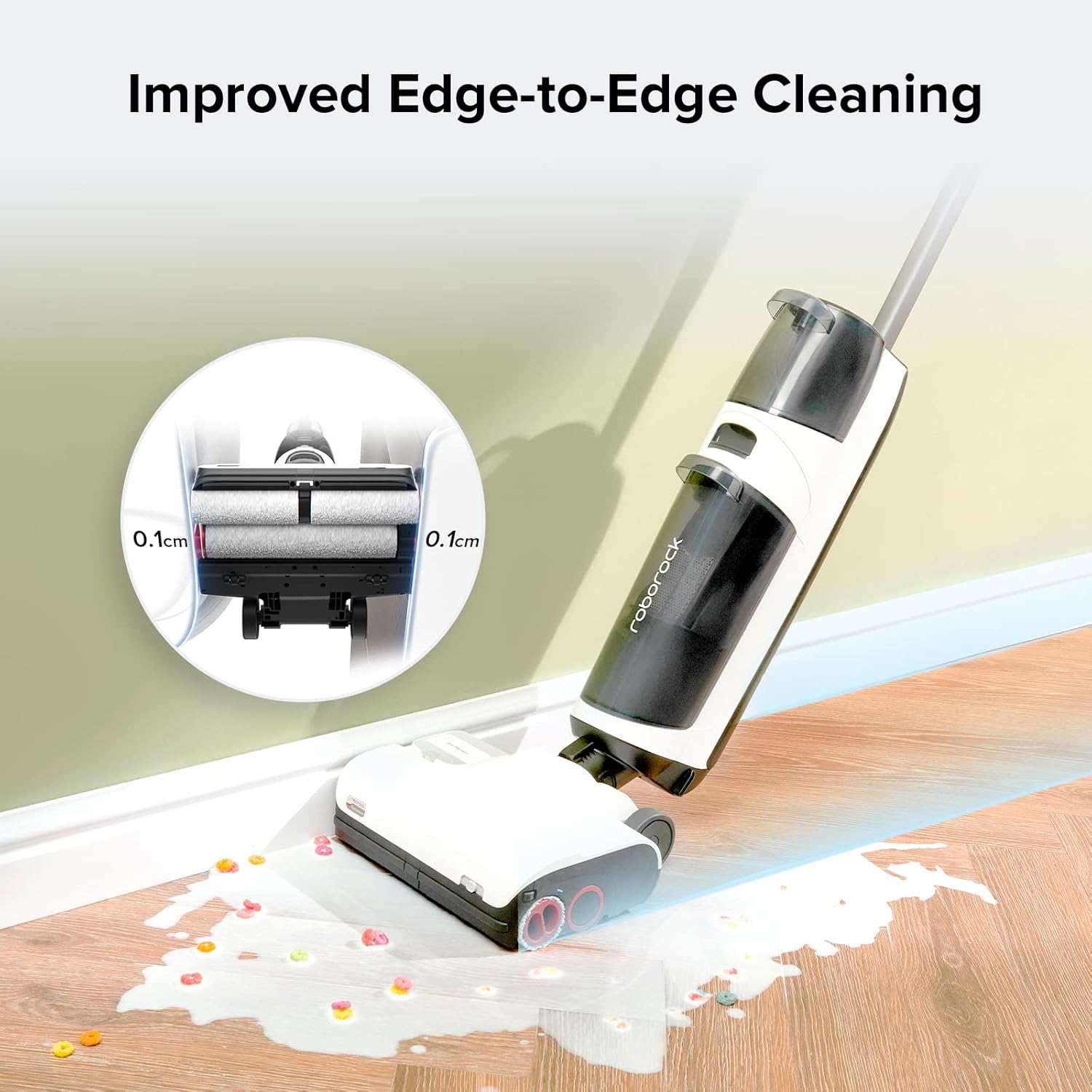
Image 3.1: The roborock Dyad Pro cleaning close to a wall, showcasing its improved edge-to-edge cleaning capability.
4. Nlekọta
4.1 roborock S8 Pro Ultra Robot Vacuum
- Dustbin: The RockDock Ultra automatically empties the robot's dustbin. Check the dock's dustbag periodically and replace it when full (up to 7 weeks of use).
- Tankị mmiri: Regularly empty the dirty water tank and refill the clean water tank on the RockDock Ultra.
- Mop & Brushes: The RockDock Ultra performs self-washing and self-drying of the mop. Periodically inspect the DuoRoller brushes for tangled hair and remove as needed.
- Ihe mmetụta: Wipe the robot's sensors (including Reactive 3D Obstacle Avoidance sensors and LiDAR) with a soft, dry cloth to ensure optimal performance.
4.2 roborock Dyad Pro Wet and Dry Vacuum Cleaner
- Tankị mmiri: Empty the dirty water tank after each use and refill the clean water tank as needed.
- Rollers: The self-cleaning function on the dock cleans the rollers. For deeper cleaning, remove and rinse the rollers under running water. Ensure they are dry before reinstallation.
- iyo: Clean the filter regularly. Refer to the app or product guide for specific filter maintenance instructions.
5. Nchọpụta nsogbu
If you encounter issues, refer to the following common troubleshooting steps. For more detailed solutions, consult the roborock app or the official roborock support websaịtị.
- Robot anaghị akwụ ụgwọ: Ensure the RockDock Ultra is plugged in and the robot is correctly docked. Clean the charging contacts on both the robot and the dock.
- Robot stuck frequently: Check for small objects, cables, or loose rugs that might be obstructing the robot. Utilize the app to set no-go zones or virtual walls around problem areas.
- Poor cleaning performance (Robot): Clean the main brushes, side brush, and mop. Ensure water tanks are filled and the dustbin is not full.
- Poor cleaning performance (Dyad Pro): Ensure clean water tank is filled and dirty water tank is empty. Clean the rollers and filter. Check for blockages in the suction path.
- Nsogbu njikọ ngwa: Ensure your Wi-Fi network is stable and the robot/Dyad Pro is within range. Restart your router, the device, and the app.
- Mkpọtụ na-adịghị ahụkebe: Check for foreign objects caught in the brushes or wheels of either device.
6. Nkọwapụta
| Njirimara | Nkọwa |
|---|---|
| Ụdị | roborock |
| Aha Nlereanya | S8 Pro Ultra & Dyad Pro |
| Njirimara Pụrụ Iche | Cordless (Dyad Pro) |
| Agba | Ọcha |
| Akụkụ ngwaahịa | 28.9"L x 20.31"W x 19.06"H |
| Ngwa gụnyere | Robot Vacuum |
| Ụdị nzacha | Disk |
| Battery Life (Robot) | 180 nkeji |
| Battery Life (Dyad Pro) | 43 nkeji |
| Isi Iyi Ike | Akwanyere batrị |
| Ngwa dakọtara | Amazon Echo |
| Ụdị Ihe | Robotic |
| Ibu Ibu | 66.3 pound |
| Onye nrụpụta | roborock |
| Nọmba ihe nlereanya | S8 Pro Ultra and Dyad Pro |
7. Akwụkwọ ikike na nkwado
For warranty information, product registration, and technical support, please visit the official roborock website or contact roborock customer service. Keep your purchase receipt for warranty claims.
Nkwado n'ịntanetị: www.roborock.com
Ndị ọrụ nlekọta ndị ahịa: Refer to your product packaging or the roborock websaịtị maka ozi kọntaktị mpaghara.


