1. Okwu mmalite
The MLOVE BV800 is a versatile and portable Bluetooth speaker designed for a wide range of audio experiences. It features wireless connectivity, FM radio, and support for Micro SD cards and USB memory, making it an ideal companion for music on the go. This manual provides detailed instructions to help you set up, operate, and maintain your BV800 speaker.

Figure 1.1: MLOVE BV800 Bluetooth Speaker
This image shows the MLOVE BV800 Bluetooth Speaker from a front-side angle, highlighting its compact design, extendable antenna, digital display, control buttons, and integrated lanyard.
2. Ozi nchekwa
Please read and follow these safety guidelines to ensure safe operation and prolong the life of your speaker:
- Ewepụla ọkà okwu na oke okpomọkụ, ìhè anyanwụ kpọmkwem, ma ọ bụ oke iru mmiri.
- Zere idobe ma ọ bụ idobe ọkà okwu na mmetụta siri ike.
- Achịkọtala, rụkwaa, ma ọ bụ gbanwee ọkà okwu n'onwe gị. Kpọtụrụ ndị ọrụ ruru eru ọrụ niile.
- Keep the speaker away from water and liquids, despite its waterproof rating, to prevent damage to internal components.
- Use only the provided USB Type-C charging cable for charging.
- Tụfuo batrị ahụ n'ụzọ kwesịrị ekwesị dịka iwu obodo si dị.
3. Ihe ngwugwu
Chọpụta na ihe niile dị na ngwugwu:
- 1x MLOVE BV800 Bluetooth Speaker
- 1x USB Type-C Charging Cable/Data Cable
- 1 x Lanyard
- Akwụkwọ ntuziaka 1x (akwụkwọ a)
4. Njirimara ngwaahịa na akụrụngwa
Atụmatụ igodo
- Ikuku Njikọ: Easy connection with electronic devices wirelessly, offering a working range of 8-10 meters (30 feet).
- Super Portable Design: Mini size (120x78x35.7mm, 195g) for convenience, easily slips into a bag or pocket, includes a lanyard.
- Oku na-anaghị aka: Built-in microphone allows for easy call management.
- Egwuregwu ọtụtụ ọrụ: Features FM radio, speakerphone function, and supports Micro SD card & USB memory playback.
- Ogologo ndụ batrị: Built-in 1800 mAh rechargeable lithium polymer battery provides up to 12 hours of playback at 50% volume.
- Ọdịda dị oke mma: Equipped with a 40mm full-range loudspeaker and large runway-type low-frequency amplifiers, powered by a Class D amplifier with 8W output.
Internal Components and Audio Technology
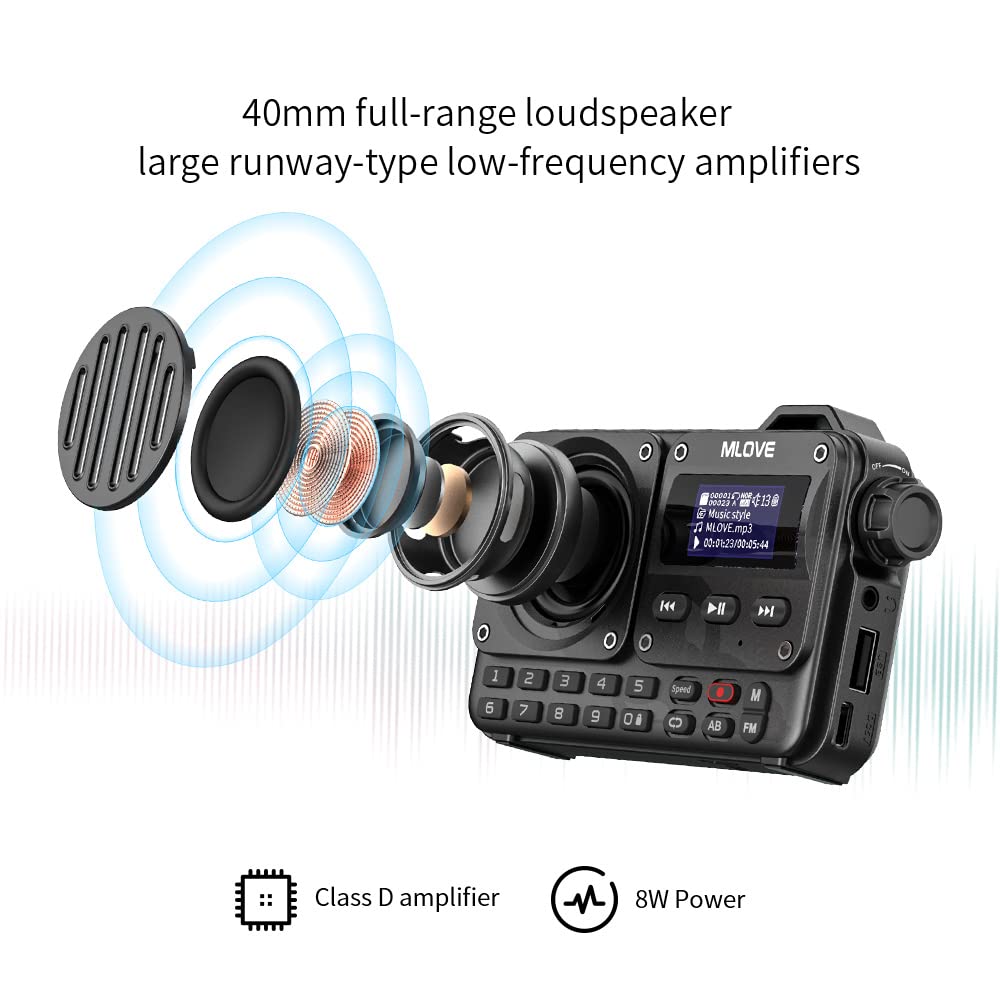
Figure 4.1: Internal Audio Components
This diagram illustrates the internal 40mm full-range loudspeaker and low-frequency amplifiers, highlighting the Class D amplifier and 8W power output for enhanced sound quality.
Nhọrọ njikọta

Figure 4.2: Available Connectivity Modes
This image displays the various connectivity options supported by the BV800 speaker, including Bluetooth 5.0, FM Radio, USB Flash Drive, Micro SD Card, and USB Sound Card functionality.
Digital Keypad and Display

Figure 4.3: Digital Keypad and HD LED Screen
This image highlights the speaker's digital keypad for direct input and its clear HD LED screen display, providing essential information during operation.
5. Nhazi
5.1 Ịchaji ọkà okwu
Before first use, fully charge the speaker. Connect the provided USB Type-C cable to the speaker's charging port and the other end to a USB power adapter (not included) or a computer's USB port. The charging time is approximately 3 hours for a full charge.
5.2 Ike mbido
Press and hold the Power button (usually marked with a power symbol) for a few seconds until the display lights up and you hear an audible prompt, indicating the speaker is powered on.
6. Ntuziaka ọrụ
6.1 Njikọ Bluetooth
- Ensure the speaker is powered on and in Bluetooth mode. If not, press the 'M' (Mode) button to switch to Bluetooth mode. The display will show a Bluetooth icon, and the speaker will enter pairing mode.
- Na ekwentị mkpanaaka gị, gbanye Bluetooth wee chọọ ngwaọrụ dị.
- Select "MLOVE BV800" from the list of found devices.
- Once paired, the speaker will confirm with an audible prompt, and the Bluetooth icon on the display will become solid.
6.2 FM Redio arụ ọrụ

Figure 6.1: FM Radio Functionality
This image illustrates the FM radio capabilities of the BV800, showing the speaker on a shelf with visual cues for automatic and semi-automatic station search, and various FM frequencies.
- Press the 'M' (Mode) button to switch to FM Radio mode. The display will show the FM frequency.
- Extend the antenna for better reception.
- Ọchọ ọdụ akpaaka: Press and hold the Play/Pause button (▶▶) to initiate an automatic scan for available FM stations. The speaker will save all found stations.
- Akwụkwọ ntuziaka: Use the Previous (◀◀) and Next (▶▶) buttons to manually tune to specific frequencies or navigate through saved stations.
6.3 Micro SD Card and USB Playback
- Insert a Micro SD card or USB memory stick (with supported audio files) banye n'ime oghere dị na ọkà okwu ahụ.
- The speaker will automatically switch to the corresponding playback mode (SD or USB) and begin playing audio files. If it doesn't, press the 'M' (Mode) button to cycle through modes until you reach the correct one.
- Jiri bọtịnụ Play/Pause, Previous, na Next iji chịkwaa ọkpụkpọ egwu.
6.4 Oku na-enweghị aka

Foto 6.2: Njirimara oku na-enweghị aka
This image demonstrates the hands-free calling capability of the BV800 speaker, showing a person using the speaker for a two-way conversation with 360-degree sound pickup and clear audio.
Mgbe ejikọrọ site na Bluetooth na ekwentị gị:
- Oku azaa: Pịa bọtịnụ Play/Pause otu ugboro iji zaa oku na-abata.
- Oku ngwụcha: Pịa bọtịnụ Play/kwụsịtụ otu ugboro mgbe oku na-aga ka ịkwụsị ya.
- Jụ oku: Pịa ma jide bọtịnụ Play/kwụsịtụ ka ịjụ oku mbata.
- Nọmba Ikpeazụ emegharịgharịrị: Double-press the Play/Pause button to redial the last dialed number.
6.5 Using the Digital Keypad
The digital keypad (0-9) on the front of the speaker can be used for direct input, particularly useful in FM radio mode for direct frequency input or in music playback modes for track selection (if supported by the file sistemu).
6.6 Earphone Playback

Figure 6.3: Earphone Playback
This image shows a woman enjoying music through headphones connected to the MLOVE BV800 speaker, demonstrating its support for any 3.5mm earphone for private listening.
The BV800 supports any standard 3.5mm earphone. Simply plug your earphones into the designated earphone jack on the speaker to enjoy private listening.
7. Nlekọta na nlekọta
- Nhicha: Use a soft, dry cloth to clean the speaker's surface. Do not use abrasive cleaners, alcohol, or chemical solvents.
- Nchekwa: Mgbe a naghị eji ya eme ihe ruo ogologo oge, chekwaa ọkà okwu n'ebe dị jụụ, nke kpọrọ nkụ na-adịghị na ìhè anyanwụ kpọmkwem.
- Nlekọta batrị: To preserve battery life, charge the speaker at least once every three months if not used regularly.
8. Nchọpụta nsogbu
If you encounter issues with your MLOVE BV800 speaker, refer to the following table for common problems and solutions:
| Nsogbu | Ihe nwere ike ime | Ngwọta |
|---|---|---|
| Ọkà okwu anaghị agba ọkụ | Batrị dị ala; Apịghị bọtịnụ ike nke ọma | Chajie ọkà okwu ahụ nke ọma; Pịa ma jide bọtịnụ Ike maka sekọnd ole na ole. |
| Enweghị ike ijikọ site na Bluetooth | Ọkà okwu adịghị n'ụdị njikọta; Agbanyụrụ Bluetooth ngwaọrụ; Oke anya site na ọkà okwu | Ensure speaker is in Bluetooth pairing mode; Enable Bluetooth on your device; Move device closer to speaker (within 10m). |
| Enweghị ụda sitere na ọkà okwu | Olu dị oke ala; Ahọpụtara ụdị na-ezighi ezi; Nsogbu isi iyi ọdịyo | Increase speaker volume; Press 'M' button to select correct mode; Check audio source (e.g., phone volume, media player). |
| Nnata redio FM adịghị mma | A naghị agbatị eriri antenna; Mpaghara mgbaàmà adịghị ike | Fully extend the antenna; Try moving to a location with better signal. |
| Micro SD/USB not playing | Enweghị nkwado file format; Card/USB not inserted correctly; Corrupted files | Gbaa mbọ hụ na ọdịyo files are in supported format; Reinsert card/USB; Try different card/USB. |
9. Nka na ụzụ nkọwa
| Njirimara | Nkọwapụta |
|---|---|
| Aha Nlereanya | BV800 |
| Ihe onwunwe | Plastic |
| Agba | Nwa |
| Ụdị Ọkà Okwu | Tweeter (Full-range loudspeaker) |
| Ike Nwepu kacha elu | 8 Watt |
| Teknụzụ nzikọrịta ozi ikuku | Bluetooth |
| Teknụzụ Njikọta | Bluetooth |
| Oke ikuku ikuku kacha | 30 Feet (approx. 8-10 meters) |
| Isi Iyi Ike | Akwadoro batrị (1 batrị lithium ion gụnyere) |
| Ike batrị | 1800 mAh (rechargeable lithium polymer) |
| Oge Nchaji | Ihe ruru. awa 3 |
| Oge egwuregwu | Ruo awa 12 (na olu 50%) |
| Akụkụ ngwaahịa | 7.8D x 12W x 3.6H centimita |
| Ibu Ibu | 300 g |
| Enweghị mmiri | EZIOKWU |
| Usoro njikwa | App (implied, but primary control is physical buttons) |
| Ụdị nkwụnye | Ugwu okpokoro |
10. Akwụkwọ ikike Ozi
The MLOVE BV800 Bluetooth Speaker comes with a Akwụkwọ ikike nwere oke. Please refer to the warranty card included in your package for specific terms, conditions, and duration of the warranty. Keep your purchase receipt as proof of purchase for any warranty claims.


