1. Okwu mmalite
Thank you for choosing the MLOVE BV230 Portable Bluetooth Speaker. This manual provides essential information for setting up, operating, and maintaining your speaker. The BV230 is designed for portability, delivering high-quality audio with enhanced bass, and features IP56 dust and water resistance, making it suitable for various environments.
2. Ihe ngwugwu
Biko hụ na ihe niile dị na ngwugwu:
- 1 x MLOVE BV230 Bluetooth Speaker
- 1 x USB Ụdị-C eriri USB
- 1 x Lanyard
- 1 x Akwụkwọ ntuziaka (akwụkwọ a)
3. Ngwaahịa gafereview
Mara onwe gị na akụkụ na njikwa ọkà okwu.
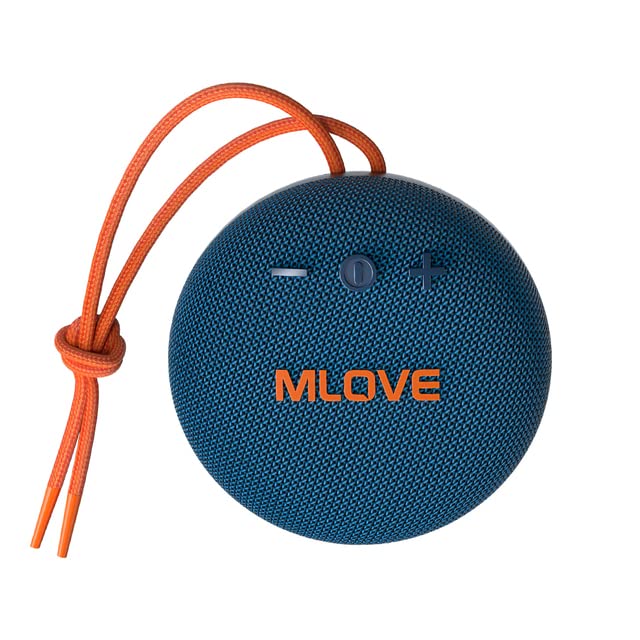
Foto 3.1: N'ihu view of the MLOVE BV230 speaker, showing the power button, volume controls, and MLOVE branding.
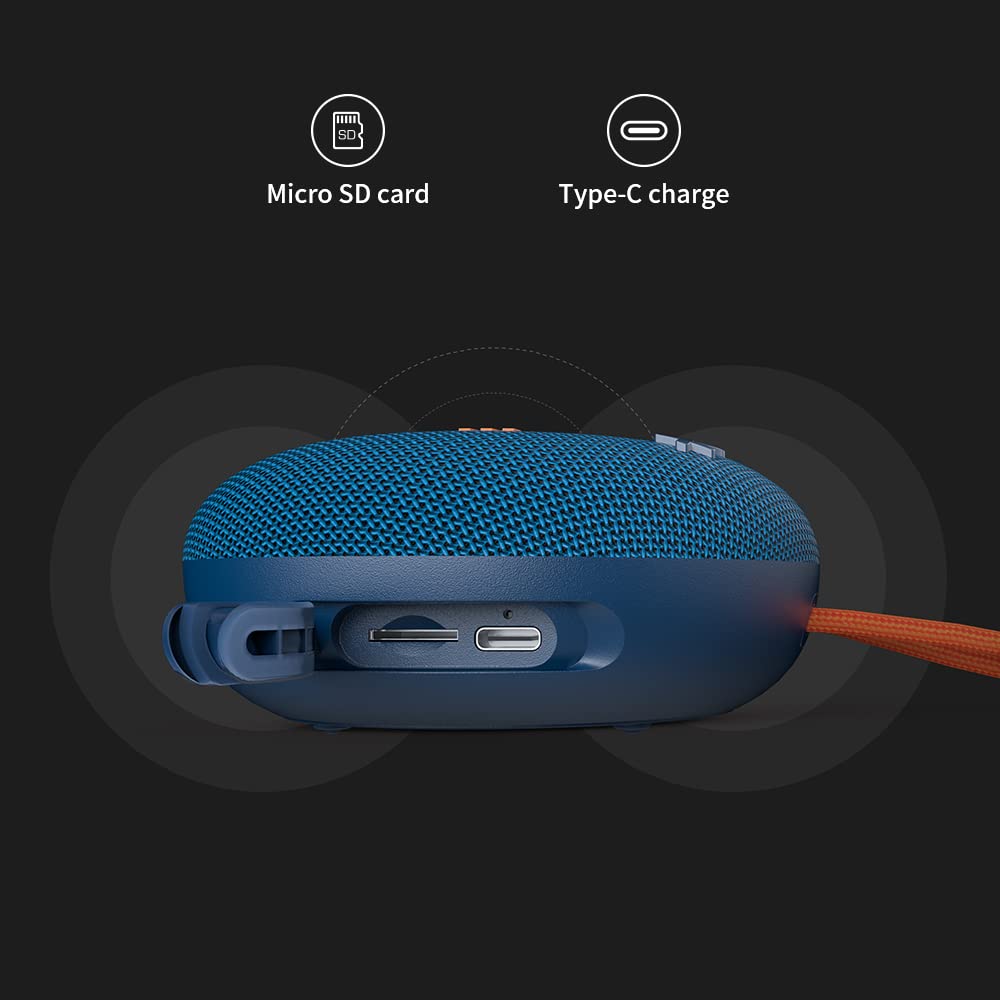
Foto 3.2: Akụkụ view of the MLOVE BV230 speaker, highlighting the Micro-SD card slot and the USB Type-C charging port, protected by a rubber flap.
bọtịnụ njikwa:
- Bọtịnụ ike: Pịa ma jide ka ịgbanwuo/gbanyụọ ọkụ. Pịa obere oge iji kpọọ/kwụsịtụ egwu ma ọ bụ zaa/kwụsị oku.
- Elu elu (+): Obere pịa ka iwelie olu. Pịa ogologo maka egwu ọzọ.
- Mpịakọta ọnụ (-): Obere pịa ka ibelata olu. Pịa ogologo maka egwu gara aga.
4. Nhazi
4.1 Ịchaji ọkà okwu
Tupu i jiri ya na mbụ, chajie igwe okwu ahụ nke ọma.
- Open the rubber flap on the side of the speaker to expose the charging port.
- Connect the included USB Type-C charging cable to the speaker's charging port.
- Jikọọ nsọtụ nke ọzọ nke eriri na ihe nkwụnye ọkụ USB (anaghị etinye ya) ma ọ bụ ọdụ ụgbọ USB nke kọmputa.
- The charging indicator light will illuminate during charging and turn off once fully charged. A full charge takes approximately 3 hours.
4.2 Gbanyụọ/ gbanyụọ
- Iji gbanye: Press and hold the Power button for approximately 2-3 seconds until you hear an audible prompt.
- Iji gbanyụọ: Press and hold the Power button for approximately 2-3 seconds until you hear an audible prompt.
4.3 Njikọ Bluetooth
Connect your BV230 speaker to a Bluetooth-enabled device.
- Hụ na ekwenyere igwe okwu ahụ ma nwee ọnọdụ njikọta Bluetooth (nke LED na-enwu enwu gosiri).
- Na ngwaọrụ gị (smartphone, tabletị, wdg), gbanye Bluetooth wee chọọ ngwaọrụ dịnụ.
- Select "BV230" from the list of found devices.
- Once connected, the speaker will provide an audible confirmation, and the LED indicator will stop flashing.
- The speaker will automatically reconnect to the last paired device when powered on, if within range (up to 10 meters).
4.4 Ezi ikuku stereo (TWS) ijikọ
Connect two MLOVE BV230 speakers for a true wireless stereo experience.

Foto 4.1: Two BV230 speakers demonstrating True Wireless Stereo (TWS) pairing for enhanced audio.
- Ensure both BV230 speakers are powered on and not connected to any other Bluetooth device.
- On one of the speakers (this will be the primary speaker), double-press the Power button. The speaker will enter TWS pairing mode.
- The two speakers will automatically search for and connect to each other. You will hear an audible confirmation once TWS pairing is successful.
- Now, connect your Bluetooth device to the primary speaker (the one you initiated TWS pairing on) as described in Section 4.3.
- Audio will now play in stereo across both speakers.
4.5 Micro-SD Card Playback
Play music directly from a Micro-SD card.
- Open the rubber flap on the side of the speaker.
- Insert a Micro-SD card (with supported audio files) into the Micro-SD card slot until it clicks into place.
- The speaker will automatically switch to Micro-SD card playback mode.
- Use the Power button for play/pause and the Volume +/- buttons for track control.
5. Ntuziaka ọrụ
5.1 Nghaghachi egwu
- Gwuo/kwụsịtụ: Obere pịa bọtịnụ Ike.
- Olu elu: Pịa bọtịnụ '+' nkenke.
- Olu ala: Pịa bọtịnụ '-' nkenke.
- Track na-esote: Pịa bọtịnụ '+' ogologo.
- Gara aga Track: Pịa bọtịnụ '-' ogologo.
5.2 Oku na-enweghị aka
The built-in microphone allows for hands-free calls when connected via Bluetooth.

Foto 5.1: The BV230 speaker facilitating a hands-free call, demonstrating its built-in microphone functionality.
- Oku azaa: Short press the Power button when an incoming call is received.
- Oku ngwụcha: Pịa obere bọtịnụ Ike n'oge oku.
- Jụ oku: Long press the Power button when an incoming call is received.
6. Nlekọta
6.1 Nhicha
To maintain the speaker's appearance and functionality:
- Jiri nwayọ hichaa ọkà okwu, damp akwa .
- Ejila ihe mkpocha abrasive, mmanya, ma ọ bụ ihe mgbaze kemịkal.
- Ensure the charging port and Micro-SD slot are dry before use or charging.
6.2 Mmiri na Uzuzu Na-eguzogide (IP56)
The MLOVE BV230 speaker is rated IP56, meaning it is protected against dust ingress and can withstand water jets from any direction. This makes it suitable for outdoor use and splashes.

Foto 6.1: The BV230 speaker in water, illustrating its IP56 water resistance.
- Ensure the rubber flap covering the charging port and Micro-SD slot is securely closed to maintain water and dust resistance.
- Do not intentionally submerge the speaker in water for extended periods.
- Avoid exposing the speaker to saltwater or other chemicals, as this may damage the seals.
- If the speaker gets wet, wipe it dry before charging or opening the port flap.
6.3 Nchekwa
- Chekwaa ọkà okwu n'ebe dị jụụ, kpọrọ nkụ na-adịghị na ìhè anyanwụ kpọmkwem na oke okpomọkụ.
- If storing for an extended period, charge the battery to approximately 50% every few months to prolong battery life.
7. Nchọpụta nsogbu
If you encounter issues with your speaker, refer to the following solutions:
| Nsogbu | Ngwọta enwere ike |
|---|---|
| Ọkà okwu anaghị agba ọkụ. | Ensure the battery is charged. Connect the speaker to a power source using the USB Type-C cable. |
| Enweghị ike ijikọ site na Bluetooth. |
|
| Enweghị ụda ma ọ bụ obere olu. |
|
| Njikota TWS ada ada. |
|
| Charging issue. |
|
8. Nkọwapụta
Key technical specifications for the MLOVE BV230 speaker:
| Njirimara | Nkọwa |
|---|---|
| Aha Nlereanya | BV230 |
| Akụkụ (L x W x H) | 100.8 x 100.8 x 46 mm (approx. 108D x 46W x 108H Millimeters) |
| Ibu Ibu | 198 g (ihe dị ka 280 g na nkwakọ ngwaahịa) |
| Ike mmepụta okwu | 5 Watt |
| Ike batrị | 1500mAh Lithium Polymer |
| Oge egwuregwu | Ruo awa 8 (na olu 70%) |
| Oge Nchaji | Ihe dị ka awa 3 |
| Nchaji ọdụ ụgbọ mmiri | USB Ụdị-C |
| Ụdị Bluetooth | 5.0 |
| Ikuku iche | Ruo mita 10 (ụkwụ 33) |
| Mmiri & Uzuzu Nguzogide | IP56 |
| Ihe onwunwe | Akpụkpọ anụ |
| Usoro njikwa | Metụ aka |
| Ọnọdụ mmepụta ọdịyo | Stereo (with TWS pairing) |
9. Akwụkwọ ikike na nkwado
The MLOVE BV230 Portable Bluetooth Speaker comes with a Akwụkwọ ikike nke ọnwa 12 site na ụbọchị ịzụrụ, na-ekpuchi ntụpọ nrụpụta.
For technical support, warranty claims, or further assistance, please contact your retailer or the manufacturer directly. Please retain your proof of purchase for warranty service.


