1. Okwu mmalite
Thank you for choosing the MINISFORUM EliteMini TH80 Mini PC. This compact desktop computer is designed for various applications, from business and education to multimedia and everyday use. Featuring an 11th Gen Intel Core i7-11800H processor, 32GB RAM, and a 512GB NVMe SSD, it offers robust performance in a small form factor. This manual provides essential information for setting up, operating, maintaining, and troubleshooting your device.

Figure 1: MINISFORUM EliteMini TH80 Mini PC key features overview.
2. Ozi nchekwa
- Always use the provided power adapter. Using an incompatible adapter may damage the device and void the warranty.
- Ewepụla ngwaọrụ ahụ na mmiri, mmiri, ma ọ bụ oke okpomọkụ.
- Avoid dropping or subjecting the device to severe impacts.
- Anwala imepe ma ọ bụ rụzie ngwaọrụ ahụ n'onwe gị. Gaa na ndị ọrụ ruru eru.
- Gbaa mbọ hụ na ikuku ikuku dị na gburugburu ngwaọrụ iji gbochie ikpo oke ọkụ.
3. Ihe ngwugwu
Chọpụta na ihe niile dị na ngwugwu:
- 1x MINISFORUM TH80 Mini PC
- 1 x HDMI USB
- 1 x ihe nkwụnye ọkụ US
- 1x VESA Bracket
- 1x Akwụkwọ ntuziaka onye ọrụ
4. Ngwaahịa gafereview
4.1 Ọdụ ụgbọ mmiri na njikọ dị na mpụga
The MINISFORUM EliteMini TH80 features a variety of ports for connectivity. Familiarize yourself with the port layout for proper setup.
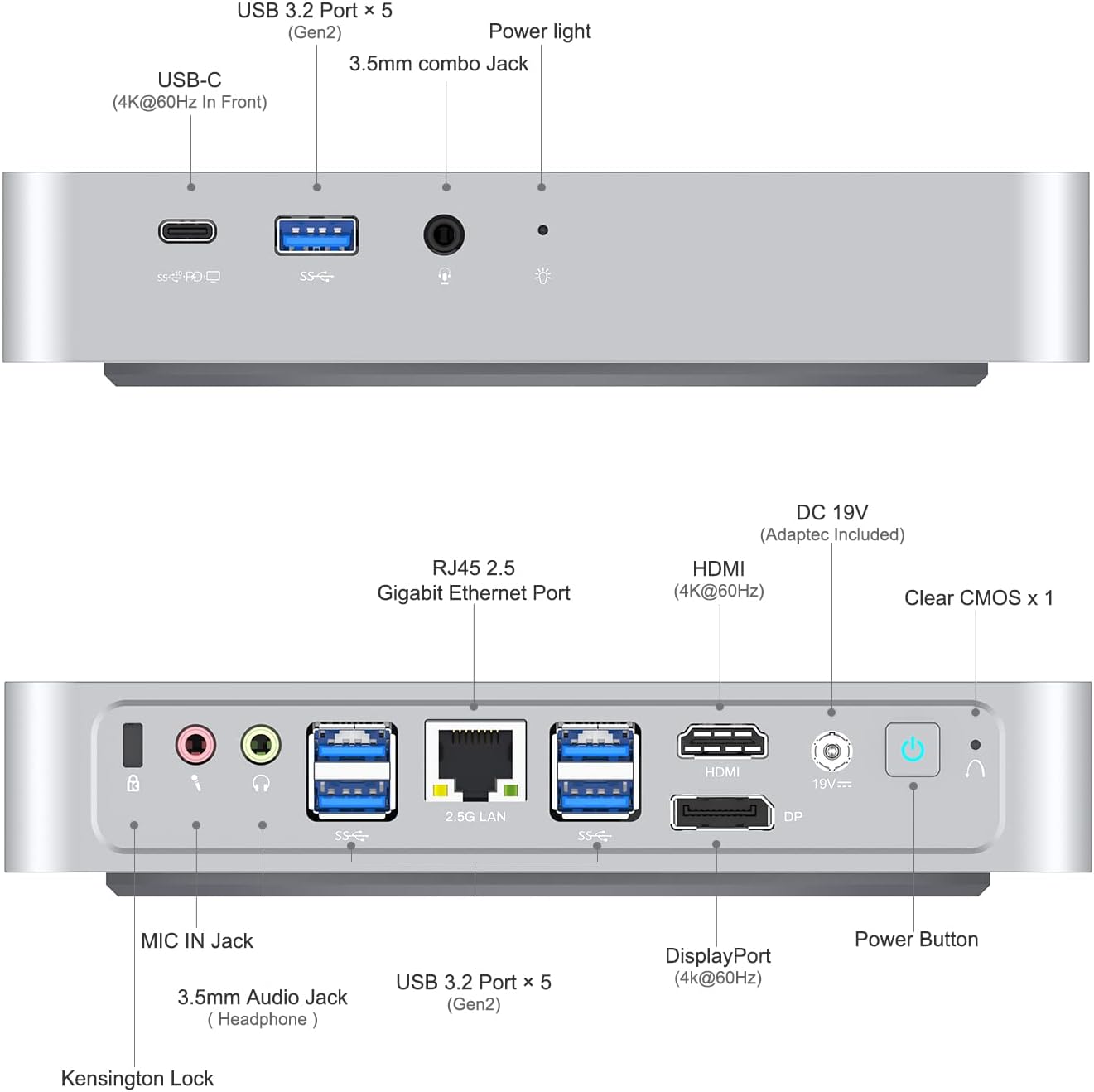
Foto nke 2: Nhazi Ọdụ Ụgbọ Mmiri Ihu na nke Azụ.
- Ọdụ ụgbọ mmiri ihu: USB 3.2 Gen2 Type-A (x5), USB-C (4K@60Hz), 3.5mm Combo Jack, Power Light.
- Ọdụ ụgbọ mmiri azụ: HDMI (4K@60Hz), DisplayPort (4K@60Hz), RJ45 2.5G Ethernet Port, 3.5mm MIC Jack, 3.5mm Headphone Jack, MIC IN Jack, Clear CMOS button, DC 19V Power Input, Power Button, Kensington Lock.
4.2 Internal Components (Upgradeability)
The TH80 Mini PC allows for memory and storage upgrades. It comes with 32GB DDR4 RAM (16GBx2) and a 512GB M.2 2280 NVMe PCIe3.0 SSD. It supports up to 64GB RAM and additional storage.
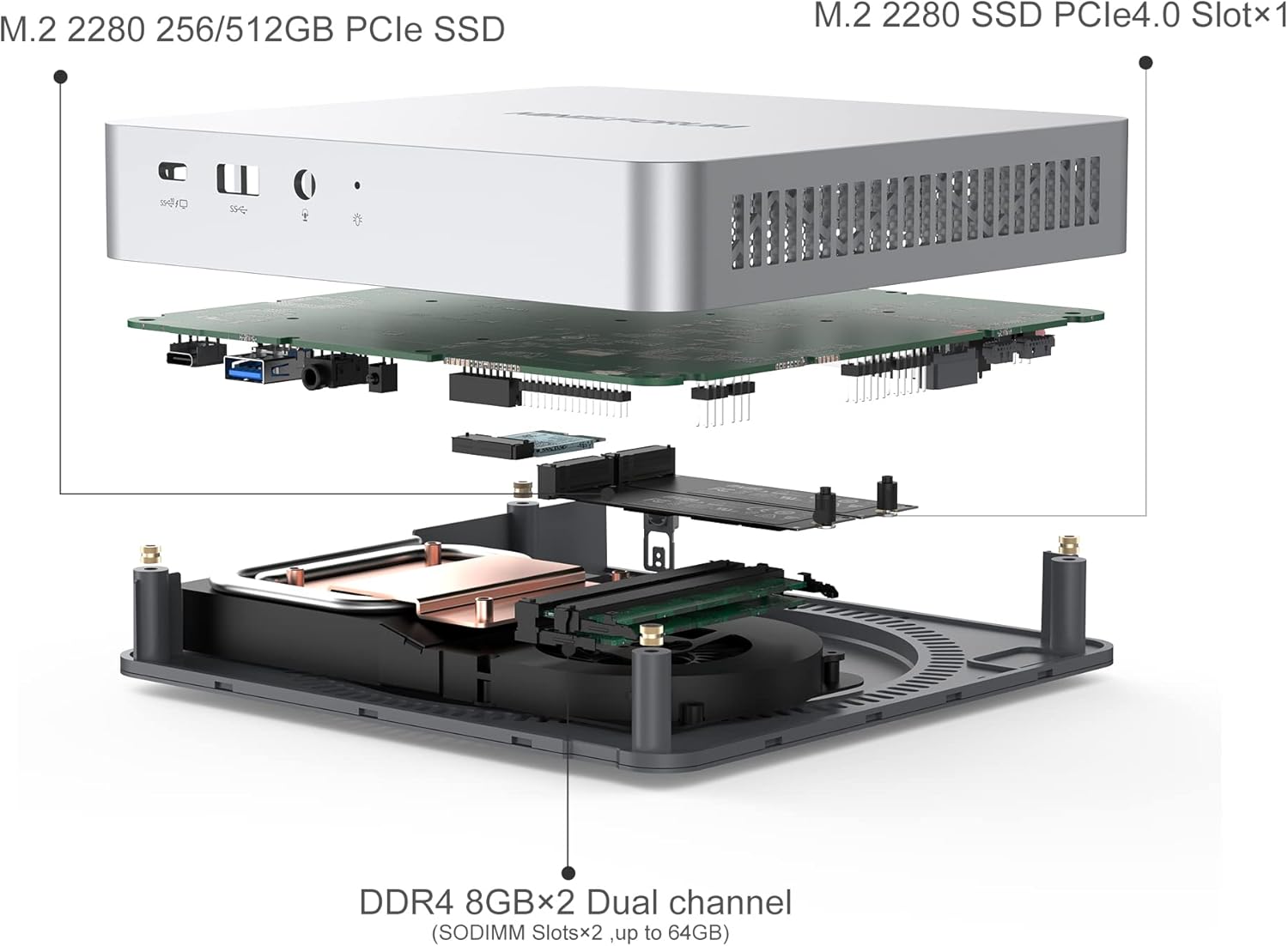
Figure 3: Internal Component Layout for Upgrades.
- RAM: Two SODIMM slots, supporting up to 64GB DDR4 RAM.
- Nchekwa: One M.2 2280 PCIe3.0 SSD slot (512GB pre-installed, upgradable to 2TB) and one M.2 2280 NVMe PCIe4.0 SSD slot (upgradable to 2TB).
5. Nhazi
5.1 Njikọta Peripherals
- Connect your monitor(s) to the HDMI, DisplayPort, or USB-C video outputs. The device supports up to three 4K@60Hz displays simultaneously.
- Connect your keyboard and mouse to the available USB 3.2 Type-A ports.
- For wired network access, connect an Ethernet cable to the 2.5G RJ45 port.
- If using external speakers or a microphone, connect them to the respective 3.5mm audio jacks.
5.2 Na-agbanye ike
- Connect the provided DC 19V power adapter to the power input port on the rear of the Mini PC.
- Tinye nkwụnye ọkụ n'ime oghere mgbidi.
- Press the Power Button on the rear of the device to turn it on. The power light will illuminate.
5.3 VESA rịgoro
The included VESA bracket allows you to mount the Mini PC to the back of a compatible monitor or to a wall, saving desk space.

Figure 4: VESA Mounting Bracket Installation.
- Jiri skru ndị enyere tinye ihe nkwado VESA na Mini PC.
- Secure the Mini PC with the attached bracket to the VESA mounting holes on your monitor or wall.
6. Ntuziaka ọrụ
6.1 Mmalite Boot na Mbido Windows 11 Pro
Upon first power-on, the system will guide you through the initial setup of Windows 11 Pro. Follow the on-screen prompts to configure your language, region, network, and user account.
6.2 Multi-Monitor Configuration
The TH80 supports connecting up to three displays simultaneously via HDMI, DisplayPort, and USB-C. To configure multiple monitors:
- Connect all desired monitors to the Mini PC.
- Pịa aka nri na desktọpụ wee họrọ "Ngosipụta ntọala."
- In the Display settings, you can detect, arrange, and extend or duplicate your displays.

Figure 5: Triple Screen 4K Output Configuration.
Mara: When connecting a second or third monitor via an adapter, ensure the adapter is an active version for optimal performance.
6.3 Njikọ netwọkụ
The Mini PC supports both wired (2.5G RJ45 Ethernet) and wireless (Dual-Band Wi-Fi) network connections.

Figure 6: 2.5Gbps Ethernet Port Performance.
- Mara: Jikọọ eriri Ethernet na ọdụ ụgbọ mmiri RJ45. Sistemụ ahụ ga-achọpụta njikọ ahụ na akpaghị aka.
- Ikuku: Access Wi-Fi settings in Windows 11 to connect to your preferred wireless network.
7. Nlekọta
- Nhicha: Use a soft, dry cloth to clean the exterior of the Mini PC. Do not use liquid cleaners or aerosols.
- Igwe ikuku: Ensure that the ventilation openings are not blocked to maintain proper airflow and prevent overheating.
- Mmelite ngwanrọ: Na-emelite sistemụ arụmọrụ Windows gị na draịva gị mgbe niile iji hụ na arụmọrụ na nchekwa kacha mma.
8. Nchọpụta nsogbu
- System Crash/Unresponsive: If the operating system crashes or becomes unresponsive, do not unplug the power adapter directly. Instead, press the "Clear CMOS" button (located on the rear panel) for 30 seconds. The device will restart automatically.
- Enweghị Ngosipụta: Ensure all display cables are securely connected and that the monitor is powered on and set to the correct input source. If using an adapter for a second/third monitor, confirm it is an active adapter.
- Enweghị ike: Verify that the power adapter is correctly connected to both the Mini PC and a working power outlet.
- Okwu netwọkụ: For wired connections, check the Ethernet cable and router. For Wi-Fi, ensure the Wi-Fi adapter is enabled and you are connected to the correct network with the correct password.
9. Nkọwapụta
| Njirimara | Nkọwapụta |
|---|---|
| Ụdị ngwaahịa | TH80 |
| Sistemụ nrụọrụ | Windows 11 Pro |
| Nhazi | Intel Core i7-11800H (8 Cores/16 Threads, up to 4.6GHz) |
| Ihe eserese processor | Intel UHD Graphics for 11th Gen Intel Processors (1.45GHz) |
| RAM | 32GB DDR4 (2xSODIMM slots, upgradable to 64GB) |
| Nchekwa | 512GB M.2 2280 PCIe3.0 SSD (upgradable to 2TB) 1x M.2 2280 NVMe PCIe4.0 SSD Slot (upgradable to 2TB) |
| Ethernet | 2.5G RJ45 LAN |
| Njikọ ikuku | M.2 2230 Wi-Fi Support (Dual-Band Wi-Fi, Bluetooth) |
| Mpụta vidiyo | 1x HDMI Port (4K@60Hz) Ngosipụta ngosi 1x (4K@60Hz) 1x USB-C Port (4K@60Hz) |
| ọdụ ụgbọ mmiri USB | 5x USB 3.2 Gen2 Type-A Ports 1x ọdụ ụgbọ mmiri USB-C |
| Ọdụ ụgbọ mmiri | 1x 3.5mm MIC Jack 1x Headphone Jack 1x MIC IN Jack |
| Ọdụ ụgbọ mmiri ndị ọzọ | 1 x Kpochapụ bọtịnụ CMOS |
| Ntinye ike | DC 19V |
| Akụkụ | 7.87 x 7.87 x 4.72 inch (Ngwugwu) |
| Ibu | 3.69 pound |
10. Akwụkwọ ikike na nkwado
MINISFORUM products typically come with a standard manufacturer's warranty. Please refer to the warranty card included in your package or visit the official MINISFORUM websaịtị maka nkọwa na usoro akwụkwọ ikike.
For technical support, troubleshooting assistance, or service inquiries, please contact MINISFORUM customer support through their official websaịtị ma ọ bụ ozi kọntaktị enyere na ịzụrụ gị.
Ndị ọchịchị Websaịtị: www.minisforum.com (Biko lelee maka ozi kọntaktị kachasị ọhụrụ)


