Okwu mmalite
Thank you for choosing the Baseus Super Energy Pro 1600A Car Jump Starter. This device is designed to provide a reliable and powerful solution for starting vehicles with dead batteries, and also functions as a portable power bank. Please read this manual thoroughly before use to ensure safe and proper operation. Keep this manual for future reference.
Ozi nchekwa
- Always read the vehicle's owner's manual before attempting to jump start it.
- Anwala ima elu malite batrị oyi kpọnwụrụ.
- Gbaa mbọ hụ na ikuku ikuku dị mma mgbe ị na-arụ ọrụ ngwaọrụ.
- Debe ngwaọrụ ahụ n'ebe ụmụaka nọ na anụ ụlọ.
- Do not expose the device to rain or extreme temperatures.
- Avoid short-circuiting the jumper clamps. Do not connect the red and black clamps ọnụ.
- If the device or cables are damaged, do not use them. Contact support.
- Always connect the clamps to the correct battery terminals (red to positive, black to negative).
- Remove the jump starter immediately after the vehicle starts.
Ihe ngwugwu
Chọpụta na ihe niile dị na ngwugwu gị:
- Baseus Super Energy Pro Car Jump Starter Unit
- Smart Jumper Cables with Clamps
- USB-C eriri USB
- Akwụkwọ ntuziaka (akwụkwọ a)
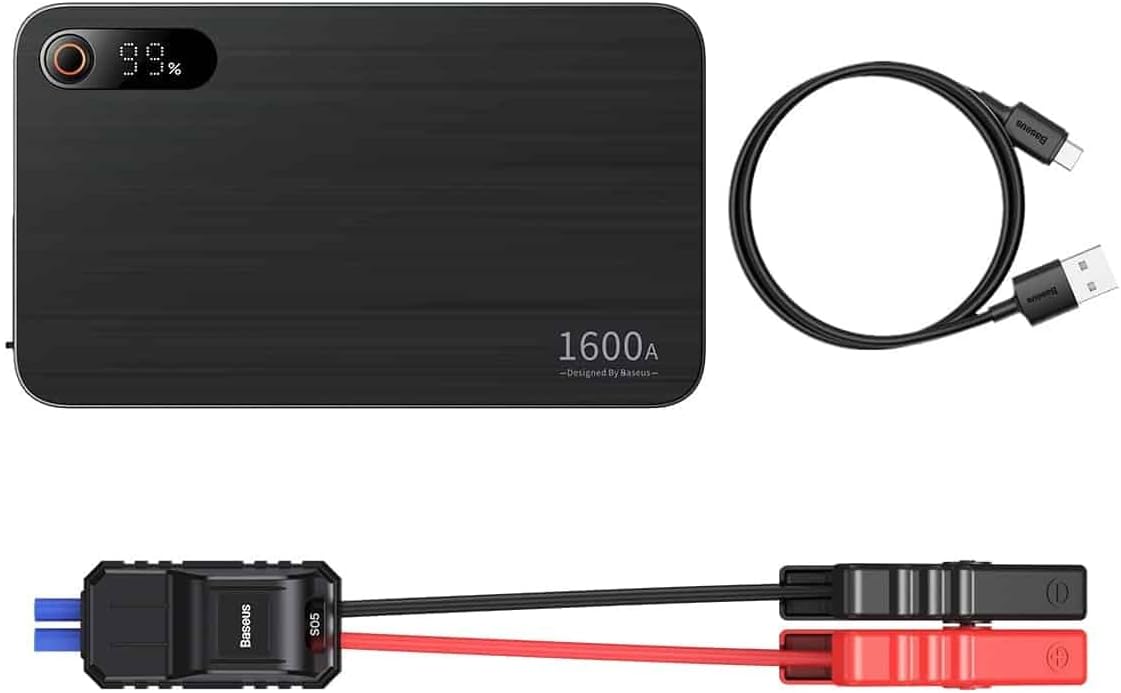
Image: Contents of the Baseus Super Energy Pro Car Jump Starter package, showing the main unit, smart jumper cables, and a USB-C charging cable.
Ngwaahịa gafereview
Familiarize yourself with the components of your Baseus Super Energy Pro Car Jump Starter:
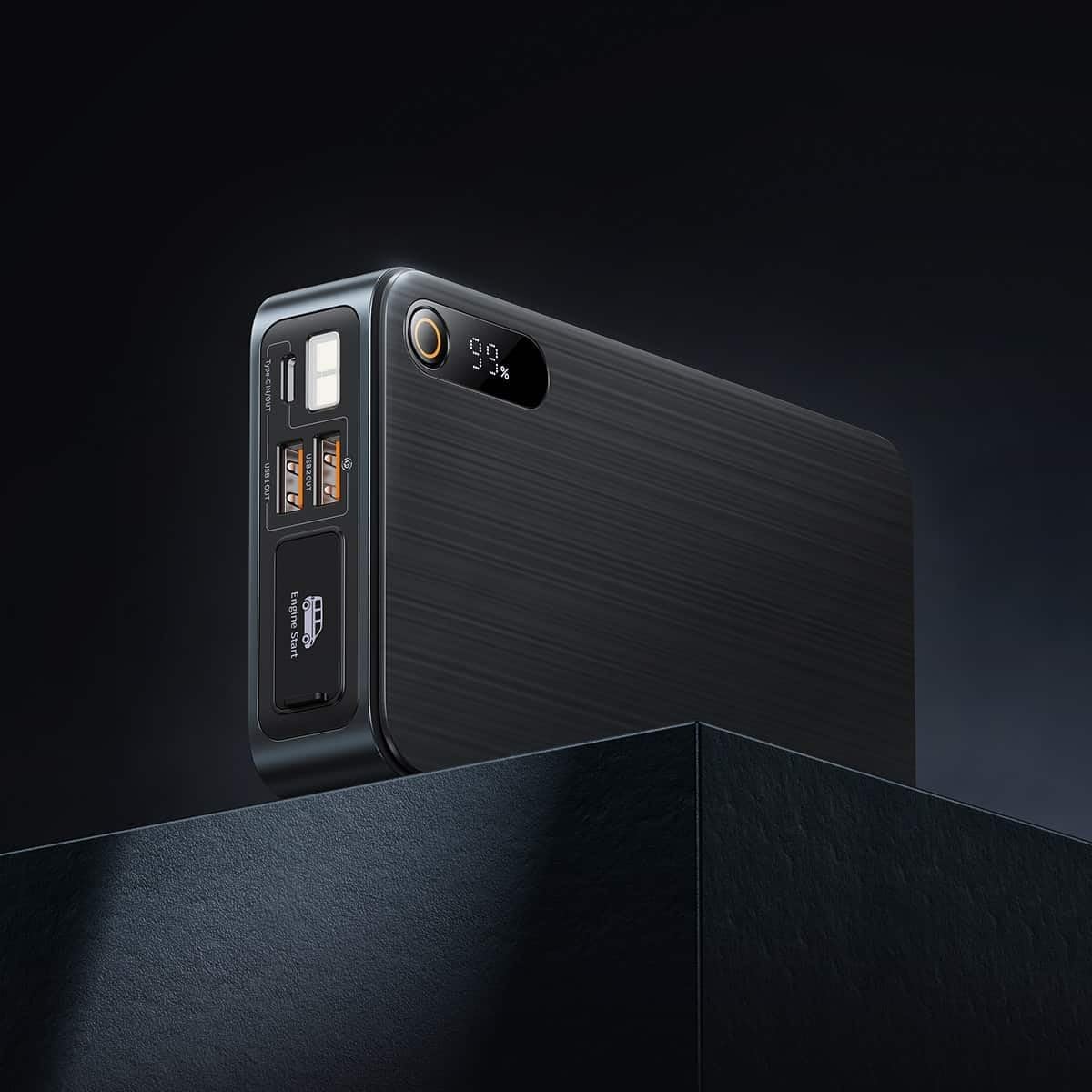
Image: Close-up of the jump starter's side panel, highlighting the various ports and the digital display.
- Ngosipụta Digital: Na-egosi pasentị batrị fọdụrụnụtage.
- Bọtịnụ ike: Activates the device and turns on the LED light.
- Ọdụ ụgbọ mmiri USB-A: For charging external devices like smartphones or tablets.
- Type-C Input/Output Port: Used for charging the jump starter itself or charging other devices.
- Engine Start Port: Dedicated port for connecting the smart jumper cables.
- Igwe ọkụ ọkụ LED: Na-enye ọkụ na gburugburu gbara ọchịchịrị.

Image: The Baseus Super Energy Pro Car Jump Starter unit, displaying its digital battery indicator.
Ịchaji ngwaọrụ
Before first use, fully charge the Baseus Super Energy Pro Car Jump Starter. It is recommended to keep the device charged above 50% for optimal performance and longevity.
- Connect the provided USB-C charging cable to the Type-C port on the jump starter.
- Connect the other end of the USB-C cable to a suitable USB power adapter (not included).
- The digital display will show the charging progress. The device is fully charged when the display shows 100%.
Setup for Jump Starting
Ensure your vehicle is in Park (P) or Neutral (N) and the parking brake is engaged. Turn off all vehicle accessories (headlights, radio, air conditioning).
- Ensure the jump starter has sufficient charge (at least 50%).
- Connect the blue end of the smart jumper cables into the Engine Start port on the jump starter. Ensure it is firmly seated.
Operating Instructions (Jump Starting)
Follow these steps carefully to jump start your vehicle:
- Jikọọ Red Clamp: Tinye uhie (+) clamp of the jumper cables to the positive (+) terminal of your vehicle's dead battery.
- Jikọọ Black Clamp: Tinye oji (-) clamp of the jumper cables to the negative (-) terminal of your vehicle's dead battery.
- Lelee ihe ngosi: Observe the indicator light on the smart jumper cable. A solid green light indicates a correct connection and that the device is ready to start. If it's red or flashing, check connections or refer to troubleshooting.
- Ụgbọ ala: Once the indicator is green, start your vehicle's engine.
- Remove Jumper Cables: As soon as the engine starts, immediately remove the blue plug of the jumper cables from the jump starter.
- Kwupu njikọ Clamps: Mgbe ahụ, wepụ ihe ojii (-) cl ahụamp from the vehicle battery, followed by the red (+) clamp.
Allow your vehicle's engine to run for at least 20-30 minutes to recharge its battery.
Nlekọta
- Nchekwa: Store the jump starter in a cool, dry place, away from direct sunlight and moisture.
- Ịchaji: For optimal battery life, recharge the device every 3-6 months, even if not in use.
- Nhicha: Jiri ákwà dị nro ma kpọọ nkụ hichaa ngwaọrụ ahụ. Ejila kemịkalụ siri ike ma ọ bụ ihe ndị na-emebi emebi.
- Mkpofu batrị: Do not dispose of the device in household waste. Follow local regulations for proper disposal of lithium-ion batteries.
Nchọpụta nsogbu
| Nsogbu | Ihe nwere ike ime | Ngwọta |
|---|---|---|
| Ụgbọala anaghị ebido | Jump starter battery is low. Njikọ eriri na-ezighi ezi. Batrị ụgbọala emebiela nke ukwuu. | Tinyegharịa ihe mmalite ihe mwụli elu. Lelee clamp connections to battery terminals. Gakwuru ọkachamara n'ihe gbasara mekaniki. |
| Mbuli elu anaghị agbacha ọkụ | Eriri chaja ma ọ bụ ihe nkwụnye ọkụ nwere nsogbu. Type-C port damaged. | Gbalịa eriri USB-C dị iche na nkwụnye ọkụ. Kpọtụrụ nkwado ndị ahịa. |
| Smart cable indicator is red/flashing | Weghachite njikọ polarity. Short circuit detected. N'ofe-ugbu a/over-voltage. | Kwupu ma jikọọ klamps correctly (red to +, black to -). Gbaa mbọ hụ na clamps anaghị emetụ ibe ha aka. Disconnect and try again after a few minutes. If problem persists, contact support. |
Nkọwapụta
| Njirimara | Nkọwa |
|---|---|
| Ụdị | Baseus |
| Nọmba nlereanya | CGNL070001 |
| Ọnụ ugbu a | 1600 A |
| Ngwakọta batrị | Lithium-ion |
| Servicedị Ọrụ hicgbọ | Ụgbọ ala |
| Akụkụ ngwaahịa (L x W x H) | 10 x 5 x 1.27 cm |
| Ibu Ibu | 920 g |
| Ntinye/mmepụta | USB-A Output, Type-C Input/Output |
Akwụkwọ ikike na nkwado
For warranty information or technical support, please refer to the warranty card included with your product or contact the retailer where you purchased the device. You may also visit the official Baseus websaịtị maka enyemaka na nkọwa kọntaktị ndị ọzọ.