Okwu mmalite
The Widex Moment 110 hearing aid ranks as the lowest technology level offered by Widex within the Moment family. The Moment 110 technology level delivers Mid-level performance by FitHearing standards.
Basic hearing aids will provide a few filters and programs, making these devices ideal for those with a mostly quiet lifestyle. If you primarily wish to improve your hearing in small groups, one-on-one conversation, and during routine activity within a home setting, the Widex Moment 110 may be the hearing aid for you.
Moment 110 hearing aids feature traditional Receiver-in-canal (RIC) form factor, whereby the hearing aids sit comfortably and discreetly behind your ear. These hearing aids are made-for-smartphones so you can stream calls, music, and other audio directly through your hearing aids.
Ngwaahịa gafereview
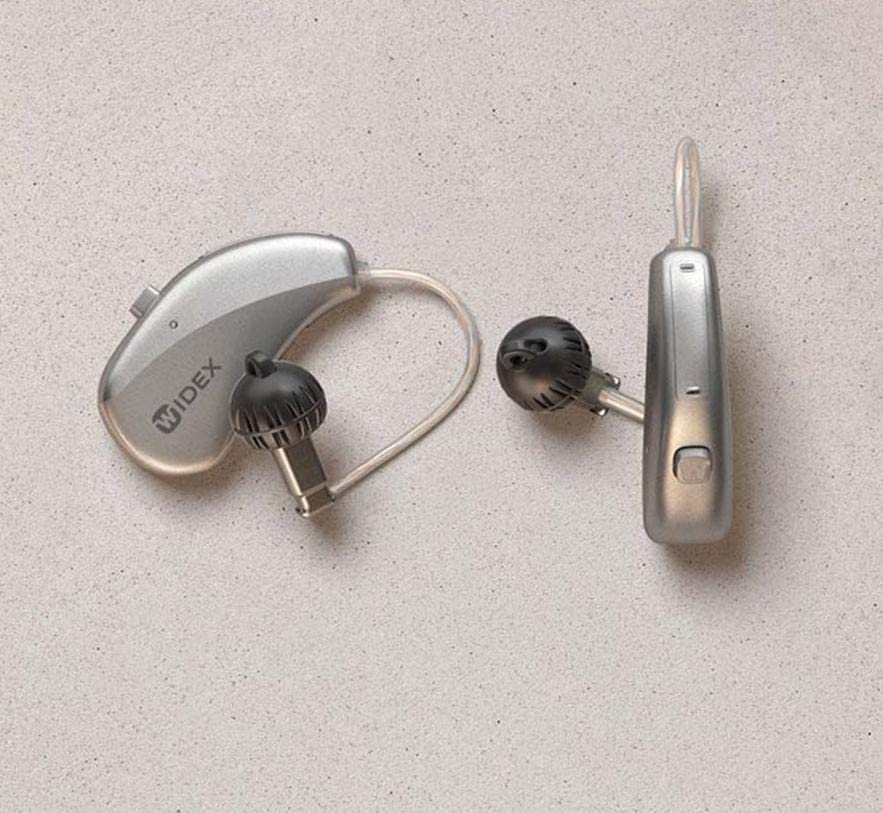
This image displays the Widex Moment Sheer 110 hearing aid, featuring its Receiver-in-canal (RIC) design. The device consists of a small, silver-colored unit that rests behind the ear, connected by a thin tube to an in-ear component with a black dome. The "WIDEX" logo is visible on the main unit. Another similar component is shown separately, indicating a pair of hearing aids.
Kedu ihe dị na Igbe ahụ
- Widex Moment Sheer 110 Hearing Aid (Pair)
- Akpa nchaji ikuku
Ntuziaka nhazi
1. Nchaji mbụ
Before first use, place your Widex Moment Sheer 110 hearing aids into the provided Wireless Charging Case. Ensure the case is connected to a power source. The indicator lights on the case and hearing aids will show charging status. A full charge typically takes 3-4 hours.
2. Ijikọ na Smartphone
- Gbaa mbọ hụ na agbanyere Bluetooth nke ama gị.
- Open the battery doors of your hearing aids (if applicable) or place them in and out of the charging case to put them in pairing mode.
- On your smartphone, go to Bluetooth settings and select your Widex Moment Sheer 110 from the list of available devices.
- Soro mkpali na ihuenyo ọ bụla iji mezue usoro njikọta.
3. First Fit
Gently place the hearing aid unit behind your ear. Guide the thin tube and the in-ear component into your ear canal. Ensure it sits comfortably and securely. Consult with your audiologist for proper fitting and initial programming.
Ntuziaka ọrụ
1. Gbanyụọ / gbanyụọ
- Iji gbanye: Remove the hearing aids from the charging case. They will automatically power on.
- Iji gbanyụọ: Place the hearing aids back into the charging case. They will automatically power off and begin charging.
2. Njikwa olu
Volume adjustments can typically be made via the connected smartphone app or through a small button/rocker switch on the hearing aid itself (refer to specific model details for button functionality).
3. Nhọrọ mmemme
Your hearing aids may have multiple listening programs for different environments (e.g., quiet, noisy, music). These programs can be switched using the smartphone app or the control button on the hearing aid.
4. Streaming Audio
Once paired, you can stream audio (calls, music, podcasts) directly from your smartphone to your hearing aids. Initiate audio playback on your phone, and it will automatically route to the hearing aids.
Nlekọta na nlekọta
1. Nhicha kwa ụbọchị
Wipe your hearing aids daily with a soft, dry cloth to remove earwax and debris. Use the provided cleaning tools (if any) to clear the sound outlet and microphone ports. Do not use water or cleaning solvents.
2. Charging Case Care
Keep the charging case clean and dry. Periodically wipe the charging contacts with a dry cotton swab. Ensure no debris obstructs the charging ports.
3. Nchekwa
When not in use, store your hearing aids in their charging case or a dry, cool place away from direct sunlight and extreme temperatures. Keep them out of reach of children and pets.
Nchọpụta nsogbu
| Nsogbu | Ihe nwere ike ime | Ngwọta |
|---|---|---|
| Enweghị ụda | Battery depleted; Earwax blockage; Hearing aid off. | Charge the hearing aids; Clean the sound outlet; Ensure hearing aids are powered on. |
| Ogo ụda adịghị mma | Low battery; Earwax buildup; Incorrect program. | Recharge; Clean hearing aid; Switch to appropriate listening program. |
| Connectivity Issues (Smartphone) | Bluetooth off; Hearing aids out of range; Pairing lost. | Ensure Bluetooth is on; Move closer to phone; Re-pair the devices. |
| Batrị anaghị achaji | Charging case not powered; Poor contact with charging pins. | Check power connection to case; Clean charging contacts on both hearing aids and case. |
If problems persist, please contact customer support or your hearing care professional.
Nkọwa nka nka
| Aha Nlereanya | Widex Moment Sheer 110 (Internal Model: signia) |
| Teknụzụ Njikọta | Ikuku |
| Teknụzụ nzikọrịta ozi ikuku | Ikuku |
| Ngwa gụnyere | Akpa nchaji ikuku |
| Ogologo afọ (Nkọwa) | Okenye |
| Ihe eji eme ihe maka ngwaahịa | Jiri kwa ụbọchị |
| Ngwa dakọtara | Smartphones, Wireless Charging Cases |
| Usoro njikwa | Remote (via smartphone app) |
| Ọnụọgụ nke ihe | 1 (referring to the product unit, typically sold as a pair) |
| Ụdị ọkwọ ụgbọ ala ọdịyo | Ọkwọ ụgbọala dị ike |
| Ụdị ntị | Ntị |
| Onye nrụpụta | Hearing for life pvt.Ltd. |
| Akụkụ ngwaahịa | 10 x 4 x 8 cm |
| Ngwaike Platform | Ekwentị mkpanaaka |
| Atụmatụ pụrụ iche | Nchaji ngwa ngwa |
| Ụbọchị mbụ dị | Maachị 10, 2023 |
| Agba | agba aja aja |
| Ntinye ntị | N'elu Ntị |
| Ụdị Ihe | N'elu Ntị |
| Jack ekweisi | 3.5 mm Jack (Note: This specification seems unusual for a modern RIC hearing aid, typically they are wireless. User should rely on wireless connectivity for this model.) |
Akwụkwọ ikike na nkwado
Emepụtara ngwaahịa a site na Hearing for life pvt.Ltd. For specific warranty details, please refer to the warranty policy provided at the time of purchase or contact the manufacturer directly. General warranty information may be available via the retailer's websaịtị.
For technical support, troubleshooting assistance beyond this manual, or service inquiries, please contact your authorized Widex dealer or the manufacturer's customer service department.
Iwu nloghachi: Please refer to the retailer's returns policy for information on product returns.


