Okwu mmalite
Thank you for choosing the Genai True Wireless Earphones. This manual provides detailed instructions on how to set up, operate, maintain, and troubleshoot your new earphones. Please read this manual carefully before use to ensure optimal performance and longevity of your device.
Ngwaahịa gafereview
The Genai True Wireless Earphones feature a digital intelligence LED display on the charging case, tap control for easy operation, and Bluetooth 5.0 for stable connectivity. They are designed for comfortable in-ear wear and deliver clear stereo sound.
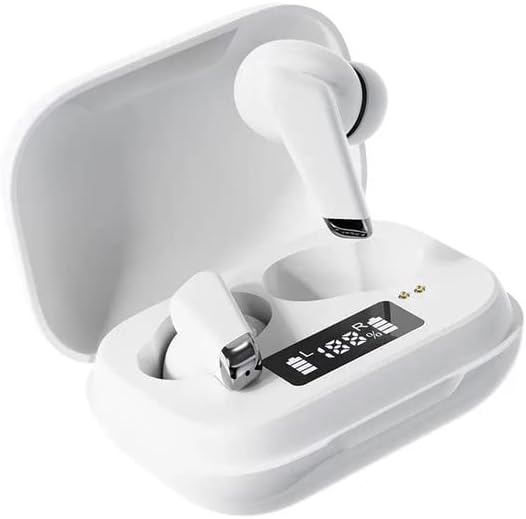
Image: Genai True Wireless Earphones in their charging case, showcasing the digital LED display indicating battery levels.
Akụkụ ndị bụ isi:
- Ezi stereo ikuku ikuku (TWS): Seamless audio experience without cables.
- Pịa njikwa: Intuitive touch-sensitive controls for music and calls.
- Digital Intelligence LED Display: Shows real-time battery status of earbuds and charging case.
- Bluetooth Bluetooth: Na-eme ka njikọ ikuku kwụsiri ike ma dị irè.
- Imepụta n'ime ntị ergonomic: Comfortable and secure fit.
Ntuziaka nhazi
1. Ịchaji ekwe ntị na akpa
- Ebube mbụ: Before first use, fully charge the charging case and earbuds. Place the earbuds into the charging case.
- Jikọọ chaja: Jiri eriri USB dakọtara jikọọ igbe chaja ahụ na isi iyi ike.
- Nyochaa ihe ngosi LED: The digital LED display on the case will show the charging status and battery percentage. Ensure both earbuds and the case are fully charged before proceeding.

Image: The charging case with its digital LED display, indicating the charge level of both the case and the individual earbuds.
2. Ijikọ na ngwaọrụ gị
- Ike Na: Open the charging case. The earbuds will automatically power on and enter pairing mode. You may hear an audible prompt.
- Mee ka Bluetooth rụọ ọrụ: Na ekwentị gị ma ọ bụ ngwaọrụ Bluetooth ọzọ, gaa na ntọala Bluetooth wee mee ka Bluetooth nwee ike.
- Họrọ Ngwaọrụ: Look for "Genai Earphones" (or similar name) in the list of available devices and select it to connect.
- nkwenye: Once successfully paired, you will hear a confirmation sound, and the earbuds will be ready for use.

Image: A visual representation of the Bluetooth 5.0 chipset, highlighting the stable wireless connection technology.
Ntuziaka ọrụ
The Genai True Wireless Earphones feature intuitive tap controls. The specific functions may vary slightly, but common controls are listed below:
Gbanyụọ/ Gbanyụọ
- Ike Na: Open the charging case, or long-press the touch area on both earbuds for a few seconds.
- Gbanyụọ: Place the earbuds back into the charging case and close the lid, or long-press the touch area on both earbuds for several seconds until they power off.
Egwu Egwu
- Gwuo/kwụsịtụ: Otu mgbata na ntị ntị.
- Track na-esote: Pịa bọtịnụ ntị aka nri ugboro abụọ.
- Gara aga Track: Kpatụ ntị ugboro abụọ n'akụkụ aka ekpe.
Njikwa Oku
- Azịza/Kwụsị Oku: Otu pịa ma ọ bụ ekwe ntị n'oge oku mbata ma ọ bụ oku nọ n'ọrụ.
- Jụ oku: Pịa ogologo na ntị ntị n'oge oku mbata.
Onye enyemaka olu
- Mee ka onye enyemaka olu rụọ ọrụ: Pịa aka ugboro atọ na ntị abụọ ahụ (ọrụ ya nwere ike ịdị iche site na ngwaọrụ).
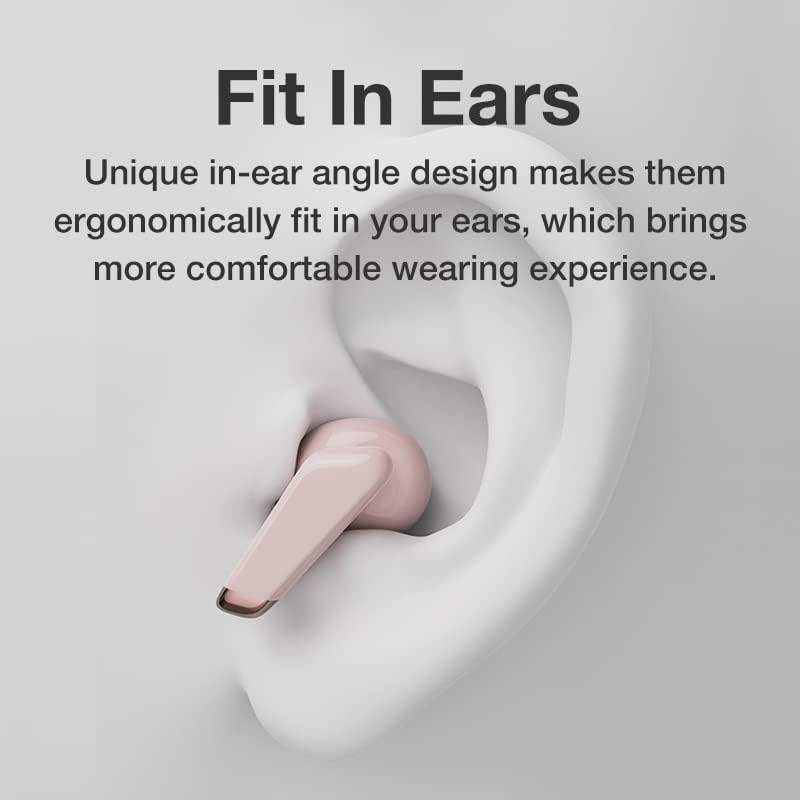
Image: An illustration showing an earbud comfortably and ergonomically fitted within the ear canal.
Nlekọta
Nhicha
- Jiri ákwà dị nro, kpọrọ nkụ, nke na-enweghị lint hichaa ntị ntị na ihe mkpuchi chaja.
- Ejila ihe mkpocha abrasive, ihe mgbaze, ma ọ bụ aerosol sprays.
- Gently clean the ear tips and speaker mesh to remove any earwax or debris.
Nchekwa
- Chekwaa ekwe ntị n'akpa chaja ha mgbe ejighị ya iji chekwaa ya ma debe ya chaja.
- Avoid storing in extreme temperatures, direct sunlight, or high humidity.
Nchọpụta nsogbu
- Earbuds not pairing with each other or with device:
- Gbaa mbọ hụ na akwụgoro ekwe ntị abụọ ahụ.
- Place both earbuds back into the charging case, close the lid, wait a few seconds, then open the lid again.
- On your device, forget/delete the "Genai Earphones" from the Bluetooth list and try pairing again.
- Enweghị ụda ma ọ bụ obere olu:
- Lelee ọkwa olu na ma ngwaọrụ gị yana ntị ntị.
- Gbaa mbọ hụ na ejikọrọ ekwe ntị nke ọma na ngwaọrụ gị.
- Clean any debris from the earbud speaker mesh.
- Nsogbu ịchaji:
- Gbaa mbọ hụ na ejikọrọ eriri chajị na echekwabara na ikpe ahụ yana isi iyi ike.
- Nyochaa na isi iyi ike na-arụ ọrụ.
- Hichaa kọntaktị ịchaji na ma ntị ntị yana akpa ahụ.
Nkọwapụta
| Njirimara | Nkọwa |
|---|---|
| Nlereanya | B0BX5G53VT |
| Teknụzụ Njikọta | Ikuku (Bluetooth 5.0) |
| Ụdị ntị | Ọkara mepere emepe |
| Ọnụọgụ Ndị Ọkwọ ụgbọala | 2 |
| Ụzọ nchaji | Nchaji ikpe |
| Ihe mkpuchi ekweisi | Silikoni |
| Dayameta ọkwọ ụgbọ ala | 10mm |
| Mgbagwoju anya Harmonic Distor | 0.02% |
| Oke mgbochi | Ruo 32 Ω |
| Ihe onwunwe | Silikoni |
| Ntinye ntị | Na Ntị |
| Ụdị Ihe | Ezi ikuku |
Akwụkwọ ikike na nkwado
The Genai True Wireless Earphones come with a Akwụkwọ ikike nke ọnwa 12 from the date of purchase, covering manufacturing defects. For any quality problems or support inquiries, please contact the seller directly through your purchase platform.
We are committed to ensuring 100% customer satisfaction. If you encounter any issues, please do not hesitate to reach out for assistance, including full refunds or replacements as applicable.


