1. Okwu mmalite
Welcome to the user manual for your Jebao Jecod ECP Smart Cross-Flow Pump Wave Maker. This device is engineered to create optimal water movement within your aquarium, enhancing the aquatic environment for its inhabitants. It offers versatile control options, including both manual adjustments via an LCD controller and remote management through a dedicated Wi-Fi application.
2. Ntuziaka nchekwa
- Always disconnect the power supply before performing any maintenance, installation, or removal of the pump.
- Ensure all electrical connections remain dry. Do not operate the pump if the power cord or plug is damaged.
- The pump must be fully submerged in water during operation. Running the pump dry will cause damage and void the warranty.
- Securely mount the pump within the aquarium using the provided magnetic bracket to prevent accidental dislodgement.
- Jiri naanị voltage (AC 100-240V input, DC 24V output) and the original power adapter.
- Keep the controller and power adapter away from water and high humidity.
3. Ihe ngwugwu
Biko chọpụta na agụnyere ihe niile edepụtara n'okpuru na ngwugwu gị:
- Jebao Jecod ECP-70M Cross-Flow Pump
- LCD Display Controller
- Ihe nkwụnye ọkụ
- Akwụkwọ ntuziaka (akwụkwọ a)
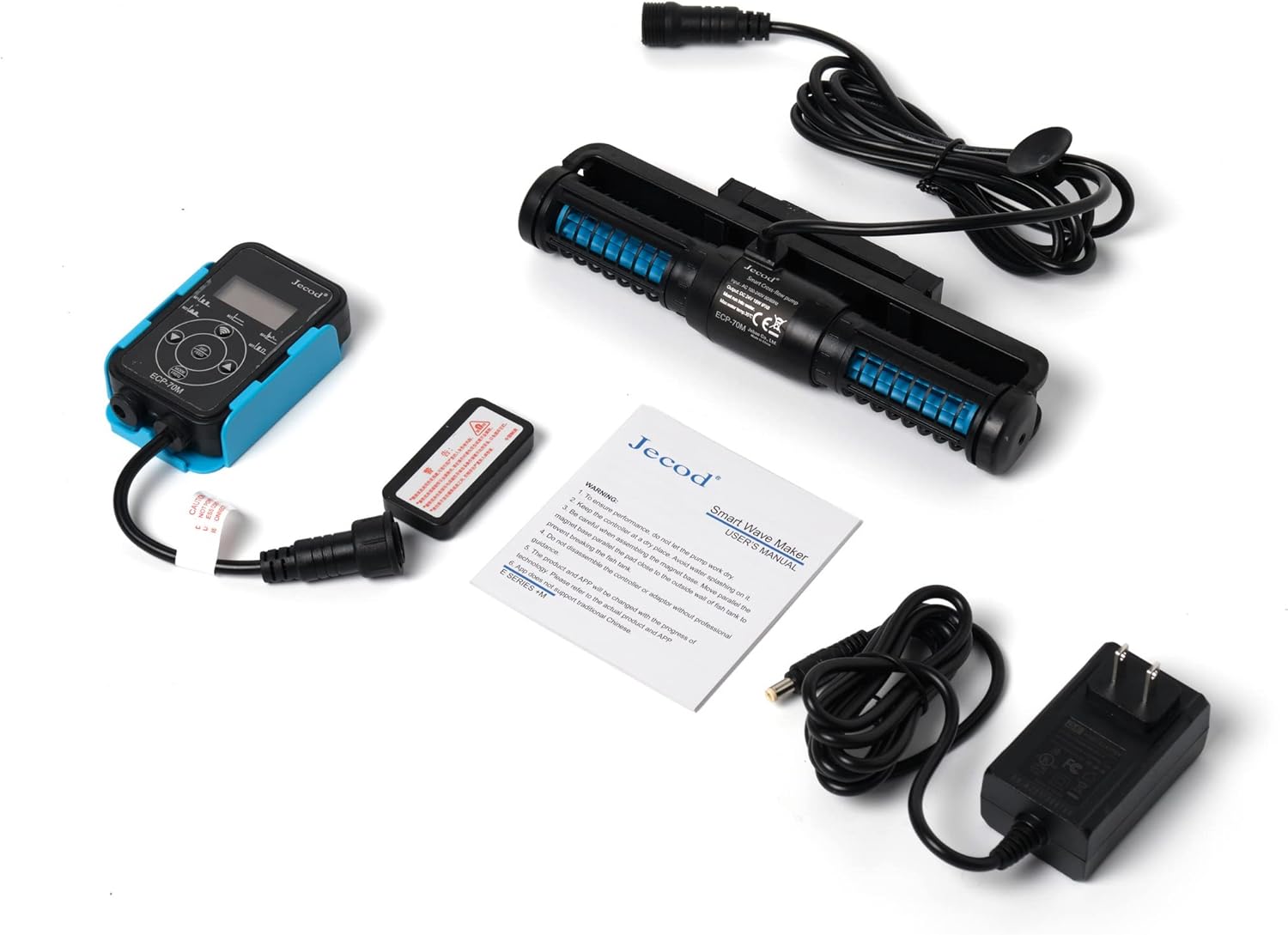
Foto 3.1: All components of the ECP-70M system laid out: pump, controller, power adapter, and instruction sheet.
4. Ngwaahịa gafereview
The Jebao Jecod ECP-70M is a smart cross-flow pump designed for efficient water circulation. Its unique cross-flow, single impeller structure ensures broad and even water movement without creating dead spots in your aquarium. The pump utilizes SINE wave technology for quiet operation and stable performance. It is suitable for both marine and fresh water environments, featuring no exposed copper elements.

Foto 4.1: Jebao Jecod ECP-70M Smart Cross-Flow Pump and Controller, shown with its retail packaging.

Foto 4.2: Agara nso view of the ECP-70M pump unit, displaying the label with technical specifications and model number.

Foto 4.3: N'elu view of the ECP-70M cross-flow pump, illustrating its elongated design for broad water movement.

Foto 4.4: N'akuku view of the ECP-70M pump, highlighting the impeller housing and water intake/output design.

Foto 4.5: Akụkụ profile of the ECP-70M pump, showing the magnetic mounting bracket for secure aquarium attachment.
5. Nhazi
5.1. Ntinye mgbapụta
- Select an appropriate location inside your aquarium for the pump. Ensure the pump is positioned to create the desired water flow patterns.
- Attach the pump to the aquarium glass using the magnetic mounting bracket. The pump should be fully submerged in water.
- Ensure the pump is securely fastened and will not move due to water flow or vibration.
5.2. Njikọ Ọdụdọ
- Connect the pump's cable securely to the designated port on the LCD controller.
- Jikọọ ihe nkwụnye ọkụ na njikwa.
- Plug the power adapter into a suitable electrical outlet (AC 100-240V).
5.3. Wi-Fi Setup (Optional)
For advanced control and remote operation, you can connect your ECP-70M to your home Wi-Fi network:
- Download the 'Jebao App' from your smartphone's app store (available for iOS and Android).
- Open the app and follow the on-screen instructions to register an account or log in.
- Select the option to add a new device and follow the pairing process to connect your ECP-70M controller to your Wi-Fi network. Ensure your phone is connected to a 2.4GHz Wi-Fi network during the initial setup.
6. Ntuziaka ọrụ
6.1. Njikwa akwụkwọ ntuziaka
The LCD controller allows for direct adjustment of pump settings:
- Use the buttons on the controller to navigate through different operating modes (e.g., constant flow, pulse mode, random wave mode).
- Adjust the flow intensity or wave frequency using the designated control buttons. The LCD screen will display the current settings.
6.2. Wi-Fi Control (Jebao App)
Once connected to Wi-Fi, the Jebao App provides comprehensive control:
- Open the Jebao App on your smartphone.
- Select your ECP-70M device from the list of connected devices.
- From the app interface, you can select various operating modes, fine-tune flow rates, set custom wave patterns, and schedule daily operations.
- The app also allows for remote monitoring of the pump's status.
7. Nlekọta
Regular maintenance ensures optimal performance and longevity of your pump.
7.1. Pump Cleaning
- Kwụpụ ike: Always unplug the power adapter from the electrical outlet before handling the pump.
- Wepu mgbapụta: Jiri nlezianya wepụ ọkpọkọ ahụ na akwarium.
- Kwụsa: Gently disassemble the impeller housing and remove the impeller. Refer to the diagrams in the full manual for specific disassembly steps if needed.
- Ngwa dị ọcha: Use a soft brush and clean water to remove any accumulated algae, debris, or mineral deposits from the impeller, impeller housing, and pump body. Avoid using harsh chemicals or abrasive materials.
- Rinse and Reassemble: Rinse all components thoroughly with clean water and carefully reassemble the pump. Ensure all parts are correctly seated before placing the pump back into the aquarium.
7.2. Controller Care
Keep the controller dry and clean. Avoid exposing it to water splashes or high humidity, as this can damage the electronic components.
8. Nchọpụta nsogbu
If you encounter issues with your ECP-70M pump, please refer to the following common troubleshooting steps:
- Pump Not Starting or No Water Flow:
- Check if the power adapter is securely plugged into both the controller and the electrical outlet.
- Ensure the pump cable is firmly connected to the controller.
- Verify that the pump is fully submerged in water.
- Inspect the impeller for any blockages (e.g., debris, sand, snails). Perform a thorough cleaning as described in the Maintenance section.
- Error Messages on Controller:
- Error messages often indicate a blockage, dry running, or an electrical fault. Disconnect power immediately.
- Inspect the pump for blockages and clean it.
- If the error persists after cleaning and ensuring proper submersion, contact customer support.
- Okwu njikọ Wi-Fi:
- Confirm your smartphone is connected to a 2.4GHz Wi-Fi network during the initial setup process.
- Double-check that you have entered the correct Wi-Fi password.
- Try restarting both the ECP-70M controller and your home Wi-Fi router.
- Ensure the controller is within effective range of your Wi-Fi router.
- Arcing/Sparking When Unplugging:
- If you observe arcing or sparking when disconnecting the power adapter from the controller or outlet, this indicates a potential electrical hazard. Immediately discontinue use of the product and contact customer support. Do not attempt to repair the unit yourself.
9. Nkọwapụta
| Nlereanya | ECP-70M |
| Ntinye Voltage | AC 100-240V, 50/60Hz |
| Mmepụta Voltage | DC 24V |
| Oriri ike | 18W |
| Ọnụego nfe kacha | 1320 GPH (galọn kwa elekere) |
| Akụkụ mgbapụta (L x W x H) | 8.5" x 2.5" x 1.25" |
| Ibu Ibu | Ihe dị ka 2 pound |
| Water Type Suitability | Marine and Fresh Water |
| Usoro njikwa | Manual LCD Controller, Wi-Fi (Jebao App for iOS/Android) |
| Nkà na ụzụ | SINE wave technology, Cross wave single impeller structure |
10. Akwụkwọ ikike na nkwado
For detailed warranty information, terms, and conditions, please refer to the documentation provided with your original purchase. In case of technical issues, questions, or to initiate a warranty claim, please contact Jebao customer service directly. It is recommended to keep your proof of purchase (receipt or invoice) readily available for any support inquiries.
For the most up-to-date contact information, please visit the official Jebao websaịtị ma ọ bụ rụtụ aka na nkọwa kọntaktị enyere na nkwakọ ngwaahịa gị.


