1. Okwu mmalite
The Cooler Master Synk X is an ergonomic real-time tactile immersion chair designed to enhance your entertainment experience. It converts sound waves into vibrations, providing tactile feedback for games, movies, and music. This manual provides essential information for the safe and efficient use of your Synk X chair.

Figure 1.1: Cooler Master Synk X Immersive Chair
2. Ozi nchekwa
Please read all safety instructions carefully before using the Synk X chair. Failure to follow these instructions may result in injury or damage to the product.
- Oke ibu: This product has a maximum weight recommendation of 275 pounds (125 kg). Exceeding this limit could result in damage to the chair or pose a risk of injury.
- Isi mmalite ike: Jiri naanị ihe nkwụnye ike enyere maka ịchaji.
- Nkwanye: Ensure the chair is placed on a stable, level surface. Avoid placing it near heat sources or in direct sunlight.
- Nhicha: Refer to the maintenance section for proper cleaning procedures. Do not use abrasive cleaners or immerse electrical components in water.
- Ụmụaka: Keep children and pets away from the chair during operation and assembly.
- Mgbanwe: Do not attempt to modify or disassemble the chair. Unauthorized modifications may void the warranty and pose safety risks.
3. Ihe ngwugwu
Chọpụta na ihe niile edepụtara n'okpuru dị na ngwugwu gị:
- Synk X Chair (Seat and Backrest)
- Oche oche
- Silinda ebuli gas
- 5 Wheel Wheel
- Ohiri isi lumbar
- Ogwe aka (2)
- Ihe nkwụnye ọkụ
- Bluetooth Transceiver (optional accessory)
- Auxiliary Cables
- Ngwa ngwaike (skru, washers, Allen wrench)
- Akwụkwọ ntuziaka onye ọrụ
Vidiyo 3.1: Mwepu na ihe ọzọview nke ihe ndị gụnyere.
4. Nhazi
Follow these steps to assemble your Cooler Master Synk X chair:
- Tinye wiil Caster na ntọala: Insert each of the five caster wheels into the openings at the ends of the chair base until they click securely into place.
- Tinye Gas ebuli: Place the gas lift cylinder into the central hole of the chair base.
- Tinye ogwe aka: Secure the armrests to the underside of the seat using the provided screws from the hardware kit. Ensure they are firmly attached.
- Jikọọ Oche na Igwe Mbuli Gas: Carefully align the central mechanism on the underside of the seat with the top of the gas lift cylinder and press down firmly until the seat is securely seated.
- Tinye azụ azụ: Connect the backrest to the seat assembly using the remaining screws. Ensure all connections are tight.
- Jikọọ eriri: Locate the internal cables for the haptic system and RGB lighting. Connect them according to the diagrams in the included user manual.
- Attach Lumbar Pillow: Position the lumbar pillow on the backrest for ergonomic support.
Video 4.1: Visual guide for chair assembly.

Figure 4.1: Fully assembled Cooler Master Synk X chair.
5. Ntuziaka ọrụ
The Synk X chair features an intuitive control panel for managing its functions.
5.1 Ogwe njikwa gafereview

Ọgụgụ 5.1: Zuru ezu view nke njikwa njikwa.
- DC 19V n'ime: Power input for charging the chair's internal battery. A full charge takes approximately 6 hours and provides 4 hours of battery life.
- Ndị na -egosi ọnọdụ batrị: LEDs display the current battery charge level.
- Nkeji oge: 3.5mm auxiliary input for wired audio sources.
- Kachasị Button: Initiates Bluetooth pairing mode for wireless audio connections.
- Họrọ bọtịnụ: Cycles through different audio input modes (AUX, Bluetooth, 5.8G).
- Jack ekweisi: 3.5mm output for connecting wired headphones.
- Nkpọ olu: Adjust master volume and headphone volume.
- Vibration Level Knob: Controls the intensity of the tactile feedback.
- ARGB Button: Cycles through various RGB lighting modes and colors.
- Bọtịnụ ike: Turns the chair on or off.
Video 5.1: Demonstration of the control panel functions.
5.2 Tactile Immersion
The Synk X converts audio signals into real-time vibrations, providing a dynamic tactile experience. Adjust the 'Vibration Level' knob to customize the intensity.
Video 5.2: Demonstration of the chair's vibration mode with a bowl of water.
5.3 RGB ọkụ
The chair features customizable RGB lighting on the backrest. Press the 'ARGB' button on the control panel to cycle through various lighting effects and colors.

Figure 5.2: RGB lighting on the Synk X chair.
Video 5.3: Demonstration of RGB lighting modes.
5.4 Mgbanwe Ergonomic
The Synk X chair offers multiple adjustments for personalized comfort:
- Ogologo oche: Use the lever located under the seat to adjust the chair's height.
- Akụkụ nrịda ala: The backrest can recline up to 135 degrees. Use the recline lever to find your preferred angle.
- Retractable Leg Rest: Pull out the leg rest from under the seat for extended comfort.
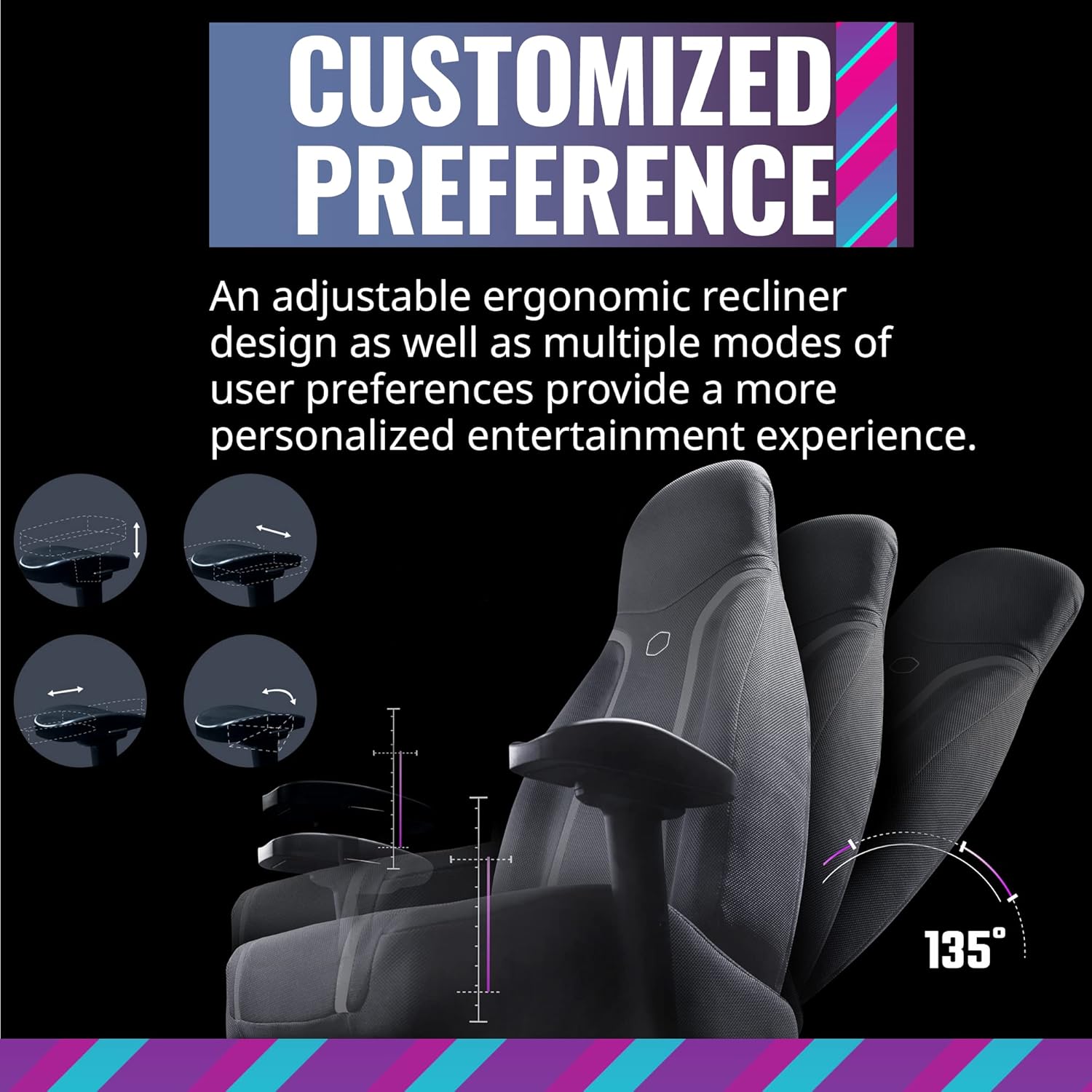
Figure 5.3: Ergonomic adjustments including recline and leg rest.
6. Nlekọta
Proper care will extend the life of your Synk X chair:
- Nhicha: Jiri mgbasa ozi hichaa ọchaamp akwa . Ejila kemịkalụ siri ike ma ọ bụ ihe abrasive.
- Mwụfu: In case of spills, immediately blot the area with a clean, dry cloth.
- Moving the Chair: When moving the chair, lift it rather than dragging it to prevent damage to the base and floor.
- Nchekwa: Store the chair in a cool, dry place away from direct sunlight and extreme temperatures.
7. Nchọpụta nsogbu
If you encounter issues with your Synk X chair, refer to the following common problems and solutions:
| Nsogbu | Ihe nwere ike ime | Ngwọta |
|---|---|---|
| No power/Chair not turning on | Battery is depleted; Power adapter not connected; Power button not pressed. | Connect the power adapter and charge the chair. Ensure the power button is pressed firmly. |
| No tactile feedback/vibration | Vibration level set too low; Audio source not connected or playing; Cables are loose. | Increase the vibration level using the knob. Verify the audio source is connected and playing. Check all internal cable connections. |
| Nsogbu njikọta Bluetooth | Chair not in pairing mode; Device too far; Interference. | Press the pairing button on the control panel. Ensure your device is within range. Reduce interference from other wireless devices. |
| RGB ọkụ anaghị arụ ọrụ | Lighting off; Cable connection loose. | Press the ARGB button to cycle through modes. Check the RGB cable connection. |
| Oche ahụ na-adị ka ihe na-adịghị mma ma ọ bụ na-ama jijiji | Loose screws; Uneven floor. | Lelee ma sie ike skru niile e ji ejikọta ihe. Hụ na oche ahụ dị n'elu dị larịị ma dịkwa nha nha. |
8. Nkọwapụta
- Akara: Nna-ukwu oyi
- Aha nlereanya: Synk X
- Nọmba Nlereanya ihe: IXC-SX1-I-US1
- Agba: Agba ntụ nke ọnwa
- Ihe: Polycarbonate
- Ibu ihe: 80.8 pound (36.74 n'arọ)
- Akụkụ ngwaahịa (LxWxH): 22 x 26.25 x 37 sentimita asatọ
- Nkwanye ịdị arọ kachasị: Pound 275 (125 n'arọ)
- Ụdị azụ: Mepee azụ
- Njirimara Pụrụ Iche: Ergonomic, Rolling, Tactile Immersion
- Eji akwadoro: Ịgba egwu
- Ọnụọgụgụ Ọnọdụ Ndagharị: More than one (up to 135 degrees)
- Njikọta: Bluetooth, AUX, 5.8G (with optional transceiver)
- Ndụ batrị: Approximately 4 hours on a full charge
- Oge nchaji: Ihe dị ka awa 6
9. Akwụkwọ ikike & Nkwado
For warranty information and customer support, please refer to the official Cooler Master websaịtị ma ọ bụ kpọtụrụ ngalaba ọrụ ndị ahịa ha. Debe nnata nzụta gị dị ka ihe akaebe nke ịzụrụ maka nkwupụta ikike.
Nkwado n'ịntanetị: Visit the Cooler Master support page for FAQs, drivers, and contact options.
Ozi mkpọtụrụ: Refer to the Cooler Master websaịtị maka nkọwa kọntaktị mpaghara.


