1. Okwu mmalite
The MiLESEEY DP20 Bilateral Laser Distance Meter is a professional-grade measuring tool designed for accuracy and efficiency in various applications. This device features patented coaxial optical technology, multiple measurement functions, and a durable design, making it suitable for both professional and DIY use. This manual provides comprehensive instructions for its safe and effective operation.

Figure 1: MiLESEEY DP20 Bilateral Laser Distance Meter
2. Ozi nchekwa
Please read and understand all safety instructions before using the device. Failure to follow these instructions may result in laser radiation exposure, electric shock, fire, or serious injury.
2.1 Nchekwa izugbe
- Debe ngwaọrụ ahụ ka ụmụaka ghara iru ya.
- Do not attempt to modify or disassemble the device. Repairs should only be performed by authorized personnel.
- Avoid using the device in explosive atmospheres or near flammable materials.
- Protect the device from extreme temperatures, moisture, and strong vibrations.
2.2 Nchekwa laser
WARNING: This product emits Class 2 laser radiation. Avoid direct eye exposure to the laser beam.
- Elepụla anya ozugbo n'ime oghere laser.
- Atụla ọkụ laser aka na mmadụ ma ọ bụ anụmanụ.
- Ejila ngwa anya (dịka ọmụmaatụ, igwe anya, teleskop) iji mee ihe view eriri laser.
- Ensure the laser is switched off when not in use.
3. Ihe ngwugwu
Chọpụta na ihe niile dị na ngwugwu:
- MiLESEEY DP20 Bilateral Laser Distance Meter x1
- Hard Case x1
- USB Type-C Nchaji x1
- Akwụkwọ ntuziaka onye ọrụ x1
- Eriri aka x1

Figure 2: Contents included in the DP20 package
4. Ngwaahịa gafereview
The MiLESEEY DP20 is engineered for precision and ease of use. Key features include:
- Bilateral Measurement: Allows measurement between two points from any position along the measurement line, significantly speeding up tasks.
- Patented Coaxial Optical Technology: Ensures both laser beams share a common geometric axis, eliminating measurement inaccuracies.
- Ọrụ Nleta Ọtụtụ: Includes single, continuous, area, volume, automatic horizontal/vertical height, and line segment division.
- OLED Display with Big Text Mode: Provides clear readability of measurements, even in challenging lighting conditions.
- Durable and Compact Design: Made from aerospace-grade magnesium-aluminum alloy, offering robustness and a comfortable grip.
- Batrị enwere ike ịchaji: Integrated 1000mAh lithium battery with USB-C charging for extended use.
4.1 Components and Display
Familiarize yourself with the device's components and display interface.
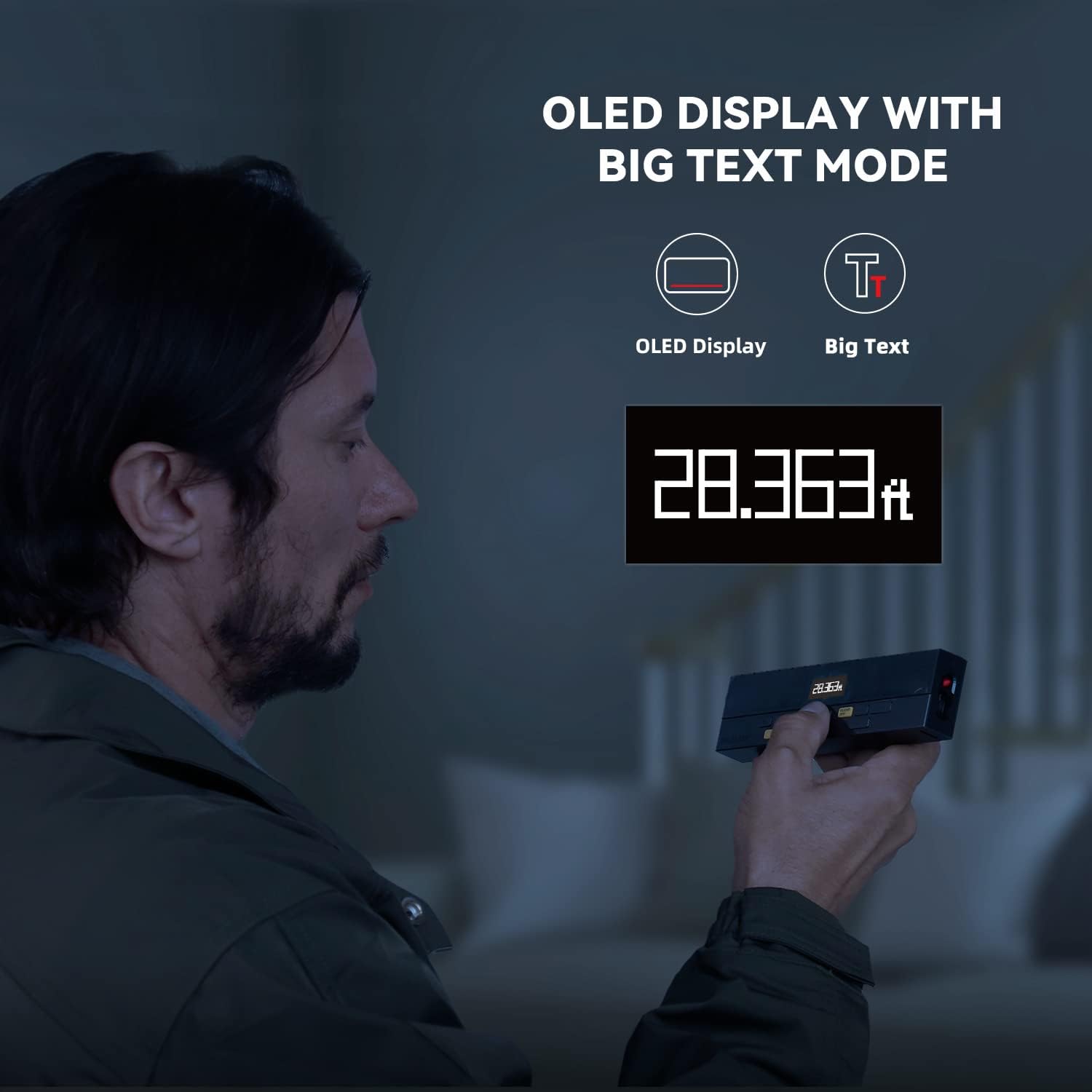
Figure 3: Clear OLED Display with Big Text Mode for enhanced readability.

Figure 4: Illustration of the patented coaxial optical design for precise measurements.
5. Nhazi
5.1 Ịchaji batrị
The DP20 comes with a built-in 1000mAh lithium battery. Before first use, fully charge the device using the provided Type-C charging cable.
- Jikọọ eriri Ụdị-C na ọdụ ụgbọ mmiri dị na ngwaọrụ.
- Jikọọ nsọtụ nke ọzọ nke eriri ahụ na ihe nkwụnye ike USB (anaghị etinye ya) ma ọ bụ ọdụ USB kọmputa.
- The battery indicator on the display will show charging status. A full charge typically takes about 2 hours.

Figure 5: Charging the DP20 via USB-C port.
5.2 Gbanyụọ ma ọ bụ gbanyụọ
- Iji gbanye, pịa MEAS bọtịnụ.
- To power off, long-press the Kpochapụ/gbanyụọ bọtịnụ. Ngwaọrụ ahụ ga-agbanyụkwa na akpaghị aka mgbe oge adịghị arụ ọrụ iji chekwaa batrị.
6. Ụdị arụ ọrụ
The DP20 offers a variety of measurement modes to suit different needs. Use the MODE button to cycle through the available functions.
6.1 Single and Continuous Measurement
For basic distance measurements.
- Pịa MEAS button once for a single measurement.
- Pịa ogologo oge MEAS button to enter continuous measurement mode, which also displays minimum and maximum distances. Press MEAS ọzọ kwụsị.
6.2 Bilateral and One-Way Measurement
The DP20 allows switching between bilateral (two-way) and one-way laser measurement.
- Use the dedicated button (often labeled T/R or similar, refer to device markings) to switch between bilateral and one-way laser modes.
- Bilateral mode measures the distance between two points by positioning the device anywhere along the line.
- One-way mode measures from the device to a single target point.
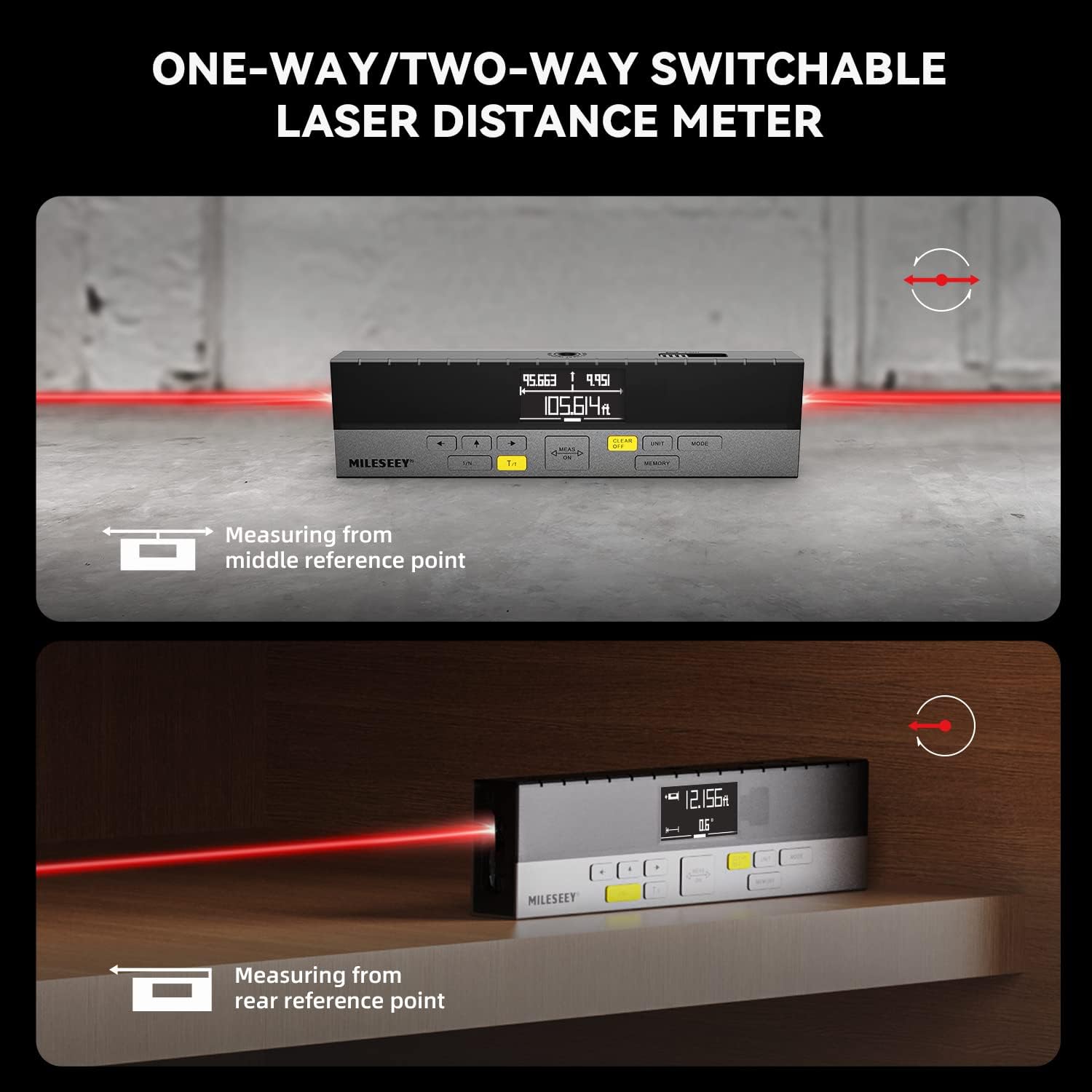
Figure 6: Demonstrating one-way and two-way measurement capabilities.
6.3 Nha Mpaghara na Olu
To calculate area or volume:
- Select the Area or Volume mode using the MODE bọtịnụ.
- Follow the on-screen prompts to take the required number of measurements (e.g., length and width for area; length, width, and height for volume).
- The device will automatically calculate and display the result.
6.4 Nha Pythagorean
For indirect measurements of height or distance where direct measurement is not possible.
- Select the Pythagorean mode using the MODE bọtịnụ.
- Follow the on-screen prompts to take the necessary measurements (e.g., hypotenuse and one leg for height).
- The device will calculate and display the unknown dimension.
6.5 Line Segment Division (Staking Out)
This function divides a line segment into equal smaller segments, useful for tasks like installing multiple items at consistent intervals.
- Enter the Line Segment Division mode (often labeled 1/N).
- Set the number of desired segments (N).
- Measure the total length of the line. The device will then guide you to the division points.
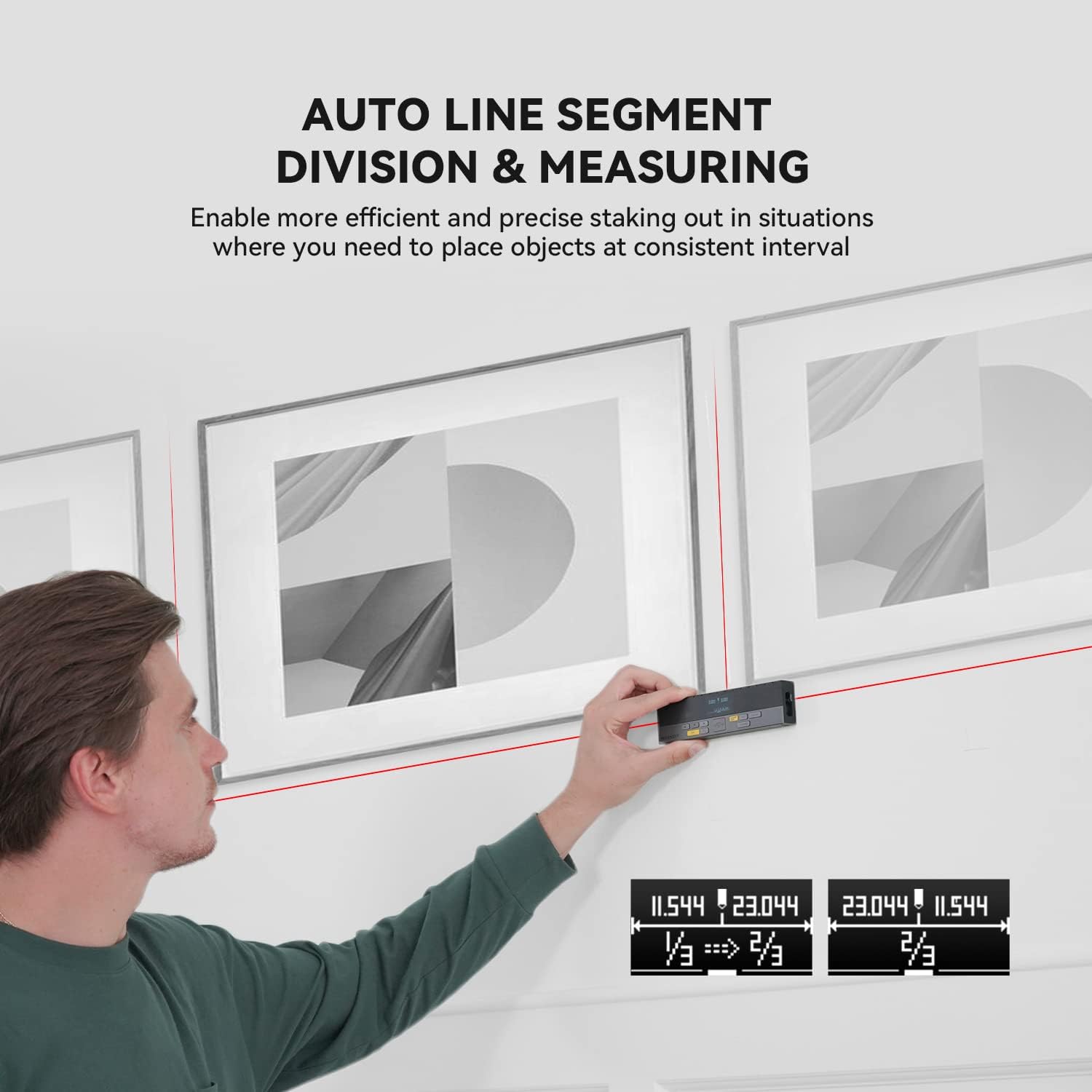
Figure 7: Using the auto line segment division feature for consistent spacing.
6.6 Digital Angle Level
The integrated digital angle level provides real-time angle measurements.
- The device automatically displays the current tilt angle.
- This feature can be used in conjunction with other measurement modes for more complex calculations.

Figure 8: The digital tilt sensor provides accurate angle readings.
7. Advanced Atụmatụ
7.1 Bluetooth Connectivity and App Synchronization
The DP20 supports Bluetooth connectivity, allowing it to pair with the
Akwụkwọ ndị emetụtara - DP20
 |
MILESEEY D5T Professional Laser Distance Meter User Manual User manual for the MILESEEY D5T Professional Laser Distance Meter. This guide details the device's 8 functions, including distance, area, volume, and Pythagorean measurements, along with operation, safety precautions, and specifications for professional use. |
 |
Akwụkwọ ntuziaka onye ọrụ MileSeey S6 Laser Distance Meter Akwụkwọ ntuziaka onye ọrụ zuru oke maka MileSeey S6 Laser Distance Meter, na-ekpuchi ntuziaka nchekwa, ọrụ, ọrụ nha (otu, na-aga n'ihu, mpaghara, olu, Pythagorean), Njikọ Bluetooth, nchọpụta nsogbu, na nkọwa nka. Mụta ka esi eji S6 maka nha anya nke ọma. |
 |
Akwụkwọ ntuziaka Onye ọrụ MILESEEY S6 Laser Akwụkwọ ntuziaka onye ọrụ MILESEEY S6 Laser Measure na-enye ntuziaka zuru ezu maka ịrụ ọrụ mita laser S6, na-egosipụta ọrụ 8 ya maka mmụba mmụba na ahụmịhe onye ọrụ, gụnyere anya, mpaghara, olu, na nha Pythagorean, yana nchọpụta nsogbu na nkọwa nka. |
 |
Mileseey DP20 Series Laser Distance Meter Quick Start Guide Quick start guide for the Mileseey DP20 Series Laser Distance Meter, detailing product overview, technical specifications, and operation instructions for various measurement modes. |
 |
Ntuziaka Mmalite Ngwa Ngwa nke Mita Anya Laser MILESEEY S2 Nduzi dị mkpirikpi maka Mita Anya Laser MILESEEY S2, nke na-ekpuchi atụmatụ ya, ọrụ ya, ntuziaka nchekwa ya, nsogbu nsogbu, na nkọwapụta ya. Mụta otu esi atụ anya anya, mpaghara, olu, na ojiji ọrụ Pythagorean. |
 |
Ntuziaka Onye Ọrụ Mileseey X5 Mita Anya Laser Comprehensive user manual for the Mileseey X5 Laser Distance Meter, covering its features, operation, measurement modes, and troubleshooting. |