1. Ngwaahịa gafereview
The Jebao SOW-3N Wave Maker Flow Pump is designed to create natural water movement in marine reef aquariums. This model features an improved motor for enhanced durability and quieter operation compared to previous series. It is suitable for both fresh and saltwater environments.
Akụkụ ndị bụ isi:
- Suitable for fresh and saltwater aquariums.
- Nrụnye na mmezi dị mfe.
- Silent design with magnetic bracket for secure placement.
- Night sensor: Automatically detects low light conditions and slows the pump.
- One-touch feed mode: Temporarily slows the pump for 10 minutes during feeding.
- Power: 100-240V 50/60Hz US plug.
- Flow Rate: 500L (132gal) to 3000L (792gal).
- Recommended for 12-30 gallon aquariums.
2. Ozi nchekwa
- Always unplug the device from the power outlet before performing any maintenance or cleaning.
- Ensure your hands are dry when handling the power plug and controller.
- Ejila ọkpọkọ ahụ rụọ ọrụ ma ọ bụrụ na eriri ọkụ ma ọ bụ plọg ahụ emebie.
- Keep the controller dry and away from water splashes.
- Emebere ngwaahịa a maka naanị ime ụlọ.
- Do not attempt to repair the device yourself; contact qualified personnel for service.
3. Ihe ngwugwu
Chọpụta na ihe niile dị na ngwugwu:
- Jebao SOW-3N Wave Maker Pump
- Onye njikwa
- Ihe nkwụnye AC
- Mpempe mgbago ndọta
- Akwụkwọ ntuziaka onye ọrụ
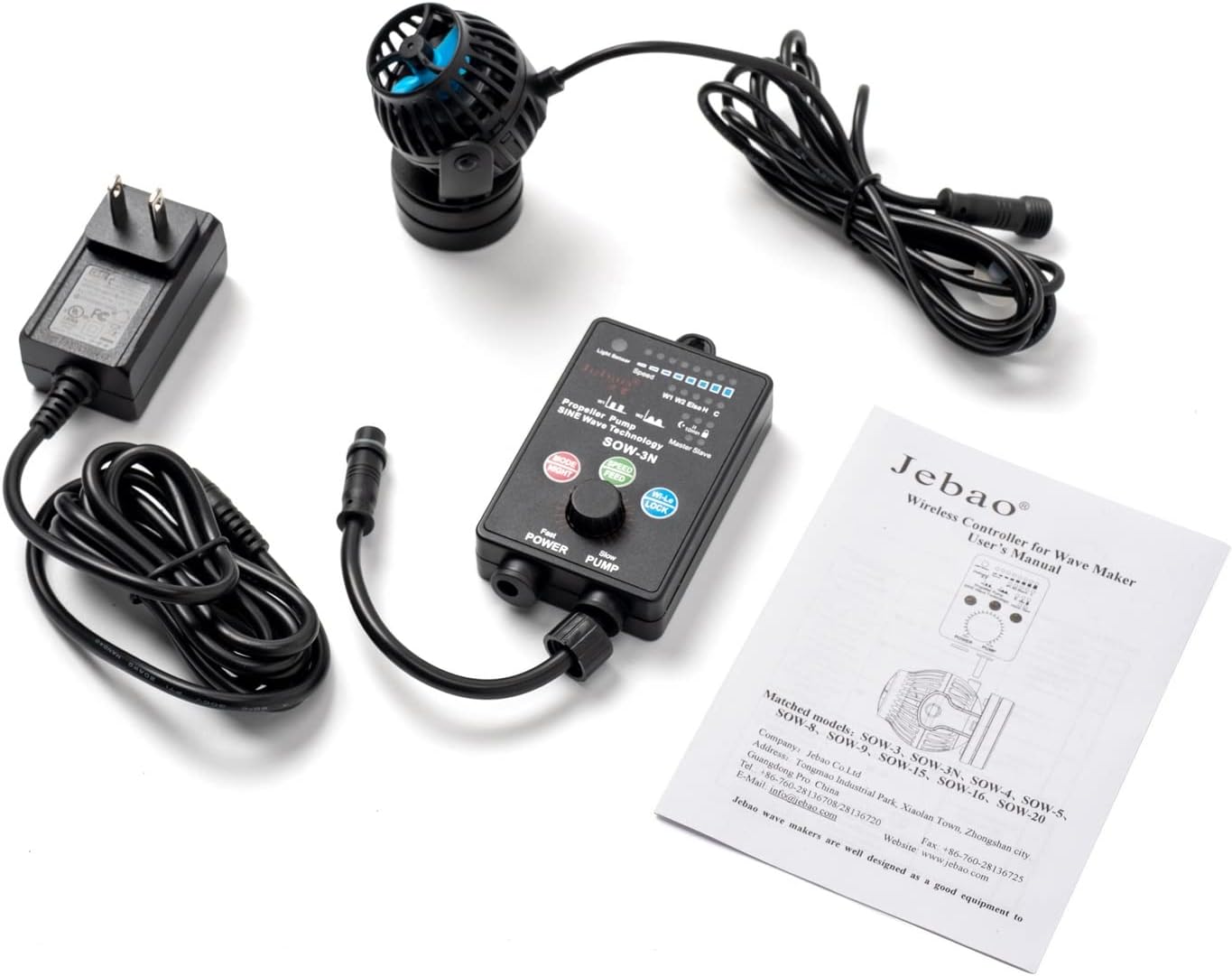
Ọgụgụ 1: Ihe niile mejupụtara na ngwugwu.
4. Nhazi
4.1 Mounting the Wave Maker
- Attach the magnetic mounting bracket to the back of the wave maker pump.
- Place the wave maker pump inside the aquarium at the desired location.
- Align the external magnet on the outside of the aquarium glass with the internal magnet of the pump. The strong magnetic force will hold the pump securely in place.

Figure 2: Close-up of the wave maker pump with its magnetic base.
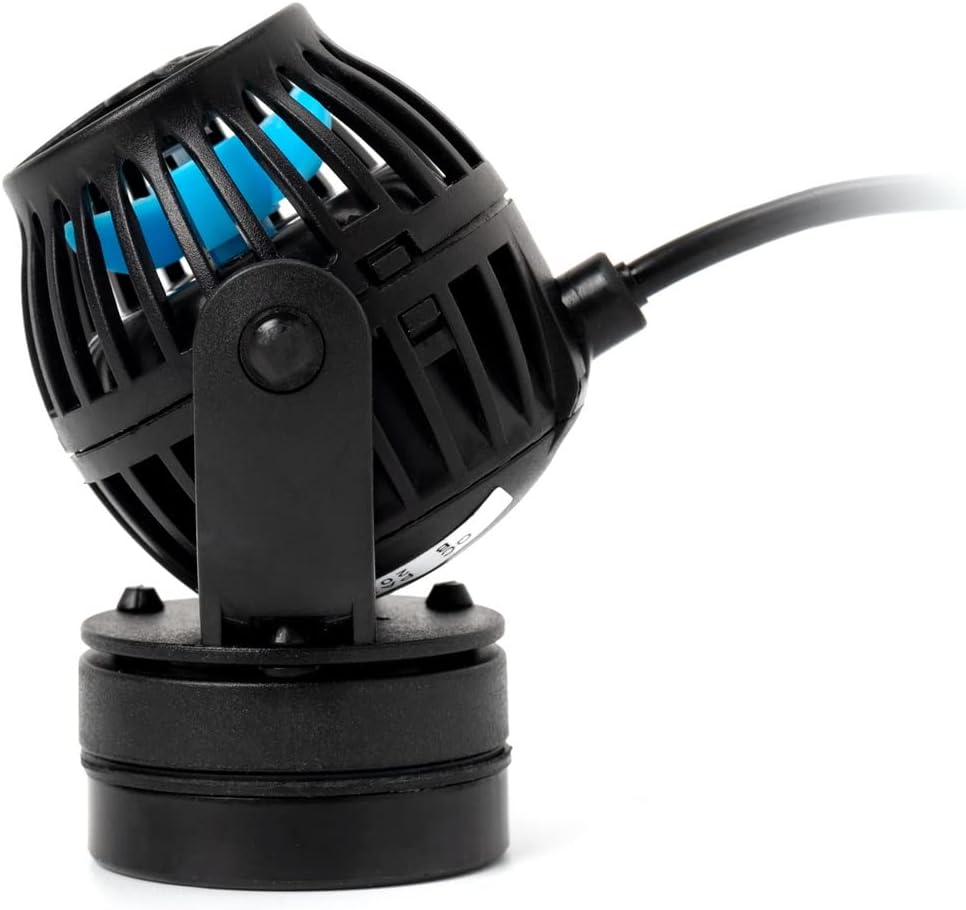
Foto 3: Akụkụ view of the pump, illustrating its compact size and magnetic attachment point.
4.2 Ijikọ njikwa
- Connect the wave maker pump's cable to the designated port on the controller. Ensure the connection is secure and the screw-on cap is tightened.
- Connect the AC adapter to the power input port on the controller.
- Plug the AC adapter into a suitable power outlet.
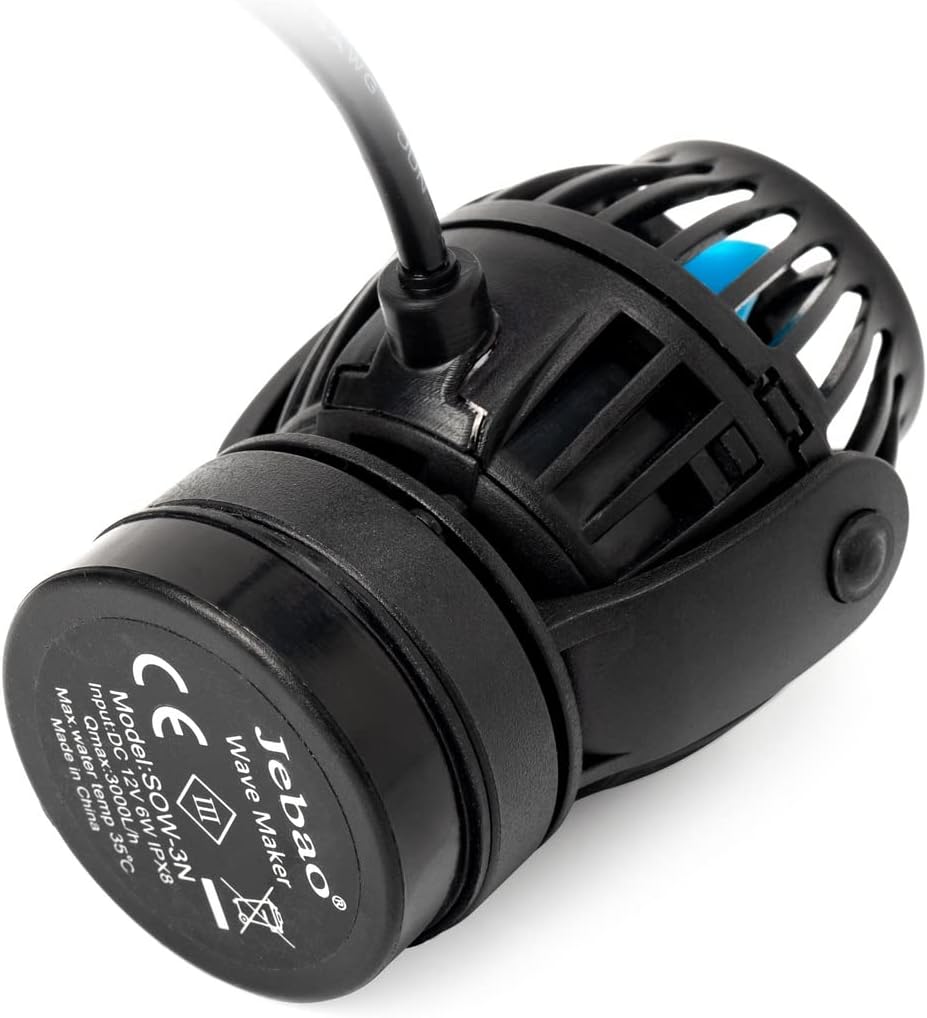
Figure 4: Back of the pump with model information and connection point.
4.3 Placement in Aquarium
Position the wave maker to achieve optimal water circulation and wave patterns for your specific aquarium setup. The magnetic mount allows for easy repositioning without submerging your hands.

Figure 5: Dimensions of the SOW-3N pump for optimal placement consideration.
5. Ntuziaka ọrụ
5.1 Njikwa karịrịview
The controller features an LED display and several buttons for easy operation:
- Bọtịnụ S: Mode selection / Time setting.
- M bọtịnụ: Cycle through wave modes / Adjust settings.
- F Button: Feeding mode activation.
- + bọtịnụ: Increase flow rate / frequency.
- - Button: Decrease flow rate / frequency.
5.2 Wave Modes
The controller offers various wave modes to simulate natural water conditions:
- Constant Flow Mode: Provides a steady, continuous water flow.
- Classic Wave Mode: Generates regular wave patterns.
- Nutrition Transmission Wave: Slow and smooth wave for proper food distribution.
- Ụdị enweghị usoro: Varies flow patterns to mimic unpredictable ocean currents.
- Ụdị abalị: Automatically reduces pump speed during low light conditions.
5.3 Adjusting Flow Rate and Frequency
Jiri ihe + na - buttons to adjust the intensity and frequency of the water flow within the selected wave mode. Refer to the controller's display for current settings.
5.4 Feeding Mode
Pịa F button to activate the 10-minute feeding mode. The pump will slow down significantly to prevent food from being quickly drawn into filtration systems, allowing fish to feed effectively. The pump will automatically resume its previous operating mode after 10 minutes.
5.5 Night Sensor
The integrated night sensor automatically detects when aquarium lights go out. In night mode, the pump's speed will be reduced to a lower, constant flow to simulate calmer nighttime conditions, minimizing stress for your aquatic inhabitants.
6. Nlekọta
6.1 Cleaning the Pump
Regular cleaning is essential for optimal performance and longevity of your wave maker:
- Wepụ mgbapụta ahụ site na isi iyi ike.
- Jiri nlezianya wepụ ọkpọkọ ahụ na akwarium.
- Disassemble the pump housing and remove the impeller.
- Clean the impeller and pump housing thoroughly with a soft brush and clean water to remove any algae, debris, or calcium buildup.
- Rinse all components with clean water and reassemble the pump.
- Reinstall the pump in the aquarium and reconnect to power.
6.2 Nyocha oge niile
Periodically inspect the power cord, connections, and magnetic bracket for any signs of wear, damage, or corrosion. Ensure all connections are secure.
7. Nchọpụta nsogbu
If you encounter issues with your Jebao SOW-3N Wave Maker, refer to the following common problems and solutions:
- Mgbapụ Anaghị agba ọsọ:
- Check if the power adapter is securely plugged into the outlet and the controller.
- Ensure the pump cable is properly connected to the controller.
- Nyochaa na ntinye ọkụ na-arụ ọrụ.
- Weak or Intermittent Flow:
- Clean the pump and impeller as described in the Maintenance section. Debris can obstruct the impeller.
- Check the selected flow rate and frequency settings on the controller; increase if necessary.
- Ensure the pump is not in feeding mode or night mode, which reduce flow.
- Mkpọtụ na-adịghị ahụkebe:
- Clean the impeller and check for any foreign objects lodged inside the pump.
- Ensure the pump is securely mounted and not vibrating against the aquarium glass.
- Ngosipụta njikwa anaghị arụ ọrụ:
- Check all power connections to the controller.
- Ọ bụrụ na nsogbu ahụ ka dị, kpọtụrụ nkwado ndị ahịa.
8. Nkọwapụta
| Njirimara | Nkọwapụta |
|---|---|
| Nọmba nlereanya | SOW-3N |
| Onye nrụpụta | Jebao |
| Ọnụego mgbaba | 792 Gallons Per Minute (Max) |
| Isi Iyi Ike | AC Power (100-240V 50/60Hz) |
| Ibu Ibu | 454 g (1 Pound) |
| Ihe onwunwe | Plastic, igwe anaghị agba nchara |
| Akụkụ | 2.0" Dia. x 2.5" long (Pump) |
| Ngwa gụnyere | Controller, AC adapter, Pump |
9. Akwụkwọ ikike na nkwado
For warranty information and customer support, please refer to the official Jebao websaịtị ma ọ bụ kpọtụrụ onye na-ere ahịa gị. Debe nnata nzụta gị ka ihe akaebe nke ịzụrụ.


