1. Okwu mmalite
The ENDGAME GEAR XM2we is a high-performance wireless gaming mouse designed for competitive play. It features a lightweight, ergonomic design, precise optical sensor, and durable switches to enhance your gaming experience. This manual provides detailed instructions for setup, operation, and maintenance of your XM2we mouse.
2. Ihe ngwugwu
Biko chọpụta na ihe niile dị na ngwugwu gị:
- ENDGAME GEAR XM2we Igwe egwuregwu ikuku ikuku
- USB-C to USB-A Charging/Data Cable (180 cm) with Angled Connector
- 2.4 GHz eriri USB Dongle

Image: The XM2we Wireless Gaming Mouse, showing its ergonomic shape and included USB-C cable.
3. Nhazi
3.1 Ijikọ òké
- Insert the 2.4 GHz wireless USB dongle into an available USB-A port on your computer.
- Turn on the XM2we mouse using the power switch located on the bottom of the mouse.
- The mouse should automatically connect to the dongle. If not, ensure the dongle is properly inserted and the mouse is powered on.
3.2 Ụdị Waya
The XM2we can also be used in wired mode. Connect the supplied USB-C cable to the front port of the mouse and the USB-A end to your computer. The mouse will function as a wired device and charge simultaneously.

Foto: N'okpuru view of the XM2we mouse, highlighting the USB-C port for charging and wired connection, and the PixArt PAW3370 optical sensor.
4. Ntuziaka ọrụ
4.1 bọtịnụ Ọrụ
The XM2we mouse features 5 programmable buttons:
- Bọtịnụ Pịa aka ekpe: Ihe omume mbụ.
- Pịa aka nri bọtịnụ: Secondary action.
- Pịa wiil pịgharịa: Middle button function.
- Side Button 1 (Forward): Ntugharị ihu nke ndabara.
- Side Button 2 (Back): Ntugharị azụ nke ndabara.

Foto: Top view of the XM2we mouse, illustrating the main left and right click buttons and the scroll wheel.
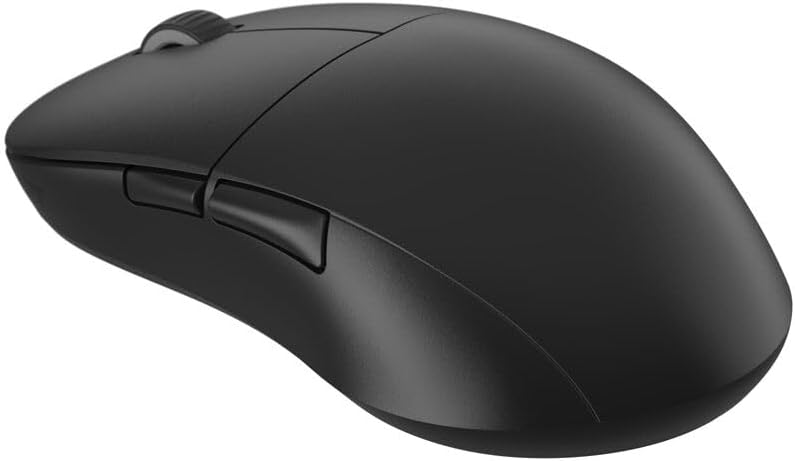
Foto: Akụkụ view of the XM2we mouse, highlighting the two thumb buttons.
4.2 DPI and Polling Rate Adjustment
The XM2we features a PixArt PAW3370 optical sensor with up to 19,000 DPI. DPI and polling rate settings can be adjusted using the ENDGAME GEAR software. The mouse supports stable 1000 Hz polling rate for responsive performance.
5. Nhazi na ngwanrọ
To unlock the full potential of your XM2we mouse, download the official ENDGAME GEAR software from the manufacturer's websaịtị. Akụrụngwa na-enye gị ohere:
- Remap all 5 buttons to custom functions or macros.
- Adjust DPI levels and create multiple DPI profiles.
- Configure polling rate (125, 250, 500, 1000 Hz).
- Customize lift-off distance (LOD).
- Update mouse firmware.
6. Nchaji na batrị
The XM2we is equipped with a 410 mAh Lithium Polymer battery, providing up to a week of gameplay on a single charge. To charge the mouse:
- Connect the supplied USB-C cable to the front port of the mouse.
- Connect the USB-A end of the cable to your computer or a USB power adapter.
- The angled connector on the USB-C cable is designed to minimize cable drag if you choose to use the mouse while charging.

Image: The USB-C charging cable with its angled connector, designed for comfortable use during charging.
7. Nlekọta
To ensure the longevity and optimal performance of your XM2we mouse:
- Nhicha: Jiri akwa dị nro dị nro hichaa elu òké. Maka unyi isi ike, ntakịrị damp enwere ike iji ákwà mee ihe, mana hụ na mmiri adịghị abanye n'ime òké ahụ.
- Nlekọta ihe mmetụta: Keep the optical sensor area on the bottom of the mouse clean and free from dust or debris.
- Ụkwụ Teflon: The large Teflon feet provide a smooth glide. Avoid scratching or damaging them. Replacement feet may be available from the manufacturer.
- Nchekwa: Chekwaa òké ahụ n'ebe dị jụụ, kpọrọ nkụ pụọ na ìhè anyanwụ kpọmkwem na oke okpomọkụ.
8. Nchọpụta nsogbu
- Òké anaghị aza:
- Gbaa mbọ hụ na agbanyere òké ahụ.
- Verify the USB dongle is securely plugged into your computer.
- Nwaa ijikọ òké ahụ na ọnọdụ waya iji lelee ma ọ na-arụ ọrụ.
- Fanye òké ma ọ bụrụ na batrị dị ala.
- Njikọ na-adịte aka:
- Move the USB dongle closer to the mouse, ideally to a front USB port or via a USB extension cable.
- Ensure there are no strong wireless interference sources (e.g., Wi-Fi routers, other wireless devices) nearby.
- Update mouse firmware using the ENDGAME GEAR software.
- DPI/Button settings not applying:
- Ensure the ENDGAME GEAR software is installed and running.
- Apply changes within the software and save them to the mouse's onboard memory if available.
- Malitegharịa ekwentị gị na kọmputa.
9. Nkọwapụta
| Njirimara | Nkọwapụta |
|---|---|
| Nlereanya | XM2we |
| Njikọta | 2.4 GHz Wireless, USB-C Wired |
| Sensọ | Ihe mmetụta anya PixArt PAW3370 |
| DPI | Ruo 19,000 DPI |
| Ọnụego ntuli aka | 125, 250, 500, 1000 Hz |
| Mgbanwe | Kailh GO Optical Switches (Main Buttons) |
| Bọtịnụ | 5 bọtịnụ mmemme |
| Batrị | 410mAh Lithium Polymer |
| Ibu | Under 64 g (2.22 oz) |
| Akụkụ (L x W x H) | 122 x 66 x 38 mm (4.80 x 2.59 x 1.50 inch) |
| Ogologo eriri USB | 180 cm |

Image: Diagram illustrating the dimensions of the XM2we mouse: 122 mm length, 66 mm width, and 38 mm height, with a weight of 63g.
10. Akwụkwọ ikike na nkwado
For warranty information, technical support, or further assistance, please refer to the official ENDGAME GEAR websaịtị ma ọ bụ kpọtụrụ ndị ahịa ha ozugbo. Debe ihe akaebe nke ịzụrụ ihe maka akwụkwọ ikike.


