1. Okwu mmalite
This manual provides detailed instructions for the amazon basics Wired Gaming Mouse, Model ABIM03. This mouse is designed to enhance your gaming and computing experience with its adjustable DPI, customizable RGB lighting, and programmable buttons. Please read this manual thoroughly before use to ensure proper operation and longevity of your device.
2. Akụrụngwa Ngwaahịa
- DPI nwere ike imeghari: Up to 6400 DPI for precise cursor control and quick movements.
- Ọkụ RGB nwere ike ịhazi ya: Personalize your mouse with various RGB lighting modes and driver customization options for PC.
- Bọtịnụ enwere ike ime: Equipped with multiple programmable buttons for assigning custom functions or macros.
- Gaming-Grade Sensor: Ensures accurate tracking and rapid response for gaming.
- Nhazi na-adịgide adịgide: Features extra durable switches and enhanced build quality for extended use.
- Honeycomb Grip: Ergonomic honeycomb design provides a comfortable and secure grip.

Image: The amazon basics Wired Gaming Mouse highlighting its adjustable DPI settings, ranging from 1200 to 7200 (though product states up to 6400).
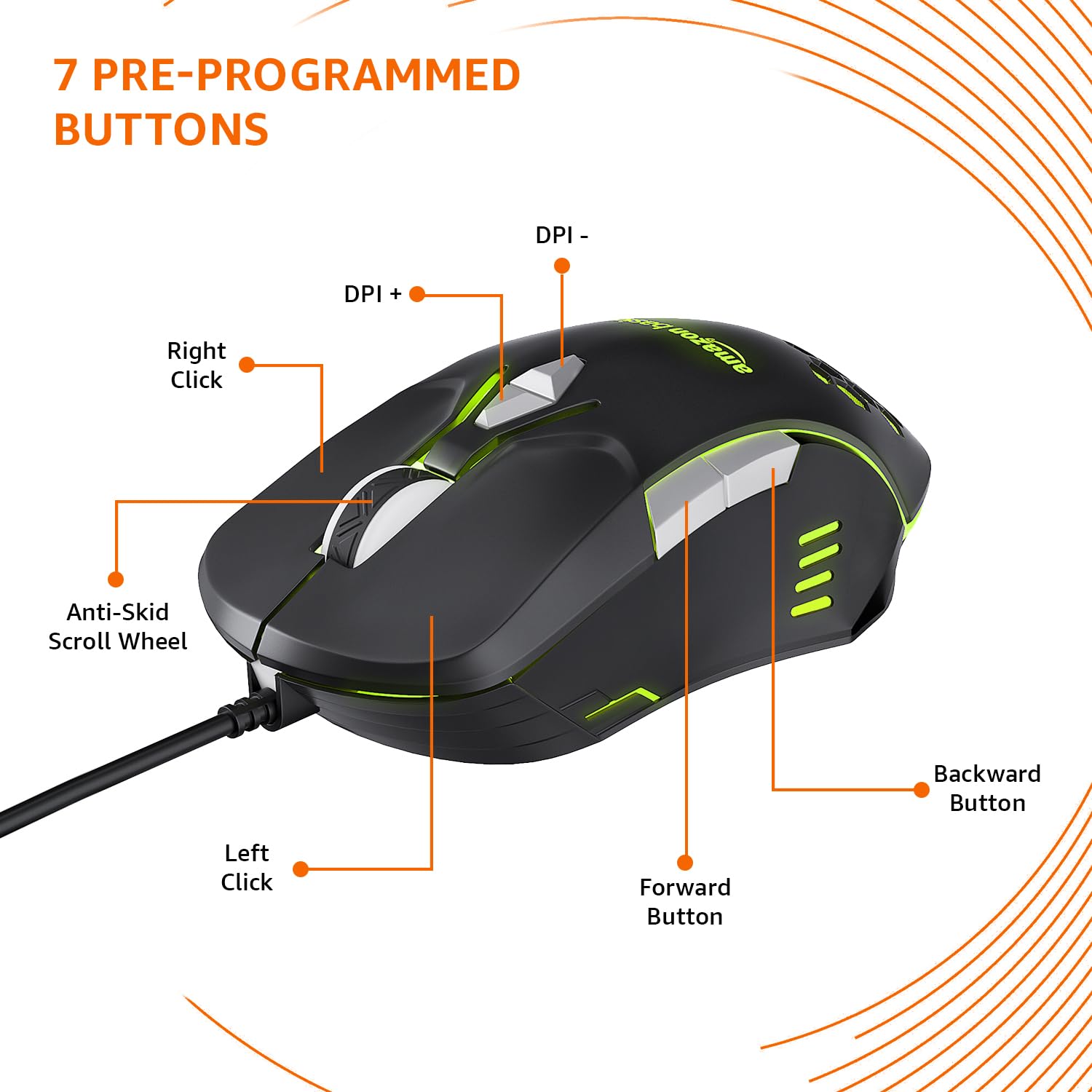
Image: The amazon basics Wired Gaming Mouse showing its 7 pre-programmed buttons, including Left Click, Right Click, Anti-Skid Scroll Wheel, DPI+, DPI-, Forward Button, and Backward Button.

Foto: A n'elu-ala view of the amazon basics Wired Gaming Mouse, emphasizing its honeycomb-designed surface for improved grip and airflow.

Image: The amazon basics Wired Gaming Mouse illuminated with red RGB lighting, showcasing its light and comfortable design.
3. Nhazi ntuziaka
- Mepee òké ahụ: Carefully remove the gaming mouse from its packaging.
- Jikọọ na PC: Tinye eriri USB nke òké n'ọdụ ụgbọ mmiri dị na kọmputa gị.
- Nwụnye ọkwọ ụgbọala: Your operating system (Windows, Linux) should automatically detect and install the necessary drivers. If prompted, follow the on-screen instructions. For advanced customization of RGB and programmable keys, refer to the manufacturer's website for specific driver software.
- Nkwanye: Debe òké ahụ n'elu ebe dị larịị ma dị ọcha ma ọ bụ ihe e ji etinye òké maka ịrụ ọrụ nke ọma.
4. Ntuziaka ọrụ
4.1 Ọrụ bụ isi
- Pịa aka ekpe: Ihe omume bụ isi, nhọrọ.
- Pịa aka nri: Ihe omume nke abụọ, menu ihe dị n'ime ya.
- Mpempe akwụkwọ mpịakọta: Scroll up/down pages. Pressing the scroll wheel often acts as a middle click.
- Bọtịnụ n'ihu/Azu: A na-ejikarị maka igodo n'ime web ihe nchọgharị ma ọ bụ file ndị na-eme nchọpụta.
4.2 Adjusting DPI (Dots Per Inch)
The mouse features dedicated DPI adjustment buttons (DPI+ and DPI-) to change cursor sensitivity on the fly. Press these buttons to cycle through different DPI levels up to 6400. A higher DPI setting results in faster cursor movement across the screen with less physical mouse movement.
4.3 Customizing RGB Lighting
The mouse includes customizable RGB lighting. Specific lighting modes can often be cycled through using a dedicated button (if present) or through the optional driver software. Refer to the driver software for advanced customization options, including color selection, effects, and brightness.
4.4 Bọtịnụ mmemme
The mouse is equipped with programmable buttons. To assign custom functions, macros, or key combinations to these buttons, you will need to install and use the specific driver software provided by the manufacturer. This software typically allows you to create profiles maka ngwa dị iche iche ma ọ bụ egwuregwu.
Video: A short product highlight video demonstrating the key features of the amazon basics Wired Gaming Mouse, including adjustable DPI, RGB lighting, programmable buttons, and durable design.
5. Nlekọta
- Nhicha: Jiri ákwà dị nro ma kpọọ nkụ hichaa mpụta òké ahụ. Maka unyi siri ike, jiri obere d hichaa mpụta òké ahụ.amp enwere ike iji akwa mee ihe, na-ahụ na ọ dịghị mmiri mmiri na-abanye na òké.
- ihicha ihe mmetụta: Occasionally, use a cotton swab lightly dampened with isopropyl alcohol to gently clean the optical sensor on the underside of the mouse. Ensure the mouse is disconnected before cleaning.
- Zere Mmiri mmiri: Do not immerse the mouse in water or any cleaning solutions.
- Nchekwa: Chekwaa òké ahụ n'ebe dị jụụ, kpọrọ nkụ pụọ na ìhè anyanwụ kpọmkwem na oke okpomọkụ.
6. Nchọpụta nsogbu
| Nsogbu | Ngwọta |
|---|---|
| Òké anaghị aza. |
|
| Ntugharị cursor na-adịghị agbanwe agbanwe ma ọ bụ na-awụlikwa elu. |
|
| Programmable buttons are not working. |
|
| RGB lighting is not working or stuck. |
|
7. Nkọwapụta
| Njirimara | Nkọwa |
|---|---|
| Ụdị | amazon ndabere |
| Nọmba nlereanya | ABIM03 |
| Teknụzụ Njikọta | Ekwenyere (USB) |
| Teknụzụ nchọpụta ngagharị | Ngwa anya |
| Ọnụ ego DPI | Ruo 6400 DPI |
| Igodo mmemme | 4 (in addition to standard left/right click and scroll) |
| Ọkụ | RGB |
| Agba | Nwa |
| Ibu Ibu | 145 g |
| Akụkụ ngwaahịa (LxWxH) | 15.8 x 10.4 x 5.4 cm |
| Ngwaike Platform | PC |
| Ndakọrịta sistemụ arụmọrụ | Linux, Windows 7 and above |
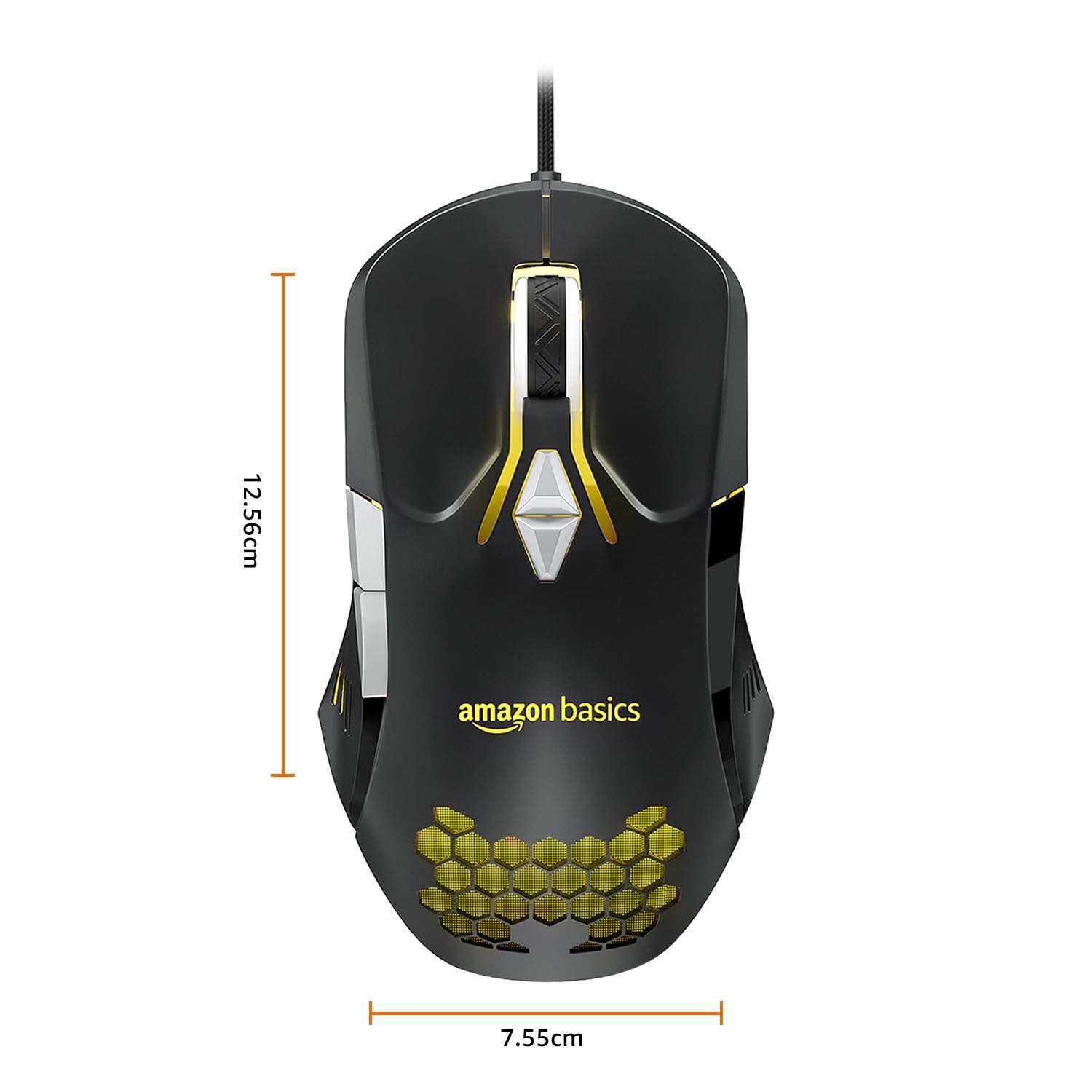
Image: The amazon basics Wired Gaming Mouse with its length (12.56cm) and width (7.55cm) dimensions indicated.
8. Akwụkwọ ikike Ozi
This amazon basics Wired Gaming Mouse comes with a Akwụkwọ ikike afọ 1 from the date of purchase. This warranty covers manufacturing defects and issues arising from normal use. It does not cover damage caused by misuse, accidents, unauthorized modifications, or normal wear and tear. Please retain your proof of purchase for warranty claims.
9. Nkwado
For further assistance, technical support, or warranty claims, please visit the official amazon basics support page or contact customer service through your purchase platform. Ensure you have your product model number (ABIM03) and proof of purchase ready when contacting support.
Akụrụngwa dị n'ịntanetị:
- Ibe ngwaahịa: amazon.in/dp/B0BTD2YN6Y
- amazon basics Store: amazon basics Store


