Ngwaahịa gafereview
The EPOS Adapt 361 is an over-ear Bluetooth headset designed for professional use. It features Active Noise Cancellation (ANC) to reduce background noise, optimizing focus in busy environments. The headset is optimized for Unified Communications (UC) and allows seamless switching between multiple devices. Its ergonomic design and comfortable ear pads provide noise dampening and comfort for extended wear. The headset is crafted from high-quality materials with a matt black finish.
Please note: During a brand transition period, products may feature either EPOS | SENNHEISER or EPOS branding.
Kedu ihe dị na Igbe ahụ
- EPOS Adapt 361 Headset
- BTD 800 USB-C Dongle
- USB-C Cable with USB-C Connector
- Audio Cable (2.5 mm Twist Lock and 3.5 mm Jack Plugs)
- Akpa nchekwa
- Mpempe akwụkwọ nnabata
- Ntuziaka nchekwa
Ntuziaka nhazi
1. Ịchaji ekweisi
Before first use, fully charge the headset using the provided USB-C cable. Connect the USB-C end to the headset and the other end to a compatible USB power source. The LED indicator on the headset will show charging status.
2. Connecting via Bluetooth (Wireless)
- Ike na ekweisi.
- Activate Bluetooth pairing mode on the headset (refer to the headset controls for specific button presses, usually a long press on the power button or a dedicated Bluetooth button).
- On your device (PC, smartphone), enable Bluetooth and search for available devices.
- Select "EPOS Adapt 361" from the list to pair.
3. Connecting via USB-C Dongle (BTD 800)
For optimal performance with PC and Microsoft Teams, use the BTD 800 USB-C dongle.
- Plug the BTD 800 USB-C dongle into an available USB-C port on your computer.
- The dongle will automatically pair with your headset. The LED on the dongle will indicate connection status.
- Ensure the headset is selected as the audio input/output device in your computer's sound settings and communication applications (e.g., Microsoft Teams).
4. Connecting via Audio Cable (Wired)
For wired connection, use the provided audio cable.
- Connect the 2.5 mm twist-lock end of the audio cable to the headset.
- Connect the 3.5 mm jack end to the audio output of your device.
Ntuziaka ọrụ
Njikwa ekweisi
The EPOS Adapt 361 features intuitive controls for managing calls, media, and headset functions. These are typically touch-sensitive or button-based on the earcups.
- Gbanyụọ/ Gbanyụọ: Pịa ma jide bọtịnụ ike.
- Njikwa olu: Use the dedicated volume buttons or touch controls.
- Nkagbu mkpọtụ mkpọtụ (ANC): Toggle ANC on/off to manage ambient noise.
- Bọtịnụ Ndị otu Microsoft: A dedicated button on the BTD 800 USB-C dongle allows for quick access to Microsoft Teams functions.
- Njikwa oku: Answer/end calls, mute microphone using designated buttons.
- Njikwa mgbasa ozi: Gwuo/kwụsịtụ, mafee egwu.
- Nkwanye olu: The headset provides voice prompts for status updates.
Eji igwe okwu
The headset features two advanced microphones optimized for voice pickup, ensuring clear communication during calls.
Multipoint Njikọta
The headset supports multipoint connectivity, allowing it to be connected to two Bluetooth devices simultaneously, enabling seamless switching between them.
Nhazi nke enwere ike idobe
The robust, foldable design allows for easy storage and portability in the included storage pouch.
Nlekọta
Nhicha
Wipe the headset with a soft, dry cloth. Avoid using harsh chemicals or abrasive materials. Do not immerse the headset in water.
Nchekwa
When not in use, store the headset in the provided storage pouch to protect it from dust and damage. The foldable design facilitates compact storage.
Nchọpụta nsogbu
- Enweghị ụda/Ọdịmma ọdịyo na-adịghị mma:
- Gbaa mbọ hụ na agbanyere na agbanyere ekweisi.
- Verify Bluetooth connection or dongle connection.
- Lelee ntọala mmepụta ọdịyo ngwaọrụ.
- Ensure the audio cable is securely connected if using wired mode.
- Igwe okwu anaghị arụ ọrụ:
- Lelee ma emechiri igwe okwu.
- Verify headset is selected as the input device in your application settings.
- Okwu Njikọta:
- Restart the headset and the connected device.
- Re-pair the Bluetooth connection or re-insert the USB-C dongle.
- Hụ na ngwaọrụ ndị ọzọ anaghị egbochi mgbaàmà Bluetooth.
- Arụmọrụ Mkpọtụ Na-arụ Ọrụ (ANC):
- Ensure ANC is activated.
- Check that the earcups are properly seated over your ears for optimal seal.
For advanced troubleshooting and firmware updates, utilize the EPOS Manager and EPOS Connect software.
Nkọwapụta
| Aha Nlereanya | ADAPT 300 Series (Model 361) |
| Teknụzụ Njikọta | Waya, Igwe na-enweghị eriri (Bluetooth 5) |
| Teknụzụ nzikọrịta ozi ikuku | Bluetooth |
| Nzaghachi ugboro ugboro | 22000 Hz |
| Jack ekweisi | 2.5mm ọkpụrụkpụ |
| Ntinye ntị | N'elu Ntị |
| Njikwa mkpọtụ | Nkagbu mkpọtụ nọ n'ọrụ |
| Ngwa dakọtara | PC |
| Ụdị njikwa | Njikwa Mgbasa Ozi, Metụ Aka |
| Atụmatụ pụrụ iche | ActiveGard, Comfortable, Detachable Cable, Ergonomic Design, Foldable, Hands-free, Microphone Included, Microsoft Teams Button, Multipoint, Noise Cancellation, Rechargeable Battery, Sub Band Coding (SBC), Unified Communication, Voice Prompt, apt-X Technology |
| Ibu Ibu | 8.5 ounce (241 grams) |
| Akụkụ ngwaahịa | 7.8 x 5.4 x 4.2 sentimita asatọ |
| Batrị | 1 batrị lithium ion (gụnyere) |
Onyonyo ngwaahịa
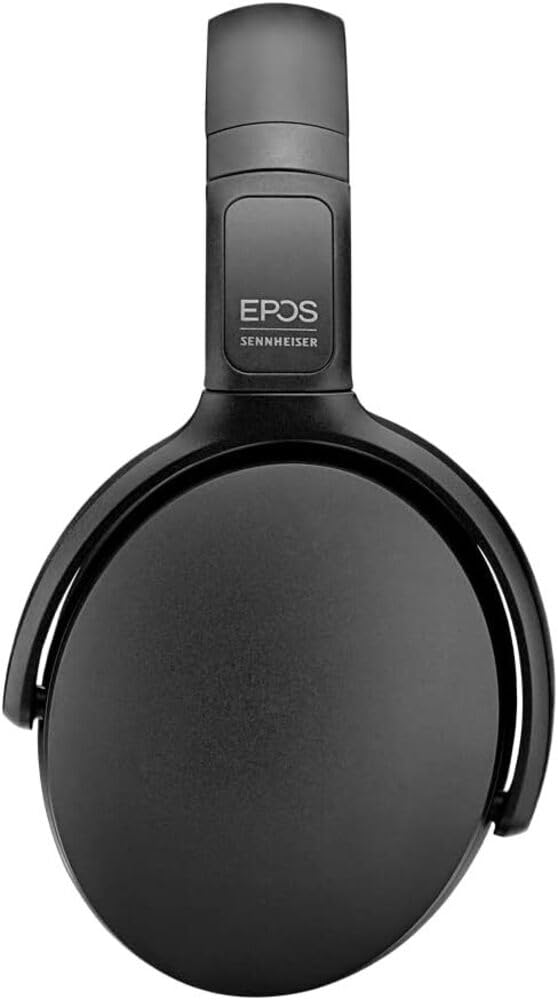
Image 1: The EPOS Adapt 361 Headset, showcasing its sleek black design and comfortable over-ear earcups. The adjustable headband is visible, designed for a secure and personalized fit.
Akwụkwọ ikike na nkwado
For warranty information and technical support, please refer to the official EPOS website or contact EPOS customer service. Details regarding specific warranty periods and service procedures can be found in the documentation included with your product or on the manufacturer's support pages.
The included Compliance Sheet and Safety Guide provide additional important information.


