1. Ngwaahịa gafereview
The Nexxt Wireless Security Camera offers a robust solution for both indoor and outdoor surveillance. Designed for ease of use and versatility, these cameras provide high-definition video, motion detection, two-way audio, and night vision capabilities, all powered by a built-in rechargeable battery for wire-free operation.
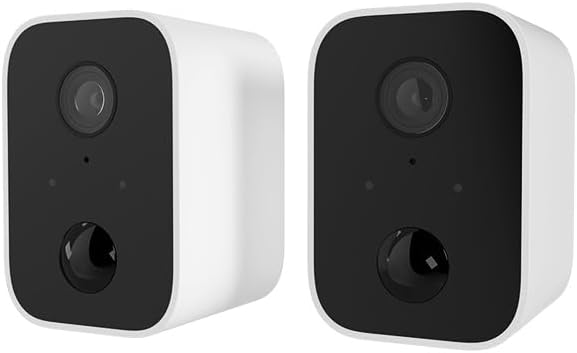
Image: Two Nexxt Wireless Security Cameras, showcasing their compact, white design with black camera faces.
Akụkụ ndị bụ isi:
- 1080P HD Live Video: Crystal clear real-time video and playback.
- Batrị arụnyere: Wire-free design for flexible placement and continued operation during power outages.
- IP65 mkpuchi ihu igwe: Durable construction suitable for outdoor use in various weather conditions.
- Nchọpụta ngagharị: Sends instant notifications to your smartphone upon detecting movement up to 26ft away.
- Audio Ụzọ Abụọ: Communicate directly through the camera using the built-in speaker and microphone.
- Ọhụụ abalị: Equipped with IR LEDs for clear vision in low-light or dark conditions.
- Local & Cloud Storage: Supports micro-SD card (not included) for local storage and optional cloud storage (subscription required).
- Ngwakọta Smart Home: Dakọtara na Amazon Alexa na Google Assistant maka njikwa olu.

Image: A single Nexxt security camera surrounded by icons representing its features: Full 1080P HD, Motion detection, Two-way communication, Night vision, Voice activated, IP65 weatherproof, Micro-microSD™ slot, Wall mount bracket included, and Cloud ready.
2. Ihe ngwugwu
Please verify that all items are present and in good condition upon opening the package. If any items are missing or damaged, please contact customer support.
- 2 x Nexxt Wireless Security Cameras
- 2 x Ntuchi Nkwado
- 2 x eriri USB chaja
- 1 x Ntuziaka mmalite ngwa ngwa
- Skrọsị Ịwụnye na Anchor Mgbidi

Image: The retail packaging for the Nexxt Smart Wi-Fi battery camera 2-pack, showing the cameras and key features on the box.
3. Ntuziaka Nhazi
3.1 Ịchaji igwefoto
Before initial use, fully charge both cameras. Connect the provided USB charging cable to the camera's charging port and a standard USB power adapter (not included). The charging indicator light will show the charging status.
3.2 Downloading the Nexxt App
Chọọ maka "Nexxt Home" in the Apple App Store or Google Play Store and download the application. Create an account or log in if you already have one.
3.3 Ijikọ igwefoto
- Open the Nexxt Home app and tap the "+" icon to add a new device.
- Select "Security Camera" from the device list.
- Follow the on-screen instructions to put the camera into pairing mode (usually involves pressing a reset button until an indicator light flashes).
- Jikọọ ekwentị gị na netwọk Wi-Fi 2.4GHz. Note: 5GHz networks are not supported.
- The app will display a QR code. Hold your camera approximately 6-8 inches (15-20 cm) in front of your phone's screen until you hear a prompt from the camera.
- Once paired, the camera will connect to your Wi-Fi network, and you can name your device within the app.
3.4 na -arịgo igwefoto
The Nexxt Wireless Security Camera can be easily mounted indoors or outdoors. Choose a location that provides the desired viewn'akuku ma dị n'ime oke nke netwọk Wi-Fi gị.

Image: A Nexxt security camera mounted on an exterior wall, demonstrating its weatherproof design and easy installation.
- Identify a suitable mounting surface.
- Use the provided mounting bracket as a template to mark drill holes.
- Drill pilot holes and insert wall anchors if mounting into drywall or masonry.
- Secure the mounting bracket to the surface using the provided screws.
- Gbakwunye igwefoto na nkwado mgbago ma mezie akụkụ dịka achọrọ ya.

Image: A Nexxt security camera detached from its mounting bracket, showing the connection point for easy installation and removal.
4. Ọrụ
4.1 Ndụ View
Open the Nexxt Home app and select your camera from the device list to access the live video feed. You can view ezigbo oge footage si ebe ọ bụla nwere njikọ ịntanetị.
4.2 Nchọpụta ngagharị
The camera's motion sensors detect movement up to 26 feet away. When motion is detected, the camera will record a short clip and send a notification to your smartphone. You can adjust motion sensitivity and set detection zones within the app settings.

Image: A dog and a child playing in a yard, with a 'Motion detection' icon overlay, illustrating the camera's ability to detect activity.
4.3 Audio ụzọ abụọ
To use two-way audio, tap the microphone icon in the live view interface of the app. You can then speak through your phone, and your voice will be projected through the camera's speaker. Release the icon to listen.
4.4 Ọhụụ abalị
Igwefoto ahụ na-agbanwe gaa na ọnọdụ ọhụụ abalị na akpaghị aka n'ọnọdụ obere ìhè, na-enye vidiyo foo ojii na ọcha doro anyatage. This feature ensures continuous surveillance 24/7.
4.5 Nhọrọ nchekwa
- Kaadị Micro-SD: Insert a micro-SD card (up to 128GB, not included) into the camera's slot for local storage of recordings.
- Nchekwa igwe ojii: Nexxt offers optional cloud storage plans for secure, off-site storage of your video recordings. Refer to the Nexxt Home app for subscription details.
4.6 Njikwa olu
Integrate your Nexxt camera with Amazon Alexa or Google Assistant for convenient voice control. Follow the instructions in the Nexxt Home app to link your account with your preferred smart home platform. You can then use voice commands to view live feeds on compatible smart displays.
5. Nlekọta
5.1 Njikwa batrị
To maximize battery life, ensure the camera is fully charged before deployment. The Nexxt Home app will notify you when the battery level is low. Regular charging is recommended, especially for cameras in high-traffic areas with frequent motion detection.
5.2 Ihicha igwefoto
Periodically clean the camera lens and housing with a soft, dry cloth to ensure clear image quality. Avoid using harsh chemicals or abrasive materials that could damage the camera.
5.3 Mmelite firmware
Nexxt Solutions may release firmware updates to improve performance, add new features, or address security vulnerabilities. The Nexxt Home app will notify you of available updates. It is recommended to keep your camera's firmware up to date for optimal performance and security.
6. Nchọpụta nsogbu
| Nsogbu | Ihe nwere ike ime | Ngwọta |
|---|---|---|
| Camera won't turn on | Batrị dị ala; Apịghị bọtịnụ ike nke ọma | Charge the camera fully; Press and hold the power button for a few seconds. |
| Enweghị ike ijikọ na Wi-Fi | Incorrect Wi-Fi password; Camera too far from router; Only 2.4GHz supported | Verify password; Move camera closer to router; Ensure you are connecting to a 2.4GHz network. |
| Nchọpụta ngagharị anaghị arụ ọrụ | Sensitivity too low; Detection zone not set; App notifications disabled | Adjust sensitivity in app; Configure detection zones; Enable notifications for Nexxt Home app. |
| Two-way audio not clear | Poor network connection; Obstruction near microphone/speaker | Check Wi-Fi signal strength; Ensure no obstructions; Reduce background noise. |
| Night vision is blurry | Dirty lens; IR LEDs obstructed | Clean the camera lens; Ensure nothing is blocking the IR LEDs. |
7. Nka na ụzụ nkọwa
| Njirimara | Nkọwapụta |
|---|---|
| Aha Nlereanya | Battery (Built-in Battery 2PK) |
| Mkpebi ịse vidiyo | 1080p HD |
| Ojiji ime ime/n'èzí | N'èzí, ime ụlọ |
| Isi Iyi Ike | Akwanyere batrị |
| Protocol Njikọta | Wi-Fi (naanị 2.4GHz) |
| Ụdị njikwa | Amazon Alexa, onye enyemaka Google |
| Ụdị nkwụnye | Ugwu mgbidi |
| Ogo nchekwa mba ụwa | IP65 Mkpuchi ihu igwe |
| Rtdị Alert | Audio na Motion |
| Ibu Ibu | 1.52 pounds (for the pair) |
| Akụkụ ngwugwu | 11.69 x 6.5 x 2.56 sentimita asatọ |
| UPC | 798302057661 |
8. Akwụkwọ ikike na nkwado
8.1 Ozi akwụkwọ ikike
Nexxt Solutions products typically come with a 2-year warranty from the date of purchase, covering defects in materials and workmanship. Please retain your proof of purchase for warranty claims. The warranty does not cover damage caused by misuse, accidents, unauthorized modifications, or natural disasters.
8.2 Nkwado ndị ahịa
For technical assistance, troubleshooting, or warranty inquiries, please visit the official Nexxt Solutions website or contact their customer support team. You can often find FAQs, video tutorials, and contact information on their support pages.
Nkwado n'ịntanetị: www.nexxsolutions.com/support
Please have your product model number (Built-in Battery 2PK) and purchase date ready when contacting support.


