Okwu mmalite
Thank you for choosing the Linkind Outdoor Solar Motion Sensor Light. This product is designed to provide efficient and reliable outdoor illumination for your garden, pathway, garage, or porch. Featuring 1000LM brightness, 24 high-power LEDs, dual color temperatures (3000K Warm White & 6500K Cool White), and three intelligent operating modes, these IP67 waterproof lights offer enhanced security and ambiance. Please read this manual carefully before installation and use to ensure optimal performance and longevity.

Image: The Linkind solar light installed, casting a warm glow on a garden path at night.
Ozi nchekwa
- Ensure the solar panel receives direct sunlight for at least 6-8 hours daily for optimal charging.
- Do not install the light near other strong light sources, as this may interfere with the motion sensor or automatic dusk-to-dawn operation.
- Keep the solar panel clean from dust, dirt, and debris to maintain charging efficiency.
- This product is IP67 waterproof, designed to withstand various weather conditions, but avoid submerging it in water.
- Do not attempt to disassemble or modify the product, as this will void the warranty and may cause damage.
- Debe ebe ụmụaka na-apụghị iru.
Ihe ngwugwu
Biko lelee ngwugwu ahụ iji hụ na ihe niile dị na ya:
- Linkind Outdoor Solar Motion Sensor Light (x2)
- Oke ala (x2)
- Wall Mounting Screws and Anchors (x2 sets)
- Akwụkwọ ntuziaka (akwụkwọ a)
Njirimara ngwaahịa
- Icha ọkụ dị elu: Equipped with 24 high-power LEDs, delivering up to 1000 lumens of bright illumination.
- Okpomọkụ Agba Abụọ: Offers both 3000K Warm White and 6500K Cool White light options to suit different preferences and environments.
- Sensọ ngagharị: Advanced motion detection with a range of 3-8 meters and a 120° detection angle, ensuring light activates when needed.
- Ụdị arụ ọrụ atọ: Customizable lighting modes for various scenarios (details in Operating Instructions).
- Ogo IP67 enweghị mmiri: Designed to withstand harsh weather conditions, including rain, snow, and extreme temperatures.
- Panel Anyanwụ Dị Elu nke Ọmarịcha: Monocrystalline silicon solar panel with a 22% conversion rate for fast and efficient charging.
- Ntinye 2-n'ime-1: Versatile design allows for both ground insertion and wall mounting.
- Akụkụ nwere ike idozi: Light head can be adjusted vertically by 90° and horizontally by 270° for precise lighting direction.

Image: Feature comparison highlighting Linkind's cool & warm white, motion sensor, 1800mAh battery, 1000 lumens, and monocrystalline silicon solar panel.

Image: The solar light demonstrating its IP67 waterproof, frostproof, and heatproof capabilities under a water splash.
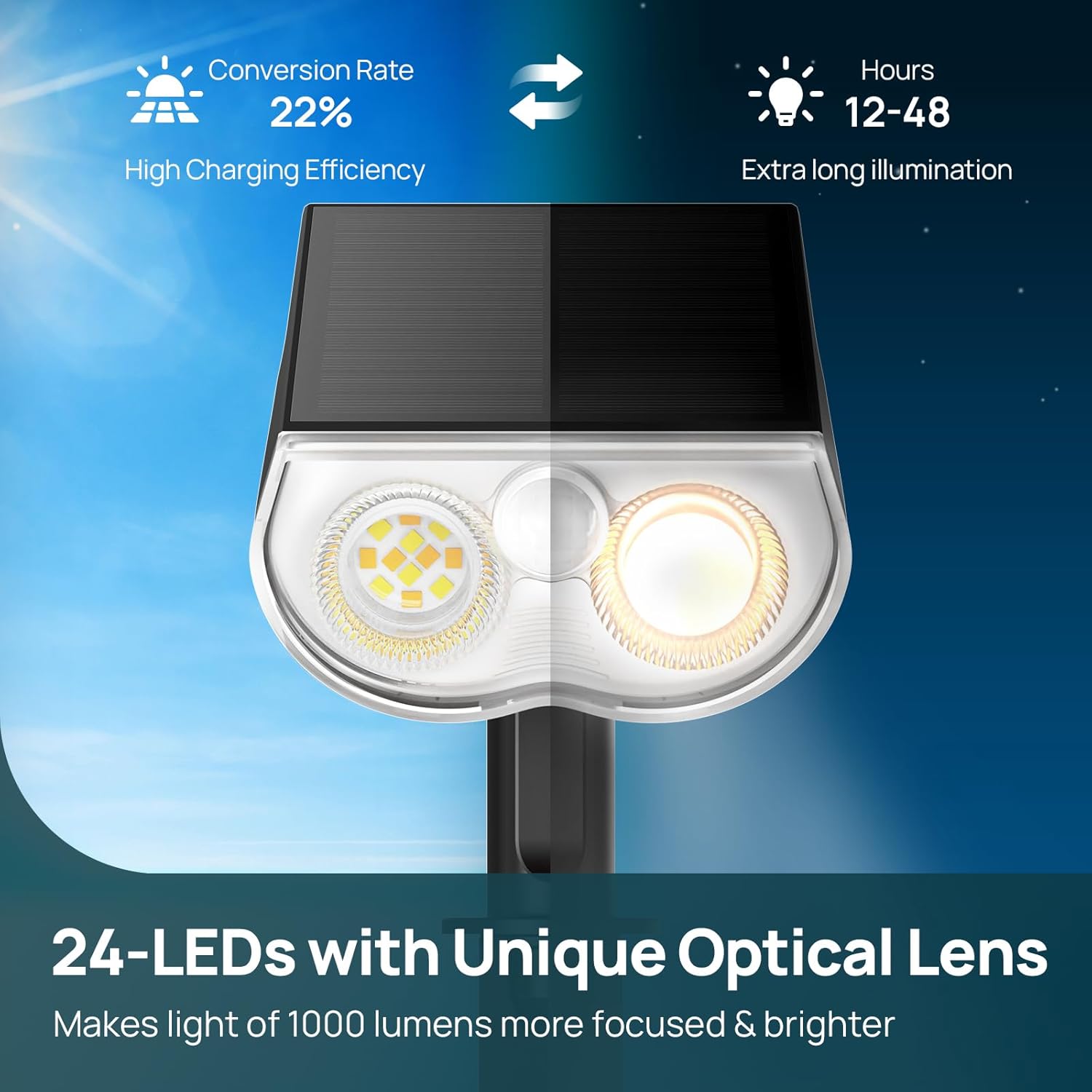
Foto: nkọwa zuru ezu view of the solar light's 24 LEDs and unique optical lens, emphasizing high charging efficiency and long illumination.
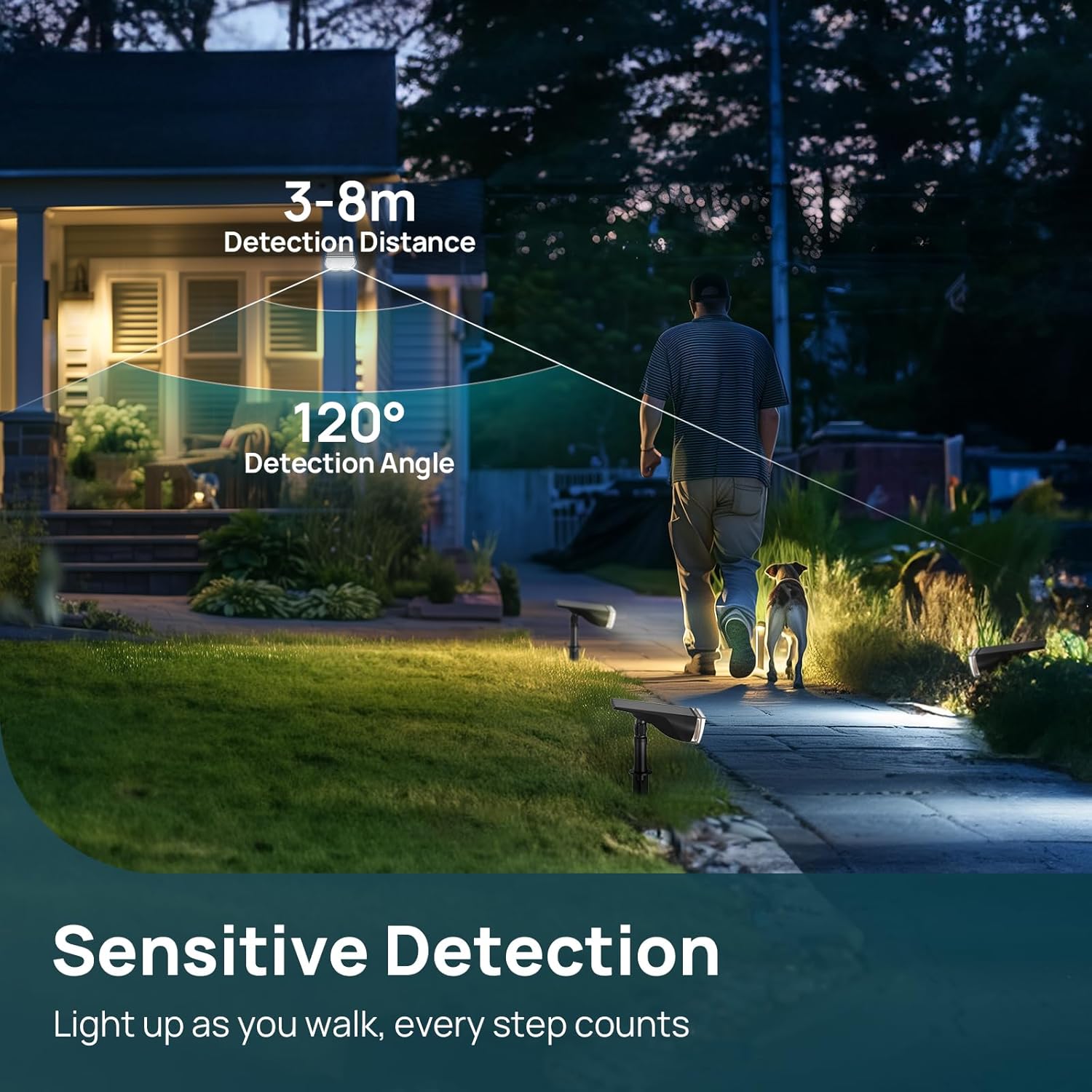
Image: A person and their dog walking past the solar light, illustrating its sensitive motion detection with a 3-8m range and 120° angle.
Ntọala na nwụnye
The Linkind solar light offers two installation options: ground insertion or wall mounting.
Ntinye ala
- Họrọ Ụdị: Before assembly, press the power button on the back of the light to select your desired operating mode (see Operating Instructions for details).
- Kpọkọta ihe njide: Attach the light unit to the top part of the ground stake.
- Connect Spikes: Connect the two spike sections of the ground stake together.
- Fanye n'ime Ala: Firmly insert the assembled light and stake into soft ground in a location that receives ample kpọmkwem ìhè anyanwụ.
Ịkwanye mgbidi
- Họrọ Ụdị: Before assembly, press the power button on the back of the light to select your desired operating mode.
- Fix the Holder: Use the provided screws and anchors to securely fix the wall mounting bracket to a desired wall or fence.
- Connect the Two Parts: Attach the light unit to the wall mounting bracket.
- Hazie akụkụ: Adjust the angle of the solar panel and light head to ensure optimal sunlight exposure and lighting direction.

Image: Visual instructions for both ground insertion and wall mounting methods.
Ntuziaka ọrụ
The Linkind solar light features a single button to cycle through its three operating modes and to switch between warm and cool white light.
Na-agbanwe okpomoku agba
To switch between 3000K Warm White and 6500K Cool White, ogologo pịa bọtịnụ ike maka 3 sekọnd.
Cycling Through Modes (Short Press)
- Ọnọdụ 1: Keeps dim light all night. The motion sensor does not react in this mode.
- Ọnọdụ 2: Dim light when no motion is detected. Switches to full brightness for 20 seconds when motion is detected.
- Ọnọdụ 3: Light is off when no motion is detected. Switches to full brightness for 20 seconds when motion is detected.

Image: Visual representation of the three lighting modes: always dim, dim with motion-activated bright, and off with motion-activated bright.
Nlekọta
- Ogwe anyanwụ dị ọcha: Jiri nwayọ na-ehichapụ akụkụ anyanwụ mgbe niile, damp cloth to remove dust, dirt, or snow. A clean panel ensures maximum charging efficiency.
- Lelee ebe: Periodically check that the light's location still receives adequate direct sunlight, especially after seasonal changes or new foliage growth.
- Lelee maka mmebi: Occasionally inspect the light for any physical damage or loose connections.
- Batrị: The built-in Lithium-ion battery is designed for long life. Do not attempt to replace it yourself.
Nchọpụta nsogbu
| Nsogbu | Ihe nwere ike ime | Ngwọta |
|---|---|---|
| Ìhè anaghị agba n'abalị. | Insufficient sunlight exposure during the day. Igwe ọkụ anyanwụ ruru unyi. Light is in "OFF" mode (Mode 3 without motion). Batrị agwụla. | Bugharịa ìhè ahụ gaa n'ebe nwere ìhè anyanwụ kpọmkwem. Hichaa ogwe anyanwụ. Press the power button to cycle to Mode 1 or Mode 2. Allow 1-2 sunny days for the battery to fully charge. |
| Light flickers or has low brightness. | Partial charge of battery. Solar panel is partially obstructed or dirty. | Ensure full sunlight exposure for several hours. Hichaa ogwe anyanwụ ma wepụ ihe mgbochi ọ bụla. |
| Sensọ ngagharị anaghị arụ ọrụ. | Light is in Mode 1 (always dim). Sensor is obstructed. External light interference. | Switch to Mode 2 or Mode 3. Clear any debris or objects blocking the sensor. Relocate the light away from other strong light sources. |
| Agba ọkụ anaghị agbanwe. | Pịa bọtịnụ na-ezighi ezi. | Ensure you are long-pressing the power button for 3 seconds to switch between warm and cool white. |
Nkọwapụta
| Njirimara | Nkọwa |
|---|---|
| Ụdị | Linkind |
| Nọmba nlereanya | LL1801131 |
| Isi Iyi Ìhè | 24 LED |
| Flux na-egbuke egbuke | 1000 Lumen |
| Okpomọkụ agba | 3000K ọkụ na-acha ọcha & 6500K Cool White |
| Oke nchọpụta ihe mmetụta ngagharị | 3-8 mita |
| Akụkụ nchọpụta ihe mmetụta ngagharị | 120° |
| Ogo IP | IP67 |
| Isi Iyi Ike | Ike anyanwụ |
| Ụdị batrị | 1 Lithium-ion (gụnyere) |
| Ịrụ ọrụ nke igwe anyanwụ | 22% Conversion Rate (Monocrystalline Silicon) |
| Ihe onwunwe | Acrylonitrile Butadiene Styrene (ABS) |
| Akụkụ ngwaahịa (L x W x H) | 15.4 x 4.8 x 10.1 cm (6.06 x 1.89 x 3.98 inch) |
| Ibu Ibu | 600g (1.32 lbs) |
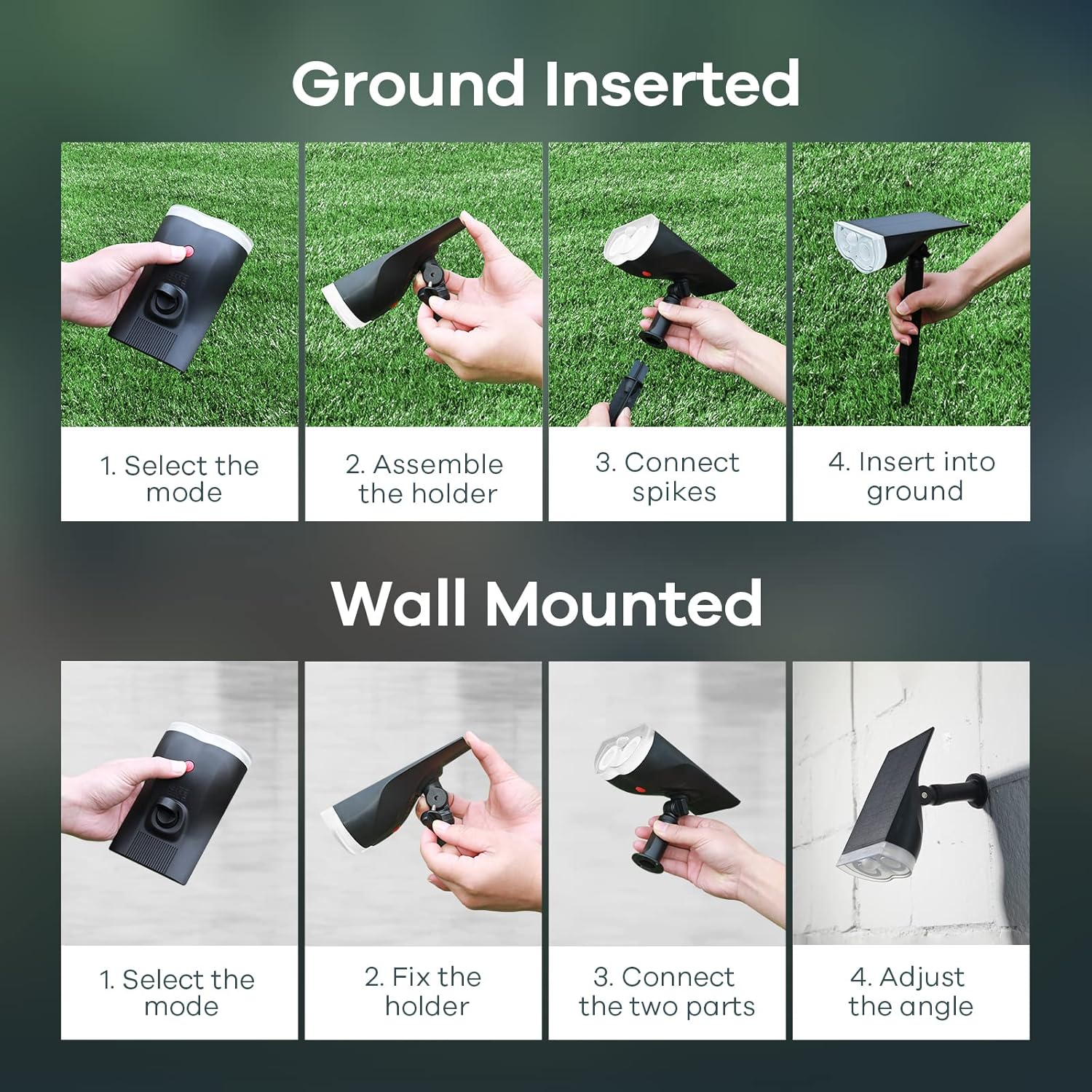
Image: Detailed diagram illustrating the dimensions, adjustable angle, motion sensor, and PET surface layer of the solar light.
Akwụkwọ ikike na nkwado
For warranty information and customer support, please refer to the product packaging or contact Linkind customer service directly through their official website or the retailer where the product was purchased. Please have your model number (LL1801131) and purchase details ready when contacting support.


