1. Okwu mmalite
This manual provides essential instructions for the setup, operation, maintenance, and troubleshooting of your White Shark GK-2102 LEGIONNAIRE-X RGB USB Keyboard. Please read this manual thoroughly before using the product to ensure proper functionality and longevity.

Foto 1.1: Elu view of the White Shark GK-2102 LEGIONNAIRE-X RGB USB Keyboard, showcasing ya zuru oke na ọkụ RGB.
2. Nhazi
Follow these steps to connect your White Shark GK-2102 LEGIONNAIRE-X RGB USB Keyboard to your computer.
- Mepee ahụigodo: Jiri nlezianya wepụ ahụigodo ahụ na eriri USB ya na ngwugwu ahụ.
- Jikọọ eriri USB: Insert the USB connector of the keyboard into an available USB port on your computer.

Image 2.1: Close-up of the USB connector, which is used to connect the keyboard to a computer.
- Nwụnye ọkwọ ụgbọala: The keyboard is plug-and-play. Your operating system should automatically detect and install the necessary drivers. No additional software installation is typically required.
- Adjust Keyboard Feet: For ergonomic comfort, you may extend the adjustable feet located on the underside of the keyboard.

Foto nke 2.2: View of the adjustable feet on the keyboard's underside, allowing users to modify the typing angle.
3. Ntuziaka ọrụ
The White Shark GK-2102 LEGIONNAIRE-X is a standard USB keyboard with RGB lighting features. Below are general operating guidelines.
3.1 Ọrụ ahụigodo bụ isi
The keyboard functions as a standard QWERTY layout device. All keys perform their indicated character or function when pressed. Special function keys (F1-F12) may require the 'Fn' key to be held down simultaneously for their secondary functions, depending on your operating system and specific keyboard model configuration.
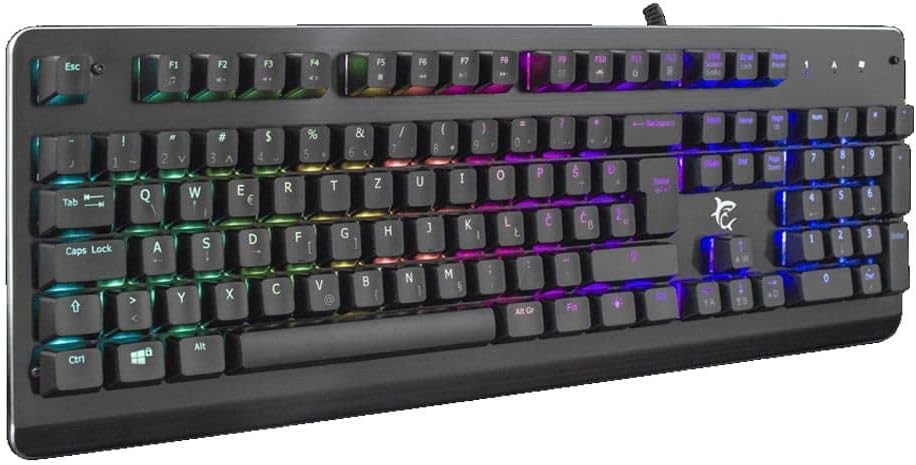
Onyonyo 3.1: Akuku view of the keyboard, highlighting the key layout and illuminated RGB backlighting.
3.2 RGB njikwa ọkụ
This keyboard features RGB lighting. Specific key combinations, often involving the 'Fn' key and other designated keys (e.g., arrow keys, Ins, Home, PgUp, Del, End, PgDn), are typically used to cycle through lighting modes, adjust brightness, or change colors. Refer to the quick start guide or manufacturer's website for detailed RGB control commands specific to this model.
4. Nlekọta
Ndozi nke ọma na-eme ka ahụ dị ogologo na arụmọrụ nke ahụigodo gị.
- Nhicha: Disconnect the keyboard from your computer before cleaning. Use a soft, dry cloth to wipe the surface. For stubborn dirt, a slightly damp cloth with mild soap can be used, ensuring no liquid enters the keyboard. Compressed air can be used to remove dust and debris from between the keys.
- Zere Mmiri mmiri: Do not spill liquids on the keyboard. Liquid damage can cause permanent malfunction.
- Nchekwa: Chekwaa ahụigodo ahụ n'ebe dị jụụ, kpọrọ nkụ pụọ na ìhè anyanwụ kpọmkwem na oke okpomọkụ mgbe ọ naghị eji ya ogologo oge.
5. Nchọpụta nsogbu
If you encounter issues with your keyboard, try the following solutions:
- Ahụigodo Anaghị aza:
- Gbaa mbọ hụ na ejikọrọ eriri USB na nchekwa na ma ahụigodo ma kọmputa.
- Gbalịa ijikọ ahụigodo na ọdụ ụgbọ USB dị iche na kọmputa gị.
- Test the keyboard on another computer to determine if the issue is with the keyboard or the computer's port/drivers.
- Malitegharịa ekwentị gị na kọmputa.
- Igodo anaghị arụ ọrụ:
- Check for any physical obstructions under the keycaps.
- Hichaa ahụigodo ahụ dịka akọwara na ngalaba Mmezi.
- Ọkụ RGB anaghị arụ ọrụ / ezighi ezi:
- Gbaa mbọ hụ na ejikọrọ ahụigodo nke ọma wee nweta ike.
- Refer to the manufacturer's specific instructions for RGB control key combinations.
6. Nkọwapụta
Below are the technical specifications for the White Shark GK-2102 LEGIONNAIRE-X RGB USB Keyboard:

Foto 6.1: Akụkụ profile of the keyboard, illustrating its physical dimensions and keycap height.
| Njirimara | Nkọwa |
|---|---|
| Ụdị | Ọcha shark |
| Nlereanya | GK-2102 LEGIONNAIRE-X |
| Njikọta | USB |
| Akụkụ ngwaahịa | 50 x 50 x 28 cm |
| Ibu | 1.06 n'arọ |
| Ihe onwunwe | Plastic |
| Atụmatụ pụrụ iche | RGB ọkụ |
| Batrị achọrọ | Mba |
7. Akwụkwọ ikike Ozi
For detailed warranty information regarding your White Shark GK-2102 LEGIONNAIRE-X RGB USB Keyboard, please refer to the warranty card included with your product or visit the official White Shark websaịtị. Usoro na ọnọdụ akwụkwọ ikike nwere ike ịdị iche site na mpaghara na onye na-ere ahịa.
8. Nkwado
If you require further assistance or have questions not covered in this manual, please contact White Shark customer support through their official website or the contact information provided with your purchase. Please have your product model (GK-2102 LEGIONNAIRE-X) and purchase details ready when contacting support.


