1. Okwu mmalite
The Audeze Filter Speakerphone is a portable conference device designed for clear voice communication. It features advanced Artificial Intelligence (A.I.) noise filtering and proprietary planar magnetic speaker technology to optimize speech clarity. This manual provides instructions for setting up, operating, maintaining, and troubleshooting your Audeze Filter Speakerphone.
2. Kedu ihe dị na Igbe ahụ
Upon unboxing your Audeze Filter Speakerphone, verify that all the following items are included:
- Audeze Filter Speakerphone Unit
- USB-C ka USB-C USB chaja
- USB-C ka USB-A nkwụnye
- Quick Start Guide (Multi-language)
- Leatherette Magnetic Closure Carry Case
- Anti-slip Pad with Audeze Logo
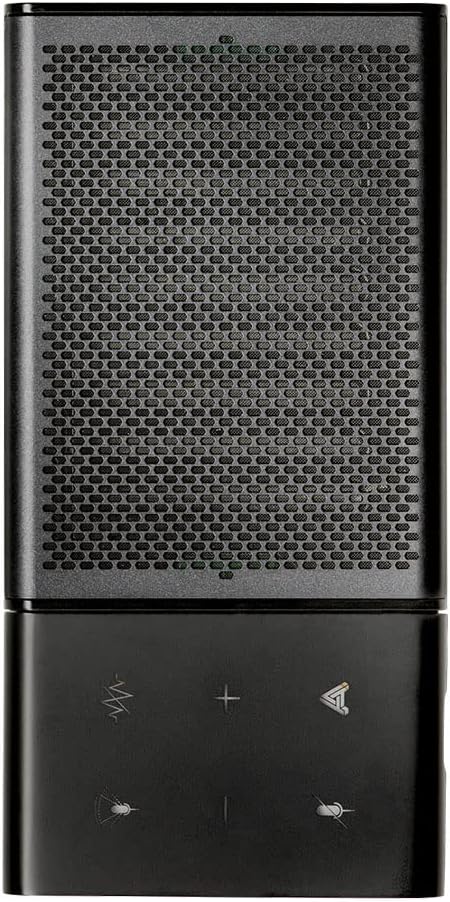
Image: All items included in the Audeze Filter Speakerphone package.
Vidiyo: Efereview of the Audeze Filter Speakerphone, including unboxing and initial setup. This video demonstrates the physical components and accessories.
3. Ngwaahịa gafereview
The Audeze Filter is designed for portability and ease of use, featuring a sleek aluminum chassis. It is comparable in size to a large cellphone when folded.
3.1 Akụkụ anụ ahụ
- Njikwa: Touch-sensitive buttons for mute, AI filter, volume adjustment, and call management.
- Igwe okwu: Intelligent beamforming microphone array.
- Ọkà okwu: Patented Audeze Planar Magnetic Speaker optimized for speech clarity.
- Ọdụ USB-C: Maka chaja na njikọ waya.
- Bọtịnụ ike: Dị n'akụkụ maka mfe ịnweta.
- Ihe ngosi LED: Na-enye nzaghachi ọnọdụ.
- Nhazi a na-agbanwe agbanwe: Allows the speaker to stand upright for optimal sound direction or fold flat for portability.

Image: Close-up of the speakerphone's control panel and speaker grille.

Image: The Audeze Filter Speakerphone in its upright position, ready for use.

Image: Dimensions of the Audeze Filter Speakerphone.

Image: The Audeze Filter Speakerphone in its compact, folded state.

Image: The Audeze Filter Speakerphone neatly stored in its protective carry case.
4. Nhazi
4.1 Ịchaji ngwaọrụ
The Audeze Filter has a built-in rechargeable Lithium Polymer battery, providing up to 15 hours of usage. To charge:
- Connect the provided USB-C cable to the USB-C port located on the inside of the speakerphone when it is unfolded.
- Connect the other end of the USB-C cable to a power source (e.g., computer, wall adapter). If your power source only has a USB-A port, use the included USB-C to USB-A adapter.
- Ụgwọ zuru ezu na-ewe ihe dịka awa 2.5.
4.2 Gbanyụọ ma ọ bụ gbanyụọ
To power on the device, press the singular power button located on the side. The LED indicator will illuminate. To power off, press and hold the power button.
4.3 Njikọ Bluetooth
The Audeze Filter supports Bluetooth connectivity for wireless use with compatible devices.
- Power on the Audeze Filter. It will automatically enter pairing mode, indicated by a blinking LED.
- Na ngwaọrụ gị (smartphone, mbadamba, laptọọpụ), gaa na ntọala Bluetooth.
- Select "Audeze Filter" from the list of available devices to connect.
- For Android devices, a prompt may appear for quick connection. For other operating systems like Windows or macOS, you may need to manually select it in Bluetooth settings.
4.4 Njikọ eriri USB
For a direct and stable connection, you can use the USB-C cable:
- Connect one end of the USB-C cable to the Audeze Filter's USB-C port.
- Connect the other end to your computer's USB-C port. Use the provided USB-C to USB-A adapter if necessary.
- The device will be recognized as an audio input/output device.
5. Ịrụ ọrụ igwe okwu
5.1 Njikwa
The Audeze Filter features intuitive touch controls on its surface:
- Oghere bọtịnụ: Located at the upper left, mutes/unmutes the microphone.
- AI Filter Button: Located to the right of the mute button, cycles through AI Noise Suppression settings (Off, Low, Medium, High).
- Bọtịnụ olu (+/-): Adjust speaker volume. Long-press to skip tracks (forward/reverse) when listening to media.
- Bọtịnụ multifunction: Located at the lower right, used for accepting and rejecting phone calls.
5.2 AI Noise Filtering
The Audeze Filter utilizes A.I. to identify and remove background noises, enhancing voice clarity. It is trained to recognize over 1000 different sounds, such as barking dogs, crying babies, fan noises, and car sounds.
- Adjust the level of noise suppression (Low, Medium, High) via the AI Filter button on the device or through the companion app.
Igwe okwu 5.3 na-akpụ akpụ
The intelligent beamforming microphone array allows you to adjust the microphone pickup pattern to suit your environment:
- 30°: Ideal for a single user directly in front of the speakerphone.
- 90°: Suitable for a small group or two people facing the speakerphone.
- 180°: For users on one side of a table.
- 360°: Best for multiple participants around the speakerphone in a conference setting.
5.4 Companion App (Audeze Hub)
The Audeze Hub app, available for iOS and Android, provides advanced control and customization options for your Audeze Filter Speakerphone.
- Ihe ngosi ndụ batrị: View batrị fọdụrụnụ na -agatage.
- Speaker Boost: Increase speaker loudness by up to 15dB for larger rooms or louder environments.
- Ogologo igwe okwu: Fine-tune the microphone pickup range from 0.5 meters to 5.5 meters to optimize for different room sizes and participant distances.
- Igwe ogbi One-tap microphone mute control.
- Mkpuchi akpaghị aka: Configure the device to automatically shut down after 30 minutes, 1 hour, 2 hours, 4 hours, or disable this feature.
- Nkwanye olu: Adjust the volume level of voice prompts from 0% to 100%.
- Mmelite femụwe: Keep your device updated with the latest features and improvements by checking for and installing firmware updates directly through the app.
Video: This video provides a comprehensive demonstration of the Audeze Filter Speakerphone, including its unboxing, physical features, and a detailed walkthrough of the Audeze Hub companion app's functionalities, such as AI noise suppression, speaker boost, and microphone distance settings. It also includes a practical test of the AI noise filtering feature.
6. Nlekọta
To ensure the longevity and optimal performance of your Audeze Filter Speakerphone, follow these maintenance guidelines:
- Nhicha: Jiri akwa dị nro dị nro hichaa mpụta ngwaọrụ ahụ. Zere iji kemịkalụ siri ike ma ọ bụ ihe na-emebi emebi.
- Nchekwa: When not in use, store the speakerphone in its provided leatherette carry case to protect it from scratches and dust.
- Okpomọkụ: Zere ikpughe ngwaọrụ ahụ na oke okpomọkụ ma ọ bụ anwụ kpọmkwem ruo ogologo oge.
7. Nchọpụta nsogbu
If you encounter issues with your Audeze Filter Speakerphone, refer to the following common solutions:
- Difficulty Hearing Others / Low Volume:
- Check the volume level on the device and your connected computer/smartphone.
- Use the Audeze Hub app to activate the Speaker Boost atụmatụ.
- Others Cannot Hear You Clearly / Background Noise:
- Gbaa mbọ hụ na akpọchighị igwe okwu.
- Hazie nke Mbelata mkpọtụ AI level (Low, Medium, High) via the device button or the Audeze Hub app.
- Hazie nke Na-akpụ akpụ setting to focus on the speaker(s) and minimize ambient noise.
- In the Audeze Hub app, verify the Ogologo igwe okwu setting is appropriate for your position relative to the speakerphone.
- Okwu njikọ Bluetooth:
- Ensure the speakerphone is powered on and in pairing mode (blinking LED).
- Turn off and on Bluetooth on your connecting device.
- Chezọ ngwaọrụ dị na ntọala Bluetooth gị wee jikọọ ọzọ.
- Try connecting via the USB-C cable as an alternative.
- Nsogbu Mmelite Firmware:
- Ensure the device has sufficient battery charge before attempting an update.
- Maintain a stable Bluetooth connection between the speakerphone and the device running the Audeze Hub app during the update process.
8. Nkọwapụta
| Njirimara | Nkọwa |
|---|---|
| Ihe onwunwe | Aluminom |
| Aha Nlereanya | Filter Speakerphone |
| Ụdị Ọkà Okwu | Igwe okwu |
| Njirimara Pụrụ Iche | A.I. Noise filtering |
| Eji akwadoro | For Computers, For Smartphones or Tablets, For Online Meetings, For Travel |
| Ngwa dakọtara | Android, Mac, Windows, iPhones |
| Ngwa gụnyere | USB-C USB |
| Akụkụ ngwaahịa | 0.3"D x 2.5"W x 6"H |
| Ibu Ibu | 280 grams (9.9 ounces) |
| Teknụzụ nzikọrịta ozi ikuku | Bluetooth |
| Isi Iyi Ike | Akwanyere batrị |
| Batrị | 1 batrị lithium polymer chọrọ (gụnyere) |
| Ụdị ọkwọ ụgbọ ala ọdịyo | Planar Magnetik ọkwọ ụgbọ ala |
| Ike Nwepu kacha elu | 10 Watt |
| Teknụzụ Njikọta | Bluetooth, USB |
| Ọnọdụ mmepụta ọdịyo | Stereo |
| Ụdị nkwụnye | Ugwu okpokoro |
| Oge Nchaji | Awa 2.5 |
9. Akwụkwọ ikike na nkwado
The Audeze Filter Speakerphone comes with a Akwụkwọ ikike zuru oke. For detailed warranty information, product support, or to contact customer service, please visit the official Audeze Store:


