1. Okwu mmalite
Thank you for choosing the AgfaPhoto Powerstation PPS 600 Pro. This portable power bank is designed to provide reliable power for various devices during outdoor activities, travel, and emergency situations. This manual provides essential information for safe operation, setup, maintenance, and troubleshooting. Please read it thoroughly before using the product.
2. Ntuziaka nchekwa
- Do not disassemble, repair, or modify the unit. Incorrect reassembly may cause fire or injury.
- Do not expose the unit to fire or extreme temperatures (above 60°C / 140°F).
- Do not use or store the unit in a bathroom or in an area exposed to water or moisture.
- Do not drop, hit, or subject the unit to strong impacts.
- Debe ebe ụmụaka na-apụghị iru.
- Use only recommended accessories and charging cables.
- Hụ na ikuku na-ekupụ ikuku nke ọma mgbe ị na-eji ya na mgbe ị na-achaji ya iji gbochie oke okpomọkụ.
- In case of leakage from the battery, avoid contact with skin and eyes. Rinse affected areas with water and seek medical attention.
3. Ihe ngwugwu
Hụ na ihe niile dị n'ime igbe ahụ:
- AgfaPhoto Powerstation PPS 600 Pro
- Power Cord (for AC charging)
- Car Cigarette Lighter Adapter
- Akwụkwọ ntuziaka onye ọrụ
4. Ngwaahịa gafereview
Familiarize yourself with the ports, buttons, and display of your Powerstation PPS 600 Pro.

Image: Front panel of the AgfaPhoto Powerstation PPS 600 Pro, showing the LCD screen, DC output, USB-A ports, USB-C port, and AC output switch.
The unit features a clear LCD display that shows battery level, input power, and output power. Various ports are available for charging different devices simultaneously.
- Ngosipụta LCD: Shows battery status, input/output wattage, na ihe ngosi njehie.
- Mmepụta DC: For devices requiring DC power.
- Ọdụ ụgbọ mmiri USB-A: For charging smartphones, tablets, and other USB-powered devices.
- Ọdụ USB-C: For fast charging compatible devices.
- Mmepụta AC: Standard wall outlet for appliances.
- Port ntinye: For charging the power station itself.
5. Nhazi
5.1 Nchaji izizi
Before first use, fully charge your AgfaPhoto Powerstation PPS 600 Pro. This ensures optimal battery performance and longevity.
- Connect the provided power cord to the AC input port on the power station.
- Tinye nsọtụ nke ọzọ nke eriri ike ahụ n'ime oghere mgbidi nkịtị.
- The LCD display will show the charging status. The unit is fully charged when the battery indicator shows 100%.
Charging can also be done via a solar panel (sold separately) or a car cigarette lighter adapter.

Image: Illustration of the three charging methods for the power station: via car cigarette lighter, AC wall adapter, and solar panel.
6. Ntuziaka ọrụ
6.1 Gbanyụọ/ gbanyụọ
- To turn on the unit, press and hold the main power button for a few seconds. The LCD display will illuminate.
- To turn off the unit, press and hold the main power button again until the display turns off.
6.2 Nchaji Ngwaọrụ Mpụga
The Powerstation PPS 600 Pro offers multiple output options:
- USB mmepụta: Connect your USB-powered devices (smartphones, tablets, drones, cameras) to the USB-A or USB-C ports. The unit will automatically detect and begin charging.
- Mmepụta AC: For devices requiring standard wall power (laptops, mini-refrigerators, LED TVs), press the AC ON/OFF button to activate the AC outlet. Plug your device into the AC outlet. Remember to turn off the AC output when not in use to conserve battery.
- Mmepụta DC: For 12V DC devices, connect them to the DC output port.

Image: The AgfaPhoto Powerstation PPS 600 Pro connected and charging a laptop, demonstrating its use for portable electronics.

Image: The power station in use during a power outage, providing light and charging a smartphone, highlighting its emergency backup capability.
7. Nlekọta
7.1 Nchekwa
- Store the power station in a cool, dry place, away from direct sunlight and heat sources.
- Maka nchekwa ogologo oge, chajịa ngwaọrụ ahụ ihe dịka 50-80% kwa ọnwa 3-6 iji chekwaa ahụike batrị.
- Avoid storing in environments with high humidity or extreme temperatures.
7.2 Nhicha
- Jiri akwa dị nro, nke dị ọcha iji hichaa mputa nke unit ahụ.
- Ejila ihe nchacha abrasive ma ọ bụ ihe mgbaze.
- Hụ na ọdụ ụgbọ mmiri niile enweghị uzuzu na ihe mkpofu.
8. Nchọpụta nsogbu
If you encounter issues with your Powerstation PPS 600 Pro, refer to the following common problems and solutions:
| Nsogbu | Ihe nwere ike ime | Ngwọta |
|---|---|---|
| Unit anaghị agbanwuo | Ahapụla batrị kpamkpam. | Charge the unit using the AC adapter. |
| No output from AC port | AC output not activated. Device exceeds power limit. | Press the AC ON/OFF button. Check device wattage against unit specifications. |
| Slow charging of external devices | Device requires higher current. Cable issue. | Ensure you are using the correct USB port (e.g., USB-C PD). Try a different cable. |
| Unit na-ekpo oke ọkụ | Poor ventilation. Excessive load. | Ensure vents are clear. Reduce the number or power of connected devices. Allow unit to cool down. |
Ọ bụrụ na nsogbu ahụ ka dị, biko kpọtụrụ nkwado ndị ahịa.
9. Nkọwapụta
Technical details for the AgfaPhoto Powerstation PPS 600 Pro:
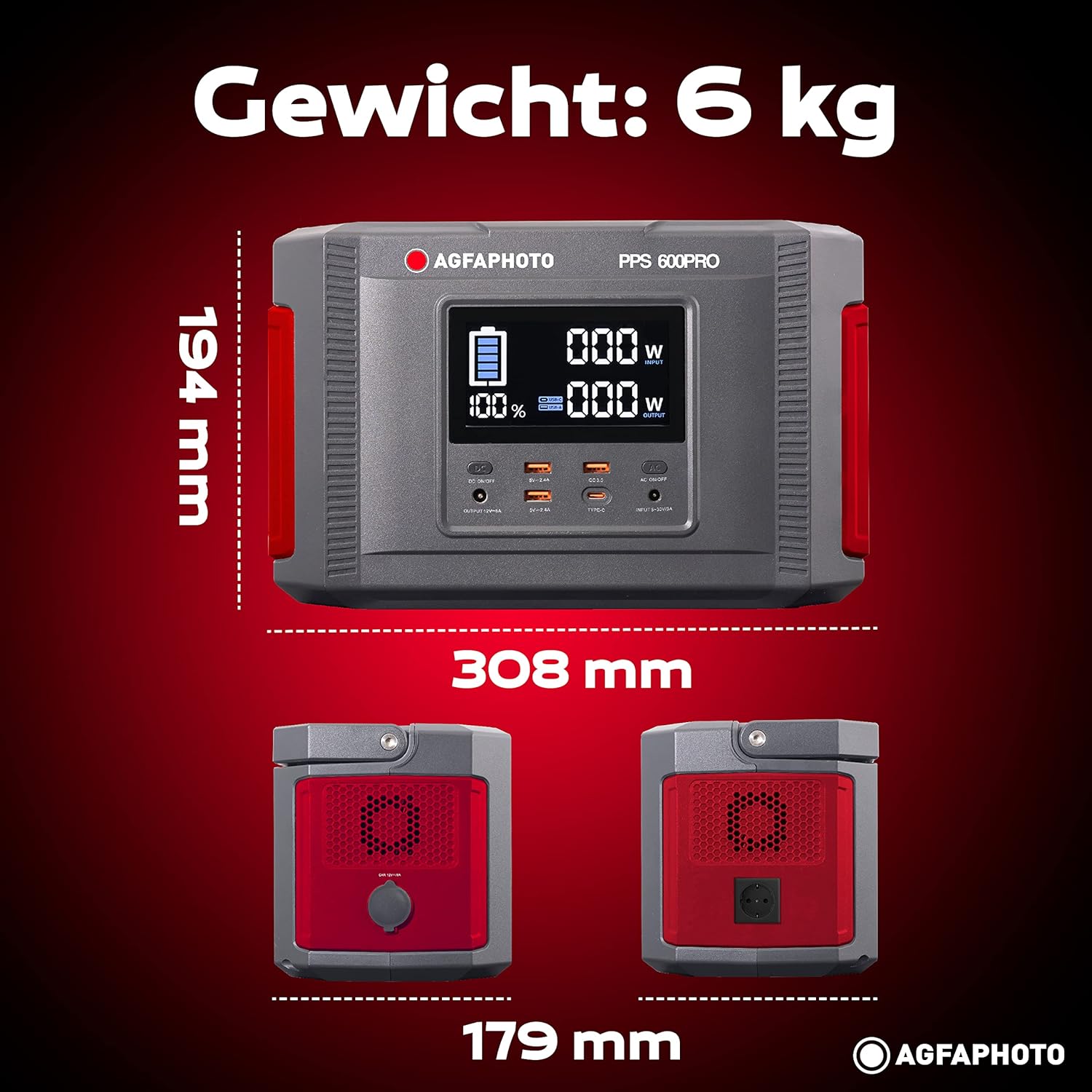
Image: Visual representation of the AgfaPhoto Powerstation PPS 600 Pro's dimensions (308 x 179 x 194 mm) and weight (6 kg).
| Njirimara | Nkọwapụta |
|---|---|
| Ụdị | Foto Agfa |
| Nọmba nlereanya | 717-854742 (PPS600) |
| Ike batrị | 644 W |
| Output Power (Continuous) | 600 W |
| Ike Nwepụta (Elu) | 1000 W |
| Voltage | 220 volts |
| Ibu Ibu | 6.1 kilogram |
| Akụkụ (L x W x H) | 308 x 179 x 194 mm |
| Isi Iyi Ike | Battery Powered (Solaire, électricité) |
| Eji akwadoro | Mobile phones, cameras, laptops, tablets |
| Ngwa gụnyere | Power cord, USB ports, LCD screen, car cigarette lighter adapter |
| Njirimara Pụrụ Iche | Kọmpat imewe |
10. Akwụkwọ ikike na nkwado
AgfaPhoto products are manufactured to high-quality standards and are covered by a manufacturer's warranty. For specific warranty terms and conditions, please refer to the warranty card included with your product or visit the official AgfaPhoto websaịtị.
For technical support, troubleshooting assistance, or spare parts inquiries, please contact AgfaPhoto customer service. Contact details can typically be found on the product packaging or the official brand websaịtị.