1. Okwu mmalite
This manual provides detailed instructions for the setup, operation, maintenance, and troubleshooting of the CAS CL3000-P Networking Barcode Label Printing Scale. This device is designed for commercial use in environments such as grocery stores, butcher shops, and supermarkets, offering integrated weighing, price computing, and barcode label printing capabilities.
Akụkụ ndị bụ isi:
- Integrated Barcode Label Printer for item-specific labels.
- Networking Ready (LAN) for central price updates and data synchronization.
- High-Speed Printing with 202 dpi resolution.
- Dual LCD Display for operator and customer viewing.
- User-Friendly PLU Management, storing up to 10,000 PLUs.
- Durable Aluminum Body Construction.
2. Mwepu na Mbido
Jiri nlezianya kewaa ihe niile dị na ya ma hụ na ihe niile dị tupu ịmalite ịtọlite ya.
2.1. Ihe ngwugwu
Hụ na ihe ndị a dị na ngwugwu gị:
- CAS CL3000-P Scale Unit
- Igwe ọkụ ọkụ
- Label Roll Starter Pack
- Akwụkwọ ntuziaka (akwụkwọ a)
2.2. Ntinye
Place the scale on a stable, level surface, away from direct sunlight, excessive heat, or strong vibrations. Ensure adequate space for operation and label printing.
2.3. Njikọ ike
- Connect the power cable to the scale's power input port.
- Tinye nsọtụ nke ọzọ nke eriri ọkụ n'ime oghere eletrik gbadoro ụkwụ.
- Turn on the scale using the power switch, typically located on the rear or side of the unit.
2.4. Network Connection (LAN)
For networking capabilities, connect an Ethernet cable from the scale's LAN port to your network router or switch. Refer to your network administrator for specific IP address configuration if required.
2.5. Label Roll Installation
Open the printer cover and carefully load the label roll according to the diagram inside the printer compartment. Ensure the labels feed smoothly and are correctly aligned for printing.
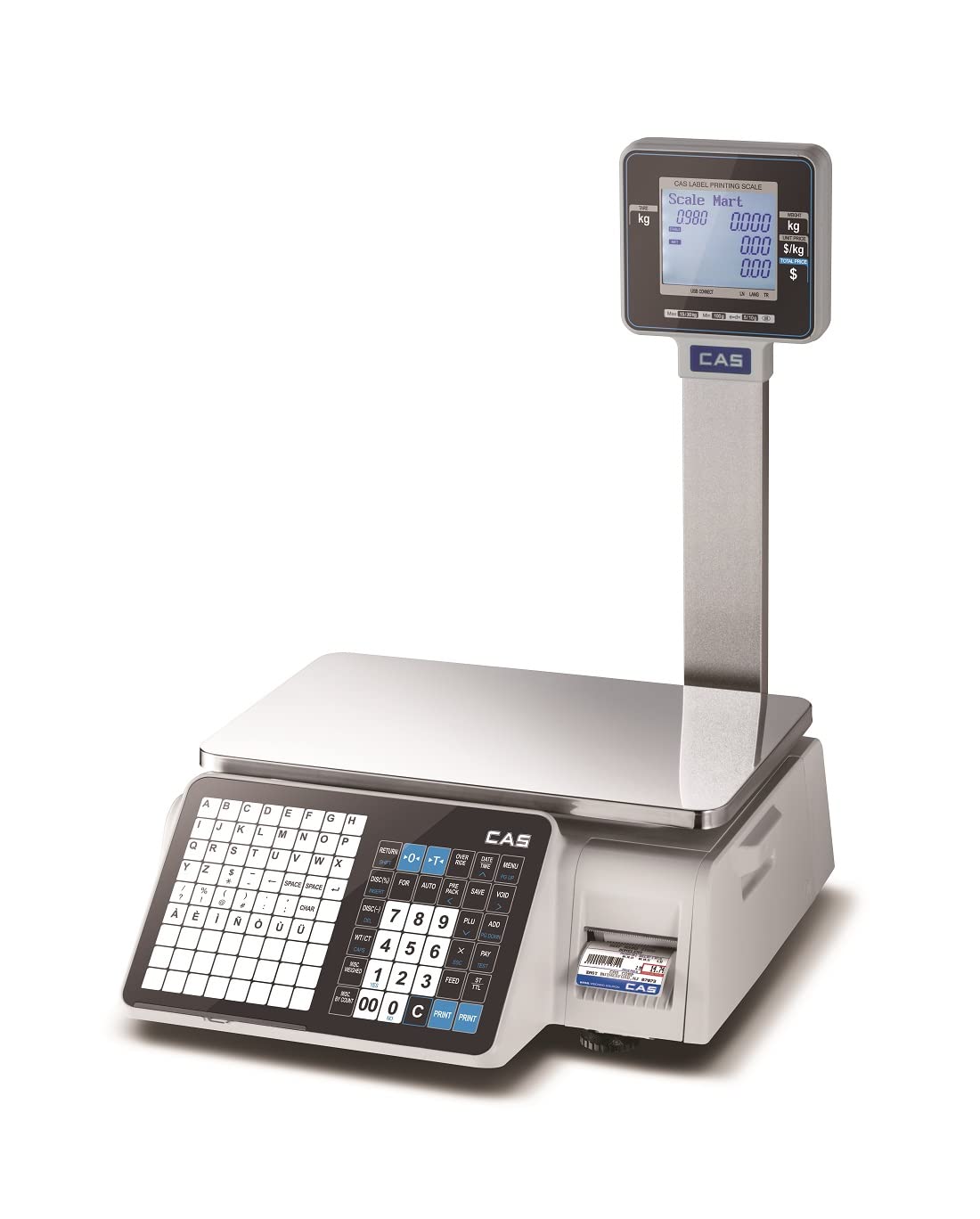
Figure 2.1: CAS CL3000-P Barcode Label Printing Scale with dual display and integrated printer.
3. Ntuziaka ọrụ
This section details the basic operation of the CAS CL3000-P scale for weighing, price computing, and label printing.
3.1. Basic Weighing
- Ensure the scale displays "0.000 kg" before placing any item. If not, press the ZERO bọtịnụ.
- Place the item to be weighed on the weighing platter.
- The weight will be displayed on both the operator and customer LCD screens.
3.2. Price Computing and Label Printing
The scale supports up to 10,000 PLUs (Price Look-Up units) for efficient operation.
- Place the item on the weighing platter.
- Enter the PLU code for the item using the numeric keypad.
- Alternatively, if a PLU is not set, enter the unit price directly using the numeric keypad.
- Pịa Bipụta button to generate a barcode label. The label will include weight, unit price, total price, and barcode.

Figure 3.1: Close-up of the dual LCD display, featuring a scrolling message bar for enhanced communication.

Figure 3.2: Detail of the integrated printer, capable of linerless printing for efficiency.
3.3. PLU Management
The CL3000-P allows for easy management of up to 10,000 PLUs. Refer to the detailed programming guide (separate document or advanced settings menu) for adding, editing, or deleting PLUs.

Figure 3.3: The scale's internal memory supports storage for up to 10,000 product PLUs.
4. Nlekọta
Regular maintenance ensures the longevity and accuracy of your CAS CL3000-P scale.
4.1. Nhicha
- Kwupu ike tupu ihicha.
- Wipe the scale's exterior and weighing platter with a soft, damp akwa .
- Do not use abrasive cleaners, solvents, or immerse the unit in water.
- Ensure no liquids enter the display or printer openings.
4.2. Nlekọta ngwa nbipute
- Regularly check the printer head for debris or adhesive residue. Clean gently with a lint-free cloth and isopropyl alcohol if necessary.
- Ensure label rolls are stored in a cool, dry place to prevent adhesive degradation.
4.3. nhazi nhazi
The scale is factory-calibrated. If you suspect accuracy issues, contact authorized CAS service personnel for re-calibration. Do not attempt to calibrate the scale yourself unless specifically instructed by a qualified technician.
5. Nchọpụta nsogbu
This section provides solutions to common issues you might encounter with your CAS CL3000-P scale.
| Nsogbu | Ihe nwere ike ime | Ngwọta |
|---|---|---|
| Scale does not power on. | Power cable disconnected; Power outlet faulty; Power switch off. | Check power cable connection; Test power outlet; Ensure power switch is ON. |
| Ọgụgụ ezighi ezi. | Scale not level; Debris under platter; Needs calibration. | Ensure scale is on a level surface; Clean under platter; Contact service for calibration. |
| Labels not printing or printing blank. | Label roll empty or incorrectly loaded; Printer head dirty; Printer error. | Replace/re-load label roll correctly; Clean printer head; Restart scale. |
| Nsogbu njikọ netwọkụ. | Ethernet cable disconnected; Network configuration error. | Check Ethernet cable; Verify network settings with IT support. |
If the problem persists after attempting these solutions, please contact CAS customer support.
6. Nkọwapụta
| Njirimara | Nkọwa |
|---|---|
| Nlereanya | CL3000-30KG-P |
| Ụdị | CAS |
| Ikike ibu ibu | 30 kilogram |
| Ịgụ izi ezi | 10g |
| Nha Pan | 380x250mm (15x10 inches) |
| Ụdị ngosi | LCD (Dual Display) |
| PLU Memory | Up to 10,000 PLUs |
| Mkpebi ngwa nbipute | 202 dpi |
| Njikọta | LAN (Ethernet), USB port, RS-232C, RJ11, optional wireless |
| Ihe onwunwe | Stainless Steel (platter), Aluminum Body Construction |
| Isi Iyi Ike | AC/DC |
| Ibu Ibu | 3.5 n'arọ |
| Akụkụ ngwugwu | 30 x 20 x 10 cm |
| Mba onye si | India |
7. Akwụkwọ ikike na nkwado
7.1. Akwụkwọ ikike Ozi
The CAS CL3000-P scale comes with a standard manufacturer's warranty. For specific warranty terms and conditions, please refer to the warranty card included with your product or contact CAS customer service. Extended warranty options may be available.
7.2. Nkwado ndị ahịa
For technical assistance, service requests, or any inquiries regarding your CAS CL3000-P scale, please contact CAS Weighing India Pvt Ltd. Their contact information can typically be found on the product packaging or their official websaịtị.
Ozi mkpọtụrụ:
- Manufacturer: CAS Corportaion
- Packer: CAS Weighing India Pvt Ltd
- Importer: CAS Corportation
- Ekwentị: 9212559707


