1. Okwu mmalite
This manual provides detailed instructions for the setup, operation, maintenance, and troubleshooting of your AIYIMA T5 Tube Phono Amplifier. Please read this manual thoroughly before using the device to ensure proper function and longevity. The AIYIMA T5 is a versatile 2.0 channel stereo amplifier featuring tube amplification, a built-in phono stage for turntables, Bluetooth 5.0 connectivity, and a headphone output, designed for home audio systems.

Foto 1: N'ihu view of the AIYIMA T5 Tube Phono Amplifier. This image displays the compact black amplifier unit with two visible vacuum tubes, a VU meter, and control knobs for volume, treble, and bass, along with input selection buttons and a headphone jack.
2. Ntuziaka nchekwa
- Ensure the power adapter is correctly connected to the amplifier and a suitable power outlet.
- Do not expose the unit to water, moisture, or extreme temperatures.
- Zere itinye ngwaọrụ ahụ n'ebe anwụ na-acha kpọmkwem ma ọ bụ n'ebe okpomọkụ dị nso.
- Emeghela ya ampihe mgbapụta casing. Kpọtụrụ ndị ọrụ ruru eru ọrụ niile.
- Debe unit ahụ pụọ na mpaghara magnetik siri ike.
- Unplug the power adapter during lightning storms or when unused for extended periods.
- Gbaa mbọ hụ na ikuku ikuku dị na gburugburu unit ahụ iji gbochie ikpo oke ọkụ.
3. Ihe ngwugwu
Chọpụta na ihe niile dị na ngwugwu:
- Ngwa ekwentị AIYIMA T5 Tube AmpNgalaba na-ebuli elu
- DC 36V 6A nkwụnye ọkụ
- Antenna Bluetooth
- Akwụkwọ ntuziaka (akwụkwọ a)
4. Ngwaahịa gafereview
4.1 Njikwa ihu ihu na ihe ngosi

Foto 2: Labeled diagram of the AIYIMA T5 front panel. This image highlights the Bluetooth antenna, 6K4 vacuum tubes, VU level meter, Treble control, Bass control, Volume/Mode knob (which also functions as a power switch and input selector), 6.35mm Headphone Output, and input indicator buttons for Bluetooth, AUX (RCA), and MM Phono.
- Antenna Bluetooth: For wireless audio reception.
- 6K4 Tube * 2: Vacuum tubes for audio signal processing.
- VU Level Meter: Displays audio output level.
- Njikwa Treble: Adjusts high-frequency response.
- Njikwa Bass: Adjusts low-frequency response.
- VOL/MODE Knob: Controls volume, acts as power switch (press), and input selector (rotate).
- 6.35mm mmepụta ekweisi: Maka ijikọ ekweisi.
- Ihe ngosi BT: Illuminates when Bluetooth input is selected.
- AUX Indicator: Illuminates when RCA input is selected.
- PHONO Indicator: Illuminates when MM Phono input is selected.
4.2 Njikọ azụ azụ
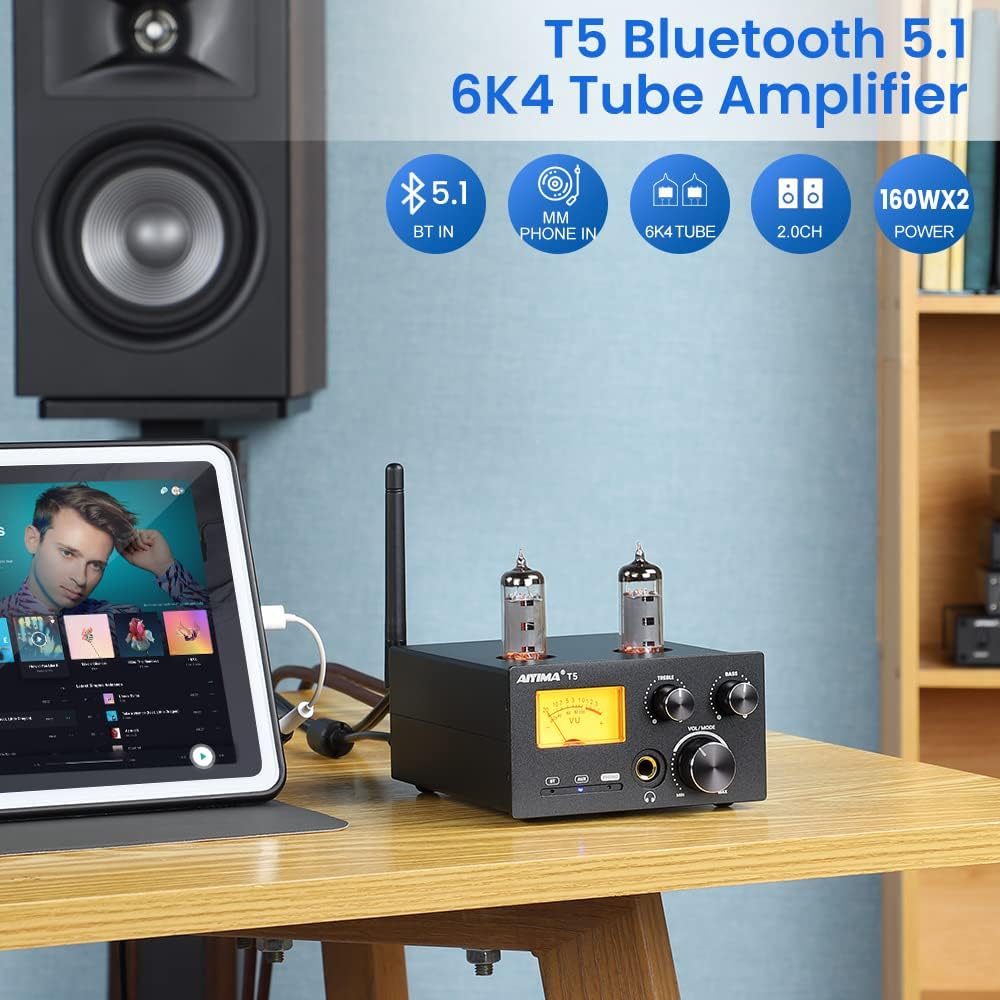
Foto 3: Labeled diagram of the AIYIMA T5 rear panel. This image shows the MM Phono input, RCA input, Audio Output terminals for passive speakers, 3.5mm AUX Output, GND (ground) terminal for turntables, DC Power Input, and the Bluetooth antenna connector.
- MM PHONO Input: For connecting turntables with MM cartridges. Includes a GND terminal for grounding.
- Ntinye RCA: For connecting audio sources via RCA cables (e.g., CD players, DACs).
- Mmepụta ọdịyo: Speaker terminals for connecting passive speakers (Left and Right channels).
- 3.5mm AUX Output: For connecting active speakers or an active subwoofer.
- Ntinye ike DC: Connects to the provided DC 36V 6A power adapter.
- ANT: Connector for the Bluetooth antenna.
5. Nhazi ntuziaka
5.1 Initial Placement and Connections
- Nkwanye: Place the AIYIMA T5 on a stable, flat surface with adequate ventilation. Ensure it is away from direct heat sources or moisture.
- Install Bluetooth Antenna: Screw the provided Bluetooth antenna onto the ANT connector on the rear panel.
- Jikọọ ndị ọkà okwu:
- Ndị na-ekwu okwu na-agafe agafe: Connect your passive speakers to the "Audio Output" terminals on the rear panel using speaker wire. Ensure correct polarity (+ to + and - to -).
- Active Speakers/Subwoofer: Connect active speakers or an active subwoofer to the "3.5mm AUX Output" on the rear panel using a 3.5mm to RCA cable (not included).
- Jikọọ Isi iyi ọdịyo:
- MM Phono (Turntable): Connect your turntable's RCA output to the "MM PHONO Input" on the rear panel. Connect the turntable's ground wire to the "GND" terminal on the amplifier to reduce hum.
- Ntinye RCA: Connect your audio source (e.g., CD player, DAC) to the "RCA Input" on the rear panel using RCA cables.
- Bluetooth: For Bluetooth connection, no physical cable is needed for the source device.
- Njikọ Ike: Connect the DC 36V 6A power adapter to the "DC Power Input" on the rear panel, then plug the adapter into a wall outlet.

Foto 4: The AIYIMA T5 amplifier connected to a turntable and passive speakers. This image illustrates the rear panel connections for a turntable (MM Phono input with ground wire) and passive speakers (Audio Output terminals).

Foto 5: Close-up of the MM Phono input on the AIYIMA T5, showing the ground wire connection point. This image emphasizes the importance of connecting the phono ground wire to reduce noise.
6. Ntuziaka ọrụ
6.1 Gbanyụọ ma ọ bụ gbanyụọ
Pịa VOL/MODE knob once to power on the amplifier. Press and hold the VOL/MODE knob for approximately 3 seconds to power off the ampna -emegharị ihe.
6.2 Nhọrọ ntinye
Tugharia ihe VOL/MODE knob to cycle through the available input sources: Bluetooth (BT), RCA (AUX), and MM Phono (PHONO). The corresponding indicator light on the front panel will illuminate to show the selected input.

Foto 6: Close-up of the input selection buttons (BT, AUX, PHONO) and their indicator lights on the AIYIMA T5.
6.3 Mgbanwe olu
Tugharia ihe VOL/MODE Pịa aka n'akụkụ aka nri iji mee ka olu dịkwuo elu ma jiri aka ekpe pịa ya iji belata ya.

Foto 7: Close-up of the volume control knob on the AIYIMA T5.
6.4 Treble and Bass Control
Jiri ihe IKU na Bass knobs to adjust the high and low frequency response of the audio output according to your preference.
6.5 Njikọ Bluetooth
- Select the Bluetooth input by rotating the VOL/MODE knob until the "BT" indicator light is on.
- Na ekwentị mkpanaaka gị ma ọ bụ kọmputa, mee ka Bluetooth nwee ike chọọ ngwaọrụ dị.
- Select "AIYIMA T5" from the list of devices to pair.
- Once paired, the "BT" indicator light may change from blinking to solid, indicating a successful connection.
6.6 Headphone Usage
Connect your 6.35mm headphones to the headphone output jack on the front panel. When headphones are connected, audio output to speakers will typically be muted.

Foto 8: Close-up of the 6.35mm headphone output jack on the AIYIMA T5.
6.7 VU mita
The VU meter on the front panel visually indicates the audio output level. Its movement is synchronized with the music playback, providing a visual representation of the sound dynamics. Note that the VU meter's accuracy may vary and it primarily serves as a visual aesthetic.
7. Nlekọta
7.1 Nhicha
- Kwụpụ ya mgbe niile amplifier from the power outlet before cleaning.
- Jiri akwa dị nro ma kpọọ nkụ hichaa mpụta nke otu ahụ.
- Ejila ihe nhicha mmiri, ihe na-eme ka aerosol dị nro, ma ọ bụ kemịkalụ na-emebi emebi, n'ihi na ha nwere ike imebi ihe dị n'ime ma ọ bụ ihe ndị dị n'ime ya.
7.2 Tube Replacement
The 6K4 vacuum tubes have a finite lifespan and may need replacement over time. If you notice a degradation in sound quality or if a tube fails, you can replace them.
- Gbaa mbọ hụ na amplifier is powered off and unplugged from the wall outlet. Allow the tubes to cool completely before handling.
- Gently pull the old tube straight up from its socket. Avoid twisting or bending.
- Carefully align the pins of the new 6K4 tube with the holes in the socket.
- Gently push the new tube straight down into the socket until it is firmly seated. Do not force it.
- Reconnect power and test the ampna -emegharị ihe.

Foto 9: Agara nso view of the 6K4 vacuum tubes on the AIYIMA T5 ampna -emegharị ihe.
8. Nchọpụta nsogbu
| Nsogbu | Ihe nwere ike ime | Ngwọta |
|---|---|---|
| Enweghị mmepụta ụda. |
|
|
| Ụda gbagọrọ agbagọ ma ọ bụ nke na-adịghị mma. |
|
|
| Bluetooth pairing failure. |
|
|
| Unit unexpectedly shuts down. |
|
|
| Humming noise from turntable. |
|
|
9. Nkọwapụta
| Njirimara | Nkọwa |
|---|---|
| Nlereanya | AIYIMA T5 |
| Ntinye ntinye | Bluetooth 5.1, MM Phono, Stereo RCA |
| Ihe ntanetịpụta | Passive Speaker, 6.35mm Headphone, 3.5mm AUX Output (for active speakers/subwoofer) |
| Ike mmepụta | 160W + 160W (at 4Ω load) |
| Sistemụ ọwa | 2.0 Stereo ọwa |
| Nzaghachi ugboro ugboro | 20Hz - 20KHz (±3dB) |
| Ụdị Bluetooth | 5.1 (SBC, AAC, APTX, APTX-HD, APTX-LL supported) |
| Ntinye ike | DC 18-36V (5-12A) |
| Akụkụ ngwaahịa | 5.2 x 4.1 x 2.1 sentimita (133mm x 105mm x 54mm) |
| Ibu Ibu | 1.65 pound |
| Ọkpụkpụ | 6K4 * 2 |

Foto 10: Diagram showing the dimensions and key specifications of the AIYIMA T5 ampna -emegharị ihe.
10. Akwụkwọ ikike na nkwado
AIYIMA na-enye 2-afọ akwụkwọ ikike for this product, ensuring worry-free after-sales service. For technical support, warranty claims, or any inquiries regarding your AIYIMA T5 amplifier, please refer to the contact information provided with your purchase documentation or visit the official AIYIMA websaịtị.


