1. Okwu mmalite
Thank you for choosing the ARREGUI Plus C 180090 Electronic Double Security Safe. This safe is designed to provide robust protection for your valuables, combining an electronic code lock with a certified key lock for enhanced security. Please read this manual carefully before installation and operation to ensure proper use and to maximize the lifespan of your safe.
The ARREGUI Plus C 180090 features a durable alloy steel construction with advanced anti-drilling and anti-lever mechanisms. Its double security system requires both a correct electronic code and the physical key for access, offering superior protection against unauthorized entry.
2. Ozi nchekwa
- Always keep the safe keys in a secure location, separate from the safe itself, and away from unauthorized individuals.
- Do not store the emergency override key inside the safe.
- Ensure the safe is securely mounted to a wall or floor to prevent removal.
- Avoid exposing the safe to extreme temperatures or high humidity.
- Do not attempt to force the safe open if the electronic lock malfunctions or if you forget the code. Refer to the troubleshooting section or contact customer support.
- Dochie batrị ozugbo mgbe ihe ngosi batrị dị ala pụtara iji zere mkpọchi.
3. Ihe ngwugwu
Nyochaa na akụrụngwa niile dị tupu ịmalite nwụnye:
- ARREGUI Plus C 180090 Safe Unit
- Akwụkwọ ntuziaka (akwụkwọ a)
- 2 User Keys (for the certified key lock)
- Owner Card Certificate
- External Micro USB Power Supply (for emergency power)
- Fixing Screws (for mounting)
- 4 x 1.5V AA Batteries (may be included, but always have spares)
4. Nhazi
4.1. Ntinye batrị
The safe requires 4 x 1.5V AA batteries to power the electronic lock. The battery compartment is typically located on the inside of the safe door. Ensure the safe is open before installing batteries.
- Locate the battery compartment cover on the inside of the safe door.
- Wepu mkpuchi.
- Insert 4 new 1.5V AA batteries, observing the correct polarity (+/-).
- Dochie mkpuchi oghere batrị.
4.2. Initial Opening and Code Setting
Upon first use, the safe will be in an unlocked state or can be opened using the factory default code (if any, check the owner card) and the key. It is crucial to set your personal code immediately.
- Open the safe: Insert one of the user keys into the key lock and turn it. Simultaneously, enter the factory default code (if applicable) or press the 'OPEN' button on the keypad. Turn the handle to open the door.
- Chọta bọtịnụ nrụpụta: With the door open, find the small red or green reset button on the inside of the safe door, usually near the battery compartment.
- Press the reset button: Press and release the reset button. The display will show 'PROG' or 'SET'.
- Enter your new code: On the keypad, enter a new personal code (3 to 8 digits).
- Confirm the code: Press the '#' or 'ENTER' button to confirm. The display should show 'GOOD' or 'SUCCESS'.
- Nwalee koodu ọhụrụ: With the door still open, test the new code by entering it and turning the key. The bolts should retract. If successful, close the door and lock it.
4.3. Ịwụnye Nchekwa ahụ
The ARREGUI Plus C 180090 safe can be securely mounted to a wall, floor, or shelf using the provided fixing screws. This significantly enhances security by preventing the safe from being removed.

Ọgụgụ 4.3.1: Ime view of the safe's base showing pre-drilled mounting holes for secure installation.
- Họrọ ebe: Select a discreet and secure location for the safe.
- Mark drilling points: Open the safe door. Use the pre-drilled holes in the back or base of the safe as a template to mark the drilling points on the wall or floor.
- Gwuo oghere pilot: Drill pilot holes at the marked locations using an appropriate drill bit for your wall/floor material.
- Position the safe: Align the safe's mounting holes with the drilled holes.
- Secure the safe: Insert the fixing screws through the safe's holes and into the wall/floor. Tighten them securely.
5. Ntuziaka ọrụ
5.1. Imepe Nchekwa ahụ
The ARREGUI Plus C 180090 requires both the correct electronic code and the physical key to open.
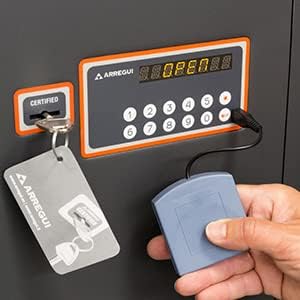
Figure 5.1.1: The electronic keypad and key slot, demonstrating the dual security mechanism.
- Insert the user key into the key lock.
- Enter your 3 to 8 digit personal code on the electronic keypad.
- Press the '#' or 'ENTER' button. The display will show 'OPEN' if the code is correct.
- Within a few seconds, turn the key and then turn the handle to open the safe door.
5.2. Imechi na Ịkpọchi Nchekwa ahụ
- Mechie ọnụ ụzọ nchekwa ahụ nke ọma.
- Turn the handle to engage the bolts.
- Turn the key to the locked position and remove it. The safe is now securely locked.
5.3. Changing the User Code
You can change your personal user code at any time while the safe door is open.
- Open the safe door using your current code and key.
- Locate and press the reset button on the inside of the safe door. The display will show 'PROG' or 'SET'.
- Enter your new 3 to 8 digit code on the keypad.
- Press the '#' or 'ENTER' button to confirm. The display should show 'GOOD'.
- Test the new code with the door open before closing the safe.
5.4. Master Code (Administrator Code)
The safe also features a master code, which can be used to open the safe and change the user code. The master code is typically set by the manufacturer or can be programmed by an administrator. Refer to your owner card certificate for initial master code details or specific instructions on setting it.
5.5. Opening Delay Function
The safe allows for a programmable opening delay between 1 and 99 minutes. This feature adds an extra layer of security by preventing immediate access even after the correct code is entered.
- With the safe door open, press the 'PROG' button (or equivalent, refer to display messages).
- Enter the desired delay time in minutes (e.g., '05' for 5 minutes).
- Pịa '#' maọbụ 'ENTER' iji gosi na ọ dị.
- When attempting to open the safe, after entering the correct code, the display will show the countdown. You must wait for the delay period to expire before turning the key and handle.
5.6. Ime ọkụ ọkụ ọkụ
The safe is equipped with an interior LED light that automatically activates when the door is opened and deactivates when closed, providing visibility inside the safe.

Figure 5.6.1: Interior of the safe showing the LED light and removable shelf.
5.7. Removable Shelf and Base Drawer
The safe includes a removable shelf for organizing contents and a 13 cm high base with an internal drawer, facilitating upright installation and access.

Figure 5.7.1: Close-up of the safe's base, showing the internal drawer.
6. Nlekọta
- Ngbanwe batrị: Replace the 1.5V AA batteries annually or when the low battery indicator appears on the display. Always use new, high-quality alkaline batteries.
- Nhicha: Jiri nwayọ hichaa mpụta nke nchekwa ahụ, damp akwa . Zere ihe nchacha ma ọ bụ ihe mgbaze nke nwere ike imebi ngwụcha ma ọ bụ ngwa eletrọnịkị.
- Igodo mkpọchi: Periodically check the key lock for smooth operation. Do not lubricate the key lock unless specifically recommended by ARREGUI.
- Bolt Mechanism: Ensure the locking bolts operate smoothly. Keep the area around the bolts clear of obstructions.
7. Nchọpụta nsogbu
| Nsogbu | Ihe nwere ike ime | Ngwọta |
|---|---|---|
| Safe does not open after entering code and turning key. | Incorrect code entered. Batteries are low or dead. Opening delay is active. | Re-enter the correct code carefully. Replace batteries. Wait for the opening delay countdown to finish. |
| Ahụigodo anaghị aza. | Batrị nwụrụ anwụ. | Replace batteries. If safe is locked, use the external micro USB power supply to provide temporary power (connect to the port on the keypad, then enter code and use key). |
| Safe locks temporarily after multiple incorrect entries. | Security feature activated. | This is normal. Wait for the lockout period to expire (usually a few minutes) before attempting to enter the code again. |
| Cannot change the code. | Safe door is not open. Reset button not pressed correctly. | Ensure the safe door is fully open. Press the reset button firmly until the display shows 'PROG' or 'SET'. |
8. Nkọwapụta
| Njirimara | Nkọwa |
|---|---|
| Nọmba nlereanya | 180090 |
| Ụdị | ARREGUI |
| Akụkụ Mpụta (H x W x D) | 62 x 38.5 x 36 cm |
| Akụkụ ime (H x W x D) | 61 x 37.5 x 29.9 cm (approximate, based on description) |
| Ibu | 65 kilogram |
| Ike | 68 lita |
| Ihe onwunwe | Alloy Steel |
| Ọkpụrụkpụ ọnụ ụzọ | 10 mm + 3 mm anti-drilling plate |
| Ọkpụrụkpụ ahụ | 5 mm |
| Ekpochi mkpọchi | 7 x Ø22 mm nickel-plated steel, anti-saw, anti-lever |
| Ụdị mkpọchi | Electronic Combination Lock & Certified Double-Bit Key Lock (EN1300 Class A) |
| Ogologo koodu | 3 ruo 8 mkpụrụọnụọgụ |
| Ịnye ọkụ | 4 x 1.5V AA Batteries (external micro USB for emergency) |
| Ụdị nkwụnye | Wall/Floor (fixing screws included) |
| Atụmatụ pụrụ iche | Interior LED light, removable shelf, 13 cm high base with internal drawer, programmable opening delay. |
9. Akwụkwọ ikike na nkwado
ARREGUI products are manufactured to high-quality standards. For warranty information, please refer to the owner card certificate included with your safe or visit the official ARREGUI websaịtị. Debe nnata nzụta gị ka ihe akaebe nke ịzụrụ.
For technical support, spare parts, or any questions not covered in this manual, please contact ARREGUI customer service through their official channels. Provide your model number (180090) and a detailed description of the issue when seeking assistance.


