Okwu mmalite
The Insta360 X3 is a versatile waterproof 360 action camera designed to capture immersive 5.7K 360 HDR video and stunning 72MP 360 photos. Featuring a new 1/2" 48MP sensor, a large 2.29" touchscreen, and advanced AI editing capabilities, the X3 allows you to capture and reframe your moments with unparalleled flexibility. This manual provides detailed instructions on setting up, operating, and maintaining your Insta360 X3 camera.
Official Insta360 X3 release video, showcasing key features and capabilities of the camera.
Kedu ihe dị na Igbe ahụ
Upon unboxing your Insta360 X3, you should find the following items:
- 1x Insta360 X3 Camera
- 1x Charge Cable
- 1x Protective Pouch
- 1 x Lens akwa
- Ntuziaka Ntuziaka 1x
- 1x 2-in-1 Selfie Stick
- 1 x 256GB MicroSD kaadị
- 1x EVO Gimbals Lens Cloth
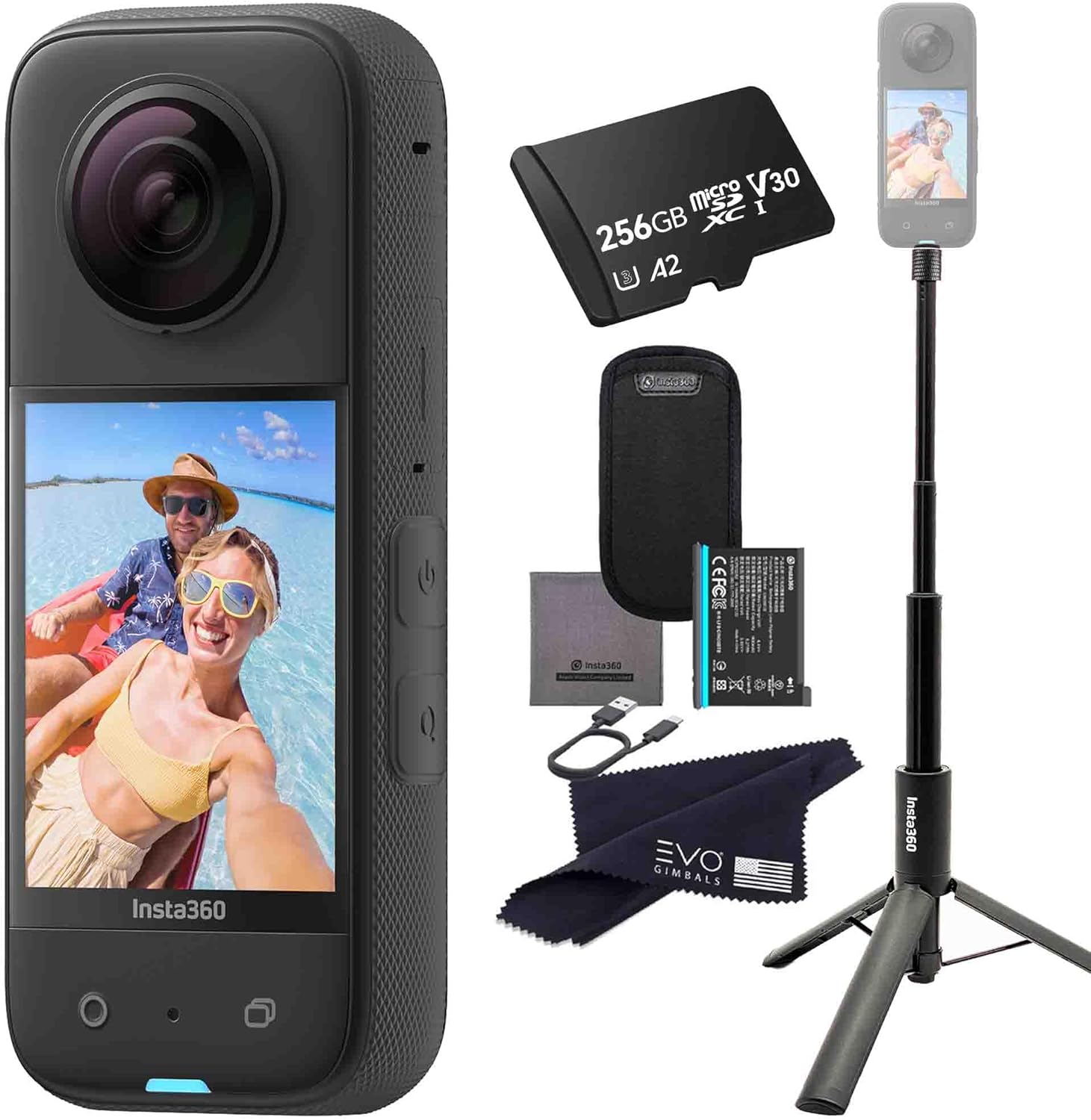
The Insta360 X3 camera shown alongside its bundled accessories, including the 2-in-1 selfie stick and 256GB microSD card.
Melite
- Gbanyụọ batrị: Before first use, fully charge the Insta360 X3 battery using the provided charge cable. Connect the cable to the camera's USB-C port and a power source. The indicator light will show charging status.
- Fanye kaadị MicroSD: Open the battery door and insert the 256GB microSD card into the designated slot. Ensure the card is inserted correctly with the contacts facing the right direction. The camera supports up to 1TB microSD cards.
- Ike Na: Pịa ma jide bọtịnụ ike (dị n'akụkụ) ruo sekọnd ole na ole ruo mgbe ihuenyo ahụ ga-enwu.
- Ntọala izizi: Follow the on-screen prompts to select your language, set the date and time, and connect to the Insta360 App via Bluetooth for firmware updates and advanced controls.
- Install Insta360 App: Download the official Insta360 App from your device's app store (Insta360 Download Center). This app is essential for reframing 360 footage, AI editing, and controlling the camera remotely.
Ntuziaka ọrụ
Understanding the 2.29" Touchscreen
The Insta360 X3 features a large 2.29" touchscreen, providing a clear preview of your shots and an intuitive interface for navigating settings and modes. Swipe gestures and taps are used to control the camera.

The Insta360 X3's massive touchscreen provides an enhanced viewing and control experience.
Capturing 5.7K 360 HDR Video and 72MP Photos
The X3 utilizes new 1/2" 48MP sensors to deliver high-resolution 360-degree content. In 360 mode, the camera captures everything around it, allowing you to reframe your shots later using the Insta360 app. This "shoot first, frame later" workflow ensures you never miss a moment.

The new 1/2" 48MP sensor enhances detail capture in both photos and videos.

The Insta360 X3 is a 360 Creative Powerhouse, capturing immersive spherical content.
4K Single-Lens Mode
For traditional wide-angle shots, switch to 4K Single-Lens Mode. This mode utilizes one of the camera's lenses to capture standard flat video at 4K resolution, similar to a conventional action camera.

Experience traditional wide-angle capture with 4K Single Lens Mode.
60fps Me Mode
The 60fps Me Mode is designed for capturing dynamic selfie footage. When used with the invisible selfie stick, this mode automatically reframes the footage to keep you in the center of the action, making the selfie stick disappear from the final video.
FlowState Stabilization
Insta360's FlowState Stabilization technology ensures your footage remains incredibly smooth, even in the most action-packed scenarios. This digital stabilization corrects for shakes and bumps, providing gimbal-like stability without the need for additional hardware.
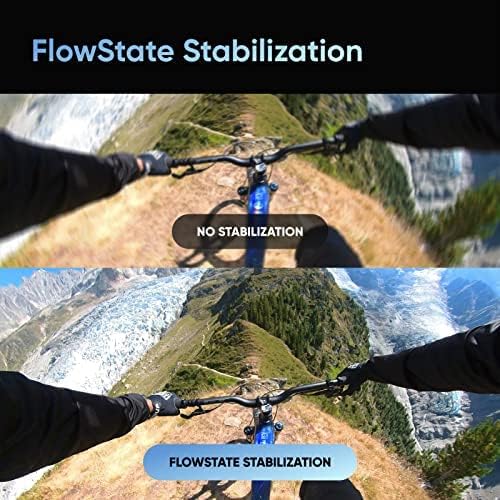
FlowState Stabilization provides incredibly smooth video, even during intense activities.
Timelapse Videos in 8K
Create stunning timelapse videos in crisp 8K resolution. The X3's advanced sensor captures detailed frames over time, which are then stitched together to produce captivating accelerated sequences.
AI Editing
The Insta360 App leverages AI-powered reframing tools to simplify the editing process. After capturing 360 footage, the AI can help you find the best angles, track subjects, and create dynamic edits with minimal effort.

AI Editing in the Insta360 app streamlines the reframing and creation of dynamic content.
Mmiri anaghị ekpuchi (IPX8)
The Insta360 X3 is IPX8 waterproof, allowing it to be submerged up to 10 meters (33 feet) without a dive case. Ensure all ports and the battery door are securely closed before exposing the camera to water.

The Insta360 X3 is IPX8 Waterproof, suitable for underwater adventures.
Nlekọta
- Nlekọta anya anya: Always use the provided lens cloth to clean the camera lenses. Avoid using abrasive materials or harsh chemicals. Keep the lenses free from dust, dirt, and fingerprints for optimal image quality.
- Mkpughe mmiri: After using the camera in water, rinse it with fresh water and dry it thoroughly with a soft cloth. Ensure no water remains in the ports or battery compartment.
- Nlekọta batrị: Store the camera and battery in a cool, dry place. Avoid extreme temperatures. If storing for extended periods, charge the battery to about 50% to prolong its lifespan. The X3 features an 1800 mAh battery.
- Mmelite femụwe: Regularly check for and install firmware updates via the Insta360 App. Updates often include performance improvements, new features, and bug fixes.

The Insta360 X3 is powered by an 1800 mAh battery.
Nchọpụta nsogbu
| Nsogbu | Ngwọta enwere ike |
|---|---|
| Camera won't power on. | Ensure the battery is fully charged. Press and hold the power button for 5-10 seconds to perform a hard reset. |
| Footage is shaky or unstable. | Ensure FlowState Stabilization is enabled in camera settings. Update firmware to the latest version. |
| MicroSD card error. | Format the microSD card in the camera's settings. Use a recommended high-speed U3 or V30 microSD card. Try a different card. |
| Cannot connect to Insta360 App. | Ensure Bluetooth and Wi-Fi are enabled on your phone. Restart both the camera and your phone. Re-pair the camera in the app. |
| Poor image quality (blurry/grainy). | Clean the lenses with the provided lens cloth. Check lighting conditions. Ensure camera settings (ISO, shutter speed) are appropriate for the environment. |
Nkọwapụta
- Akara: Insta360
- Ụdị: X3 (X3-2-IN-1-SELFIE_256GB)
- Ibu ihe: 6.3 ounces
- Agba: Nwa
- Atụmatụ pụrụ iche: 360 Degree Capture, Waterproof (IPX8)
- Teknụzụ ihe mmetụta foto: CMOS
- Mkpebi ịse vidiyo: 5.7K (360), 4K (Single-Lens)
- Ogologo Fokalụ kacha elu: 6.7 millimeters
- Ụdị ebe nchekwa Flash: MicroSD (supports up to 1TB)
- Nhazi vidiyo: MP4
- Ụdị ọdịyo akwadoro: MP4
- Nha ihuenyo: 2.29 inches (Touchscreen)
- Teknụzụ Njikọta: Bluetooth, WiFi
- Ike batrị: 1800 mAh
- Mba onye si: China
- Ụbọchị mbụ dị: Septemba 8, 2022
Akwụkwọ ikike na nkwado
The Insta360 X3 comes with a standard manufacturer's warranty. Please refer to the official Insta360 website for detailed warranty terms and conditions. For technical support, troubleshooting assistance, or warranty claims, please contact Insta360 customer service directly.
Nkwado n'ịntanetị: Visit the official Insta360 Support page: https://www.insta360.com/support
Firmware & Ngwa: Download the latest firmware and software from: https://www.insta360.com/download/insta360-x3
For purchases made through EVO Gimbals, customer service is based in Bend, OR, and replies within 24 hours. You can reach them via the seller contact options on the platform where you made your purchase.


