Okwu mmalite
This manual provides detailed instructions for the proper use and maintenance of your Cellularline FINE Transparent TWS Wireless In-Ear Earbuds. Please read this manual thoroughly before using the product to ensure optimal performance and longevity.
The Cellularline FINE Transparent TWS Wireless In-Ear Earbuds feature a distinctive transparent design, showcasing the internal components of both the earbuds and their charging case. Designed for comfort and high-quality audio, these earbuds offer up to 3.5 hours of playtime per charge, extended to a total of 10 hours with the charging case. They include intuitive touch controls for managing calls and music, and an auto-pairing function for effortless connection. The Double Master function allows for independent use of either earbud.
Ozi nchekwa
- Ekpughela ihe mkpuchi ntị ma ọ bụ ihe mkpuchi chaja n'ebe okpomọkụ dị oke elu, iru mmiri, ma ọ bụ mmiri mmiri dị.
- Avoid dropping, impacting, or disassembling the device. This may void the warranty.
- Debe ebe ụmụaka na anụ ụlọ na-apụghị iru.
- Jiri naanị eriri nchaji enyere ma ọ bụ ihe dabara adabara.
- Gee ntị n'ogo olu na-agafeghị oke iji gbochie mmebi ntị.
- Ejila ekweisi ekwe ntị n'ọnọdụ ebe enweghị ike ịnụ ụda gburugburu nwere ike ịdị ize ndụ (dịka ọmụmaatụ, ịnya ụgbọala, ịgba ígwè, ịga ije n'okporo ụzọ).
Ihe ngwugwu
Biko lelee ngwungwu maka ihe ndị a:
- Cellularline FINE Transparent TWS Wireless In-Ear Earbuds (Left and Right)
- Nchaji case
- Igwe nchaji USB
- Akwụkwọ ntuziaka onye ọrụ
Ngwaahịa gafereview
The Cellularline FINE earbuds are designed for ease of use and a distinctive aesthetic. Below is an overview nke ihe ndị bụ isi.
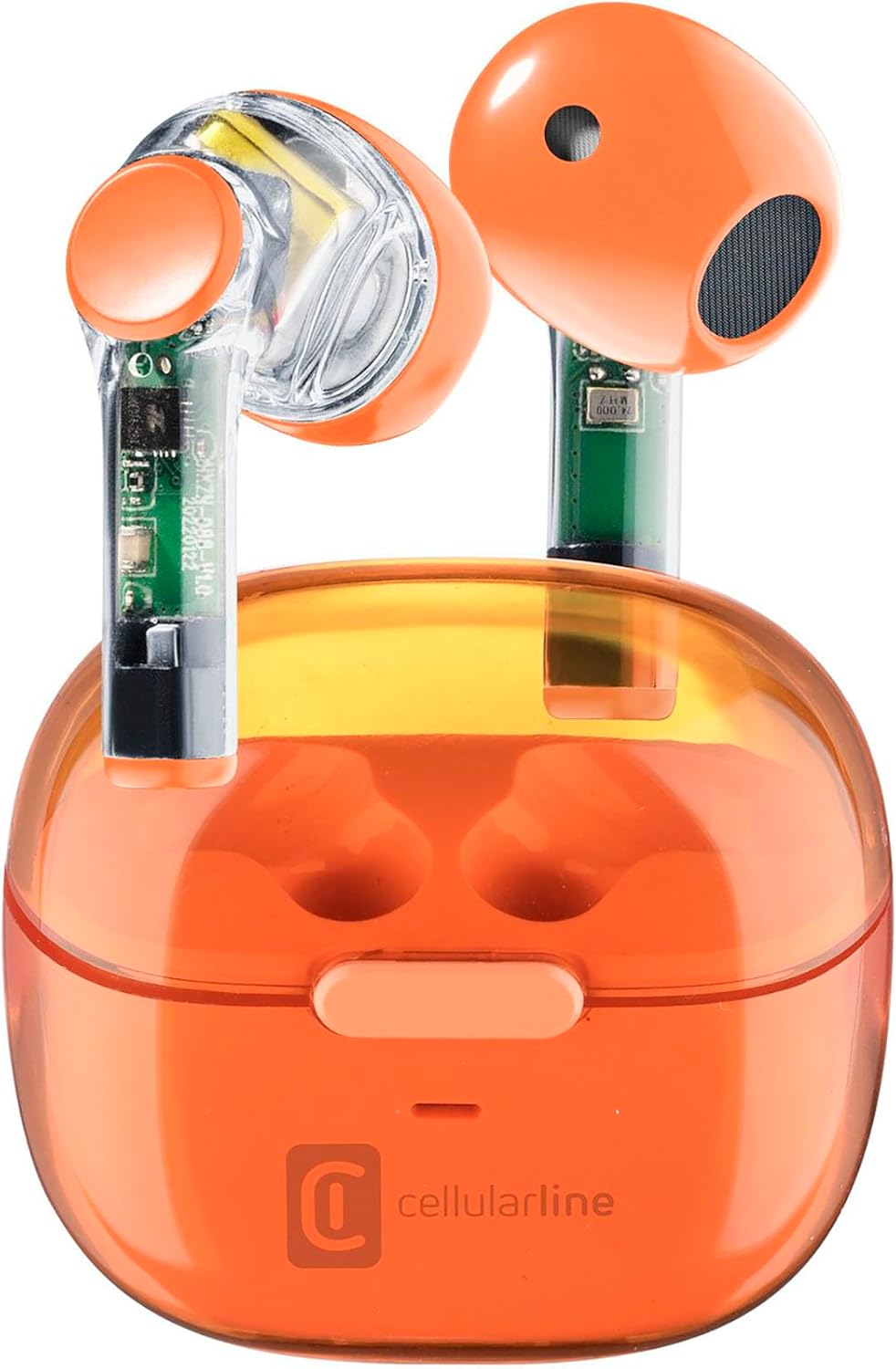
Image: Cellularline FINE Transparent TWS Wireless In-Ear Earbuds in their charging case. The earbuds and case feature a transparent orange design, revealing internal circuitry.

Foto: nso nso view highlighting the transparent design of the Cellularline FINE earbuds, showing the internal components.
Ngwa:
- Akpa ntị: Left and Right, with touch control surfaces and microphones.
- Nchaji akpa: Houses and charges the earbuds, with a charging port and LED indicator.
- Mpaghara njikwa aka: Located on the outer surface of each earbud for various functions.
- Igwe okwu: Integrated into each earbud for calls.
Melite
1. Ịchaji ihe ntị na akpa
Tupu ojiji nke mbụ, chajie nke ọma ekwe ntị na akpa nchaji.
- Tinye ekwe ntị abụọ ahụ n'ime akpa chaja. Hụ na ha nọdụrụ nke ọma.
- Connect the USB charging cable to the charging port on the case and to a compatible USB power source (e.g., computer, wall adapter).
- The LED indicator on the charging case will show the charging status. Once fully charged, the indicator will change or turn off.
- A full charge provides approximately 3.5 hours of playtime for the earbuds, and the case can provide up to 4 additional charges, totaling 10 hours of playtime.

Image: Illustration showing the earbuds and charging case, indicating 3.5 hours of playtime per single charge and 10 hours of total playtime with the charging case.
2. Pairing with Your Device (Auto-Pairing)
The earbuds feature an auto-pairing function for quick and easy connection.
- Gbaa mbọ hụ na agbanyere Bluetooth ngwaọrụ gị.
- Mepee igbe chaja ma wepụ ntị abụọ ahụ. Ha ga-agbanye ma banye na ọnọdụ njikọta na akpaghị aka.
- On your device, search for Bluetooth devices and select "Cellularline FINE" (or similar name) from the list.
- Ozugbo ejikọrọ, ị ga-anụ nkwenye a na-anụ, na ntị ntị ga-adị njikere maka ojiji.
- Maka ojiji ndị ọzọ, ekweisi ga-ejikọ na ngwaọrụ ikpeazụ ejikọtara na akpa ahụ ozugbo ewepụrụ ya.

Image: A smartphone displaying a music player interface, with the Cellularline FINE earbuds and charging case nearby, illustrating the fast Bluetooth pairing process.
3. Yiri ekwe ntị
Maka ịdị mma na nkasi obi kacha mma, hụ na e tinyere ntị ntị gị nke ọma n'ime ntị gị.
- Jiri nwayọ tinye ntị ntị ọ bụla n'ime ntị kwekọrọ (L maka aka ekpe, R maka aka nri).
- Hazie ihe ntị ahụ ruo mgbe ọ ga-adị mma ma dịkwa mma.

Image: A woman smiling while wearing the Cellularline FINE earbuds, demonstrating comfort and stability during use.
Ntuziaka ọrụ
Njikwa mmetụ
The Cellularline FINE earbuds feature intuitive touch controls on each earbud. The specific functions may vary slightly depending on your device and operating system.
| Omume | Ọrụ |
|---|---|
| Otu mgbata (Earbọchị ntị aka ekpe ma ọ bụ aka nri) | Kpọọ/Kwụsịtụ egwu, zaa/Kwụsị oku |
| Pịa ugboro abụọ (Earbọchị ntị aka nri) | Track na-esote |
| Pịa ugboro abụọ (Earbọchị ntị aka ekpe) | Egwu gara aga |
| Pịa ugboro atọ (Earbọchị ntị aka ekpe ma ọ bụ aka nri) | Mee ka onye enyemaka olu rụọ ọrụ |
| Ogologo Pịa (Earbọchị ntị aka nri) | Welie olu |
| Ogologo Pịa (Earbọchị ntị aka ekpe) | Wedata olu |
| Long Press (2 seconds) during incoming call | Jụ oku |
Single Earbud Use (Double Master Function)
The Double Master function allows you to use either the left or right earbud independently. This is useful for calls or when you need to be aware of your surroundings.
- Simply remove one earbud from the charging case. It will automatically connect to your device.
- The other earbud can remain in the case or be used later.
- To switch back to stereo mode, simply remove the second earbud from the case.
Nlekọta
Nhicha
- Jiri akwa dị nro, kpọrọ nkụ na-adịghị na-ehicha ntị ntị na chaja mgbe niile.
- Ejila ihe mkpocha abrasive, mmanya, ma ọ bụ ihe mgbaze kemịkal.
- Jiri nwayọọ wepụ ihe ntị ntị ma ọ bụ irighiri ihe ọ bụla na ndụmọdụ ntị na ntupu okwu site na iji obere ahịhịa dị nro ma ọ bụ swab owu.
- Hụ na kọntaktị chaja dị na ntị ekwe ntị na akpa ahụ dị ọcha ma ghara ịfụ uzuzu.
Nchekwa
- Mgbe ejighị ya, na-echekwa earbuds mgbe niile na chaja ha iji chebe ha ma debe ha ebubo.
- Chekwaa ngwaọrụ ahụ n'ebe dị jụụ, kpọrọ nkụ, pụọ na ìhè anyanwụ kpọmkwem na oke okpomọkụ.
Nchọpụta nsogbu
If you encounter any issues with your Cellularline FINE earbuds, refer to the following common solutions:
| Nsogbu | Ngwọta enwere ike |
|---|---|
| Eti ntị anaghị ejikọ ma ọ bụ jikọọ |
|
| Naanị otu earbud na-arụ ọrụ |
|
| Obere olu ma ọ bụ ogo ụda adịghị mma |
|
| Earbuds anaghị akwụ ụgwọ |
|
Nkọwapụta
| Njirimara | Nkọwa |
|---|---|
| Ụdị | Cellularline |
| Nọmba nlereanya | BTFINETWSO |
| Agba | Oroma na-acha uhie uhie |
| Ntinye ntị | N'ime ntị |
| Ụdị Ihe | N'ime ntị |
| Mkpọtụ iche | Acoustic Isolation |
| Teknụzụ Njikọta | Ikuku (Bluetooth) |
| Ngwa gụnyere | Ihe ntị ntị |
| Batrị enwere ike ịchaji | Yes (Lithium-ion) |
| Atụmatụ pụrụ iche | Volume Control, Microphone Included |
| Usoro njikwa | Metụ aka |
| Eji akwadoro | Music Listening, Phone Calls, Sports, Outdoor Leisure |
| Ngwa dakọtara | Laptops, Tablets, Mobile Phones, Music Production Equipment |
| Ihe onwunwe | Plastic |
| Oge egwu ntị | Ruo awa iri abụọ |
| ngụkọta oge egwuregwu (ya na ikpe) | Ruo awa iri abụọ |
Akwụkwọ ikike na nkwado
Cellularline products are designed and manufactured to the highest quality standards. For information regarding warranty coverage, technical support, or service, please refer to the official Cellularline websaịtị ma ọ bụ kpọtụrụ ndị ahịa ha ozugbo. Debe ihe akaebe nke ịzụrụ ihe maka akwụkwọ ikike.
Maka enyemaka ọzọ, biko gaa na: www.cellularline.com