1. Okwu mmalite
This manual provides essential information for the safe and effective use of your OTL Technologies Pokemon Pikachu Wireless Bluetooth Kids Headphones, model PK0980. Please read this manual thoroughly before using the product and retain it for future reference.
2. Ozi nchekwa
Iji hụ na arụ ọrụ nchekwa ma gbochie mmebi, debe ihe ndị a akpachara anya:
- Kwesịrị ekwesị afọ: These headphones are suitable for children aged 3 years and above.
- Njikwa olu: The headphones feature two safe volume settings: 85 dB and 95 dB. Always select the appropriate volume level for the listening environment to protect hearing. Prolonged exposure to loud noise may cause hearing damage.
- Nguzogide mmiri: Ngwaahịa a bụ ọ bụghị mmiri na-eguzogide. Avoid exposure to water or moisture to prevent damage.
- Nhicha: Do not use harsh chemicals or strong detergents to clean the headphones. Use a soft, dry cloth.
- Mbupu: Do not attempt to disassemble, repair, or modify the headphones. This will void the warranty and may cause damage or injury.
- Mmata gburugburu: Do not use headphones in situations where an inability to hear surrounding noise may present a danger (e.g., while cycling, driving, or near operating machinery).
- Nchekwa batrị: The headphones contain a Lithium-ion battery. Do not expose to extreme temperatures or dispose of in fire.
3. Ihe ngwugwu
Chọpụta na ihe niile dị na ngwugwu:
- 1x OTL Technologies Pokemon Pikachu Wireless Bluetooth Kids Headphones
- 1 x USB Ụdị-C eriri USB
- 1x 3.5mm Audio Sharing Cable
- 1x Instruction Leaflet (this manual)

Image: Headphones and accessories neatly packaged in the box.
4. Ngwaahịa gafereview
Familiarize yourself with the components and controls of your headphones.
4.1 Headphone Structure

Foto: N'ihu view of the headphones, showcasing the Pikachu design on the earcups and the adjustable headband.

Foto: Top view of the headphones, showing the foldable design and the headband's cushioning.
4.2 Njikwa na ọdụ ụgbọ mmiri

Image: Close-up of the right earcup, displaying the power button, volume controls, and charging port.

Foto: Zuru ezu view of the volume limit switch, allowing selection between 85 dB and 95 dB.
- Bọtịnụ ike: Used to turn the headphones on/off and for Bluetooth pairing.
- Bọtịnụ olu: Gbanwee olu ege ntị.
- Volume Limit Switch: Toggle between 85 dB and 95 dB maximum volume levels.
- Ọdụ ụgbọ mmiri Ụdị-C: Maka ịchaji ekweisi.
- Jack Audio: 3.5mm Maka njikọ wired na-eji eriri ọdịyo agụnyere.
- Igwe okwu: Ejikọtara maka oku na-enweghị aka.
4.3 Adjustable Headband

Image: Close-up of the extendable headband, showing numbered adjustment points for a customized fit.
The headband is extendable to provide a flexible and customized fit for various head sizes. Adjust both sides evenly for optimal comfort.
5. Nhazi
5.1 Ịchaji ekweisi
Tupu ejie ya nke mbụ, chajie ekweisi nke ọma.
- Connect the USB Type-C charging cable to the charging port on the headphones.
- Connect the other end of the USB cable to a compatible USB power source (e.g., computer USB port, USB wall adapter).
- The LED indicator will show the charging status. A full charge takes approximately 2 hours.
- Once fully charged, the LED indicator will change (refer to the instruction leaflet for specific LED behavior) and the headphones will provide up to 24 hours of playback time.
5.2 Njikọ Bluetooth
Iji jikọọ ekweisi gị na ikuku ikuku na ngwaọrụ:
- Gbaa mbọ hụ na ebubo ekweisi.
- Pịa ma jide bọtịnụ Ike ruo mgbe ihe ngosi LED na-enwu, na-egosi ụdị njikọ.
- On your device (e.g., smartphone, tablet, laptop), enable Bluetooth and search for available devices.
- Select "OTL Pikachu" or a similar name from the list of found devices.
- Once connected, the LED indicator will change (e.g., solid blue) and a confirmation tone may sound.
- The headphones have a working distance of up to 10 meters from the paired device.
5.3 Njikọ Waya (Nhọrọ)
You can use the headphones with the included 3.5mm audio cable for devices without Bluetooth or when the battery is depleted.
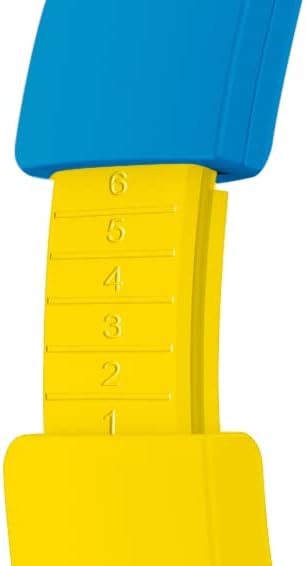
Image: The included 3.5mm audio cable for direct connection to devices.
- Plug one end of the 3.5mm audio cable into the audio jack on the headphones.
- Tinye nsọtụ nke ọzọ n'ime ihe na-eme ka ụda 3.5mm dị na ngwaọrụ gị.
- The headphones will operate in passive mode, and Bluetooth functionality will be disabled.
6. Na-arụ ọrụ ekweisi
6.1 Gbanyụọ ma ọ bụ gbanyụọ
- Iji gbanye: Pịa ma jide bọtịnụ Ike maka ihe dị ka sekọnd abụọ. Ihe ngosi LED ga-enwu.
- Iji gbanyụọ: Pịa ma jide bọtịnụ Ike maka ihe dị ka sekọnd abụọ. Ihe ngosi LED ga-agbanyụ.
6.2 na-agbanwe olu
- Olu elu: Pịa bọtịnụ '+'.
- Olu ala: Pịa bọtịnụ '-'.
- Setting Maximum Volume: Use the volume limit switch (85 dB / 95 dB) located on the earcup to set the desired maximum safe listening level.
6.3 Music Playback and Calls
- Gwuo/kwụsịtụ: Press the Power button once during music playback.
- Track na-esote: Pịa ma jide bọtịnụ '+'.
- Gara aga Track: Pịa ma jide bọtịnụ '-'.
- Azịza/Kwụsị Oku: Press the Power button once during an incoming call or to end an active call.
- Jụ oku: Press and hold the Power button during an incoming call.
6.4 Using the Sharing Cable
The included sharing cable allows two pairs of headphones to listen to the same audio source simultaneously.
- Connect the main 3.5mm audio cable from your audio source to the first pair of headphones.
- Connect one end of the sharing cable to the available 3.5mm audio jack on the first pair of headphones.
- Connect the other end of the sharing cable to the 3.5mm audio jack on the second pair of headphones.
- Both headphones will now receive audio from the same source.
7. Nlekọta
- Nhicha: Wipe the headphones with a soft, dry, lint-free cloth. Do not use liquid cleaners or aerosols.
- Nchekwa: Mgbe ejighị ya, chekwaa ekweisi n'ebe dị jụụ, kpọrọ nkụ, pụọ na ìhè anyanwụ kpọmkwem na oke okpomọkụ. Nhazi a na-agbanwe agbanwe na-enye ohere maka nchekwa kọmpat.
- Nlekọta batrị: To prolong battery life, avoid fully discharging the battery frequently. Charge the headphones regularly, even if not in constant use.
8. Nchọpụta nsogbu
| Nsogbu | Ihe nwere ike ime | Ngwọta |
|---|---|---|
| Igwe ekweisi anaghị agba ọkụ. | Batrị agwụla. | Charge the headphones using the provided USB Type-C cable. |
| Enweghị ike ijikọ site na Bluetooth. | Igwe ekweisi adịghị na ọnọdụ njikọta; gbanyụọ ngwaọrụ Bluetooth; tere aka site na ngwaọrụ. | Ensure headphones are in pairing mode (flashing LED). Turn Bluetooth on your device. Move headphones closer to the device (within 10 meters). Try restarting both devices. |
| No sound when connected. | Volume too low; incorrect audio source selected; wired cable not fully inserted. | Increase headphone and device volume. Check if the correct audio output is selected on your device. Ensure the 3.5mm cable is fully inserted if using wired mode. Check the volume limit switch. |
| A na-agbagọ ma ọ bụ bepụ ụda. | Batrị dị ala; ntinye aka; tere aka site na ngwaọrụ. | Charge the headphones. Move away from other wireless devices. Reduce distance to the paired device. |
9. Nkọwapụta
| Nọmba nlereanya | PK0980 |
| Teknụzụ Njikọta | Ikuku (Bluetooth) |
| Teknụzụ nzikọrịta ozi ikuku | Bluetooth |
| Ogologo afọ (Nkọwa) | Children (3+ years) |
| Ihe onwunwe | Plastic |
| Oge Nchaji | Ihe dị ka awa 2 |
| Akwadoro ojiji | Audio nkeonwe |
| Ngwa dakọtara | Laptop, Smartphones, Tablets (Bluetooth enabled) |
| Ụdị njikwa | Volume Control, Remote |
| Ibu Ibu | 160 grams |
| Ọkwa Nguzogide mmiri | Ọ bụghị Mmiri-eguzogide |
| Atụmatụ ndị ọzọ | Microphone included, Foldable design |
| Nkezi Ndụ batrị | Awa 24 |
| Ngwakọta cell batrị | Lithium-ion |
| Agba | Odo |
| Ntinye ntị | Na-ntị |
| Ụdị Ihe | Ntị n'elu |
| Mgbochi | 32 ohms |
| Njikwa mkpọtụ | Mkpọtụ iche |
| Nzaghachi ugboro ugboro | 20000 Hz |
| Mmetụta | 85 dB |
| Jack ekweisi | 3.5mm Jack |
| Akụkụ ngwaahịa | 16 x 7 x 17 cm |


