Okwu mmalite
This manual provides comprehensive instructions for the setup, operation, maintenance, and troubleshooting of your Timex TW5M53900 Men's Wristwatch. Please read this manual carefully to ensure proper use and longevity of your timepiece.
The Timex TW5M53900 is a digital watch equipped with various functions including a Day-Date display, Chronograph, Countdown timer, Dual Time zone, and Alarm.
Melite
Initial Power On and Time Setting
Your watch comes with a pre-installed battery. Upon first use, you may need to activate the display or set the current time and date.
- Chọpụta bọtịnụ: Locate the control buttons on the sides of the watch case. Typically, these are labeled or have distinct functions (e.g., MODE, SET, START/STOP, LIGHT). Refer to the image below for button identification.
- Tinye Ọnọdụ Ntọala Oge: Pịa MODE button repeatedly until the time setting mode is displayed. Digits for hours or minutes will usually flash.
- Dezie oge: Jiri ihe SET or Malite/Kwụsị buttons to adjust the flashing digits (hours, minutes, seconds). Press MODE again to move to the next setting (e.g., from hours to minutes).
- Tọọ ụbọchị: Gaa n'ihu ịpị MODE to cycle through date settings (month, day, year) and adjust them using the SET or Malite/Kwụsị bọtịnụ.
- Ọnọdụ Ntọala Pụọ: Ozugbo ntọala niile ziri ezi, pịa bọtịnụ MODE button or another designated button (e.g., Tụgharịa) to exit the setting mode and return to normal time display.

Foto 1: N'ihu view of the Timex TW5M53900 watch, highlighting the digital display and button layout.
Ntuziaka ọrụ
The Timex TW5M53900 watch offers several modes accessible via the MODE bọtịnụ.
Ngosipụta oge na ụbọchị
In the default mode, the watch displays the current time (hours, minutes, seconds) and the day and date. The display is LCD for clear visibility.
Chronograph (Oge nkwụsị)
To use the chronograph function:
- Pịa MODE button until "CHRONO" or a similar indicator appears on the display.
- Pịa Malite/Kwụsị bọtịnụ iji malite oge.
- Pịa Malite/Kwụsị again to pause or stop the timing.
- Pịa Tụgharịa button to clear the chronograph to zero.
Ngụ oge
To set and use the countdown timer:
- Pịa MODE button until "TIMER" or a countdown icon is displayed.
- Jiri ihe SET or Malite/Kwụsị buttons to set the desired countdown duration (hours, minutes, seconds).
- Pịa Malite/Kwụsị ibido ngụkọ.
- An alarm will sound when the countdown reaches zero. Press any button to stop the alarm.
Oge Abụọ
The dual time function allows you to track a second time zone:
- Pịa MODE button until "DUAL TIME" or "T2" is displayed.
- Jiri ihe SET or Malite/Kwụsị buttons to adjust the second time zone.
- Pịa MODE ịpụ apụ.
Oti mkpu
Iji tọọ ma mee ka mkpu ahụ rụọ ọrụ:
- Pịa MODE button until "ALARM" or an alarm icon is displayed.
- Jiri ihe SET or Malite/Kwụsị bọtịnụ iji tọọ oge mkpu achọrọ.
- Press a designated button (often Tụgharịa or MODE again) to toggle the alarm ON/OFF. An alarm indicator will typically appear on the display when active.
- Mgbe mkpu ahụ dara, pịa bọtịnụ ọ bụla iji mee ka ọ ghara ịgbachi nkịtị.
Indiglo® Night-Light
The watch features an Indiglo® night-light for illumination in low-light conditions. Press the ÌHÈ button (usually located on the top right or left side of the case) to activate the backlight.
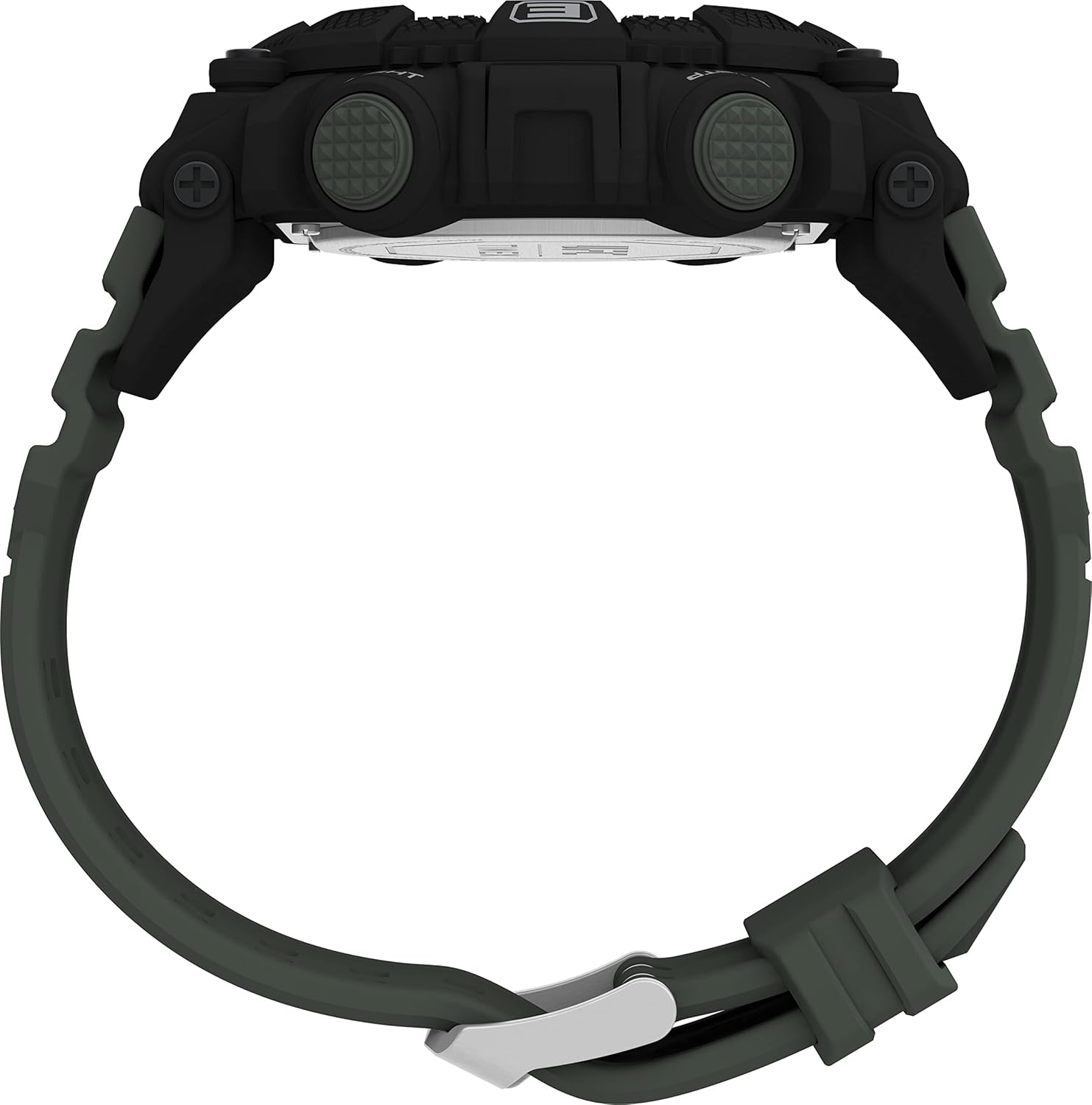
Foto 2: Akụkụ view of the watch, illustrating the placement of control buttons.
Nlekọta
Nhicha
- Hichaa akpa elekere ahụ ma jiri eriri dị nro, d hichaa ya mgbe niile.amp akwa .
- For stubborn dirt, a mild soap solution can be used, followed by rinsing with clean water and drying thoroughly.
- Avoid using harsh chemicals, solvents, or abrasive cleaners, as these can damage the watch's finish or components.
Mmiri Nguzogide
This watch is water-resistant up to 5 bar (50 meters). This rating means it is suitable for everyday use and can withstand splashes, rain, and brief immersion in water. It is ọ bụghị suitable for showering, swimming, or diving.
- Do not operate the buttons while the watch is submerged in water.
- Ensure the crown (if applicable) is pushed in completely after setting the time to maintain water resistance.

Ọgụgụ 3: N'azụ view of the watch, displaying the case back and strap attachment.
Ngbanwe batrị
The watch uses a CR2025 cell battery. When the display becomes dim or functions become erratic, it may be time to replace the battery. It is recommended to have the battery replaced by a qualified watch technician to ensure proper sealing and maintain water resistance.

Figure 4: Close-up of the watch's case back, detailing the model number, water resistance, and battery type.
Nchọpụta nsogbu
| Nsogbu | Ihe nwere ike ime | Ngwọta |
|---|---|---|
| Ngosipụta bụ oghere ma ọ bụ nchara nchara. | Batrị dị ala ma ọ bụ nwụrụ anwụ. | Replace the battery (CR2025). Professional replacement recommended. |
| Bọtịnụ anaghị anabata ya. | Elekere ahụ nwere ike ịnọ n'ọnọdụ akpọchiri akpọchi ma ọ bụ na ọ naghị arụ ọrụ nke ọma n'ime. | Try pressing all buttons firmly. If unresponsive, a battery reset (removing and reinserting battery) might be needed by a professional. |
| Time is incorrect or not keeping time. | Ntọala na-ezighi ezi ma ọ bụ obere batrị. | Re-set the time according to the "Initial Power On and Time Setting" section. If issue persists, replace battery. |
| Condensation n'okpuru kristal. | Loss of water resistance or extreme temperature change. | Avoid extreme temperature changes. If condensation persists, seek professional repair immediately to prevent internal damage. |
Nkọwapụta
| Njirimara | Nkọwa |
|---|---|
| Nọmba nlereanya | TW5M53900 |
| Ụdị | Timex |
| Ụdị ngosi | Digital (LCD) |
| Dayameta ikpe | 52 mm |
| Ọkpụrụkpụ ikpe | 15 mm |
| Agba Agba | Nwa |
| Ihe eriri eriri | Plastic dị elu |
| Agba eriri | Akwụkwọ ndụ akwụkwọ ndụ |
| Ogologo eriri | 21 cm |
| Ogologo eriri | 27 mm |
| Ụdị mgbako | Pin Buckle |
| Mmiri Nguzogide | 5 bar (50 meters) |
| Ibu | 60 grams |
| Ụdị batrị | CR2025 (gụnyere) |
| Ọrụ | Day-Date, Chronograph, Countdown, Dual Time, Alarm, Indiglo® Night-Light |
| Mba onye si | China |
| Ụbọchị mbụ dị | Ọktoba 11, 2022 |
Akwụkwọ ikike na nkwado
Ozi akwụkwọ ikike
This Timex TW5M53900 watch comes with a Akwụkwọ ikike onye nrụpụta afọ 2 from the date of purchase. This warranty covers manufacturing defects in materials and workmanship under normal use. It does not cover:
- Mmebi sitere na njikwa na-ekwesịghị ekwesị, enweghị nlekọta, ihe ọghọm, ma ọ bụ akwa na akwa nkịtị.
- Water damage if the watch was used beyond its specified water resistance rating or if buttons were operated underwater.
- Ndochi batrị.
- Mmebi kpatara nrụzi ma ọ bụ mgbanwe na-akwadoghị.
Biko dowe ihe akaebe nke ịzụrụ ihe maka akwụkwọ ikike.
Nkwado ndị ahịa
For technical assistance, warranty claims, or service inquiries, please contact Timex customer support through their official website or the contact information provided with your purchase documentation. When contacting support, please have your watch model number (TW5M53900) and proof of purchase readily available.
Spare parts availability information is currently unavailable. For any repair needs, please contact authorized Timex service centers.


