Baseus Bowie WM02 TWS Bluetooth Earbuds
Akwụkwọ ntuziaka onye ọrụ
Okwu mmalite
Thank you for choosing the Baseus Bowie WM02 TWS Bluetooth Earbuds. These ultra-compact and lightweight earbuds are designed for comfortable, long-term wear, offering a seamless audio experience with advanced Bluetooth 5.3 technology and an impressive 25-hour battery life (with charging case). This manual will guide you through the setup, operation, and maintenance of your new earbuds.

Image: Baseus Bowie WM02 TWS Bluetooth Earbuds in white, with their charging case.
Melite
1. Unboxing na akụrụngwa
Before first use, please ensure all components are present in the package:
- Baseus Bowie WM02 TWS Earbuds
- Nchaji case
- USB-C eriri USB
- Ọtụtụ nha ndụmọdụ ndụmọdụ ntị (S, M, L)
- Akwụkwọ ntuziaka onye ọrụ
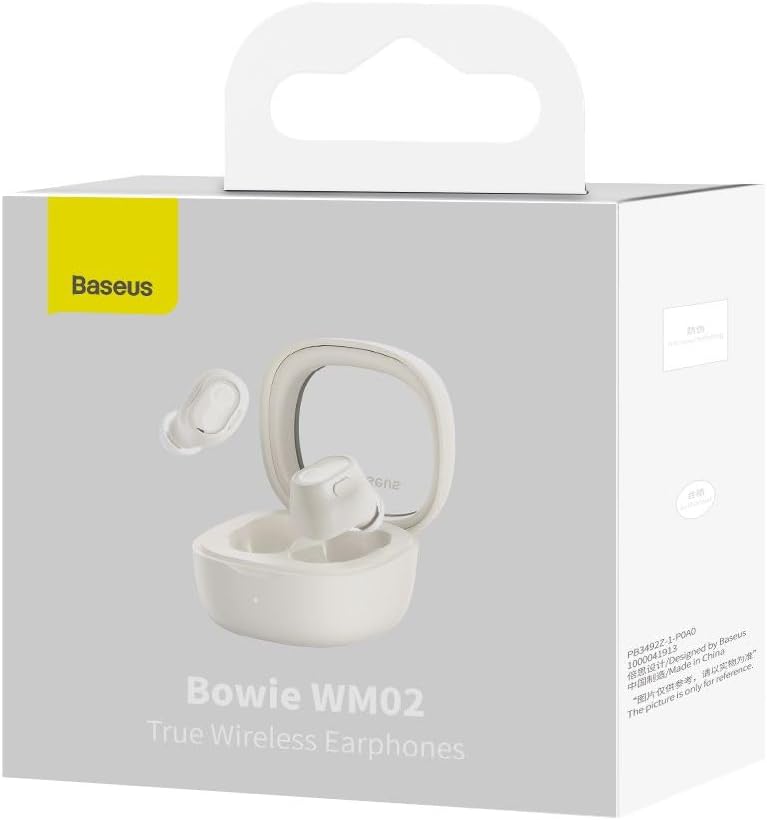
Image: The Baseus Bowie WM02 earbuds, charging case, USB-C cable, and ear tips laid out with the product packaging.
2. Ịchaji ihe ntị na akpa
For optimal performance, fully charge the earbuds and charging case before first use.
- Tinye ekweisi n'ime akpa chaja. Hụ na ha dị n'ọnọdụ kwesịrị ekwesị n'ebe ha dị.
- Connect the USB-C charging cable to the charging port on the case and the other end to a USB power source (e.g., computer, wall adapter).
- The indicator light on the charging case will show the charging status. Once fully charged, the light will typically turn solid or turn off.
A 10-minute quick charge provides approximately 2 hours of listening time, and a full charge offers up to 5 hours of continuous use, extending to 25 hours with the charging case.

Image: Graphic illustrating the 25-hour battery life of the Baseus Bowie WM02 earbuds and charging case.
3. Njikọ Bluetooth
Follow these steps to pair your earbuds with a Bluetooth-enabled device:
- Mepee igbe nchaji. Igwe ntị ga-abanye na ọnọdụ njikọta na-akpaghị aka (ọkụ ọkụ ga-enwu).
- On your device (smartphone, tablet, laptop), go to Bluetooth settings and enable Bluetooth.
- Chọọ maka available devices and select "Baseus Bowie WM02" from the list.
- Once connected, the earbud indicator lights will typically turn off or show a steady light.
The earbuds feature Bluetooth 5.3 for stable and efficient connection.

Image: A visual representation of the Wireless 5.3 chip, highlighting fast and smooth connection.
4. Baseus App Integration
Enhance your experience by downloading the official Baseus app. The app allows you to:
- Chọta ntị ntị gị.
- Check real-time battery levels.
- Hazie njikwa mmetụ aka.
- Access additional features and updates.

Image: Screenshot of the Baseus app interface, demonstrating features like earbud location and battery status.
Ntuziaka ọrụ
1. Yiri ekwe ntị
The Baseus Bowie WM02 earbuds are designed for a comfortable and secure fit, even for smaller ears. They weigh only 3.8g per earbud and have a 108-degree elevation angle for ergonomic wear.
- Select the ear tips that provide the best seal and comfort for your ears.
- Gently insert each earbud into your ear canal and twist slightly to secure them.

Image: A woman demonstrating the comfortable and seamless fit of the Baseus Bowie WM02 earbuds.
2. Aka njikwa
The earbuds feature intuitive touch controls. You can customize these controls via the Baseus app.
| Omume | Njikwa |
|---|---|
| Gwuo/kwụsịtụ | Otu mgbata na ntị ntị |
| Track na-esote | Pịa ekwe ntị aka nri ugboro abụọ |
| Egwu gara aga | Pịa ekwe ntị aka ekpe ugboro abụọ |
| Zaa/Kwụsị Oku | Otu mgbata na ntị ntị |
| Jụ oku | Pịa ogologo na ntị ntị ọ bụla |
| Mee ka onye enyemaka olu rụọ ọrụ | Pịa ugboro atọ na ntị ntị |
| Toggle Low Latency Mode (Gaming Mode) | Long press on either earbud (check app for specific gesture) |
3. Gbanyụọ / gbanyụọ
- Ike Na: Mepee igbe chaja, ekweisi ga-agbanye ma jikọọ na ngwaọrụ ikpeazụ ejikọtara na ya na akpaghị aka.
- Gbanyụọ: Tinye ihe ntị ntị n'ime akpa nchaji wee mechie mkpuchi. Ha ga-akwụsị na-akpaghị aka wee gbanyụọ.
4. Gaming Mode (Low Latency)
The Bowie WM02 features a 60ms low-latency mode, ideal for gaming, ensuring instant response and synchronized audio. Activate this mode via the touch controls or the Baseus app for an immersive gaming experience.
Nlekọta
1. Nhicha
Ịdị ọcha mgbe niile na-enyere aka ịnọgide na-adị mma na ịdị ọcha.
- Jiri akwa dị nro, kpọrọ nkụ, akwa na-enweghị lint ka ihichapụ ntị ntị na akpa nchaji.
- For ear tips, remove them and clean with mild soap and water, then dry thoroughly before reattaching.
- Jiri nwayọ hichaa kọntaktị chaja dị na ntị ntị na akpa ahụ site na iji ákwà owu kpọrọ nkụ hichaa ya.
- Zere iji ihe nhicha na-eme ka ihe dị nro, mmanya na-aba n'anya, ma ọ bụ ihe mgbaze.
2. Nchekwa
Mgbe ejighị ya, chekwaa ntị ntị na chaja ha iji chebe ha pụọ na uzuzu na mmebi.
3. Nlekọta batrị
- Avoid exposing the earbuds and case to extreme temperatures (hot or cold).
- Do not leave the battery completely drained for extended periods. Charge them regularly.
Nchọpụta nsogbu
If you encounter any issues with your Baseus Bowie WM02 earbuds, please refer to the following common solutions:
| Nsogbu | Ngwọta enwere ike |
|---|---|
| Igwe ntị anaghị ejikọta ọnụ | Ensure earbuds are charged. Turn off and on your device's Bluetooth. Forget the device in Bluetooth settings and re-pair. |
| Enweghị ụda sitere na otu ntị ntị | Check battery level of both earbuds. Place both earbuds back in the case, close the lid, then open again. Re-pair if necessary. |
| Okwu ịchaji | Ensure charging cable is securely connected. Try a different USB port or charger. Clean charging contacts on earbuds and case. |
| Obere olu ma ọ bụ ogo ụda adịghị mma | Adjust volume on your device. Ensure ear tips provide a good seal. Clean earbud mesh to remove debris. |
| Njikwa mmetụ anaghị aza | Ensure your fingers are clean and dry. Try resetting the earbuds (refer to Baseus app or online support for specific reset instructions). |
If the problem persists, please contact Baseus customer support.
Nkọwapụta
| Njirimara | Nkọwa |
|---|---|
| Aha Nlereanya | Bowie WM02 |
| Nọmba Nlereanya Onye nrụpụta | NGTW180002 |
| Teknụzụ Njikọta | Ikuku (Bluetooth) |
| Teknụzụ nzikọrịta ozi ikuku | Bluetooth 5.3 |
| Earbud Form Factor | N'ime ntị |
| Njikwa mkpọtụ | Ọ dịghị |
| Ibu ngwaahịa | 60 grams |
| Oke ugboro ugboro | 20 Hz - 20,000 Hz |
| Mgbochi | 140 Ohm |
| Average Battery Life (Earbuds) | Awa 5 |
| Mgbakọta ndụ batrị (ya na igbe) | Ruo awa 25 |
| Oge Nchaji | Ihe dị ka awa 1.5 (maka ịchaji zuru oke) |
| Nchaji ọdụ ụgbọ mmiri | USB Ụdị-C |
| Atụmatụ pụrụ iche | Fast Charging, Low Latency Mode (60ms) |
| Ngwa dakọtara | Ngwaọrụ ndị nwere Bluetooth dịka ekwentị mkpanaaka, mbadamba, laptọọpụ, na kọmputa desktọpụ. |
Akwụkwọ ikike na nkwado
Ozi akwụkwọ ikike
The Baseus Bowie WM02 TWS Bluetooth Earbuds come with a 12-month manufacturer's warranty from the official Baseus Brazil store. Please retain your proof of purchase for warranty claims.
Nkwado ndị ahịa
For further assistance, technical support, or warranty inquiries, please contact Baseus customer support through the official Baseus website or the Baseus app. You can also visit the Ụlọ Ahịa Baseus dị na Amazon maka ozi ndị ọzọ.


