Okwu mmalite
Thank you for choosing the Varmilo MA Series V2 Summit R2 Mechanical Keyboard. This manual provides essential information for setting up, operating, maintaining, and troubleshooting your new keyboard. Please read this manual thoroughly to ensure optimal performance and longevity of your device.
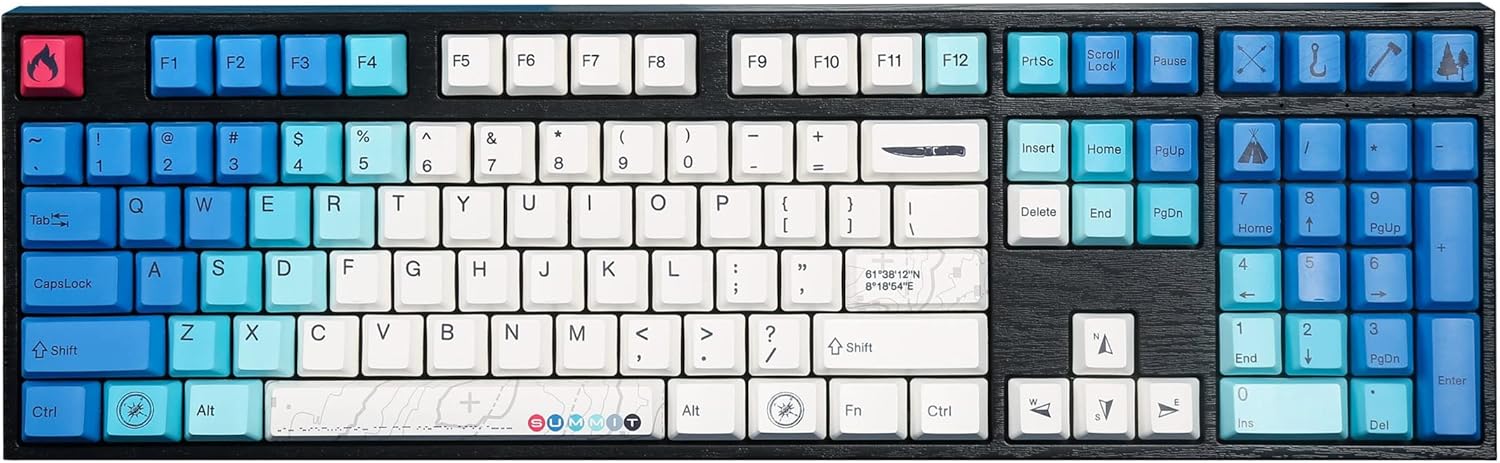
Image: The Varmilo MA Series V2 Summit R2 Mechanical Keyboard, showcasing its full layout and unique keycap design.
Melite
1. Igbe mkpuchi
Carefully remove the keyboard and all accessories from the packaging. Ensure the following items are present:
- Varmilo MA Series V2 Summit R2 Mechanical Keyboard
- USB-C USB
- Ihe ndọpụta igodo (ọ bụrụ na etinyere ya)
- Akwụkwọ ntuziaka (akwụkwọ a)
2. Jikọọ ahụigodo
- Chọta ọdụ USB-C n'azụ ahụigodo ahụ.
- Jikọọ otu njedebe nke eriri USB-C enyere na ahụigodo.
- Jikọọ nsọtụ nke ọzọ nke eriri USB-C na ọdụ USB dị na kọmputa gị.
- Ahụigodo ahụ bụ nkwụnye na-egwu ma ekwesịrị ịmara ya na-akpaghị aka site na sistemụ arụmọrụ gị.
3. Ịgbanwe Akụkụ Igodo
The Varmilo MA Series V2 features a double-section kickstand, allowing for two different typing angles. Gently flip out the desired sections of the kickstand located on the underside of the keyboard to adjust its height and angle for ergonomic comfort.

Foto: Akụkụ profile of the Varmilo keyboard, illustrating the adjustable kickstand in an extended position.
Ntuziaka ọrụ
1. Basic Key Ọrụ
The keyboard features a standard full-size (104-key) layout. All alphanumeric and standard function keys operate as expected. The Varmilo EC Ivy V2 switches provide a smooth and responsive typing experience.
2. Function (Fn) Key Combinations
The Fn key (typically located near the right Alt key) allows access to secondary functions printed on certain keycaps. Hold down the Fn key and press the desired function key simultaneously.
- Fn + F1-F12: Njikwa mgbasa ozi (dịka ọmụmaatụ, olu, kpọọ/kwụsịtụ, kwụsị).
- Igodo Fn + akụ: LED brightness or effect control (refer to specific keycap legends).
- Fn + merie: Mkpọchi/kpọghee igodo Windows.

Foto: A nso nso view of the right side of the Varmilo keyboard, highlighting the special function keys and their legends.
3. LED Backlighting Control
The keyboard features White LED backlighting. Use the Fn key combinations to adjust the brightness and switch between various lighting effects. Specific key legends will indicate the corresponding functions for LED control.
Nlekọta
1. Na-ehicha ahụigodo
Iji nọgide na-enwe ọdịdị na ọrụ nke keyboard ahụ:
- Kwụpụ kiiboodu na kọmputa gị tupu ihicha.
- Jiri akwa dị nro na-enweghị ntụpọ dampened with water or a mild cleaning solution to wipe the keycaps and casing.
- Maka uzuzu na irighiri ihe n'etiti igodo igodo, jiri ikuku abịakọrọ.
- Avoid using harsh chemicals, abrasives, or solvents, as these can damage the PBT keycaps and finish.
2. Iwepụ na Ndochi Mkpuchi Igodo
The keyboard features durable Dye Sub PBT keycaps. If you need to remove keycaps for deep cleaning or customization:
- Use the provided keycap puller (if applicable) or a similar tool.
- Gently attach the keycap puller to the keycap and pull straight up to remove it. Avoid twisting or excessive force.
- To replace, align the keycap with the switch stem and press down firmly until it clicks into place.

Image: A collection of individual Varmilo keycaps, including special design keycaps, demonstrating their PBT material and dye-sublimated legends.
Nchọpụta nsogbu
If you encounter issues with your Varmilo keyboard, please refer to the following common solutions:
- Ahụigodo Anaghị aza:
- Gbaa mbọ hụ na ejikọrọ eriri USB-C nke ọma na ma ahụigodo na kọmputa.
- Gbalịa ijikọ ahụigodo na ọdụ ụgbọ USB dị iche na kọmputa gị.
- Nwalee ahụigodo na kọmpụta ọzọ ka ewepụ nsogbu ndị metụtara sistemụ.
- Malitegharịa ekwentị gị na kọmputa.
- LEDs Not Working or Incorrect:
- Ensure the LED brightness is not set to the lowest level using Fn key combinations.
- Check if any specific lighting modes are active that might turn off certain LEDs.
- Igodo anaghị edebanye aha:
- Remove the keycap and inspect the switch for any obstructions.
- Clean around the switch stem with compressed air.
Ntọgharị ụlọ nrụpụta
If issues persist, a factory reset may resolve them. Consult the Varmilo official website or support for specific reset procedures for your model, as these can vary.
Nkọwapụta
The following are the technical specifications for the Varmilo MA Series V2 Summit R2 Mechanical Keyboard:
| Njirimara | Nkọwa |
|---|---|
| Ụdị | Varmilo |
| Nlereanya | MA Series V2 Summit R2 |
| Nhazi | Full-size (104 + 4 keys) |
| Ngbanwe Ụdị | Varmilo EC Ivy V2 Mechanical Switches |
| Ihe mkpuchi igodo | Dye Sub PBT |
| Njikọta | USB-C |
| Ịkụ azụ azụ | Ọcha ọkụ ọkụ |
| Ihe onwunwe | Polybutylene Terephthalate, Silicone |
| Isi Iyi Ike | Kwadoro USB |
| Ngwa dakọtara | Kọmputa (site na USB-C) |
Akwụkwọ ikike na nkwado
Varmilo products are manufactured to high-quality standards. For information regarding warranty coverage, technical support, or service inquiries, please visit the official Varmilo websaịtị ma ọ bụ kpọtụrụ nkwado ndị ahịa ha ozugbo. Debe nnata nzụta gị dị ka ihe akaebe nke ịzụrụ maka nkwupụta ikike.
Official Varmilo Store: Varmilo Store on Amazon


