1. Okwu mmalite
The XPG Levante X 360 is an All-in-One (AIO) ARGB CPU Liquid Cooler designed to provide efficient and reliable thermal management for high-performance CPUs. This cooler features a 360mm radiator equipped with three 120mm Fluid Dynamic Bearing (FDB) ARGB fans and an Asetek-powered pump, ensuring optimal heat dissipation and quiet operation. This manual provides essential information for the proper installation, operation, and maintenance of your XPG Levante X 360 liquid cooler.
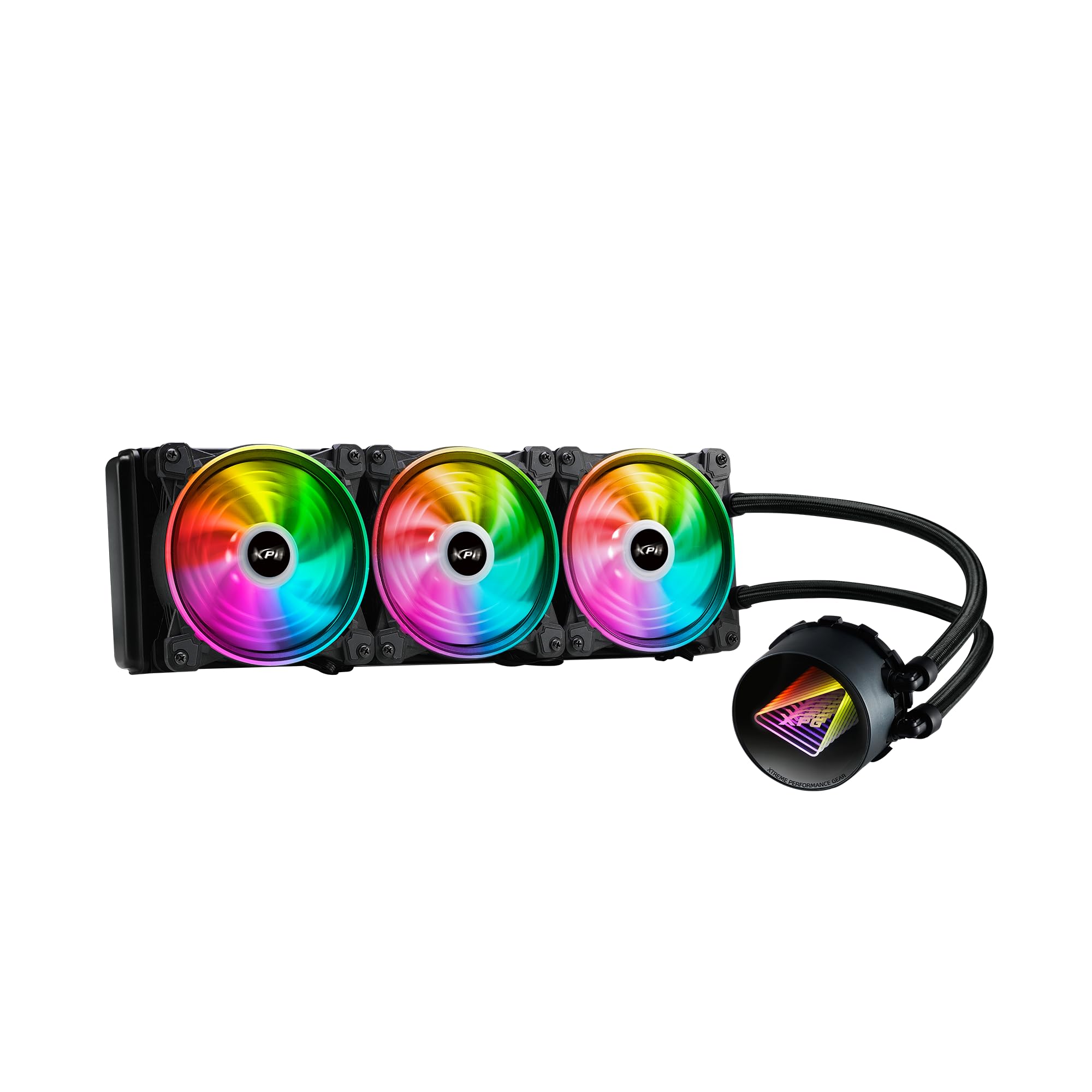
Image 1.1: XPG Levante X 360 All-in-One ARGB CPU Liquid Cooler. This image displays the complete liquid cooler unit, including the 360mm radiator, three 120mm ARGB fans, and the pump/cold plate assembly with braided tubing.
2. Ihe ngwugwu
Verify that all components are present and in good condition before proceeding with installation.
- XPG Levante X 360 CPU Liquid Cooler (Radiator, Pump, Tubing, 3x 120mm ARGB Fans)
- Mounting Bracket Kit for Intel (LGA 1700, 1200, 115X, 2066, 2011-3, 2011)
- Mounting Bracket Kit for AMD (AM5, AM4, TR4)
- Fan Screws and Radiator Screws
- ARGB Controller/Cables
- Paste thermal (etinyere ya n'ọrụ ma ọ bụ na tube)
- Akwụkwọ ntuziaka (akwụkwọ a)

Image 2.1: Package contents. This image shows the radiator with fans, pump, various mounting brackets, screws, and cables included in the box.
3. Ozi nchekwa
Please read and understand the following safety precautions before installing or operating the XPG Levante X 360 liquid cooler.
- Ịkwụsị ike: Always disconnect power from your computer before performing any installation or maintenance.
- Mgbasa ọkụ eletrik (ESD): Take precautions against ESD by grounding yourself before handling components.
- Ijikwa mmiri mmiri: While the cooler is a sealed unit, handle it with care to prevent damage to the tubing or radiator, which could lead to leaks.
- Ọnụ dị nkọ: Be aware of sharp edges on computer cases and cooler components during installation.
- Igwe ikuku: Ensure adequate airflow within your computer case for optimal cooling performance.
- ndakọrịta: Verify compatibility with your CPU socket and computer case before installation.
4. Ntọala na nwụnye
The XPG Levante X 360 is designed for hassle-free installation. Follow these steps carefully for proper setup.
4.1 Kwadebe sistemụ gị
- Gbanyụọ kọmputa gị wee kwupu eriri niile.
- Mepee akpa kọmputa gị iji nweta ebe motherboard na CPU.
- Wepu igwe nju oyi CPU ọ bụla dị. Hichaa elu CPU nke ọma ka ịwepụ pasta okpomọkụ ochie.
4.2 Wụnye ngwaike mgbakwasa
Select the appropriate mounting bracket for your CPU socket (Intel or AMD). The cooler supports LGA 1700, 1200, 115X, 2066, 2011-3, 2011 for Intel, and AM5, AM4, TR4 for AMD.
- Attach the correct backplate to the rear of your motherboard (for Intel sockets). AMD AM4/AM5 typically uses the stock backplate.
- Secure the standoffs to the motherboard through the CPU cooler mounting holes.
- Attach the chosen CPU bracket to the pump head.

Image 4.1: Key features highlighting support for LGA 1700 and AM5 sockets, along with low noise fan, aluminum radiator, high quality low noise pump, and hassle-free installation.
4.3 Wụnye Radiator na Fan
Determine the optimal mounting location for the 360mm radiator within your case (e.g., front, top).
- If not pre-attached, mount the three 120mm ARGB fans to the radiator using the provided fan screws. Ensure correct airflow direction (intake or exhaust) based on your case's ventilation strategy.
- Secure the radiator assembly to your chosen mounting location in the PC case using the longer radiator screws.
4.4 Install the Pump Head
Carefully place the pump head onto the CPU, aligning the mounting holes with the standoffs.
- If thermal paste is not pre-applied, apply a small pea-sized amount to the center of the CPU's integrated heat spreader (IHS).
- Place the pump head onto the CPU, ensuring even contact.
- Tighten the thumbscrews or nuts in a diagonal pattern until snug. Do not overtighten.
4.5 Jikọọ eriri
Connect the pump and fan cables to your motherboard or ARGB controller.
- Connect the pump's 3-pin or 4-pin power cable to the motherboard's CPU_FAN or AIO_PUMP header.
- Connect the 4-pin PWM fan cables from the three 120mm fans to available fan headers on your motherboard or to a fan hub/controller.
- Connect the ARGB cables from the fans and pump head to an ARGB header on your motherboard (5V 3-pin) or to the included ARGB controller.

Image 4.2: The XPG Levante X 360 cooler installed inside a computer case, showcasing the illuminated pump head and ARGB fans.
5. Ntuziaka ọrụ
Once installed, the XPG Levante X 360 operates automatically to cool your CPU.
- Ike izizi: After installation, power on your computer. The pump and fans should start operating. Check for any unusual noises or leaks.
- Fan and Pump Control: The 4-pin PWM fans and pump allow for speed control via your motherboard's BIOS/UEFI settings or dedicated software. Adjust fan curves to balance cooling performance and noise levels.
- Ọkụ ARGB: The Addressable RGB (ARGB) lighting on the fans and pump head can be controlled via your motherboard's ARGB software (e.g., ASUS Aura Sync, MSI Mystic Light Sync, GIGABYTE RGB Fusion, ASRock Polychrome Sync) or through the included ARGB controller.

Foto 5.1: nso nso view of the XPG Levante X 360's ARGB fans and pump, illustrating the vibrant lighting effects.
6. Nlekọta
Ndozi mgbe niile na-enyere aka hụ na ihe na-ekpo ọkụ mmiri gị na-arụ ọrụ nke ọma ma na-adịte aka.
- Mwepụ uzuzu: Na-asachapụ uzuzu site na ntù radiator na agụba fan site na iji ikuku abịakọrọ ma ọ bụ ahịhịa dị nro. Uzuzu buru ibu nwere ike igbochi ikuku ikuku ma belata arụmọrụ jụrụ oyi.
- Nyochaa Tubing: Occasionally check the tubing for any signs of kinks, cracks, or leaks.
- Ọrụ Fan: Ensure all fans are spinning freely and quietly. Replace any fans that become excessively noisy or stop functioning.
- Ọrụ mgbapụta: Listen for any unusual noises from the pump. A properly functioning pump should operate quietly.
7. Nchọpụta nsogbu
If you encounter issues with your XPG Levante X 360, refer to the following common problems and solutions.
| Nsogbu | Ihe nwere ike ime | Ngwọta |
|---|---|---|
| CPU ekpo oke ọkụ | Poor thermal paste application, pump not running, fans not spinning, insufficient mounting pressure. | Reapply thermal paste, check pump and fan connections, ensure pump head is securely mounted. Verify fan direction. |
| Fans anaghị agba ọsọ | Loose fan cable connection, incorrect fan header, faulty fan. | Check fan cable connections to motherboard/controller. Ensure correct fan headers are used. Test fans individually if possible. |
| Mgbapụta anaghị agba ọsọ | Loose pump power cable, incorrect pump header, faulty pump. | Verify pump power cable is securely connected to the CPU_FAN or AIO_PUMP header. Check BIOS settings for pump control. |
| Ọkụ ARGB anaghị arụ ọrụ | Loose ARGB cable connection, incorrect ARGB header (5V vs 12V), software issue. | Ensure ARGB cables are connected to a 5V 3-pin ARGB header. Check motherboard ARGB software. Verify connections to the ARGB controller. |
| Oke mkpọtụ | Fan speed too high, pump noise, air bubbles in the loop. | Adjust fan curves in BIOS/software. Orient radiator to ensure pump is not the highest point to minimize air bubbles. |
8. Nkọwapụta
Detailed technical specifications for the XPG Levante X 360 All-in-One ARGB CPU Liquid Cooler.
- Ụdị: LEVANTEX360-BKCWW
- Ụdị oyi: All-in-One Liquid CPU Cooler
- Radiator Size: 360mm
- Nha Fans: 120mm (x3)
- Ụdị onye ofufe: ARGB Fluid Dynamic Bearing (FDB) Fans
- Njikọ fan: 4-PWM nkwụnye
- Ọsọ ntụgharị kacha elu: 2000 RPM
- Ikike mbugharị ikuku: 61.5 Cubic Feet kwa nkeji (CFM)
- Ọkwa mkpọtụ: Desibel 18.17 (dBA)
- Ụdị Pump: Asetek-powered High-Performance Pump
- Mgbapụta Voltage: 12 volts
- Ụzọ oyi: Mmiri mmiri
- Ihe: Aluminum (Radiator), Copper (Cold Plate)
- Compatible CPU Sockets:
- Intel: LGA 1700, 1200, 115X, 2066, 2011-3, 2011
- AMD: AM5, AM4, TR4
- Akụkụ ngwaahịa (Ngwugwu): 18.9 x 5.91 x 7.48 sentimita asatọ
- Ibu ihe: 4.71 pound
- UPC: 842243029062
- Onye nrụpụta: Adata

Image 8.1: Graph illustrating the relationship between PWM duty cycle, fan speed (RPM), fan air flow (CFM), and fan noise (dBA) for the XPG Hurricane 120 ARGB PWM fans.
9. Akwụkwọ ikike na nkwado
XPG products are manufactured to the highest quality standards. For warranty information, technical support, or service inquiries, please refer to the official XPG webma ọ bụ kpọtụrụ ndị ahịa ha. Debe ihe akaebe nke ịzụrụ ihe gị maka nkwupụta nkwa.
Official XPG Websaịtị: www.xpg.com


