1. Okwu mmalite
Daalụ maka ịzụrụasing the Panasonic 23 Litres Convection Microwave Oven, model NN-CT35MBFDG. This appliance is designed to provide versatile cooking options, including microwave, convection, and grill functions, with an 800-watt power output. To ensure safe and efficient operation, please read this manual thoroughly before using the oven and retain it for future reference.
2. Ntuziaka nchekwa dị mkpa
When using electrical appliances, basic safety precautions should always be followed to reduce the risk of fire, electric shock, burns, or injury. This includes:
- Gụọ ntuziaka niile tupu ojiji.
- Ejila oven ahụ rụọ ọrụ ma ọ bụrụ na eriri ma ọ bụ plọg ahụ emebie, ma ọ bụrụ na ọ naghị arụ ọrụ nke ọma, ma ọ bụ ma ọ bụrụ na emebie ma ọ bụ daa.
- Ejila mmiri ọkụ ma ọ bụ ihe oriri ndị ọzọ ọkụ n'ime akpa ejiri mechiri emechi ka ha nwere ike ịgbawa.
- Naanị hapụ ụmụaka ka ha jiri oven na-enweghị nlekọta mgbe enyerela ntụziaka zuru oke ka nwatakịrị ahụ nwee ike iji oven n'ụzọ dị nchebe ma ghọta ihe ize ndụ nke iji na-ekwesịghị ekwesị.
- Jiri naanị arịa kwesịrị ekwesị maka ojiji na oven microwave.
- Mgbe ị na-ekpo ọkụ nri n'ime akpa rọba ma ọ bụ akwụkwọ, lekwasị anya na oven n'ihi ohere nke ịgbanye ọkụ.
- Ọ bụrụ na ahụrụ anwụrụ ọkụ, gbanyụọ ma ọ bụ wepụ ngwa ahụ ma mechie ọnụ ụzọ ka ị kwụsị ire ọkụ ọ bụla.
- Ejila nri gabiga ókè.
- Ejila kemịkalụ ma ọ bụ vapors na-emebi emebi na ngwa a.
- Ezubere ngwa a maka iji naanị ụlọ.
- Ekwesịrị ịsacha oven mgbe niile ma wepụ ihe ọ bụla nri nri.
- Ọdịda na-edobe oven na ọnọdụ dị ọcha nwere ike iduga mmebi nke elu nke nwere ike imetụta ndụ ngwa ngwa ma nwee ike ịkpata ọnọdụ dị ize ndụ.
3. Ngwaahịa gafereview
3.1 Oven Components
The Panasonic NN-CT35MBFDG microwave oven features a spacious 23-liter interior with a stainless steel inner material for durability and easy cleaning. It includes a turntable for even cooking and a grill rack for grilling functions.

Foto 1: N'ihu view of the Panasonic 23 Litres Convection Microwave Oven NN-CT35MBFDG. The image shows the black floral design on the left side of the door and the control panel on the right.

Ọgụgụ 2: Ime view of the microwave oven, showing the glass turntable and the internal cavity. This view highlights the cooking space.
3.2 Ogwe njikwa
The control panel provides access to all cooking functions and settings. It features a digital display, function buttons, time/weight adjustment buttons, and start/stop controls.
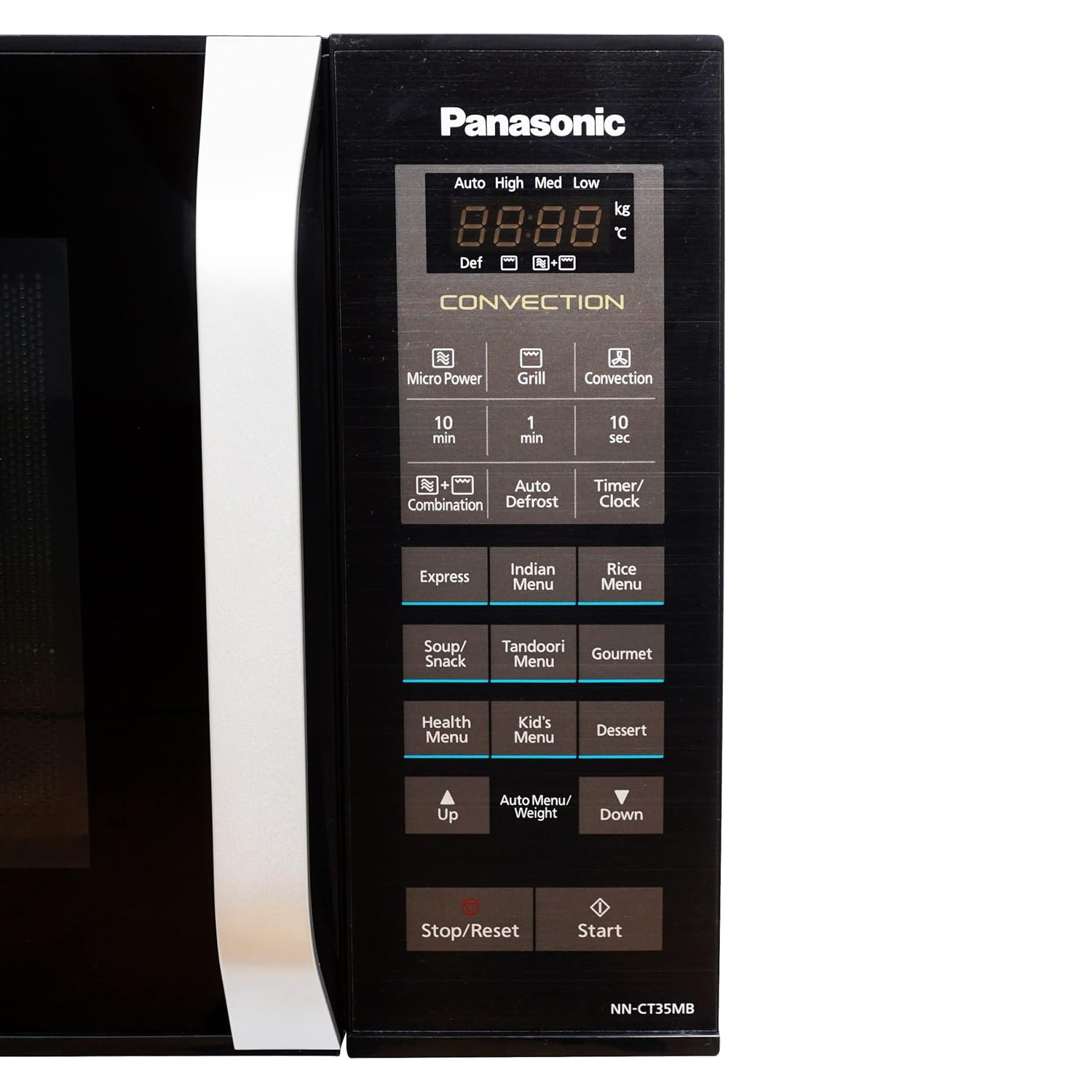
Figure 3: Close-up of the control panel. Key buttons include Micro Power, Grill, Convection, Combination, Auto Defrost, Timer/Clock, Express, Indian Menu, Rice Menu, Soup/Snack, Tandoori, Gourmet, Health Menu, Kid's Menu, Dessert, Up/Down arrows for adjustment, and Start/Stop/Reset buttons.
4. Nhazi
4.1 Nwepu
- Wepu ihe niile nkwakọ ngwaahịa n'ime na n'èzí oven.
- Lelee oven maka mmebi ọ bụla, dị ka dent ma ọ bụ ọnụ ụzọ na-adịghị mma. Ejila oven rụọ ọrụ ma ọ bụrụ na ọ mebiri emebi.
- Ensure all accessories, including the glass turntable and grill rack, are present.
4.2 Ntinye
- Debe oven ahụ n'elu ala dị larịị, nke siri ike nke na ọ ga-akwado ibu ya.
- Ensure adequate ventilation by leaving at least 10 cm (4 inches) of space at the rear, 20 cm (8 inches) at the top, and 5 cm (2 inches) on both sides.
- Akwụsịla ikuku ikuku.
- Debe oven ahụ ka ọ ghara iru ebe okpomọkụ, ebe magnet siri ike, na ebe mmiri dị elu.
4.3 Njikọ eletrik
- Tinye ọkụkọ n'ime ebe ọkụ eletrik dabara adaba nke ọma.
- Gbaa mbọ hụ na voltage and frequency match the specifications on the oven's rating label.
- Ejila eriri ndọtị ma ọ bụ ihe nkwụnye ọkụ.
4.4 Ntọala mbụ
- After plugging in, the display may show "0:00" or similar.
- To set the clock, press the "Timer/Clock" button, then use the Up/Down arrows or number pads (if available) to set the current time. Press "Timer/Clock" again to confirm.
5. Ntuziaka ọrụ
5.1 Isi nri Microwave
- Tinye nri n'ime efere e ji microwave sie ike na tebụl ahụ.
- Mechie ọnụ ụzọ oven.
- Press the "Micro Power" button repeatedly to select the desired power level (e.g., High, Med, Low).
- Use the "10 min", "1 min", "10 sec" buttons or Up/Down arrows to set the cooking time.
- Pịa "Malite".
5.2 Isi nri Convection
Convection mode uses a fan to circulate hot air, ideal for baking and roasting.

Figure 4: A whole chicken roasting inside the oven, demonstrating the convection cooking capability. The interior lights indicate operation.
- Place food on the grill rack or a heat-resistant dish.
- Pịa bọtịnụ "Convection".
- Jiri akụ Elu/Ala tọọ okpomọkụ achọrọ.
- Set the cooking time using the time buttons or Up/Down arrows.
- Press "Start". The oven may preheat first.
5.3 Grill nri
- Debe nri n'elu ihe e ji esi nri.
- Pịa bọtịnụ "Grill".
- Set the grilling time.
- Pịa "Malite".
5.4 Ngwakọta nri
Combination mode allows simultaneous microwave and convection/grill cooking for faster and more thorough results.
- Press the "Combination" button.
- Select the desired combination mode (e.g., Micro+Grill, Micro+Convection).
- Tọọ oge nri.
- Pịa "Malite".
5.5 Mwepu akpaaka
- Debe nri oyi kpọnwụrụ akpọnwụ n'elu tebụl ahụ.
- Pịa bọtịnụ "Auto Defrost".
- Use the Up/Down arrows to select the food type or enter the weight of the food.
- Press "Start". The oven will automatically calculate the defrosting time.
5.6 NchNhr akpaaka
The oven features several pre-programmed auto menus for convenient cooking of various dishes.

Figure 5: Icons illustrating common food items like Popcorn, Potato, Pizza, Frozen Veggie, Beverage, Dinner Plate, and Defrost, which correspond to the oven's auto menu functions.
- Press the desired auto menu button (e.g., "Express", "Indian Menu", "Rice Menu", "Soup/Snack", "Tandoori", "Gourmet", "Health Menu", "Kid's Menu", "Dessert").
- Use the Up/Down arrows to select the quantity or weight if prompted.
- Pịa "Malite".
6. Nlekọta na nhicha
Ịdị ọcha mgbe niile na-enyere aka ịnọgide na-arụ ọrụ oven ma gbatịa ndụ ya.
6.1 Na-ehicha ime ime
- Kwupuo oven mgbe niile tupu ihicha ya.
- Jiri mgbasa ozi hichaa oghere imeamp ákwà mgbe ejiri ya mee ihe ọ bụla iji gbochie nri ịba ụba.
- Maka ntụpọ siri ike, jiri ncha dị nro ma ọ bụ ihe nhicha dị mfe nke a na-eji microwave eme. Zere iji ihe nhicha na-ehicha ihe ma ọ bụ ihe nhicha na-ehicha ihe.
- Remove and wash the glass turntable and roller ring in warm, soapy water.
6.2 Na-ehicha Mpụga
- Jiri nwayọ hichaa elu mpụta, damp akwa .
- Clean the control panel gently with a damp cloth, ensuring no water seeps into the panel.
- Ejila kemịkalụ siri ike ma ọ bụ ihe mgbaze.
7. Nchọpụta nsogbu
Ọ bụrụ na ị hụ nsogbu na oven gị, lee nsogbu na ngwọta ndị a na-ahụkarị:
| Nsogbu | Ihe nwere ike ime | Ngwọta |
|---|---|---|
| Igwe ọkụ anaghị ebido | Agbanyeghi eriri ike; A naghị emechi ọnụ ụzọ nke ọma; Fiusi fụrụ ma ọ bụ ihe mgbaji sekit kwụsịrị. | Gbaa mbọ hụ na plọg dị na ntinye nke ọma; Mechie ọnụ ụzọ nke ọma; Lelee ihe na-emebi fuse/circuit n'ụlọ. |
| Nri anaghị esi nri nke ọma | Nri anaghị agwakọta ma ọ bụ tụgharịa; Ọkwa ike/oge na-ezighi ezi; Igwe anaghị atụgharị. | Stir or turn food during cooking; Adjust power/time; Check if turntable is correctly placed and clean. |
| Light inside oven not working | Igwe ọkụ chọrọ nnọchi. | Kpọtụrụ ndị ọrụ ruru eru maka nnọchi bọlbụ. |
| Uzuoku dị ukwuu n'ime oven | Ọdịnaya dị elu na nri. | This is normal for foods with high water content. Wipe interior after use. |
Ọ bụrụ na nsogbu ahụ dịgidere mgbe ị nwara azịza ndị a, biko kpọtụrụ nkwado ndị ahịa.
8. Nkọwapụta
The following are the technical specifications for the Panasonic 23 Litres Convection Microwave Oven NN-CT35MBFDG:
- Akara: Panasonic
- Ụdị: NN-CT35MBFDG
- Ike: 23 lita
- Wattage (Microwave Power Output): 800 Watt
- Ụdị nri oven: Okwuchi
- Ụdị nwụnye: Countertop
- Ụdị ihe dị n'ime: Igwe anaghị agba nchara
- Ihe eji eme ọnụ ụzọ: Igwe ọkụ
- Sistemu ekpochapụ: Ndidi
- Ngwa gụnyere: Grịl ogbe
- Ibu ihe: 15 n'arọ 600 g
- Akụkụ ihe (LxWxH): 50 x 44 x 35 centimita
- Mba onye si: India

Figure 6: Diagram showing the dimensions of the microwave oven: 35cm height, 44cm width, and 50cm depth.
9. Akwụkwọ ikike na nkwado
9.1 Ozi akwụkwọ ikike
This Panasonic microwave oven comes with a standard manufacturer's warranty. Please refer to the warranty card included with your product for specific terms, conditions, and duration. Keep your purchase receipt as proof of purchase for warranty claims.
9.2 Nkwado ndị ahịa
For technical assistance, service, or to inquire about replacement parts, please contact Panasonic customer support. Contact details can typically be found on the Panasonic official website or in the warranty documentation provided with your appliance.